
1. Introduction
Thank you for purchasing the Daakro SR-3800 5.1 Channel Home Audio Amplifier. This amplifier is designed to provide a high-quality audio experience for your home theater, studio, or entertainment setup. It features a dynamic DSP display, multiple input options including Bluetooth 5.4, and robust power output for passive speakers. Please read this manual thoroughly before operating the device to ensure proper use and to maximize its performance and lifespan.

Image 1.1: Daakro SR-3800 5.1 Channel Home Audio Amplifier. This image shows the front view of the amplifier with its illuminated DSP display and control knobs.
2. Important Safety Information
- Read all instructions before operating the appliance.
- Keep this manual for future reference.
- Do not expose this appliance to rain or moisture.
- Do not block any ventilation openings. Install in accordance with the manufacturer's instructions.
- Do not install near any heat sources such as radiators, heat registers, stoves, or other apparatus (including amplifiers) that produce heat.
- Protect the power cord from being walked on or pinched, particularly at plugs, convenience receptacles, and the point where they exit from the appliance.
- Only use attachments/accessories specified by the manufacturer.
- Unplug this appliance during lightning storms or when unused for long periods of time.
- Refer all servicing to qualified service personnel. Servicing is required when the apparatus has been damaged in any way, such as power-supply cord or plug is damaged, liquid has been spilled or objects have fallen into the apparatus, the apparatus has been exposed to rain or moisture, does not operate normally, or has been dropped.
- Warning: To reduce the risk of fire or electric shock, do not expose this appliance to rain or moisture.
- Caution: Risk of electric shock. Do not open.
3. Package Contents
Ensure all items are present in the box:
- Daakro SR-3800 5.1 Channel Home Audio Amplifier
- Remote Controller
- User Manual (this document)
- Power Cable
4. Product Overview
4.1 Front Panel Controls

Image 4.1: Detailed view of the Daakro SR-3800 front panel with labels for each control and display element.
- MIC VOL: Adjusts microphone volume.
- POWER ON/OFF: Main power switch.
- LCD Screen: Displays current mode, DSP spectrum, and other information.
- DELAY: Adjusts microphone echo delay.
- ECHO: Adjusts microphone echo effect.
- M.BASS: Adjusts microphone bass level.
- M.TREBLE: Adjusts microphone treble level.
- MIC INPUT: Connect wired microphones.
- VOLUME: Adjusts overall music volume.
- BASS: Adjusts music bass level.
- TREBLE: Adjusts music treble level.
- SUB VOL: Adjusts passive subwoofer volume.
- USB: USB input for media playback.
- Input Mode Buttons: Select input source (DVD/CD/AUX, USB/BT/FM, OPT/COA).
- DSP Mode: Cycles through 13 DSP spectrum display effects.
- Playback Controls: Play/Pause, Previous, Next, Single Song/Playlist Loop.
- MUSIC VOL: Main music volume control knob.
4.2 Rear Panel Connections
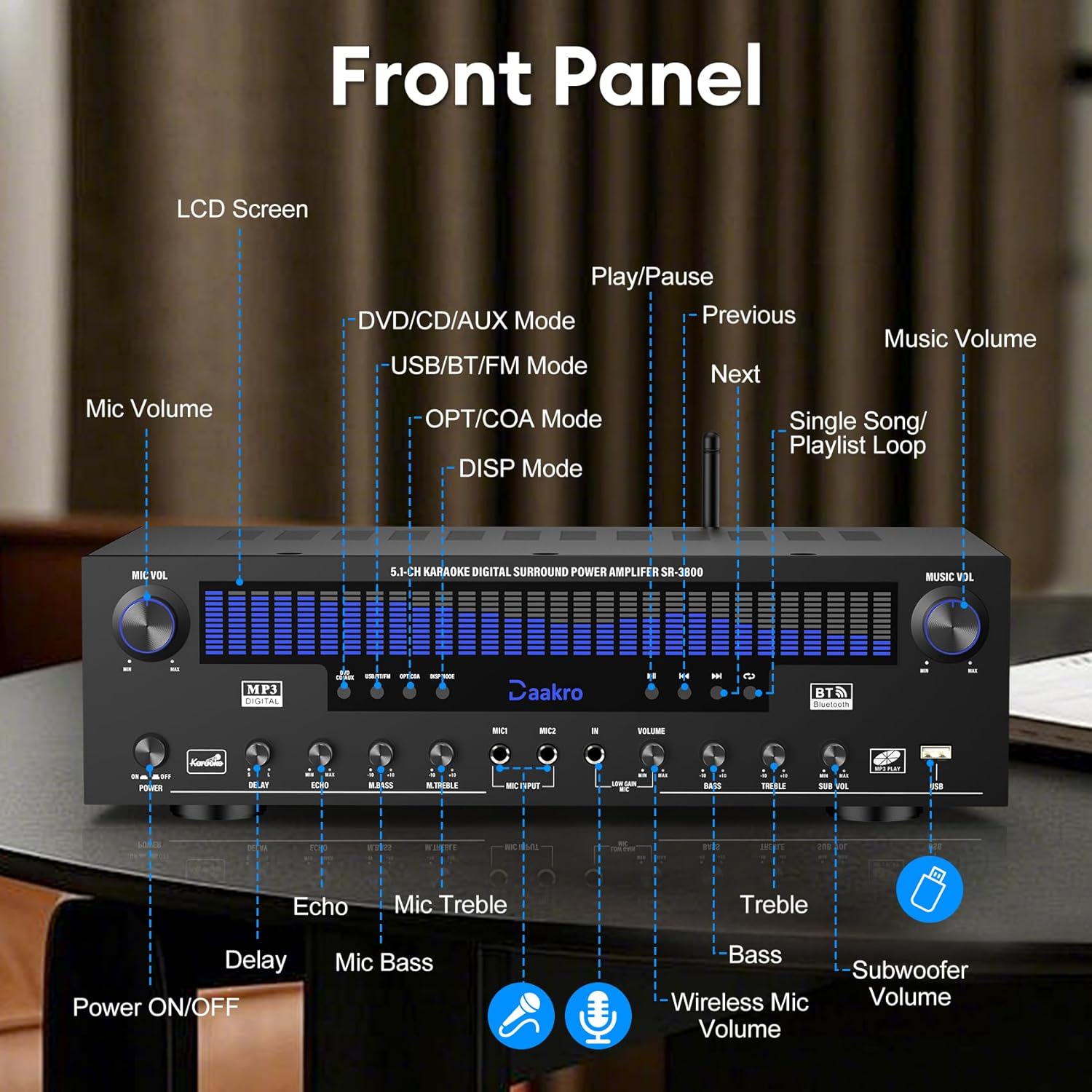
Image 4.2: Detailed view of the Daakro SR-3800 rear panel, showing all input and output ports with labels.
- FM ANT: FM antenna input.
- AUX IN: 3.5mm auxiliary input.
- OPT: Optical audio input.
- COAX: Coaxial audio input.
- BT ANT: Bluetooth antenna.
- AUDIO INPUT (DVD, CD, LINE): RCA stereo audio inputs for DVD, CD, and Line sources.
- AUDIO OUT (LINE): RCA stereo audio output for connecting to active speakers or other audio devices.
- SPEAKER OUTPUT (FR, FL, SR, SL, C, SUB): Spring clip terminals for connecting passive speakers (Front Right, Front Left, Surround Right, Surround Left, Center, Subwoofer). Compatible with 4-16 ohm passive speakers.
- POWER INPUT: AC power input (110V).
4.3 Key Features
- Dynamic DSP Display: 19.8-inch LED screen with 13 spectrum effects, analyzing music rhythms in real-time (20 Hz to 20 kHz).
- True 300W Rated Power: Delivers 50W per channel across 5.1 channels, compatible with 4-16 ohm passive speakers.
- Multiple Input Interfaces: Bluetooth, USB, wireless microphone, two wired microphones, FM, AUX, OPT, COAX, DVD, CD, and LINE inputs.
- Wireless Bluetooth Streaming: Equipped with the latest Bluetooth 5.4 chip for stable connections up to 30 feet with smartphones, tablets, laptops, and computers.
- Intuitive Volume Equalizer Control: Independent rotary knobs for music volume, microphone volume, treble, bass, subwoofer, microphone delay, and reverb.
- Ultra-Quiet Cooling System: Built-in fans, heat sinks, and side ventilation ports improve cooling efficiency by 130% and reduce noise by 80%.
5. Setup
5.1 Speaker Connection
The Daakro SR-3800 is compatible with 5-12 inch passive speakers and passive subwoofers. Ensure your speakers meet these requirements.
- Identify the speaker terminals on the rear panel: Front Right (FR), Front Left (FL), Surround Right (SR), Surround Left (SL), Center (C), and Subwoofer (SUB).
- Connect your passive speakers to the corresponding terminals. Ensure correct polarity (+ to + and - to -) for each speaker.
- If using a passive subwoofer, connect it to the SUB terminals.

Image 5.1: The Daakro SR-3800 amplifier positioned between two large passive speakers, illustrating a typical setup.
5.2 Audio Source Connection
Connect your desired audio sources using the appropriate input ports on the rear panel.
- DVD/CD/LINE: Use RCA cables to connect DVD players, CD players, or other line-level audio devices.
- OPT/COAX: Use optical or coaxial cables for digital audio sources like TVs or game consoles.
- AUX IN: Use a 3.5mm audio cable for portable devices.
- FM ANT: Connect the FM antenna for radio reception.
5.3 Power Connection
- Ensure the amplifier's power switch is in the OFF position.
- Connect the power cable to the POWER INPUT on the rear panel.
- Plug the other end of the power cable into a standard 110V AC power outlet.
6. Operation
6.1 Powering On/Off
Press the POWER ON/OFF switch on the front panel to turn the amplifier on or off.
6.2 Selecting Input Source
Use the input mode buttons on the front panel (DVD/CD/AUX, USB/BT/FM, OPT/COA) to select your desired audio source. The selected input will be displayed on the LCD screen.
6.3 Adjusting Volume and Tone
- MUSIC VOL: Rotate this knob to adjust the overall music volume.
- BASS/TREBLE: Use these knobs to fine-tune the bass and treble levels of the music.
- SUB VOL: Adjusts the output volume of the passive subwoofer.
6.4 Bluetooth Streaming
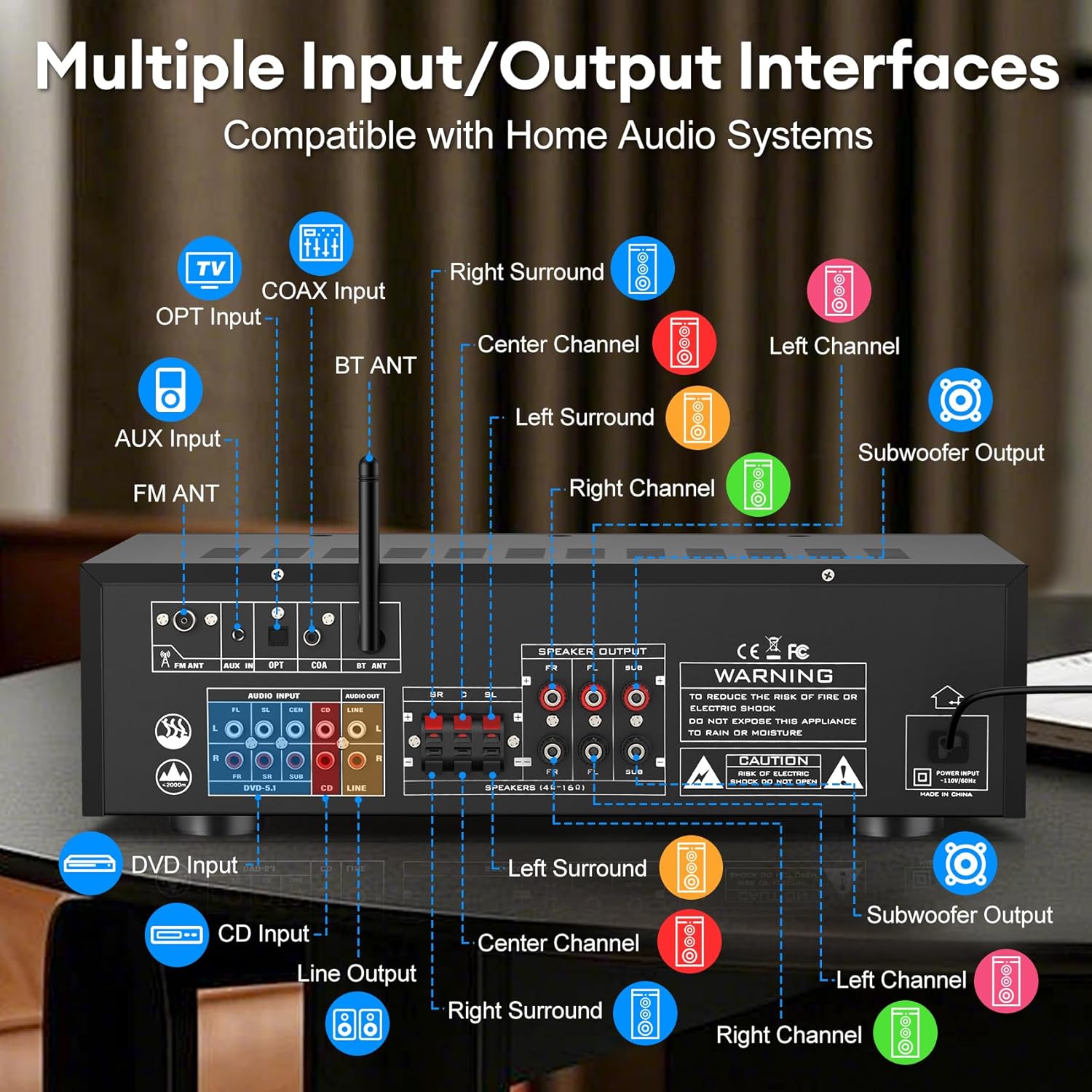
Image 6.1: The Daakro SR-3800 amplifier surrounded by various smart devices, illustrating its Bluetooth 5.4 connectivity and stable 30ft range.
- Select the 'USB/BT/FM' input mode.
- On your Bluetooth-enabled device (smartphone, tablet, etc.), search for available Bluetooth devices.
- Select 'Daakro SR-3800' from the list to pair.
- Once paired, you can stream audio wirelessly to the amplifier.
6.5 Microphone and Karaoke Functions

Image 6.2: Two individuals singing into microphones, demonstrating the karaoke feature of the Daakro SR-3800 amplifier.
- Connect wired microphones to the MIC INPUT jacks on the front panel.
- Adjust microphone volume using the MIC VOL knob.
- Use the DELAY, ECHO, M.BASS, and M.TREBLE knobs to customize microphone sound effects.
- The amplifier also supports wireless microphones.
6.6 DSP Display Modes
Press the 'DISP Mode' button on the front panel to cycle through 13 different DSP spectrum display effects on the LCD screen.

Image 6.3: The Daakro SR-3800 amplifier showcasing its 19.8-inch dynamic DSP display with active spectrum effects.
7. Maintenance
7.1 Cleaning
- Unplug the amplifier from the power outlet before cleaning.
- Use a soft, dry cloth to wipe the exterior surfaces.
- Do not use liquid cleaners or aerosol cleaners.
7.2 Cooling System
The SR-3800 features an ultra-quiet cooling fan. Ensure that the ventilation openings on the top and sides of the unit are not obstructed to allow for proper airflow.
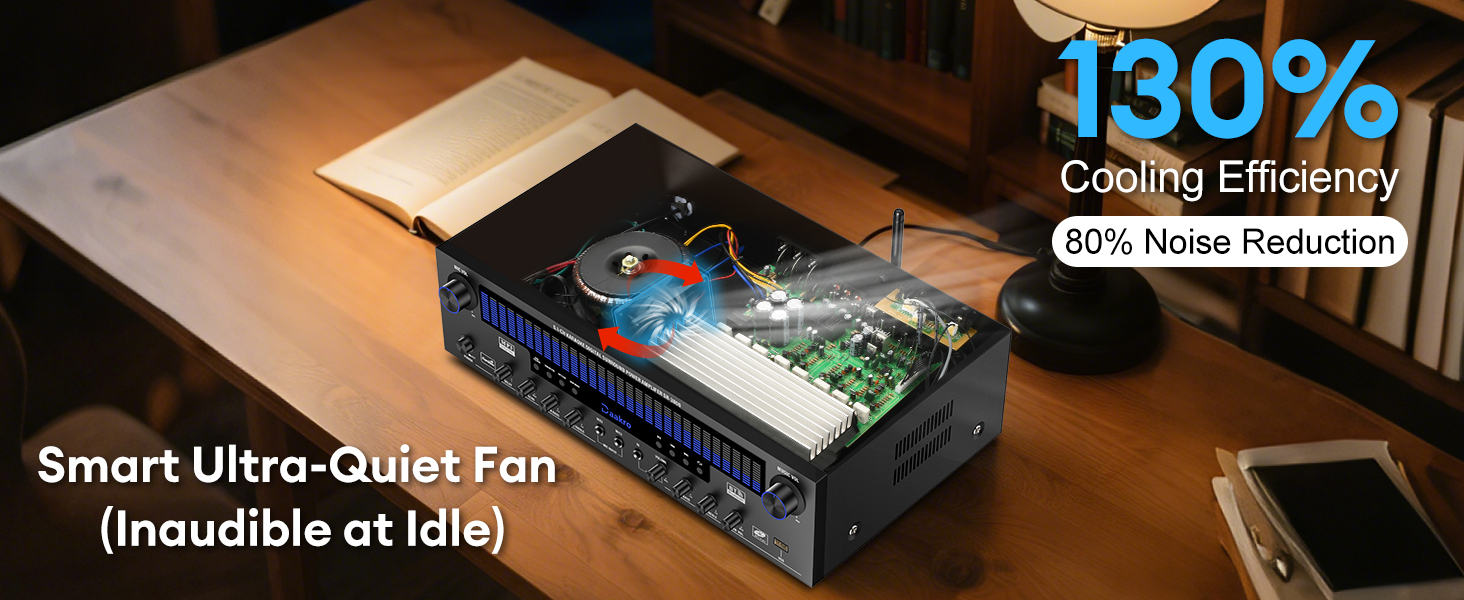
Image 7.1: An internal view of the Daakro SR-3800 amplifier highlighting its smart ultra-quiet fan and heat sinks for efficient cooling.
8. Troubleshooting
| Problem | Possible Cause | Solution |
|---|---|---|
| No power | Power cable not connected; Power switch off; Power outlet faulty. | Ensure power cable is securely connected. Turn the power switch ON. Test the power outlet with another device. |
| No sound | Incorrect input selected; Volume too low; Speakers not connected or faulty; Source device not playing. | Select the correct input source. Increase the MUSIC VOL. Check speaker connections and ensure they are passive speakers. Verify the audio source is playing. |
| Bluetooth not connecting | Amplifier not in Bluetooth mode; Device too far; Device already paired with another unit. | Select 'USB/BT/FM' input mode. Ensure your device is within 30 feet. Disconnect your device from other Bluetooth devices and try pairing again. |
| Microphone feedback/noise | Microphone too close to speakers; Microphone volume too high. | Move microphones away from speakers. Reduce MIC VOL. Adjust M.BASS and M.TREBLE. |
| Distorted sound | Volume too high; Incorrect speaker impedance; Source audio quality is poor. | Reduce volume. Ensure speakers are 4-16 ohms. Check the quality of the audio source. |
9. Specifications
| Feature | Specification |
|---|---|
| Model Number | SR-3800 |
| Rated Power Output | 300W (50W per channel) |
| Number of Channels | 5.1 |
| Speaker Impedance | 4-16 Ohms (Passive Speakers) |
| Bluetooth Version | 5.4 |
| Bluetooth Range | Up to 30 feet (10 meters) |
| DSP Display | 19.8-inch LED with 13 spectrum effects |
| Frequency Response Range | 20 Hz to 20 kHz |
| Input Interfaces | Bluetooth, USB, Wireless Mic, 2x Wired Mic, FM, AUX, OPT, COAX, DVD, CD, LINE |
| Output Interfaces | 5.1 Channel Passive Speaker Output, Line Out (RCA) |
| Voltage | 110 Volts (AC) |
| Item Weight | 13.87 pounds |
| Package Dimensions | 19.75 x 14 x 8 inches |
| Certification | FCC |
10. Product Video Overview
Video 10.1: An official product video from Daakro showcasing the features and connectivity of the SR-3800 5.1 Channel Home Audio Amplifier with DSP Display. This video provides a visual guide to the amplifier's design, input/output ports, and dynamic display in action.
11. Warranty and Support
11.1 Warranty Information
The Daakro SR-3800 amplifier comes with a 30-day warranty from the date of purchase. This warranty covers manufacturing defects and malfunctions under normal use. It does not cover damage caused by misuse, accidents, unauthorized modifications, or improper installation.
11.2 Customer Support
For technical assistance, troubleshooting, or warranty claims, please contact Daakro customer service. Our team is available to provide support and ensure your satisfaction.
- Online Customer Service: Available 24 hours.
- Contact Information: Refer to the product packaging or the official Daakro website for the most up-to-date contact details.