
Product Overview
The Dyson V11 Extra cordless vacuum cleaner is designed for powerful and versatile whole-home deep cleaning. It features advanced whole-machine filtration and a long-lasting battery.
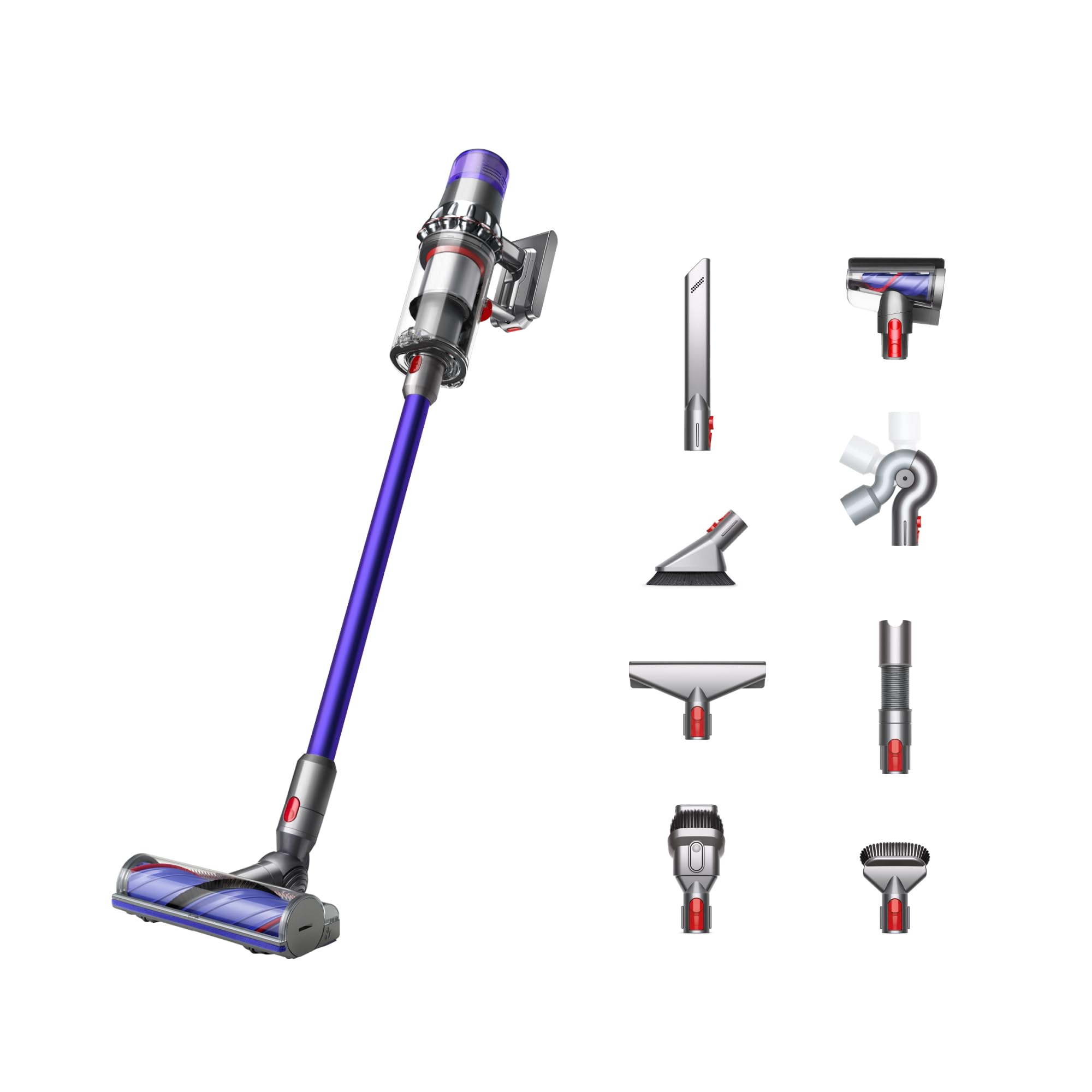
Key features include:
- Versatile, powerful, and cordless design for whole-home deep cleaning.
- Up to 60 minutes of run time with three cleaning modes.
- LED display showing remaining battery life, power modes, and maintenance alerts.
- Engineered for homes with pets.
- Advanced whole-machine filtration trapping 99.99% of particles as small as 0.3 microns.

The Motorbar™ cleaner head is equipped with hair removal vanes to prevent tangles from long hair and pet hair, ensuring consistent performance on carpets and hard floors.

Included Components
Your Dyson V11 Extra comes with a range of tools and accessories to enhance your cleaning experience:

- Vacuum cleaner main body
- Wand
- Motorbar™ cleaner head
- Wall dok (docking station)
- Charger
- Combination tool
- Crevice tool
- Hair screw tool
- Mini soft dusting brush
- Stubborn dirt brush
- Mattress tool
- Up-top tool
- Extension hose
- Wand clip
Note: Some attachments may be pre-assembled or stored on the wall dock.
Setup
Charging the Vacuum
Before first use, fully charge your Dyson V11 Extra. The wall dock serves as a convenient charging station and storage for your vacuum and some attachments.
- Mount the wall dock in a suitable location near a power outlet.
- Connect the charger to the wall dock and plug it into the mains power.
- Place the vacuum onto the wall dock. The LED display will indicate charging status.

A full charge is recommended prior to initial use to optimize battery performance.
Operating Instructions
Powering On and Off
The Dyson V11 Extra operates with a trigger button. Press and hold the trigger to activate the vacuum. Release the trigger to turn it off.
Selecting Power Modes
The vacuum features three power modes: Eco, Medium (Med), and Boost. Use the mode selection button on the LED display to cycle through these options:
- Eco Mode: Provides the longest run time for lighter cleaning tasks.
- Medium (Med) Mode: Offers a balance of power and run time for everyday cleaning.
- Boost Mode: Delivers maximum suction for intensive cleaning of stubborn dirt. Note that Boost mode will reduce battery run time.
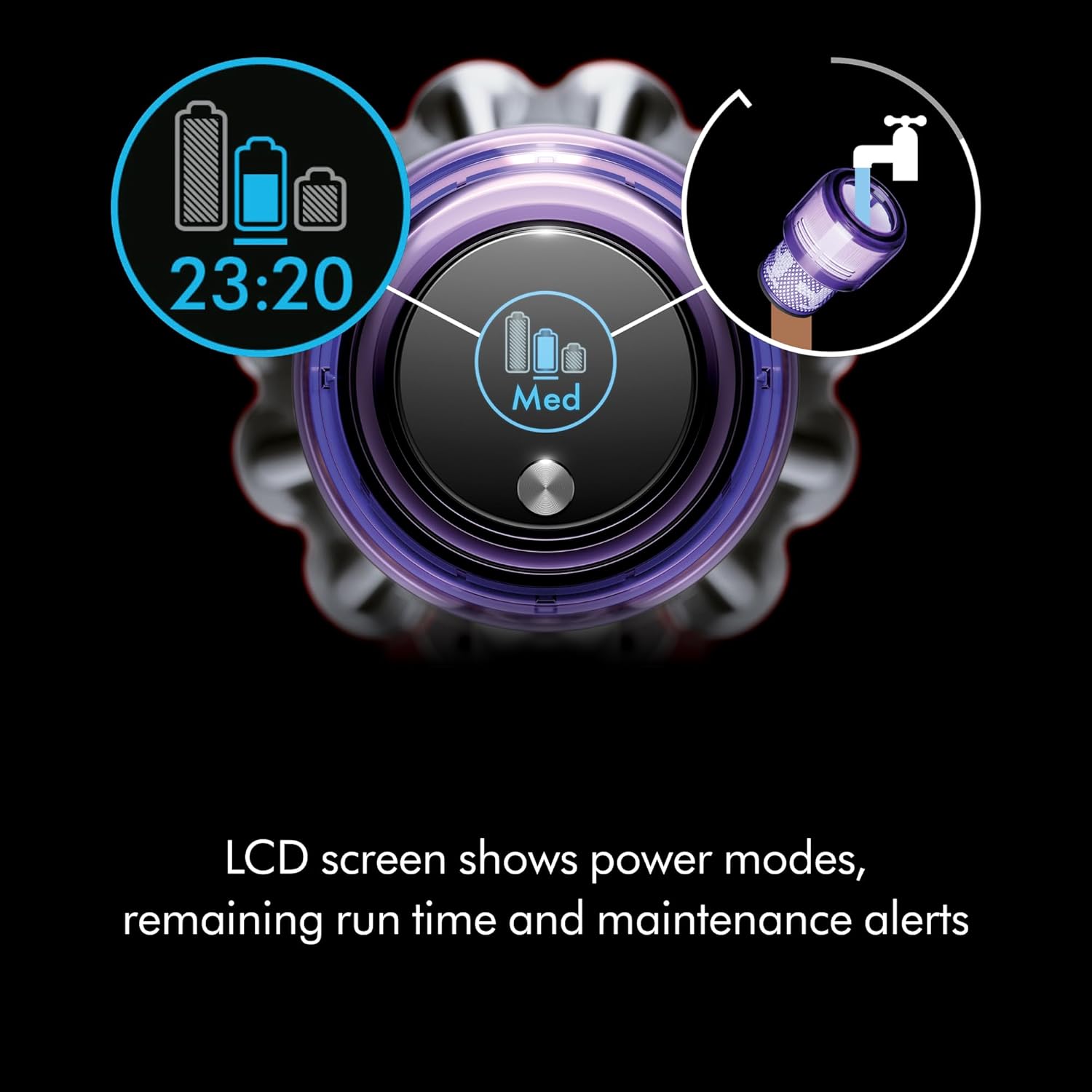
The LED display provides real-time information on selected power mode and remaining battery life.
Using Attachments
Different attachments are designed for specific cleaning tasks:
- Motorbar™ Cleaner Head: Ideal for deep cleaning carpets and hard floors. Its de-tangling technology automatically clears hair from the brush bar.

- Hair Screw Tool: Features a conical, anti-tangle brush bar, perfect for removing long hair and pet hair from upholstery, pet beds, and tight spaces.

- Crevice Tool: Designed for precise cleaning around edges, in narrow gaps, and hard-to-reach areas.
- Combination Tool: A two-in-one tool with a wide nozzle and brush, suitable for switching between cleaning surfaces and dusting.
- Mini Soft Dusting Brush: For gentle dusting of delicate surfaces.
- Mattress Tool: Specifically designed to remove dust and allergens from mattresses and upholstery.
- Up-top Tool: Extends and bends to clean high-up areas and awkward spaces.
- Extension Hose: Provides extra reach for cleaning in confined spaces, such as car interiors.

Maintenance
Emptying the Dust Bin
To maintain optimal suction, empty the dust bin regularly, ideally after each use. The Dyson V11 Extra features a 'point and shoot' mechanism for hygienic, no-touch bin emptying.
- Hold the vacuum over a waste bin.
- Push the red lever down firmly to release the bin and eject debris.
- Close the bin base until it clicks securely.
Washing the Filter
The whole-machine filter is washable and reusable for the lifetime of the machine. Wash the filter at least once a month, or more frequently if used heavily.
- Twist the filter counter-clockwise from the top of the main body to remove it.
- Wash the filter under cold running water, squeezing gently until the water runs clear.
- Shake off excess water and leave to air dry completely for at least 24 hours in a warm place. Do not use a tumble dryer or microwave.
- Ensure the filter is completely dry before reattaching it to the vacuum.
Troubleshooting
If you encounter issues with your Dyson V11 Extra, please refer to the following common solutions:
- No Power: Ensure the battery is fully charged. Check the charger connection and wall outlet.
- Reduced Suction: Empty the dust bin. Check for blockages in the cleaner head, wand, or attachments. Wash and thoroughly dry the filter.
- Cleaner Head Not Spinning: Check for obstructions in the brush bar. Ensure the cleaner head is correctly attached.
- LED Display Errors: Consult the Dyson support website or contact customer service for specific error codes.
For persistent issues, please contact Dyson Customer Support.
Specifications
| Feature | Detail |
|---|---|
| Brand | Dyson |
| Model Number | 304912-01 |
| Special Feature | Cordless |
| Filter Type | Cloth |
| Surface Recommendation | All floors (Bare Floor, Car, Carpet, Hard Floor, Home, Sofa, Stairs, Upholstery) |
| Power Source | Battery Powered |
| Capacity | 0.2 Gallons |
| Number of Power Levels | 3 |
| Indoor Outdoor Usage | Indoor |
| Item Weight | 6.53 Pounds |
| Item Dimensions (L x W x H) | 49.4"L x 10.3"W x 9.8"H |
| Voltage | 120 Volts |
| Runtime | Up to 60 minutes |
| UPC | 885609041490 |
Warranty and Support
The Dyson V11 Extra cordless vacuum cleaner comes with a 2-year limited warranty. This warranty covers defects in materials and workmanship under normal use.
For warranty claims, technical assistance, or general inquiries, please contact Dyson Customer Support. Lifetime Dyson support is available for your product.
Please visit the official Dyson website for the most up-to-date support information and contact details.


