
Introduction
This manual provides essential information for the safe and efficient operation of your Garvee 8000 BTU Portable Air Conditioner. This versatile 3-in-1 unit offers cooling, dehumidification, and fan functions, designed for rooms up to 350 sq. ft. Please read all instructions carefully before installation and use, and retain this manual for future reference.
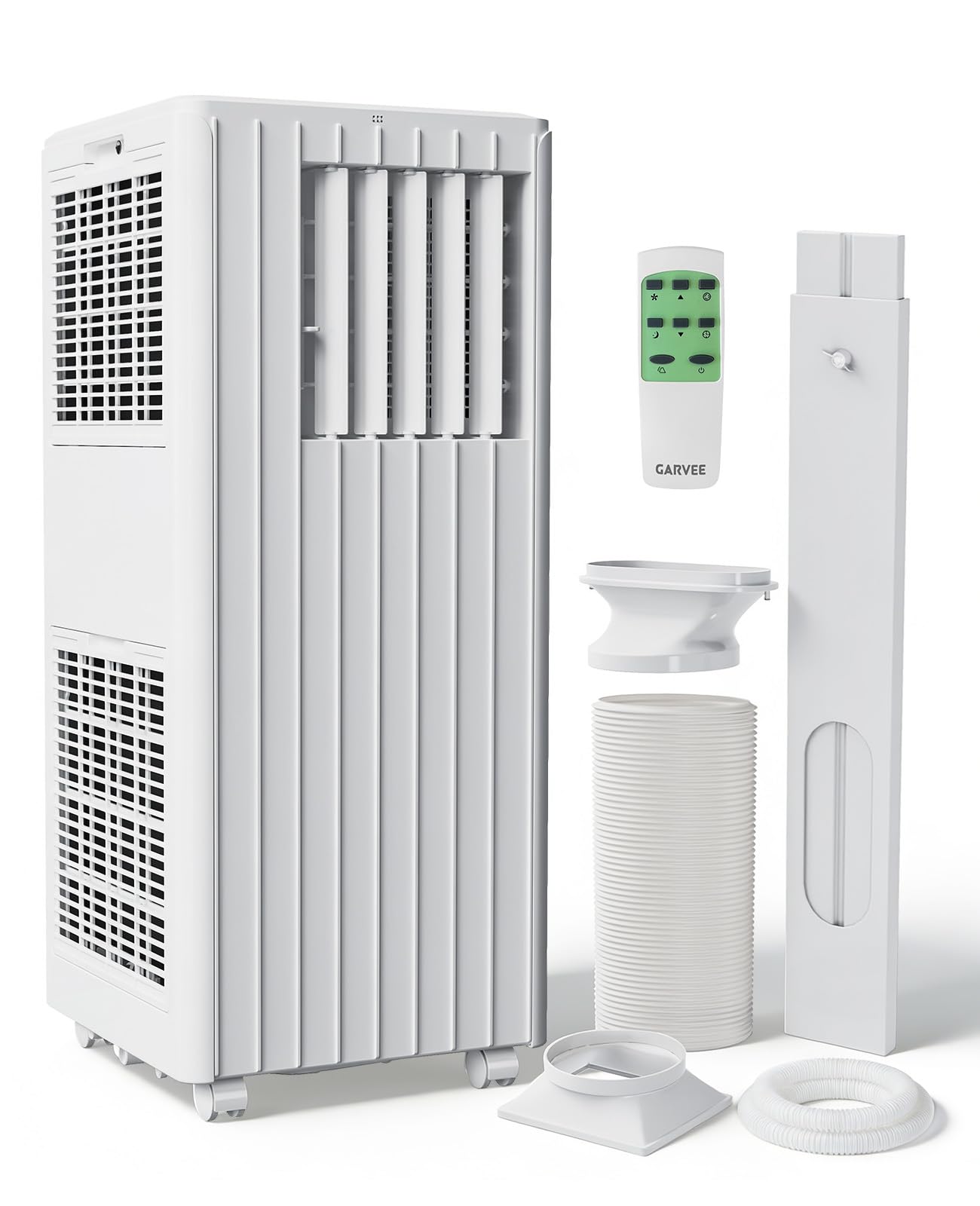
Image: Garvee 8000 BTU Portable Air Conditioner, front view.
Setup and Installation
Your Garvee portable air conditioner comes with a complete window installation kit for easy setup. This kit is designed to fit most vertical and horizontal sliding windows. Ensure the unit is placed on a flat, stable surface near a window and a power outlet.
Window Kit Components
- Drainage Hose
- Window Kit Panels (adjustable)
- Exhaust Hose
- Hose Connector
- Window Kit Adapter

Image: Illustration of window kit components and compatible window types (vertical and horizontal sliding windows).
Installation Steps
- Connect the hose connector to one end of the exhaust hose.
- Connect the window kit adapter to the other end of the exhaust hose.
- Attach the hose connector to the exhaust air outlet of the AC unit.
- Extend the adjustable window panels to fit your window opening and tighten the nuts to secure them.
- Install the window panels into your window (for horizontal or vertical slide windows).
- Insert the exhaust hose adapter into the window panels, ensuring a secure seal to prevent air leakage.

Image: Visual guide for installing the window kit and exhaust hose.
Operating Instructions
Your portable AC unit features an intuitive LED display and a remote control for convenient operation. It offers three primary modes: Cooling, Dehumidifying, and Fan.
Control Panel and Remote

Image: Close-up of the unit's control panel and the included remote control.
Operating Modes
- Cooling Mode: Adjust the temperature between 61°F and 88°F. This mode provides powerful cooling for your space.
- Dehumidifying Mode: Removes up to 45 pints of moisture per day, helping to reduce humidity levels in your room.
- Fan Mode: Operates as a 2-speed fan to circulate air without cooling.

Image: Visual representation of the three operating modes: Cool, Dry, and Fan.
Additional Features
- 24-Hour Programmable Timer: Set the unit to turn on or off automatically at desired times.
- Sleep Mode: Activates quiet operation and gradually adjusts temperature for comfortable sleep.
- Airflow Control: Features manual 104° vertical louvers and 90° automatic horizontal oscillation to distribute air effectively.

Image: Depiction of the unit's wide air oscillation feature and the removable filter.

Image: The portable AC unit operating in a bedroom, highlighting its quiet sleep mode.
Maintenance
Regular maintenance ensures optimal performance and longevity of your Garvee portable air conditioner.
Cleaning the Air Filter
The unit features a removable and washable mesh filter. It is recommended to clean the filter every two weeks, or more frequently depending on usage and air quality.
- Turn off and unplug the unit before cleaning.
- Remove the filter from its housing.
- Wash the filter under running water with a mild detergent.
- Allow the filter to air dry completely before reinstalling.
Water Drainage
The unit has a self-evaporating function that handles most condensation during cooling. However, in areas with high humidity, or when using the dehumidifying mode, manual drainage may be required.
- Connect the included drainage hose to the drainage port at the back of the unit.
- Direct the hose to a suitable drain or collection bucket.
- The unit will alert you and stop operation if the water tank becomes full and requires draining.

Image: Explanation of the self-evaporating function and when additional drainage is needed.
Troubleshooting Guide
If you encounter issues with your Garvee portable air conditioner, refer to the following common problems and solutions:
| Problem | Possible Cause | Solution |
|---|---|---|
| Unit does not turn on | No power, power cord unplugged, circuit breaker tripped. | Check power connection, reset circuit breaker. |
| Unit not cooling effectively | Room size too large, dirty air filter, exhaust hose not properly installed/sealed, windows/doors open. | Ensure room size is within 350 sq. ft., clean air filter, check exhaust hose for proper sealing, close all windows and doors. |
| Loud noise or rattling | Unit not on a stable surface, loose internal components, fan obstruction. | Place unit on a flat, stable surface. Check for any obstructions in the fan area. If rattling persists, contact customer support. |
| Water leakage or full tank indicator | Drainage hose not connected, hose clogged, high humidity. | Connect drainage hose, clear any clogs, drain the water tank. |
| Blowing warm air | Exhaust hose disconnected or blocked, unit in fan mode, ambient temperature too high. | Ensure exhaust hose is securely connected and unobstructed. Verify unit is in cooling mode. |
Specifications
Key technical specifications for the Garvee 8000 BTU Portable Air Conditioner:
| Feature | Detail |
|---|---|
| Model Name | JHS-A029A-05KR-D3 |
| Cooling Power | 8000 BTU |
| Coverage Area | Up to 350 sq. ft. |
| Dehumidifying Capacity | 45 pints/day |
| Product Dimensions (D x W x H) | 13.15" x 12.99" x 34.25" |
| Item Weight | 50.3 pounds |
| Noise Level | 50 dB |
| Voltage | 115V |
| Wattage | 699W |
| Refrigerant | R32 |
| Control Type | Remote Control |
| Included Components | Installation Kit |

Image: Chart illustrating recommended BTU capacity based on room size.
Warranty Information
The Garvee 8000 BTU Portable Air Conditioner comes with a 30-day manufacturer's warranty from the date of purchase. This warranty covers defects in materials and workmanship under normal use.
For additional protection, extended protection plans may be available for purchase separately:
- 3-Year Protection Plan
- 4-Year Protection Plan
Please refer to the terms and conditions of any purchased protection plan for full details on coverage.
Customer Support
For any questions, technical assistance, or warranty claims, please contact Garvee customer support. We are committed to providing:
- Email Support within 12 hours
- 30-day return policy
- 12 Months Free Maintenance and Technology Support
Please have your model number (JHS-A029A-05KR-D3) and purchase date ready when contacting support.


