
1. Introduction
Thank you for choosing the HLDIRECT 55 Inch Gaming Desk. This desk is designed to enhance your gaming and work experience with its versatile features, including a built-in power outlet, LED lighting, ample storage, and a foldable tabletop. This manual provides detailed instructions for assembly, operation, and maintenance to ensure safe and optimal use of your new desk.
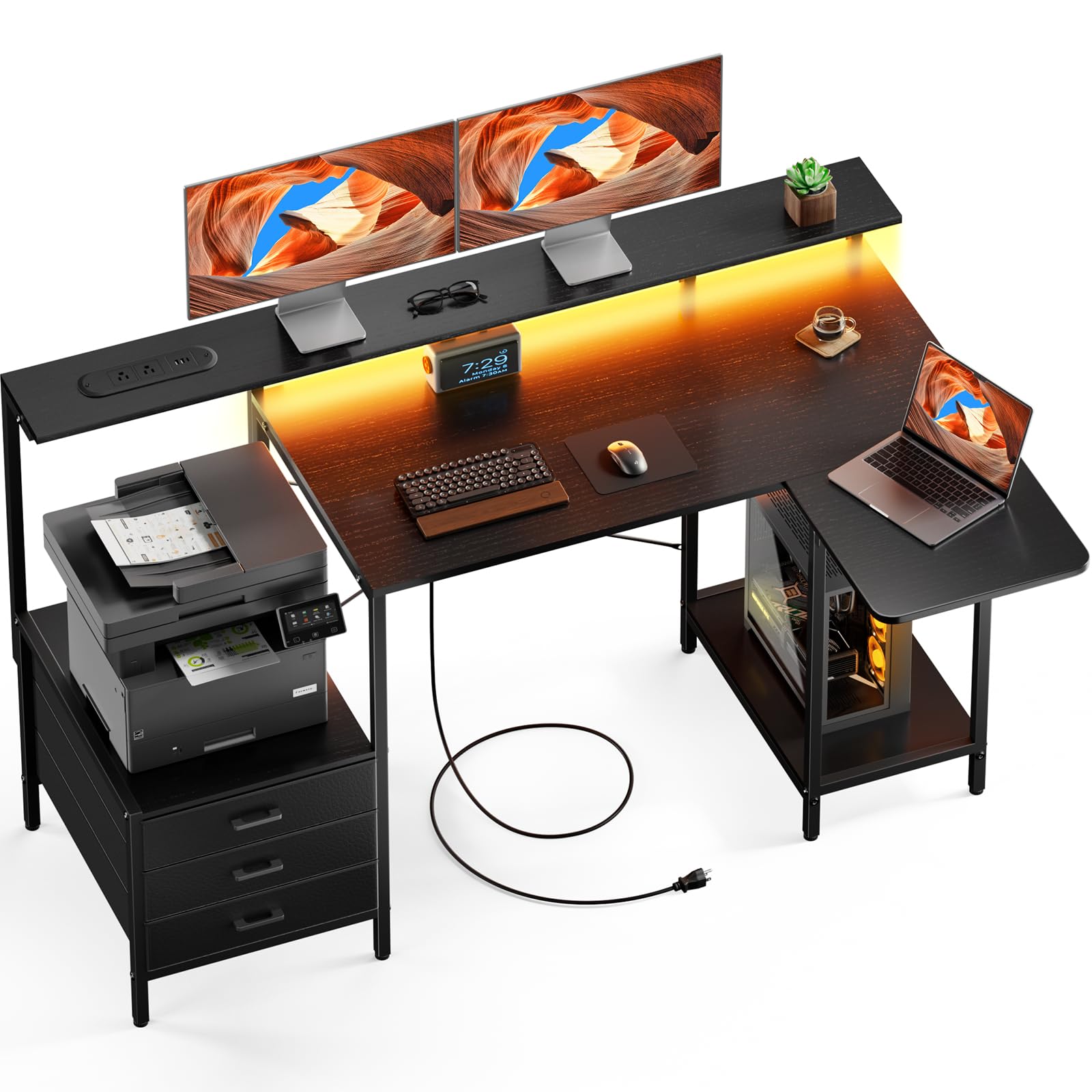
Figure 1: HLDIRECT 55 Inch Gaming Desk (Black)
2. Safety Information
Please read and understand all safety instructions before assembly and use. Failure to follow these instructions may result in injury or damage to the product.
- Always assemble the desk on a stable, flat, and clean surface to prevent scratching or damage.
- Do not use the foldable tabletop in its extended position unless properly secured. Ensure all locking mechanisms are engaged.
- This desk is heavy (approximately 20 pounds). Exercise caution during assembly and moving. It may tip over if not used or assembled correctly.
- Do not exceed the maximum weight recommendation of 22 pounds for the monitor stand or any individual shelf.
- Keep children and pets away during assembly. Small parts can be a choking hazard.
- Ensure all screws and fasteners are tightened securely before use. Periodically check and re-tighten as needed.
- Do not place hot items directly on the desk surface without protection.
- Keep liquids away from electrical components (power outlets, LED lights).
3. Setup and Assembly
The HLDIRECT Gaming Desk requires assembly. All necessary components and a detailed instruction manual are included. Follow the steps carefully.
3.1 Package Contents
Before starting, verify that all parts are present and undamaged. Refer to the included parts list in your physical manual. If any parts are missing or damaged, please contact customer support.

Figure 2: Desk Dimensions and Key Components
- Desk panels (main desktop, monitor stand, foldable tabletop, shelves)
- Metal frame components (legs, support bars)
- 3 Fabric Drawers
- Power outlet unit with USB and Type-C ports
- LED light strip
- Adjustable feet
- Assembly hardware (screws, bolts, Allen wrench)
- Instruction Manual
3.2 Assembly Steps
- Attach Legs: Securely attach the desk legs to the main frame components using the provided screws. Tighten using the included tool.
- Connect Desktop: Fasten the main desktop panel to the assembled frame using bolts.
- Install Drawer Slides: Insert the drawer slides into the designated side panels for the fabric drawers.
- Assemble Storage Shelves: Construct and attach the storage shelves according to the diagrams in the manual.
- Install Monitor Stand: Secure the monitor stand to the main desktop.
- Integrate Power Outlet: Connect the power outlet unit and LED light strip following the provided wiring diagram. Ensure all connections are firm.
- Attach Foldable Tabletop: Mount the foldable tabletop to the main desk structure, ensuring the locking mechanism operates smoothly.
- Adjust Feet: Level the desk on any surface using the adjustable feet to ensure stability.
Note: All components are clearly labeled. Refer to the step-by-step guide in your physical instruction manual for detailed diagrams.
4. Operating Instructions
Your HLDIRECT Gaming Desk offers several features designed for convenience and functionality.
4.1 Built-in Power Outlet

Figure 3: Built-in Power Outlet
The desk is equipped with a power strip featuring:
- 2 AC Outlets (120V/12A)
- 2 USB-A Ports (5V/2A)
- 1 USB-C Port (5V/2A)
To use, plug the desk's main power cord (59 inches long) into a wall outlet. You can then charge multiple devices simultaneously. Ensure devices are compatible with the provided voltage and current.
4.2 LED Light Strip

Figure 4: LED Light Strip in Operation
The integrated RGB LED light strip offers multiple lighting effects to create an immersive atmosphere. Connect the LED strip to the power outlet unit as per assembly instructions. Control the lighting effects, colors, and dynamic modes using the dedicated controller or a compatible smartphone application (if applicable, refer to the LED light strip's specific instructions for app details).
4.3 Foldable Tabletop

Figure 5: Foldable Tabletop Extended

Figure 6: Foldable Tabletop Mechanism
The foldable tabletop allows the desk to switch between L-shape and straight configurations. To extend the tabletop, lift the panel until it locks into place. To fold it back, press the release button (as shown in Figure 6) and gently lower the panel. Ensure the tabletop is securely locked in either position before placing items on it.
4.4 Storage Features

Figure 7: Ample Storage Space
The desk provides extensive storage options:
- Monitor Stand: An ergonomically designed stand to reduce eye strain and neck/shoulder pressure.
- Storage Shelf: Ideal for printers, books, Bluetooth speakers, or other essentials.
- PC Tower Storage: A dedicated load-bearing base to securely store your computer tower.
- 3 Fabric Drawers: For organizing smaller items and keeping your workspace tidy.
5. Maintenance
Proper maintenance will extend the life of your HLDIRECT Gaming Desk.
- Cleaning: Wipe the desk surface with a soft, damp cloth. Avoid harsh chemicals or abrasive cleaners that may damage the finish.
- Dusting: Regularly dust the desk and its components to prevent buildup, especially around electrical ports and LED lights.
- Fasteners: Periodically check all screws and bolts to ensure they remain tight. Re-tighten if necessary to maintain stability.
- Adjustable Feet: Ensure the adjustable feet are properly set to keep the desk level and prevent wobbling.
- Electrical Components: Keep the power outlet and LED light strip free from dust and moisture. Do not attempt to repair electrical components yourself.
6. Troubleshooting
If you encounter issues with your desk, refer to the following common problems and solutions.
- Desk is wobbly:
- Ensure all assembly screws are tightened. Adjust the leveling feet on the bottom of the desk legs to compensate for uneven floors.
- Power outlets are not working:
- Check if the desk's main power cord is securely plugged into a functional wall outlet. Verify that the wall outlet itself is receiving power. Ensure all internal connections for the power strip are secure.
- LED lights are not turning on:
- Confirm the LED light strip is properly connected to the power outlet unit. Check the power supply to the desk. If using an app, ensure Bluetooth/Wi-Fi connection is active and the app is functioning correctly.
- Foldable tabletop does not lock or fold smoothly:
- Inspect the locking mechanism for any obstructions or damage. Ensure it is properly aligned. Apply a small amount of silicone lubricant if movement is stiff.
If these solutions do not resolve the issue, please contact customer support.
7. Specifications
| Brand | HLDIRECT |
| Model Number | 120414 |
| Overall Dimensions (L-shape) | Approx. 55"L x 19.7"D x 34"H |
| Main Desktop Height | 29.1"H |
| Color | Black |
| Material | Metal (frame), High-density Particleboard (top) |
| Number of Drawers | 3 (fabric) |
| Power Outlet | 2 AC Outlets (120V/12A), 2 USB-A Ports (5V/2A), 1 USB-C Port (5V/2A) |
| Power Cord Length | 59 inches |
| Special Features | Foldable Tabletop, LED Lights, Monitor Stand, Storage Shelves, PC Tower Storage |
| Item Weight | 20 Pounds |
| Maximum Weight Recommendation | 22 Pounds (for monitor stand/shelves) |
| Assembly Required | Yes |
8. Warranty and Support
Your HLDIRECT Gaming Desk comes with a one-year warranty from the date of purchase, covering manufacturing defects.
If you receive a damaged product, encounter any missing parts, or experience issues not covered in the troubleshooting section, please do not hesitate to contact HLDIRECT customer support at any time. We are committed to providing assistance and ensuring your satisfaction.
For warranty claims or support, please refer to the contact information provided in your product packaging or visit the official HLDIRECT website.