
1. Introduction
Thank you for choosing the SQUATZ 2-in-1 Walking Pad Treadmill with Handlebar & Vibration Plates. This versatile fitness equipment is designed to support both walking and light running, incorporating vibration plate technology for enhanced workouts. Its compact design and quiet operation make it suitable for various home and office environments. This manual provides essential information for safe operation, assembly, maintenance, and troubleshooting.
2. Important Safety Information
Please read all instructions carefully before using this product. Retain this manual for future reference.
- Weight Limit: Do not exceed the maximum user weight of 264 lbs (120 kg).
- Placement: Place the walking pad on a flat, stable surface. Ensure adequate clear space around the unit (at least 2 feet on all sides).
- Power: Use only the provided power cable. Ensure the power outlet is properly grounded. Unplug the unit when not in use or before cleaning/maintenance.
- Children and Pets: Keep children and pets away from the walking pad during operation.
- Medical Conditions: Consult a physician before starting any new exercise program, especially if you have pre-existing medical conditions.
- Emergency Stop: Familiarize yourself with the emergency stop function.
- Handlebar: Always ensure the handlebar is securely locked in place if using it for support.
- Footwear: Always wear appropriate athletic footwear when using the walking pad.
- Maintenance: Perform regular maintenance as described in this manual to ensure safe operation.
3. Package Contents
Verify that all components are present in the package:
- SQUATZ 2-in-1 Walking Pad Treadmill
- Remote Controller
- Silicone Oil
- L Spanner
- Wrench
- Power Cable with US / Canada Plug
4. Setup
The SQUATZ Walking Pad Treadmill arrives fully assembled. Follow these steps for initial setup:
- Unpacking: Carefully remove the walking pad from its packaging.
- Placement: Position the walking pad on a firm, level surface. Ensure there is at least 2 feet of clear space behind and on both sides of the unit for safety.
- Handlebar (Optional): If using the handlebar, lift it into the upright position and secure it with the locking mechanisms on both sides. Ensure it clicks firmly into place.
- Power Connection: Connect the power cable to the walking pad's power port and then plug it into a grounded electrical outlet.
- Initial Check: Before first use, ensure the running belt is centered and free from any obstructions.

Figure 4.1: The SQUATZ Walking Pad is compact and can be stored under furniture. Dimensions are approximately 42.5"D x 21.6"W x 4.3"H when folded flat.
5. Operating Instructions
The SQUATZ Walking Pad offers multiple modes and features for your workout.
5.1 Power On/Off
- Power On: Plug in the unit and press the power button on the main unit or the remote control. The LED display will illuminate.
- Power Off: Press and hold the power button on the remote or the main unit until the display turns off. Always unplug the unit from the wall when not in use.
5.2 Modes of Operation

Figure 5.1: The walking pad supports both walking (0.5 MPH min) and running (3.7 MPH max) modes.
- Walking Mode: Ideal for low-intensity exercise or use under a desk. Speed range typically starts from 0.5 MPH.
- Running Mode: For higher intensity workouts. The maximum speed is 3.7 MPH. Ensure the handlebar is in the upright position for added stability during running.
5.3 Vibration Plate Function
The integrated vibration plates can be used for warm-ups, balance training, or light recovery.
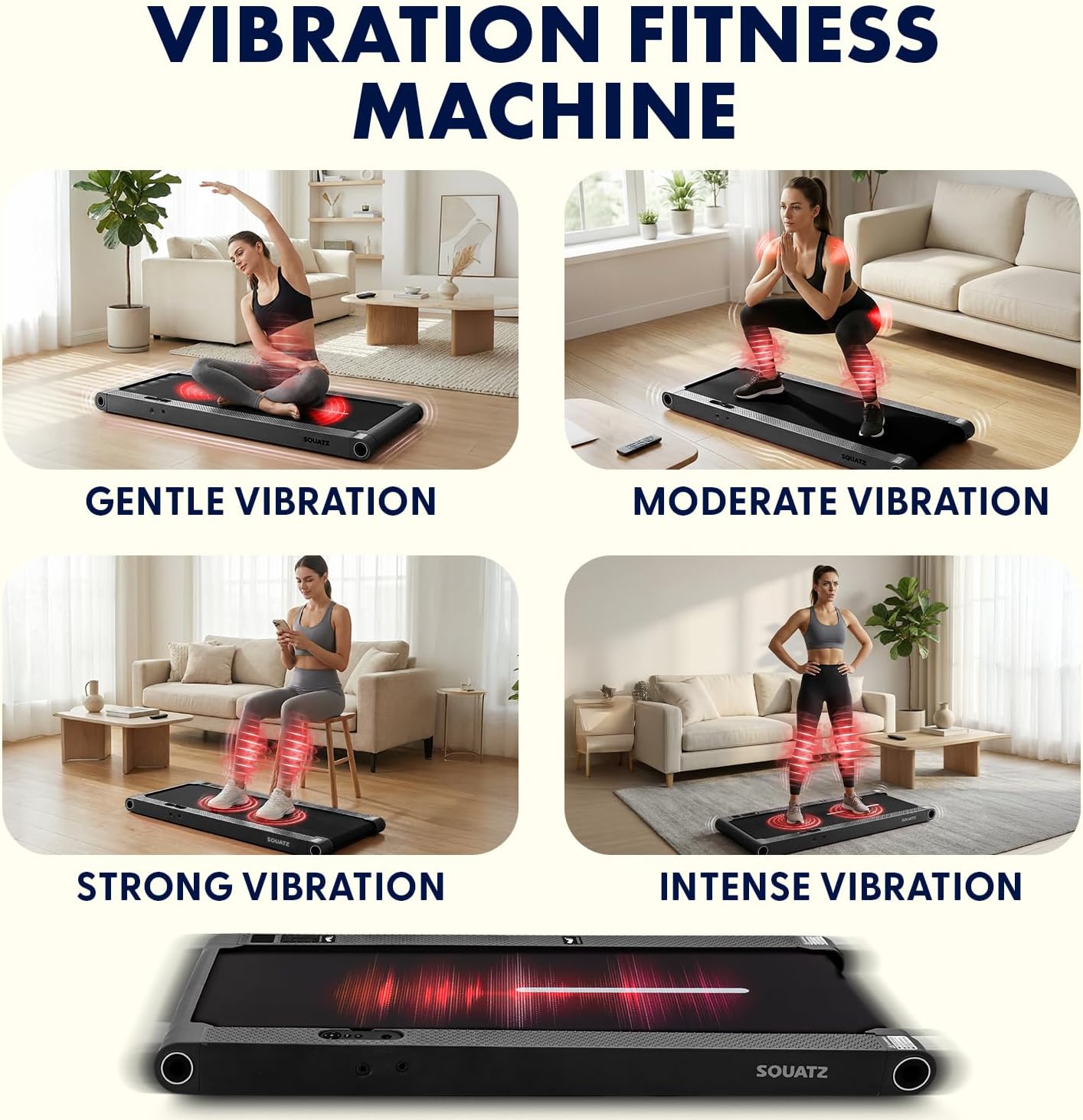
Figure 5.2: The vibration plates offer four adjustable modes: Gentle, Moderate, Strong, and Intense.
- Activating Vibration: Use the remote control to activate and adjust the vibration intensity.
- Vibration Modes: There are 4 adjustable vibration modes (Gentle, Moderate, Strong, Intense) to suit your preference.
5.4 LED Display and Remote Control

Figure 5.3: The LED display tracks time, speed, step count, distance, and vibration mode. The remote control allows for quick adjustments.
- LED Display: The integrated LED panel shows real-time workout data including time, calories burned, speed, and distance. It also indicates the current vibration mode.
- Remote Control: Use the remote to power on/off, adjust speed, select preset programs, and control vibration intensity.
- Preset Programs: The walking pad features 12 preset programs designed to vary speed and intensity for a diverse workout experience. Refer to the remote control guide for program selection.
5.5 Bluetooth and App Integration

Figure 5.4: Connect your walking pad via Bluetooth to a compatible fitness app for tracking goals and session statistics.
- Bluetooth Connectivity: The walking pad can connect to compatible fitness applications via Bluetooth.
- App Features: The app allows you to track your workout goals, view session statistics (distance, time, calories, points), and potentially access additional training programs. Refer to the app's instructions for pairing and usage.
6. Maintenance
Regular maintenance ensures the longevity and safe operation of your SQUATZ Walking Pad.
- Cleaning:
- Always unplug the unit before cleaning.
- Wipe down the walking pad and display with a soft, damp cloth. Do not use abrasive cleaners or solvents.
- Keep the area around the motor clean and free of dust.
- Belt Lubrication:
- The running belt requires periodic lubrication with the provided silicone oil to ensure smooth operation and prevent wear.
- Lift the edge of the running belt and apply a small amount of silicone oil evenly to the center of the deck.
- Run the walking pad at a low speed (e.g., 1 MPH) for 5 minutes to distribute the lubricant.
- Frequency of lubrication depends on usage; typically every 3-6 months for moderate use.
- Belt Adjustment:
- If the running belt shifts to one side or slips, it may need adjustment.
- Use the L spanner and wrench provided to adjust the tension bolts at the rear of the walking pad.
- Turn the bolt clockwise to tighten the belt or move it to the right; turn counter-clockwise to loosen or move it to the left. Make small adjustments (quarter turns) and test.
- Ensure the belt is centered and has proper tension (you should be able to lift the edge of the belt about 2-3 inches in the middle).
- Storage:
- When not in use, the walking pad can be stored flat under furniture due to its slim profile.
- Ensure the power is off and the unit is unplugged before storing.

Figure 6.1: The multi-layer running belt is designed for durability and anti-slip performance. Regular lubrication is essential for its upkeep.
7. Troubleshooting
If you encounter issues with your SQUATZ Walking Pad, refer to the table below.
| Problem | Possible Cause | Solution |
|---|---|---|
| Walking pad does not power on. | Power cable not connected; power outlet issue; main power switch off. | Ensure power cable is securely plugged into the unit and a working outlet. Check the main power switch on the unit. |
| Running belt slips or stops. | Belt too loose; insufficient lubrication; motor overload. | Adjust belt tension (see Section 6). Apply silicone oil (see Section 6). Reduce user weight or speed. |
| Running belt shifts to one side. | Belt alignment issue. | Adjust belt alignment using the tension bolts (see Section 6). |
| Unusual noise during operation. | Lack of lubrication; loose components; foreign object. | Lubricate the belt. Check for loose screws or components. Inspect for any foreign objects under the belt. |
| Remote control not working. | Dead battery; remote not paired. | Replace remote control battery. Refer to pairing instructions (if applicable, usually automatic). |
If the problem persists after attempting these solutions, please contact customer support.
8. Specifications
Technical details for the SQUATZ 2-in-1 Walking Pad Treadmill (Model SQWPVH15BK):
- Model Number: SQWPVH15BK
- Brand: SQUATZ
- Product Dimensions (D x W x H): 42.5" x 21.6" x 41.34" (upright with handlebar)
- Item Weight: 30.86 Pounds
- Material: Powder Coated Steel, PP
- Maximum Speed: 3.7 Miles per Hour
- Minimum Speed: 0.5 Miles per Hour
- Motor: 1.0 Horsepower (Brushless, ≤45 dB)
- Maximum Weight Recommendation: 264 Pounds
- Number of Programs: 12 Preset Programs
- Running Belt Dimensions: Approximately 39.3" x 14.9"
- Special Features: Adjustable Speed, Foldable Handlebar, Vibration Plates (4 modes), LED Display, Device Holder, Remote Control, Bluetooth Connectivity
- Assembly Required: No (Arrives fully assembled)
- Included Components: Walking Pad Treadmill, Remote Controller, Silicone Oil, L Spanner, Wrench, Power Cable
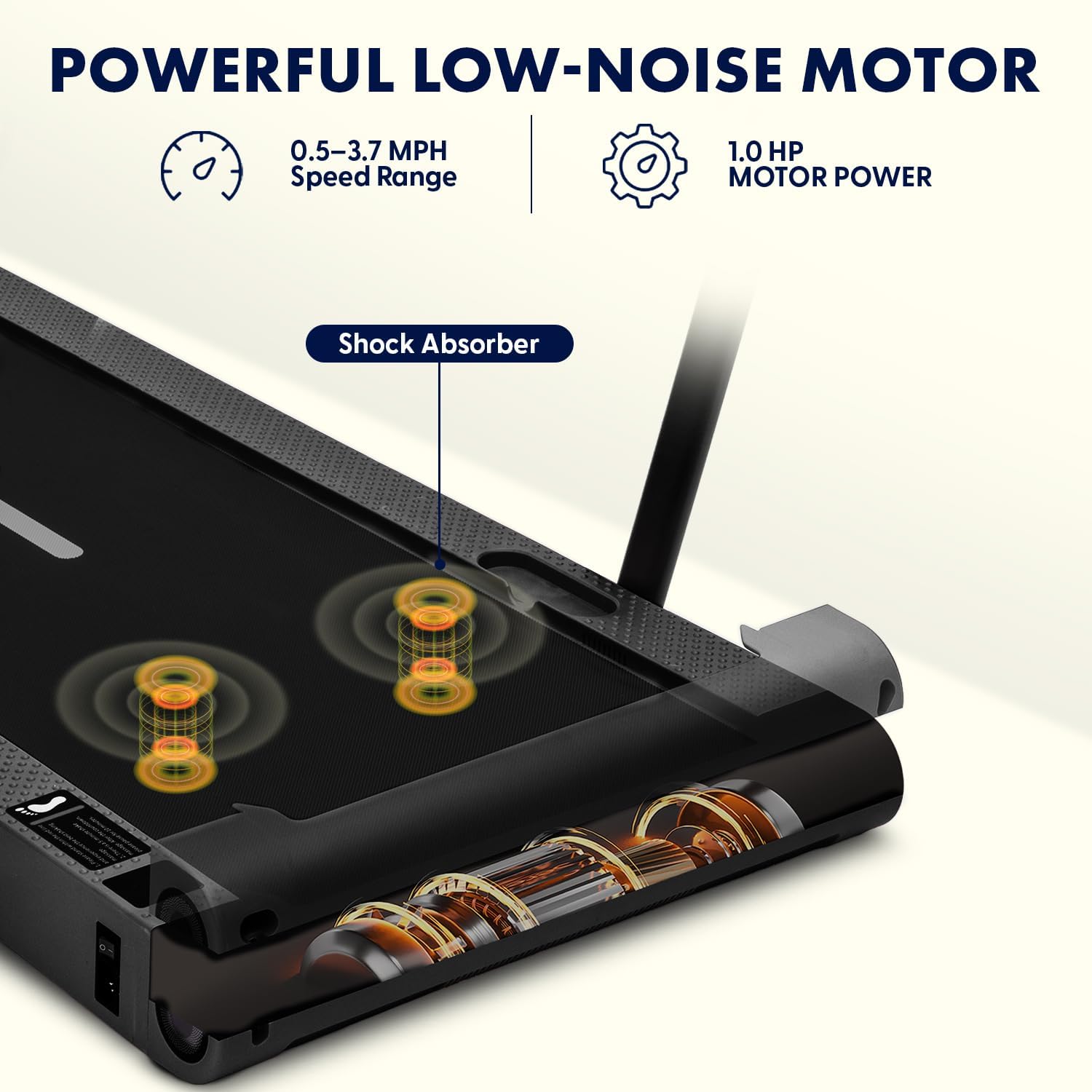
Figure 8.1: The walking pad features a 1.0 HP low-noise brushless motor with a speed range of 0.5-3.7 MPH and shock absorption.
9. Warranty and Support
- Warranty: This SQUATZ Walking Pad Treadmill comes with a 1 Year Warranty from the date of purchase. This warranty covers manufacturing defects under normal use. It does not cover damage caused by misuse, accidents, unauthorized modifications, or improper maintenance.
- Customer Support: For warranty claims, technical assistance, or any questions not covered in this manual, please contact SQUATZ customer support. Refer to the product packaging or the official SQUATZ website for contact information.
- Online Resources: Visit the SQUATZ Store on Amazon for additional product information and support.
