
1. Introduction
This manual provides essential information for the safe and efficient operation of your Samsung 85-Inch Class Mini LED M80H Series Smart TV. Please read this manual thoroughly before using the product and retain it for future reference. The Samsung M80H Series TV features Mini LED technology with AI Mode, Supersize Picture Enhancer, Pure Spectrum Color, Motion Xcelerator 144Hz, Auto HDR Remastering, and the NQ4 AI Gen2 Processor for an enhanced viewing experience.
2. What's in the Box
Verify that all components are present in the packaging:
- Samsung 85-Inch M80H Series TV
- Power Cable
- Remote Control (BT Simple Remote TM2280A with batteries)
- Stand
- User Manual
- Warranty Card

3. Setup
3.1 Physical Installation
Carefully unpack the TV and its components. For stand installation, align the stand with the designated slots at the bottom of the TV and secure it according to the instructions provided in the separate stand assembly guide. For wall mounting, the TV supports a VESA standard of 400 x 300 mm.
3.2 Connections
Connect your external devices to the TV's ports. Ensure the TV is powered off before making any connections.
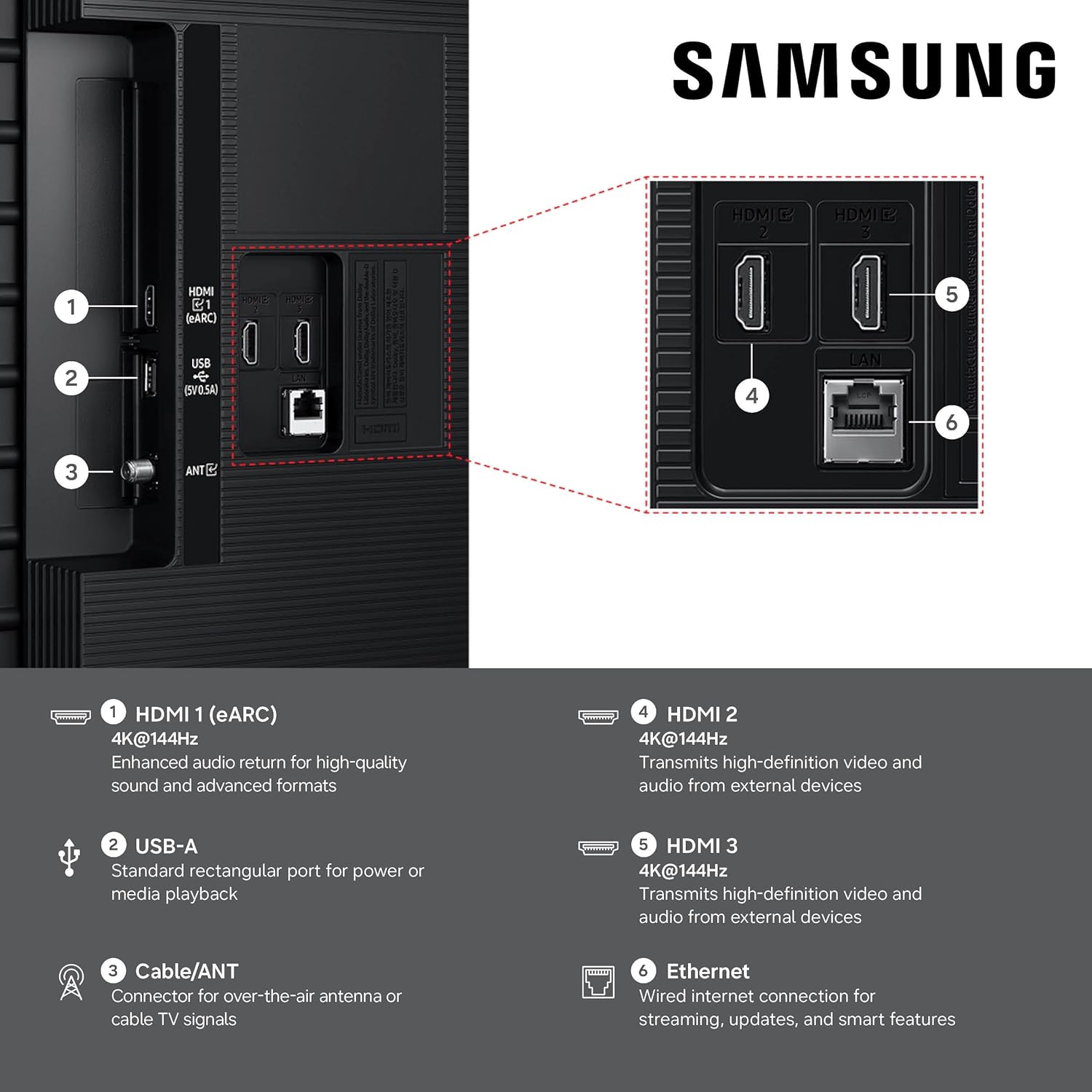
- HDMI Ports (3 Total): Connect high-definition devices such as Blu-ray players, game consoles, or set-top boxes. HDMI 1 supports eARC for enhanced audio return.
- USB Port (1 Total): Connect USB storage devices for media playback.
- Ethernet (LAN) Port: For a wired internet connection.
- Antenna/Cable Input: Connect an over-the-air antenna or cable TV signal.
- Wireless Connectivity: The TV supports Bluetooth 5.3 and Wi-Fi for wireless connections.

4. Operating Instructions
4.1 Power On/Off
Connect the power cable to the TV and a wall outlet. Press the power button on the remote control or the TV to turn it on or off.
4.2 Remote Control
Use the included Bluetooth Simple Remote (TM2280A) to navigate the TV's interface, adjust volume, change channels, and access smart features. Ensure batteries are correctly inserted.
4.3 Smart TV Features (Tizen OS)
Your Samsung M80H TV runs on the Tizen operating system, offering a personalized smart TV platform. Access popular internet applications such as Netflix, Amazon Prime, and YouTube. Alexa is built-in for voice control.
Vision AI Companion
Interact with your TV using voice commands to ask questions and access powerful AI features. The Vision AI Companion can provide information, recommend content, and help you find answers on the big screen.
Samsung TV Plus
Enjoy over 2,700 free streaming options, including more than 750 subscription-free channels, offering news, sports, movies, and more.
Gaming Hub
A central hub for your favorite games from consoles, cloud services, and gaming apps. It provides personalized recommendations and allows for fine-tuning game settings with the Game Bar, including ultra-wide aspect ratios (21:9 and 32:9). FreeSync Premium reduces stuttering and tearing for a smoother gaming experience.
AI Sound Controller & Object Tracking Sound Lite
The AI Sound Controller allows you to adjust the balance of voices, music, and sound effects. Object Tracking Sound Lite provides motion-based sound, where audio is precisely placed in space for an immersive experience. Q-Symphony enables the TV and a compatible soundbar to work together for enhanced audio.
Additional AI Features
- AI Customization Mode: Automatically detects content type and optimizes picture settings.
- Real Depth Enhancer: Analyzes scenes and adjusts foreground contrast for lifelike depth.
- Live Translate: Identifies content language and provides instant subtitles in your preferred language.
- Generative Wallpaper: Create AI-generated on-screen images to match your mood or decor.
- Pet Care: AI detects pet barking and alerts you, allowing custom rules for content.
- Storage Share: Seamlessly share multimedia files across compatible Samsung devices.
- AI Energy Mode: Reduces power consumption by auto-adjusting brightness based on room lighting and user activity.
- Karaoke: Transform your TV into a karaoke stage with the Samsung Daily+ feature.
5. Key Features Explained
5.1 Mini LED with AI Mode
Mini LED technology utilizes thousands of tiny LEDs for precise backlighting, delivering brighter visuals with richer contrast. AI Mode intelligently analyzes and enhances each scene, improving clarity, color, and contrast for stunning image quality.
5.2 Supersize Picture Enhancer
This feature provides groundbreaking enhancements for larger screens, improving clarity, reducing noise, and delivering dramatic contrast. Content appears sharp and clear, optimized for the 85-inch display.

5.3 Pure Spectrum Color
Experience one billion true-to-life colors, powered by advanced color technology and Mini-LED precision. This results in rich reds, deep blues, and vibrant greens, making every scene realistic.

5.4 Motion Xcelerator 144Hz
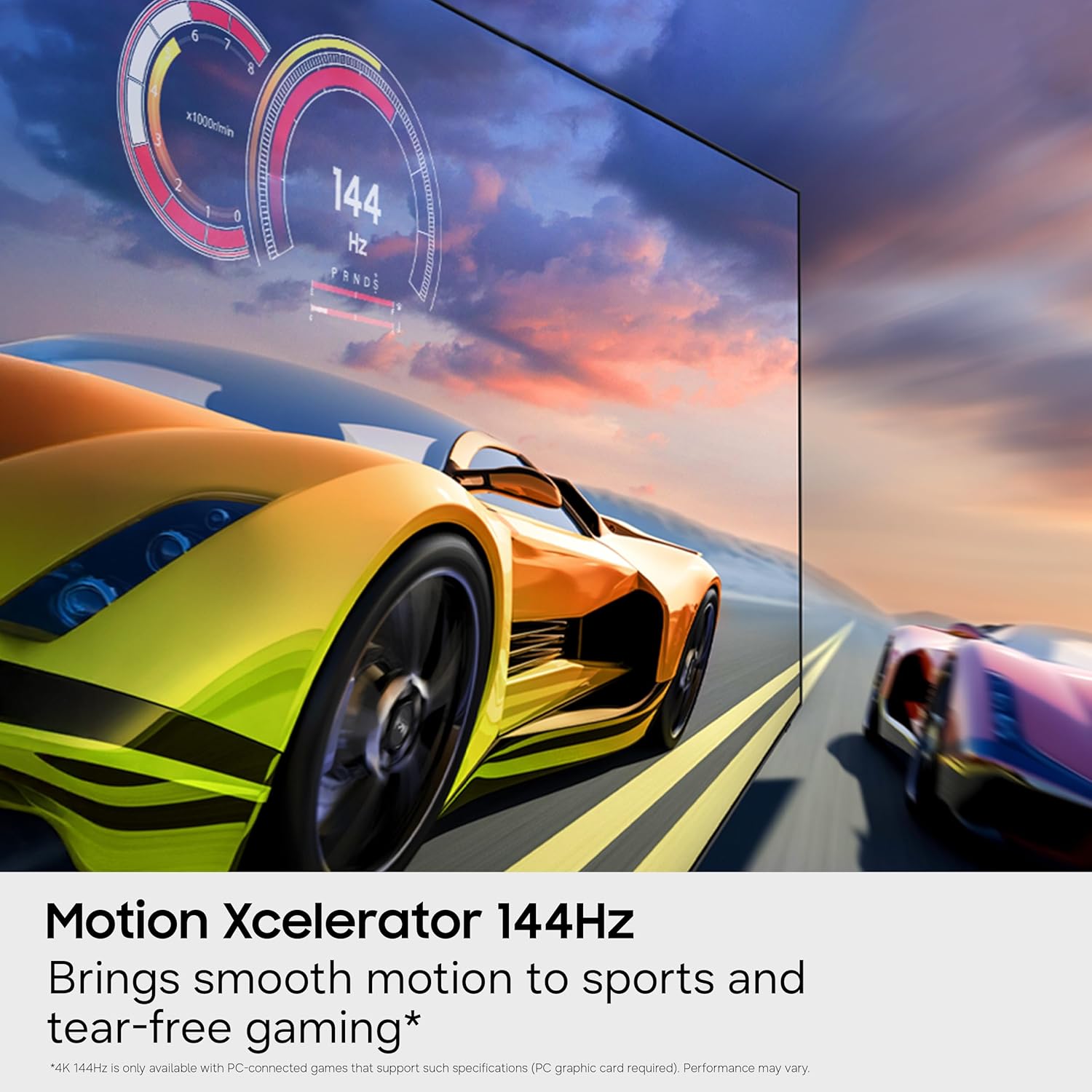
Achieve ultra-smooth performance for fast-paced games and sports with a 144Hz refresh rate. Variable Refresh Rate (VRR) technology dynamically matches the display to the game, eliminating stutter and tearing for optimal responsiveness. Note: 4K 144Hz is only available with PC-connected games that support such specifications (PC graphics card required). Performance may vary.

5.5 Auto HDR Remastering
This feature intelligently transforms Standard Dynamic Range (SDR) content to High Dynamic Range (HDR)-like quality. It delivers brighter highlights, more vibrant colors, and clearer details for a dazzling picture.
5.6 NQ4 AI Gen2 Processor
The NQ4 AI Gen2 Processor is the advanced powerhouse behind the TV's performance. It analyzes and enhances content in real-time, delivering sharper images, smoother motion, and more vibrant colors. This processor also contributes to advanced sound processing for a cinematic experience. Note: Utilizes AI-based formulas to upscale to 4K resolution. Resulting picture may vary based on source content.

5.7 Official Product Video
Watch the official product video for a visual overview of the Samsung M80H Series features.
6. Maintenance
6.1 Cleaning the TV
To clean the screen, gently wipe it with a soft, dry microfiber cloth. For stubborn marks, lightly dampen the cloth with water or a screen-safe cleaning solution. Avoid using harsh chemicals, abrasive materials, or direct spraying of liquids onto the screen or frame. For the TV frame and stand, use a soft, dry cloth.
6.2 General Care
Ensure proper ventilation around the TV. Avoid placing the TV in direct sunlight or near heat sources. Disconnect the power cable during lightning storms or when the TV will be unused for extended periods.
7. Troubleshooting
7.1 No Power
- Check if the power cable is securely connected to the TV and the wall outlet.
- Verify that the wall outlet is functioning by plugging in another device.
- Try a different power outlet.
7.2 No Picture or Poor Picture Quality
- Ensure all video cables (HDMI, etc.) are securely connected to both the TV and the source device.
- Check that the correct input source is selected on the TV.
- Adjust picture settings (brightness, contrast, sharpness) in the TV menu.
- If using an antenna, check antenna connection and perform a channel scan.
7.3 No Sound or Poor Sound Quality
- Check the TV volume and ensure it is not muted.
- If using external audio devices (soundbar, receiver), ensure they are properly connected and powered on.
- Check audio output settings in the TV menu.
7.4 Remote Control Not Working
- Replace the batteries in the remote control.
- Ensure there are no obstructions between the remote and the TV.
- If it's a Bluetooth remote, ensure it is paired with the TV.
7.5 Smart Features/Internet Connectivity Issues
- Check your Wi-Fi connection or Ethernet cable.
- Restart your router and modem.
- Perform a network connection test in the TV's settings menu.
- Ensure your Samsung Account is logged in for network-based smart services.
8. Specifications
| Model Name | M80H |
| Model Number | UN85M80HAFXZA |
| Brand | Samsung |
| Screen Size | 85 Inches |
| Display Technology | Mini-LED |
| Resolution | 4K (3840 x 2160) |
| Refresh Rate | 120Hz (Motion Xcelerator 144Hz for PC gaming) |
| Processor | NQ4 AI Gen2 Processor |
| Operating System | Tizen |
| Connectivity | 3 HDMI Ports (1 eARC), 1 USB Port, Ethernet, Wi-Fi, Bluetooth 5.3 |
| VESA Mount Standard | 400 x 300 mm |
| Product Dimensions (D x W x H) | 12.8"D x 74.4"W x 44.6"H (with stand) |
| Item Weight | 63.7 Pounds (with stand) |
| Color | Black |
9. Warranty and Support
9.1 Warranty Information
Your Samsung M80H Series TV comes with a 1 Year Manufacturer Warranty. Please refer to the included Warranty Card for detailed terms and conditions. EU spare part availability duration is 7 years.
9.2 Customer Support
For technical assistance, troubleshooting beyond this manual, or warranty claims, please contact Samsung Customer Support. Contact information can be found on the Warranty Card or the official Samsung website.


