
1. Introduction
This manual provides essential information for the safe and efficient operation of your LDGSUPH CA4-RB60 Counter. Please read this manual thoroughly before installation and use, and keep it for future reference. The CA4-RB60 is designed for monitoring and counting operations in various industrial applications, offering stable performance and intuitive controls.
2. Safety Information
Always observe the following safety precautions to prevent injury and damage to the device:
- Electrical Hazard: This device operates on AC220V. Ensure power is disconnected before installation, wiring, or maintenance. Only qualified personnel should perform electrical connections.
- Proper Installation: Install the counter in a dry, well-ventilated area, free from excessive dust, moisture, and corrosive gases.
- Correct Wiring: Follow all wiring diagrams and local electrical codes. Incorrect wiring can lead to malfunction or electrical shock.
- Operating Environment: Do not expose the device to extreme temperatures or direct sunlight.
- Maintenance: Do not attempt to repair the device yourself. Refer all servicing to qualified service personnel.
3. Product Overview
The LDGSUPH CA4-RB60 is a compact and reliable industrial counter designed for precise counting tasks. Its robust construction ensures stable performance under continuous use, making it suitable for various industrial environments. The device features an intuitive interface for easy operation and quick monitoring of counts.

Figure 3.1: Rear view of the LDGSUPH CA4-RB60 Counter, illustrating the various terminal connections for power input and signal inputs.
4. Specifications
Key technical specifications for the CA4-RB60 Counter:
| Specification | Value |
|---|---|
| Model Number | CA4-RB60 |
| Input Voltage | AC220V |
| Dimensions (W x H x D) | 48 x 48 x 97.5 mm |
| Package Dimensions | 0.39 x 0.39 x 0.39 inches |
| Item Weight | 1.1 pounds |
| Manufacturer | LDGSUPH |
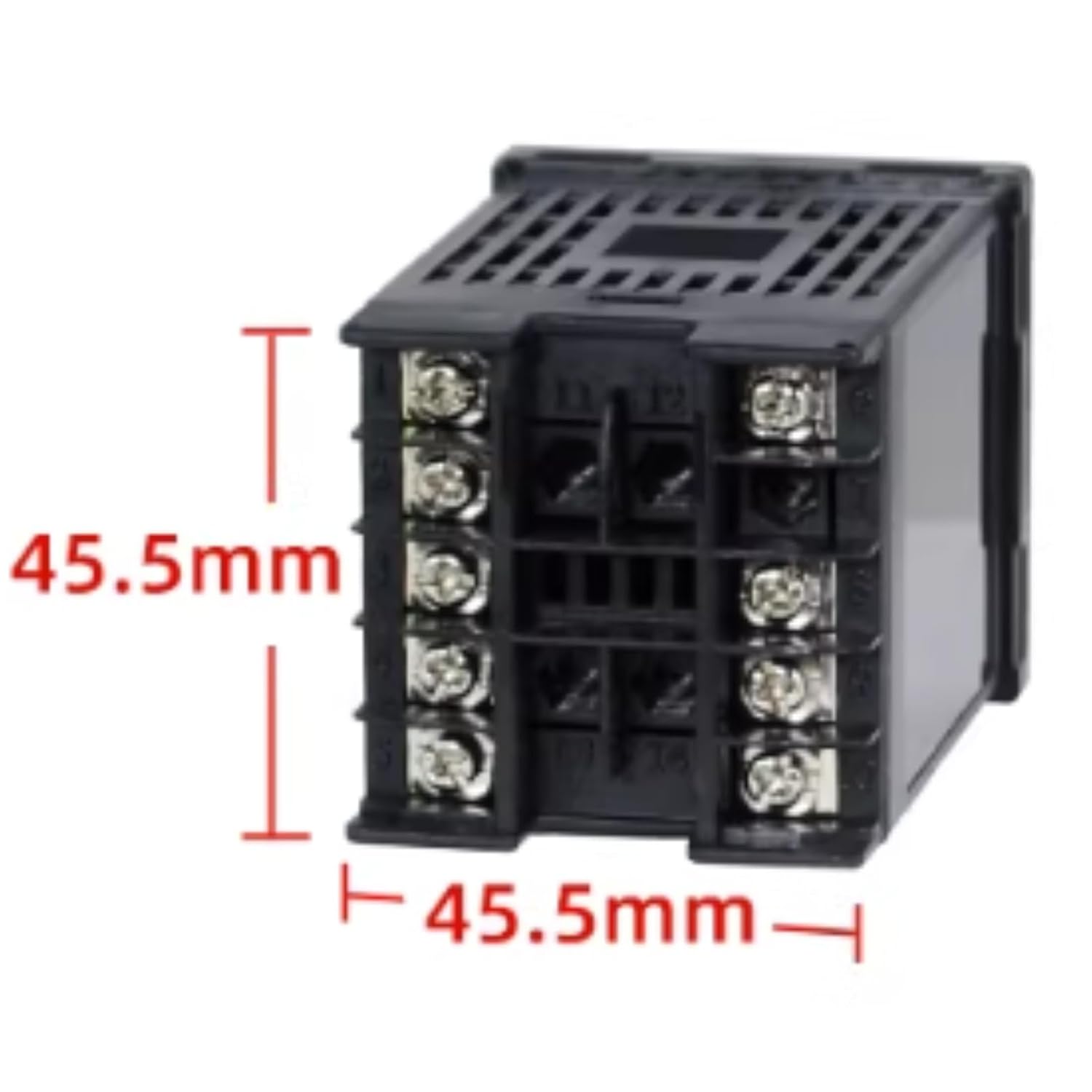
Figure 4.1: Dimensional drawing of the CA4-RB60 Counter, indicating a width and height of 45.5mm for mounting purposes.
5. Setup
Follow these steps for proper installation of the CA4-RB60 Counter:
- Mounting: The counter is designed for panel mounting. Ensure the cutout dimensions in your panel match the device's specifications (48x48mm front panel, 97.5mm depth). Secure the counter using the provided mounting hardware.
- Power Connection: Connect the AC220V power supply to the designated power terminals on the rear of the counter. Refer to the wiring diagram (typically found on the device label or in a separate wiring guide) for correct polarity and terminal identification.
- Input Signal Connection: Connect your counting input signals (e.g., from sensors, switches) to the appropriate input terminals. Ensure signal compatibility with the counter's specifications.
- Output Connection (if applicable): If the counter has relay or other output functions, connect them to your control system as required.
- Verify Connections: Double-check all wiring connections before applying power to prevent damage or malfunction.
6. Operating Instructions
The CA4-RB60 Counter features intuitive operation for monitoring counts quickly. While specific button functions may vary slightly, general operation typically involves:
- Power On: Once properly wired, apply AC220V power. The display should illuminate.
- Counting: The counter will increment based on the input signals received. Ensure your input source is correctly configured to provide the desired pulses.
- Display Reading: Read the current count directly from the digital display.
- Reset Function: Most counters include a reset button or terminal to clear the current count and start from zero. Consult the device's specific labeling or wiring diagram for the reset mechanism.
- Parameter Settings (if applicable): Some models may have basic settings for counting mode, input sensitivity, or output control. Refer to the device's specific documentation for details on accessing and adjusting these parameters.
7. Maintenance
To ensure the longevity and reliable performance of your CA4-RB60 Counter, perform the following maintenance:
- Cleaning: Periodically clean the exterior of the counter with a soft, dry cloth. Do not use abrasive cleaners or solvents, as they may damage the casing or display.
- Inspection: Regularly inspect the wiring connections for any signs of loosening, corrosion, or damage. Ensure all terminals are securely fastened.
- Environmental Check: Verify that the operating environment remains within the recommended conditions (temperature, humidity, dust levels).
- No User Serviceable Parts: The internal components are not user-serviceable. Do not open the device casing.
8. Troubleshooting
If you encounter issues with your CA4-RB60 Counter, refer to the following common problems and solutions:
- No Power/Display Off:
- Check the AC220V power supply connection.
- Verify that the power source is active.
- Inspect the power cable for damage.
- Counter Not Incrementing:
- Ensure the input signal source is functioning correctly and providing pulses.
- Check the input signal wiring for loose connections or breaks.
- Verify that the input signal type and voltage are compatible with the counter.
- Incorrect Count:
- Check for electrical noise or interference affecting the input signal.
- Ensure the input signal is clean and free from bouncing or multiple pulses for a single event.
- If applicable, adjust input sensitivity settings.
- Display Malfunction:
- If the display is erratic or blank, power cycle the device.
- If the issue persists, contact customer support.
If these steps do not resolve the issue, contact LDGSUPH customer support for further assistance.
9. Warranty and Support
For warranty information and technical support regarding your LDGSUPH CA4-RB60 Counter, please contact the manufacturer directly. Details are typically provided with your purchase documentation or on the manufacturer's official website. Keep your purchase receipt as proof of purchase.