
Introduction
The Nokta The Legend 2 is an advanced simultaneous multi-frequency metal detector designed for various treasure hunting and prospecting applications. This device offers robust performance, waterproof capabilities, and user-friendly features for both novice and experienced detectorists. Please read this manual thoroughly to ensure proper operation and maintenance of your detector.
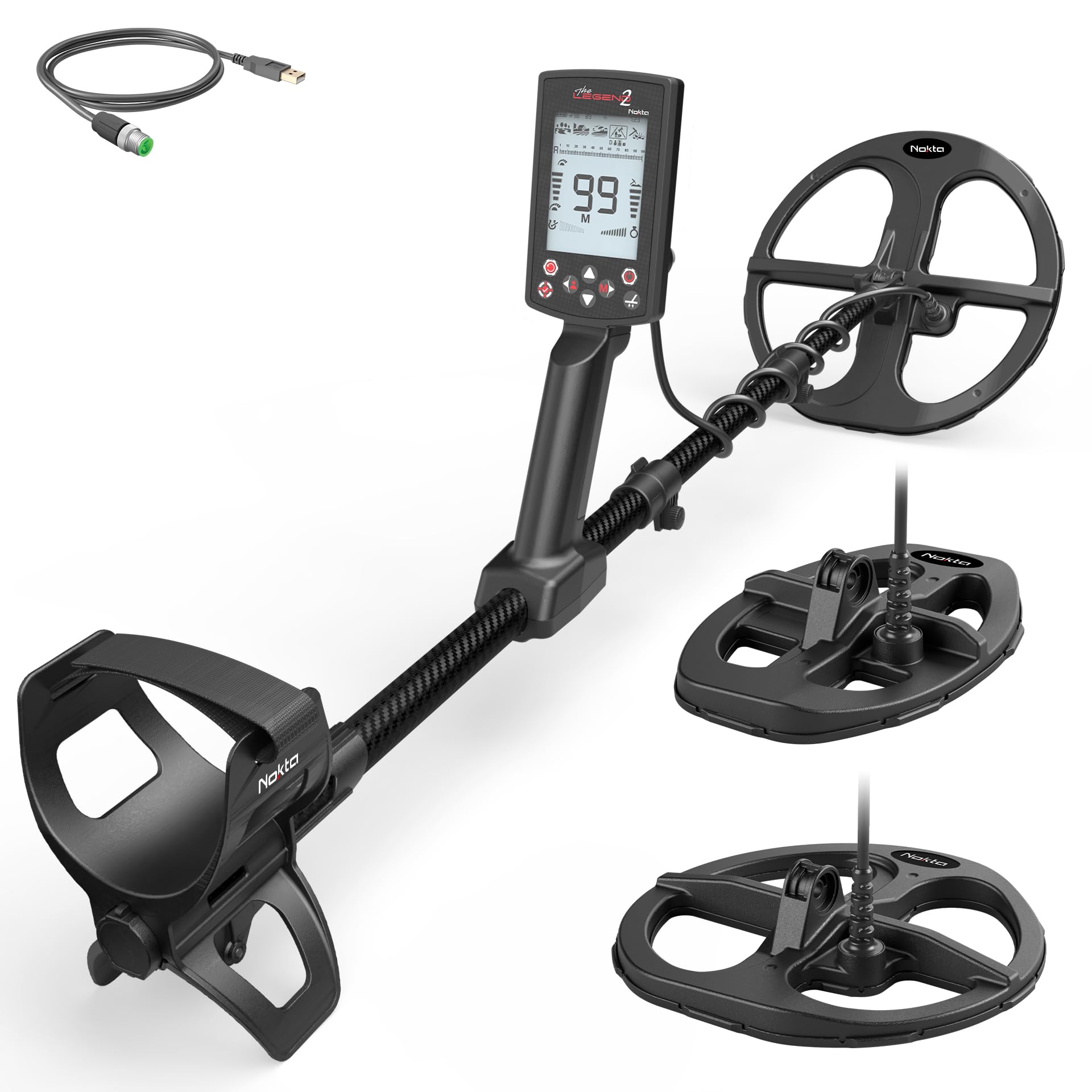
Image: The Nokta The Legend 2 Metal Detector with its control unit, shaft, and search coil.
Package Contents
Before assembly, verify that all items listed below are present in your package. If any components are missing or damaged, contact your dealer immediately.

Image: An overview of the Nokta The Legend 2 package contents, including the detector, search coils, wireless headphones, and charging cables.
- Nokta The Legend 2 Control Unit and Shaft Assembly
- Wireless Headphones
- LD22 Search Coil
- Additional Search Coil (as per package variant)
- USB Charging Cable
- User Manual
Setup
1. Assembly
- Attach the search coil to the lower shaft using the provided bolt and washers. Ensure it is securely fastened but do not overtighten.
- Connect the search coil cable to the control unit. Align the pins carefully and tighten the connector ring.
- Adjust the shaft length to a comfortable position, allowing the search coil to be parallel to the ground when standing upright.
- Secure the armrest for comfortable use.
2. Charging the Battery
The detector is equipped with a 6700 mAh LiPo battery. For optimal performance, fully charge the battery before first use.
- Connect the USB charging cable to the charging port on the control unit.
- Plug the other end of the cable into a USB power adapter (not included) or a computer USB port.
- The charging indicator on the display will show the charging status.
- A full charge typically takes several hours.
3. Powering On/Off
- To power on, press and hold the power button until the display illuminates.
- To power off, press and hold the power button until the device shuts down.
Operating Instructions
The Legend 2 offers various modes and settings to optimize your detecting experience across different terrains and for different target types.
Search Modes
The detector features multiple search modes, each optimized for specific conditions. These include modes for Park, Field, Beach, Relic, and Gold. Each mode has a factory default and three user-customizable profiles, allowing for up to 15 unique settings.

Image: Visual representation of different search modes: Park, Field, Beach, Relic, and Gold, indicating versatility across terrains.
- Park Mode: Ideal for areas with high trash, such as parks and playgrounds.
- Field Mode: Suitable for open fields and agricultural land.
- Beach Mode: Optimized for wet and dry sand conditions, including saltwater environments.
- Relic Mode: Designed for finding older, deeper targets.
- Gold Mode: Specifically tuned for detecting small gold nuggets in mineralized ground.
Key Features and Settings

Image: An infographic summarizing key features of The Legend 2, such as IP68 waterproofing, 99 Target IDs, 15 user profiles, and wireless firmware updates.
- 99 Target IDs & Harmonic Tones: Accurate target identification with adjustable audio frequencies helps distinguish targets.
- 15 Custom User Profiles: Save your preferred settings for quick access across different search modes.
- Wireless Firmware Update: Update your detector's software wirelessly via your phone or laptop for the latest features and improvements.
- IP68 Waterproof: The detector is fully submersible up to 5 meters (16 feet), making it suitable for underwater detecting and protected from dust.
- Vibration: The device vibrates upon target detection, useful for hearing-impaired users or underwater searching.
- Larger Screen: Provides improved readability of target information and settings.
- Effortless Pinpoint: Target IDs are visible in Pinpoint Mode, simplifying target recovery.
- Recovery Speed Setting: Adjust to detect smaller targets in trashy areas.
- Frequency Shift & Noise Cancellation: Reduces electromagnetic interference for clearer signals.
- Adjustable Threshold: Set the background hum level to hear faint signals.
- Backlit LCD & LED Flashlight: Enhances visibility in low-light conditions.
- Long Battery Life: 6700 mAh battery provides extended operating time.
- Lightweight Design: Weighing 1.2kg (2.6 lbs), it is well-balanced for comfortable extended use.
Maintenance
- Cleaning: After each use, especially in wet or sandy conditions, wipe down the detector with a damp cloth. Avoid abrasive cleaners.
- Storage: Store the detector in a dry, cool place away from direct sunlight. Remove batteries if storing for extended periods (though it has an integrated battery, ensure it's not fully discharged for long storage).
- Coil Care: Inspect the search coil cable for any damage regularly. Avoid sharp bends or excessive pulling.
- Waterproofing: Ensure all caps and connectors are securely tightened before submerging the detector in water.
Troubleshooting
| Problem | Possible Cause | Solution |
|---|---|---|
| No power | Battery discharged | Charge the battery fully. |
| Erratic signals/False signals | High mineralization, electromagnetic interference, or incorrect ground balance. | Perform ground balance. Use Frequency Shift/Noise Cancellation. Reduce sensitivity. |
| No target audio | Volume too low, headphones disconnected, or speaker muted. | Increase volume. Check headphone connection. Ensure speaker is not muted. |
| Detector not detecting targets | Incorrect search mode, low sensitivity, or coil not sweeping correctly. | Select appropriate search mode. Increase sensitivity. Ensure proper coil sweep technique. |
Specifications
| Feature | Detail |
|---|---|
| Brand | NOKTA DETECTION TECHNOLOGIES |
| Model Number | 11000562 |
| Color | Black |
| Material | Carbon Fiber |
| Power Source | Battery Powered (6700 mAh LiPo) |
| Adjustable Length | Yes |
| Item Weight | 2.6 Pounds (1.2 kg) |
| Item Dimensions (L x W x H) | 57"L x 25"W x 25"H (assembled) |
| Waterproof Rating | IP68 (Fully submersible up to 5 meters / 16 feet) |
| Recommended Uses | Treasure Hunting, Gold/Mineral Prospecting, Metal Detection |
Warranty and Support
For warranty information, please refer to the warranty card included with your product or visit the official NOKTA DETECTION TECHNOLOGIES website. Keep your proof of purchase for warranty claims.
For technical support, troubleshooting assistance, or spare parts, please contact NOKTA DETECTION TECHNOLOGIES customer service. Contact details can typically be found on their official website or in the product packaging.
Online Resources: www.noktadetectors.com


