
Motorola XT2601-3
Motorola Moto Edge 70 5G Ai User Manual
Model: XT2601-3
1. Introduction
The Motorola Moto Edge 70 5G Ai is a powerful and slim smartphone designed for enhanced performance and photography. It features a 50MP triple camera system, a vibrant 6.67-inch Super HD pOLED display, and a long-lasting 4800mAh silicon-carbon battery with 68W TurboPower charging.
2. What's in the Box
Upon unboxing your Motorola Moto Edge 70 5G Ai, you should find the following items:
- Motorola Moto Edge 70 5G Ai Smartphone
- 68W TurboPower Charger
- USB Type-C Cable
- SIM Ejector Tool
- Phone Case
Important Note: If you receive a Euro charger instead of a US Specs Charger, please return the phone immediately and contact Amazon customer service.
3. Physical Overview
3.1 Design and Durability
The Moto Edge 70 5G Ai features an ultra-thin design, measuring just 5.99mm. It boasts a rubberized, nylon-inspired silicone textured back for a comfortable grip. The device is lightweight at 159.6 grams.
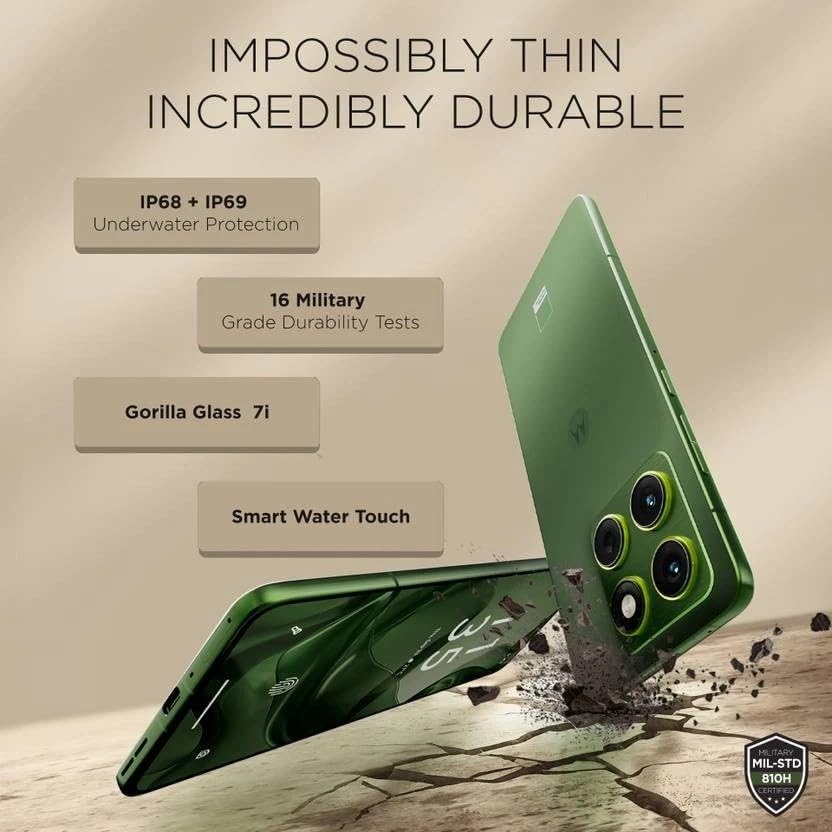
Image: Motorola Moto Edge 70 5G Ai showcasing its thin profile and durability features like IP68+IP69 underwater protection, 16 military-grade durability tests, Gorilla Glass 7i, and Smart Water Touch.
The phone is built with MIL-STD 810H military-grade durability, Corning Gorilla Glass 7i protection on the display, and IP68/IP69 water and dust resistance, ensuring robust protection against environmental elements.
3.2 Buttons and Ports
The device includes a volume rocker and power button on the side. It also features a dedicated AI key. At the bottom, you will find the speaker grille, a USB Type-C 2.0 port, and the SIM card tray. The earpiece doubles as a stereo speaker.
4. Display
The Motorola Moto Edge 70 5G Ai is equipped with a 6.67-inch Super HD pOLED display (2712 x 1220 resolution, 446ppi) with a 120Hz refresh rate. It offers a peak brightness of 4500 nits for excellent visibility, even in bright conditions. The display is Pantone Validated for authentic color and skin tones, and supports HDR10+ for infinite contrast. It is a flat panel design with a tiny punch-hole camera.
While the panel supports HDR10+, HDR video playback on platforms like Netflix may not be available due to certification requirements.
An optical in-display fingerprint scanner is integrated for secure and fast unlocking.
5. Performance
Powered by the Qualcomm Snapdragon 7 Gen 4 (4nm) Octa-core processor, the Moto Edge 70 5G Ai delivers a stable and smooth user experience. It comes with 12GB of LPDDR5x RAM and 512GB of UFS 3.1 storage.
Benchmark scores indicate strong performance for everyday tasks and casual gaming, with an AnTuTu score of approximately 1.4 million and good CPU/GPU stability.
For gaming, the device supports up to 120 FPS in BGMI and 90 FPS in Call of Duty, providing a fluid experience for short gaming sessions.
6. Camera
The Moto Edge 70 5G Ai features a versatile triple camera system: a 50MP primary camera with Optical Image Stabilization (OIS), a 50MP ultrawide camera with autofocus (allowing for macro shots), and a 3-in-1 dedicated light sensor for accurate color reproduction. The front-facing camera is also 50MP, capable of high-resolution selfies and 4K video recording.
The camera excels in HDR tuning, providing excellent control over highlights and detailed retrieval from shadows across all lenses. While primary shots offer natural colors, some noise may be visible in shadows at 100% zoom due to less aggressive noise processing. Color consistency between lenses may vary slightly.
7. Software
The device runs on Hello UI based on Android 15, offering a clean and feature-rich experience. Motorola promises 3 years of software updates and 4 years of security updates.
It includes Moto features like Moto Gestures, Smart Connect 2.0, Moto Secure, and Family Spaces. The phone also integrates AI features such as Google Gemini, Circle to Search, 'Remember This', Image Studio, and Playlist Studio.
During initial setup, users should be mindful to deselect any unwanted third-party apps (bloatware) or Glance integration to maintain a cleaner user experience.
8. Battery and Connectivity
Equipped with a 4800mAh silicon-carbon battery, the Moto Edge 70 5G Ai supports 68W TurboPower fast charging, capable of reaching 0-100% charge in approximately 40 minutes. It also supports 15W wireless charging.

Image: Motorola Moto Edge 70 5G Ai showing its 4800mAh silicon-carbon battery, 68W TurboPower charger, and 15W wireless charger.
Connectivity options include 16 5G bands, 4G VoLTE, Wi-Fi 6E, Bluetooth 5.4, and NFC.
9. Setup
- Unboxing: Carefully remove all items from the box: Motorola Moto Edge 70 5G Ai smartphone, 68W TurboPower charger, USB Type-C cable, and SIM ejector tool. A phone case is also included.
- SIM Card Insertion: Use the SIM ejector tool to open the SIM card tray. Insert your Nano SIM card (and eSIM if applicable). This device supports Dual SIM (1 Nano SIM + eSIM) and does not have a MicroSD slot.
- Initial Power On: Press and hold the power button until the Motorola logo appears. Follow the on-screen prompts to select your language, region, and connect to a Wi-Fi network.
- Account Setup: Sign in with your Google account or create a new one. This is essential for accessing the Google Play Store and other Google services.
- Data Transfer (Optional): If you are upgrading from another device, follow the prompts to transfer your data. You can use Google's backup and restore features or Motorola's migration tools.
- Security Setup: Set up your preferred security methods, including PIN, pattern, password, fingerprint recognition (in-display sensor), and face unlock.
- App Installation & Bloatware: During the setup process, you may be prompted to install additional apps or enable features like Glance. Review these options carefully and deselect any unwanted applications or services to optimize your phone's performance and privacy.
- Software Updates: After initial setup, connect to Wi-Fi and check for any available software updates to ensure your device has the latest features and security patches.
10. Operating Your Device
- Navigation: The Moto Edge 70 5G Ai uses gesture navigation by default. Swipe up from the bottom to go home, swipe up and hold for recent apps, and swipe from the left or right edge to go back.
- Moto Gestures: Access quick actions with intuitive gestures. For example, a chop-chop motion to turn on the flashlight or a twist motion to open the camera.
- AI Key: Utilize the dedicated AI key for quick access to AI features like Google Gemini or 'Remember This'.
- Display Settings: Adjust display settings such as refresh rate (up to 120Hz), color mode (Natural, Radiant, Vivid), and brightness for optimal viewing.
- Audio: The device features stereo speakers (earpiece and bottom speaker). Adjust volume using the volume rocker. Be aware of potential channel imbalance due to the earpiece acting as one speaker.
- Camera Usage:
- Primary Camera: Open the camera app and select 'Photo' mode for standard shots.
- Ultrawide/Macro: Switch to 'Ultrawide' mode for wider scenes or use the macro feature for close-up shots.
- Selfie Camera: Switch to the front camera for selfies. Use 'High-Res' mode for 50MP output.
- Video Recording: Record videos in up to 4K UHD at 30fps, or FHD at 30fps. Slow motion is available at FHD (240fps/120fps).
11. Maintenance
- Cleaning: Use a soft, lint-free cloth to clean the screen and body of the phone. Avoid harsh chemicals or abrasive materials.
- Water and Dust Resistance: The device has an IP68/IP69 rating, meaning it is protected against dust ingress and can withstand immersion in water up to 1.5 meters for 30 minutes. However, it is not waterproof. Avoid intentional submersion and exposure to pressurized water.
- Software Updates: Regularly install software and security updates to ensure optimal performance and protection against vulnerabilities.
- Battery Care: To prolong battery life, avoid extreme temperatures. Use the provided 68W TurboPower charger for fast and efficient charging. Wireless charging is also supported.
- Storage Management: Periodically clear unnecessary files and apps to maintain optimal storage performance. The device comes with 512GB internal storage.
12. Troubleshooting
- Network Connectivity Issues:
- Ensure your SIM card is correctly inserted and activated.
- Check if your carrier (T-Mobile, Mint, Tello, Ultra, or any T-Mobile network in the USA; any carrier worldwide outside the USA) is compatible with the phone's GSM unlocked status.
- Restart the device.
- Reset network settings if problems persist.
- Performance Lags:
- Close background applications.
- Clear app caches.
- Ensure sufficient free storage space.
- Restart the phone.
- Display Issues:
- Adjust brightness settings.
- Check for software updates that might address display anomalies.
- Camera Quality:
- Ensure lenses are clean.
- For optimal detail, especially in low light or zoomed shots, ensure good lighting conditions.
- Check for software updates that may improve camera processing.
- Unwanted Apps/Bloatware: If you accidentally installed unwanted apps during setup, you can uninstall them from the 'Apps' section in Settings. For Glance integration, disable it during setup or from the lock screen settings.
13. Specifications
| Feature | Detail |
|---|---|
| Brand | Motorola |
| Model Name | EDGE 70 5G (XT2601-3) |
| Operating System | Android 15 |
| Processor | Qualcomm SM7750-AB Snapdragon 7 Gen 4 (4 nm) Octa-core (1x2.8 GHz Cortex-720 & 4x2.4 GHz Cortex-720 & 3x1.8 GHz Cortex-520) |
| RAM | 12 GB LPDDR5x |
| Storage | 512 GB UFS 3.1 |
| Screen Size | 6.67 Inches |
| Display Type | pOLED, HDR10+, Pantone Validated Colors, 100% DCI-P3 |
| Resolution | 2712 x 1220 pixels (Super HD), 446 PPI |
| Refresh Rate | Up to 120Hz |
| Peak Brightness | 4500 nits |
| Rear Camera | 50MP (OIS) Primary, 50MP Ultrawide (with AF/Macro), 3-in-1 Light Sensor |
| Front Camera | 50MP |
| Video Capture Resolution | 4K UHD (30fps), FHD (30fps), Slow motion: FHD (240fps/120fps) |
| Battery Capacity | 4800 Milliamp Hours (Silicon-Carbon) |
| Charging | 68W TurboPower (wired), 15W Wireless Charging |
| SIM Card | Dual SIM (1 Nano SIM + eSIM) |
| Connectivity | 5G (16 bands), 4G VoLTE, Wi-Fi 802.11 a/b/g/n/ac/ax (2.4 GHz | 5 GHz | 6 GHz / Wi-Fi 6E), Bluetooth 5.4, NFC |
| Security | On-screen fingerprint reader, Face Unlock, ThinkShield |
| Durability | IP69/IP68 underwater protection, MIL-STD 810H |
| Color | Pantone Lily Pad (Olivo) |
| UPC | 840493607603 |
14. Warranty and Support
14.1 Warranty Information
The Motorola Moto Edge 70 5G Ai comes with a 30-day Amazon warranty and a 1-year Latin America warranty.
14.2 Customer Support
For further assistance, troubleshooting, or warranty claims, please refer to the official Motorola support website or contact Amazon customer service.
Related documentsXT2601-3


Ask a question about this manual
Ask about setup, troubleshooting, compatibility, parts, safety, or missing instructions. Manuals+ will review the question and use this page’s manual context to help answer it.