
1. Introduction
Thank you for choosing the ModernMate Electric Height Adjustable Standing Desk. This manual provides essential information for the safe assembly, operation, maintenance, and troubleshooting of your new desk. Please read these instructions carefully before use and retain them for future reference.
2. Safety Information
Please observe the following safety precautions:
- Always ensure the desk is properly assembled and stable before use.
- Do not attempt to lift or adjust the desk while it is in use or while objects are unstable on its surface.
- Keep children and pets away from the desk when it is in motion.
- Never exceed the maximum weight limit of 176 pounds (80 kg) on the desktop.
- Always follow the assembly instructions carefully to avoid injury.
- Ensure all cables are properly managed to prevent entanglement during height adjustments.
3. Package Contents
Before assembly, verify that all components are present. Refer to the detailed parts list in the separate assembly guide provided with your product. Key components include:
- Desktop with integrated drawers and monitor shelf
- Electric lifting columns (legs)
- Foot pads/bases
- Control panel and power adapter
- Hardware kit (screws, bolts, etc.)
4. Assembly Instructions
Detailed and clear assembly instructions are provided with your ModernMate Standing Desk. Please follow these instructions step-by-step for proper setup. While some tools may be included, it is recommended to have a Phillips head screwdriver and an Allen wrench set on hand.

Figure 4.1: Overall dimensions of the ModernMate Standing Desk, illustrating the desktop, monitor shelf, and drawer section.

Figure 4.2: Detailed view of the desk's motor, control panel, and cable management features, essential for assembly and operation.
Ensure all connections are secure and the desk is stable before plugging it into a power source.
5. Operating Instructions
5.1 Height Adjustment
Your ModernMate Standing Desk features an electric height adjustment system. The desk can be adjusted smoothly and quietly between a minimum height of 27.9 inches and a maximum height of 45.7 inches (excluding desktop thickness).

Figure 5.1: The control panel for height adjustment, featuring up/down arrows and memory preset buttons.
- Adjusting Height: Use the Up and Down arrow buttons on the control panel to raise or lower the desk to your desired height. The current height will be displayed on the digital screen.
- Setting Memory Presets: To save a preferred height, adjust the desk to the desired position, then press the M button followed by one of the numbered memory buttons (1, 2, or 3). The height is now saved to that preset.
- Recalling Memory Presets: Press the corresponding numbered memory button (1, 2, or 3) to automatically move the desk to the saved height.
5.2 Quiet Operation
The desk's motor operates at a noise level below 50dB, ensuring a quiet working environment.

Figure 5.2: Noise level comparison, highlighting the quiet operation of the desk's motor.
5.3 Anti-Collision System
The desk is equipped with an anti-collision system that detects obstacles during height adjustment and automatically stops movement to prevent damage or injury.
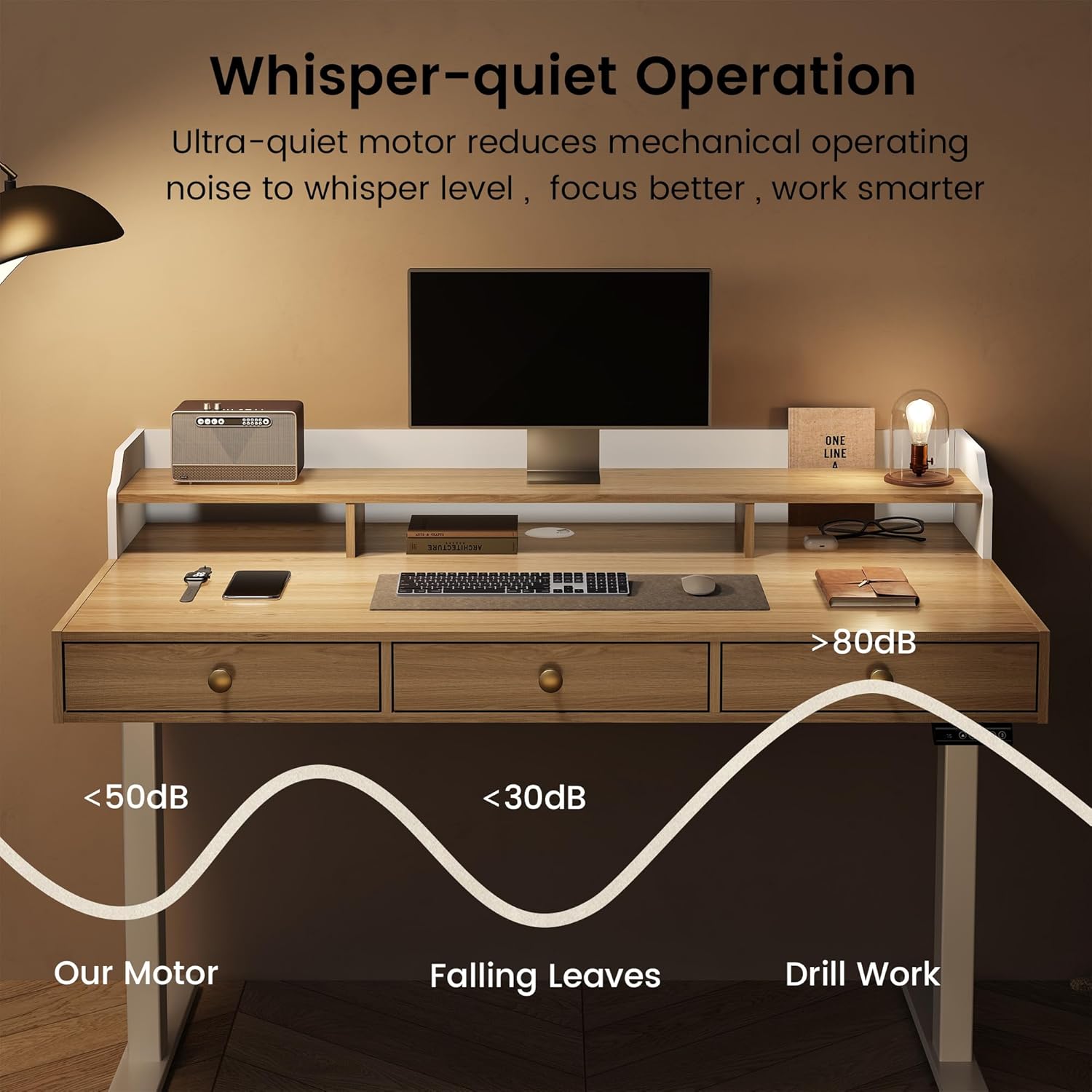
Figure 5.3: The ModernMate desk seamlessly adjusts between sitting and standing positions, promoting ergonomic work habits.
6. Features
6.1 Integrated Storage Drawers
The desk includes three smooth-gliding, spacious wooden drawers ingeniously integrated beneath the desktop. These provide convenient storage for files, stationery, and personal items, helping to maintain an organized workspace.

Figure 6.1: An open drawer revealing its dimensions and organizational capacity for various office supplies.
6.2 Monitor Shelf
A dedicated desktop monitor shelf provides an ergonomic viewing experience by elevating your screen. This shelf also offers additional storage space underneath for small items, contributing to a tidier desktop.
6.3 Cable Management Grommet
Thoughtfully designed cable management holes on the desktop surface allow you to neatly organize power cords and data cables, eliminating tangles and clutter for a clean and functional workspace.
7. Maintenance
To ensure the longevity and optimal performance of your ModernMate Standing Desk, follow these maintenance guidelines:
- Cleaning: Wipe the desktop and frame with a soft, damp cloth. Avoid using harsh chemicals or abrasive cleaners, which can damage the finish.
- Motor Care: Keep the motor and lifting columns free from dust and debris. Do not lubricate the motor or internal mechanisms.
- Cable Inspection: Periodically check all power cords and connections for any signs of wear or damage. Replace damaged cables immediately.
- Weight Distribution: Distribute weight evenly across the desktop to prevent strain on the lifting mechanism.
8. Troubleshooting
If you encounter any issues with your ModernMate Standing Desk, refer to the following common troubleshooting steps:
| Problem | Possible Cause | Solution |
|---|---|---|
| Desk does not move | Power cable disconnected Overload protection activated | Check power connections. Reduce weight on the desk. Unplug for 10 minutes, then plug back in. |
| Uneven height adjustment | Obstruction Unbalanced load | Check for obstructions under the desk. Ensure weight is evenly distributed. |
| Error code displayed | Specific system error | Refer to the detailed troubleshooting section in your separate assembly guide or contact customer service. |
| Anti-collision system triggers frequently | Sensitivity setting too high Obstacles present | Ensure no objects are in the path of movement. Consult manual for anti-collision sensitivity adjustment if available. |
If the problem persists after attempting these solutions, please contact ModernMate customer service for further assistance.
9. Specifications
| Feature | Detail |
|---|---|
| Brand | ModernMate |
| Model Number | J-SJZ-BW-025 |
| Product Dimensions (D x W x H) | 26" x 47.2" x 37" (at lowest height, including monitor shelf) |
| Adjustable Height Range | 27.9" to 45.7" (excluding desktop thickness) |
| Weight Capacity | Up to 176 lbs (80 kg) |
| Noise Level | < 50dB |
| Number of Drawers | 3 |
| Monitor Shelf | Included |
| Cable Management | Grommet holes |
| Material Type | Engineered Wood (Desktop), Steel (Frame) |
| Color | Light Walnut |
| Assembly Required | Yes |
10. Warranty and Support
ModernMate is committed to providing quality products and customer satisfaction. While specific warranty details are provided with your purchase documentation, if you have any questions, concerns, or require assistance with your standing desk, please do not hesitate to contact our customer service team. Our team is available to help with installation, operation, and any other inquiries you may have.
For support, please refer to the contact information provided in your product packaging or visit the official ModernMate website.


