
1. Introduction
This manual provides essential information for the installation, operation, maintenance, and troubleshooting of your Generic DA97-13718CCM Refrigerator Ice Maker. This ice maker is designed as a replacement part for specific Samsung refrigerator models. Please read this manual thoroughly before attempting any installation or maintenance to ensure safe and correct usage.
Compatible Samsung Refrigerator Models include:
- RF22M9581SR/AA-00
- RF22N9781SG/AA-00
- RF22N9781SR/AA-00
- RF22NPEDBSG/AA-00
- RF22NPEDBSR/AA-00
- RF22NPEDBSR/AA-01
- RF23HCEDBBC/AA-00
- RF23HCEDBSR/AA-00
- And other models listed in the product description.
2. Safety Information
Always prioritize safety when working with electrical appliances. Failure to follow these safety instructions could result in electric shock, fire, or personal injury.
- Disconnect Power: Always unplug the refrigerator from the power outlet before attempting any installation, repair, or maintenance.
- Professional Installation: If you are unsure about any step, it is recommended to seek assistance from a qualified appliance technician.
- Water Supply: Ensure the water supply to the refrigerator is turned off before beginning installation.
- Handle with Care: The ice maker contains delicate electronic components. Handle it carefully to avoid damage.
- Proper Tools: Use appropriate tools for the job to prevent damage to the appliance or injury to yourself.
3. What's in the Box
Upon unpacking, please verify that all components are present and undamaged:
- 1 x DA97-13718CCM Refrigerator Ice Maker (6 Cube Solid Tray with Electronic Eye Sensor, 16 Pin Wire Harness)
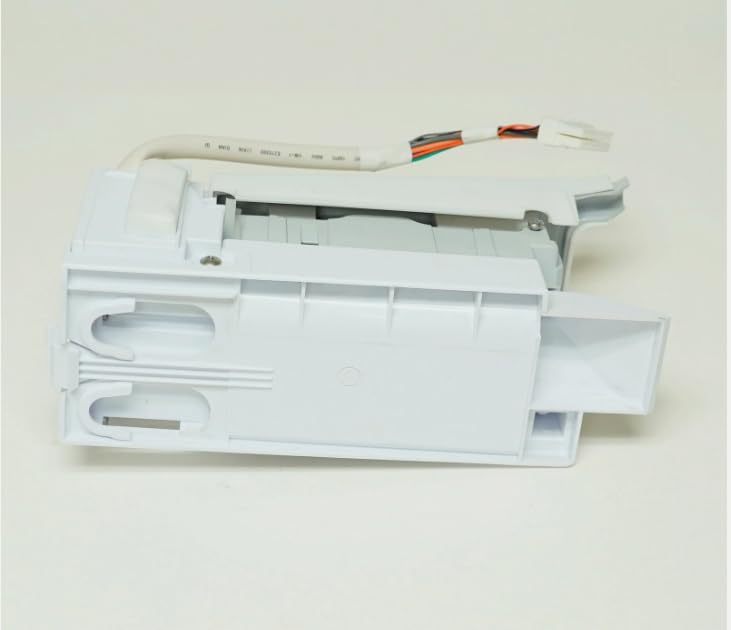
Image 1: The Generic DA97-13718CCM Refrigerator Ice Maker. This image shows the main body of the ice maker, including the 6-cube solid tray mechanism and the attached multi-colored 16-pin wire harness with 13 wires and 4 open pins, ready for connection.
4. Setup and Installation
This section outlines the general steps for replacing an existing ice maker. Specific steps may vary slightly depending on your refrigerator model. Refer to your refrigerator's service manual for detailed instructions if available.
- Prepare for Installation:
- Unplug the refrigerator from the electrical outlet.
- Turn off the water supply valve to the refrigerator.
- Empty the ice bucket and remove any existing ice.
- Locate the existing ice maker compartment, typically in the freezer section.
- Remove the Old Ice Maker:
- Carefully disconnect the wire harness from the old ice maker.
- Unscrew any mounting screws or release clips holding the old ice maker in place.
- Gently remove the old ice maker from the freezer compartment.
- Install the New Ice Maker:
- Position the new DA97-13718CCM ice maker in the freezer compartment, aligning it with the mounting points.
- Secure the new ice maker with the appropriate screws or clips.
- Connect the 16-pin wire harness of the new ice maker to the corresponding receptacle in the refrigerator. Ensure a firm and secure connection.
- Final Steps:
- Turn on the water supply valve to the refrigerator.
- Plug the refrigerator back into the electrical outlet.
- Allow several hours for the ice maker to cool down and begin producing ice. The first few batches of ice may be smaller or have an unusual taste; it is recommended to discard them.
Warning: Ensure all power and water supplies are disconnected before proceeding with installation to prevent electric shock or water damage.
5. Operating Instructions
Once installed and connected, the ice maker operates automatically:
- Automatic Operation: The electronic eye sensor detects when the ice bucket is full and automatically stops ice production. When ice levels drop, it resumes production.
- Initial Ice Production: After installation, it may take 12-24 hours for the ice maker to produce its first full batch of ice.
- Ice Cube Size: This model produces 6-cube solid ice.
- Dispensing: Use your refrigerator's ice dispenser or manually retrieve ice from the ice bucket.
6. Maintenance
Regular maintenance helps ensure optimal performance and longevity of your ice maker:
- Clean Ice Bucket: Periodically remove and wash the ice bucket with mild soap and warm water. Rinse thoroughly and dry completely before returning it to the freezer.
- Check Water Filter: If your refrigerator has a water filter, ensure it is replaced according to the manufacturer's recommendations to maintain water quality and ice production efficiency.
- Inspect Water Line: Occasionally check the water supply line for kinks, leaks, or blockages.
- Defrosting: If ice builds up around the ice maker mechanism, manually defrost the freezer or use a hairdryer on a low setting to melt the ice, ensuring not to overheat plastic components.
7. Troubleshooting
If your ice maker is not functioning correctly, refer to the following common issues and solutions:
| Problem | Possible Cause | Solution |
|---|---|---|
| No ice production |
|
|
| Small or hollow ice cubes |
|
|
| Ice tastes bad or has odor |
|
|
If these steps do not resolve the issue, please contact customer support or a qualified technician.
8. Specifications
| Feature | Detail |
|---|---|
| Brand | Generic |
| Model Name | Icemaker (DA97-13718CCM) |
| Product Dimensions (D x W x H) | 13"D x 7"W x 7"H |
| Capacity | 1 cubic feet (Ice production capacity) |
| Voltage | 120 volts |
| Included Components | Icemaker |
| Part Number | DA97-13718CCM (Replacement for DA97-13718C, DA97-18859A, DA97-13718A, AP6261444, SZAB002TA2, SZAB002TC2, PS12115582) |
9. Warranty Information
Specific warranty details for this Generic replacement part should be obtained directly from the seller at the time of purchase. Please retain your proof of purchase for any warranty claims.
For information regarding extended protection plans, please refer to the options provided by your retailer.
10. Customer Support
If you have any questions regarding the installation, operation, or troubleshooting of your Generic DA97-13718CCM Refrigerator Ice Maker, please contact the seller directly through the platform where the purchase was made.
For issues related to your Samsung refrigerator itself, please refer to your refrigerator's original manufacturer manual or contact Samsung customer service.