
VASAGLE LWD73XV1
VASAGLE L-Shaped Computer Desk LWD73XV1 Instruction Manual
Model: LWD73XV1 | Brand: VASAGLE
Introduction
Thank you for choosing the VASAGLE L-Shaped Computer Desk. This manual provides essential information for the safe assembly, operation, and maintenance of your new desk. Please read these instructions carefully before beginning assembly and retain them for future reference.

Image: The VASAGLE L-Shaped Computer Desk, showcasing its vintage brown and ink black design in a modern office setup.
Product Overview Video
Video: Official product presentation video from hksy (Seller). This video provides an overview of the desk's features and design.
Important Safety Information
- Always ensure that the desk is on a flat and stable surface.
- Do not exceed the weight limit of 50 kg on the tabletop.
- Use the adjustable feet to level the desk on uneven floors.
- Keep all small parts and packaging materials away from children during assembly.
- Regularly check all screws and connections to ensure they remain tight.
Setup and Assembly
The VASAGLE L-Shaped Computer Desk is designed for straightforward assembly. All necessary parts are clearly labeled, and detailed instructions are provided to guide you through each step.
- Unpack Components: Carefully remove all parts from the packaging. Verify that all components listed in the parts list are present and undamaged.
- Follow Instructions: Refer to the included assembly manual for step-by-step visual instructions. Each part is typically marked with a letter or number for easy identification.
- Assemble Frame: Begin by assembling the steel frame components according to the manual. Ensure all screws are tightened securely but do not overtighten until the entire frame is assembled.
- Attach Tabletop: Once the frame is stable, carefully place the engineered wood tabletop sections onto the frame and secure them with the provided hardware.
- Adjust Leveling Feet: The desk features adjustable feet. After assembly, place the desk in its desired location and adjust the feet as needed to ensure the desk is level and stable on any floor surface.

Image: A visual guide indicating the desk's main sections (A, B, C) and the estimated assembly time of 35 minutes with clear instructions.
Assembly Video Guide
Video: Official product installation video from hksy (Seller). This video demonstrates the step-by-step assembly process for the desk.
Operating and Usage
The L-shaped design of this desk offers a spacious and efficient workspace, ideal for various activities from office work to gaming.
- Spacious L-Shape: The 140 x 140 cm (55.1 x 55.1 inch) L-shaped tabletop provides ample space for multiple monitors (up to 3-4 monitors), laptops, and other office essentials, maximizing corner space utilization.
- Cable Management: The chamfered rear corner of the desk is specifically designed to allow cables to pass through easily, helping to keep your workspace tidy and organized.
- Adjustable Feet: The adjustable feet not only ensure stability but also protect your floor from scratches. Adjust them by rotating until the desk is perfectly level.

Image: An overhead view highlighting the generous 140 x 140 cm workspace, suitable for multiple devices and accessories.
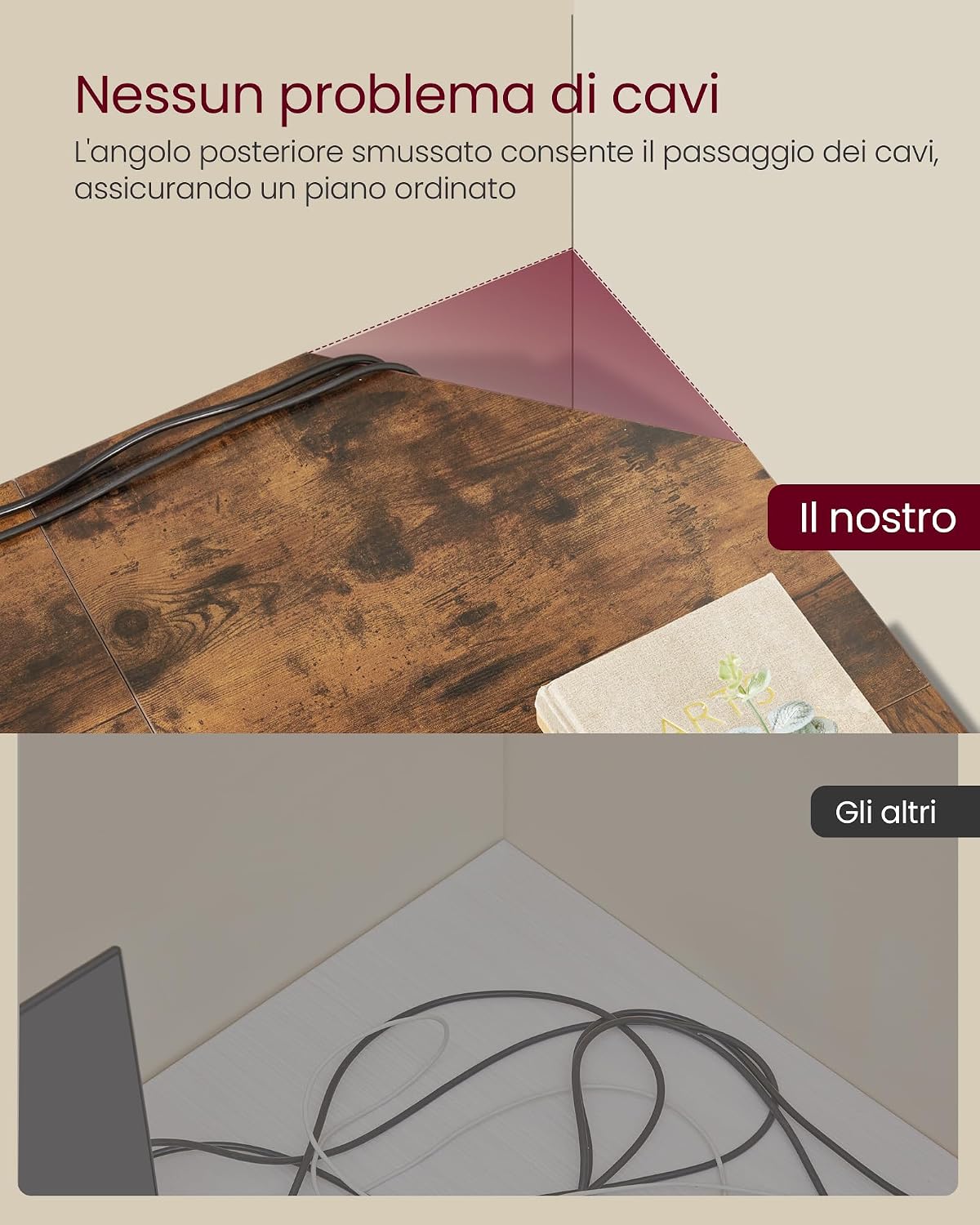
Image: A detailed view of the chamfered rear corner, illustrating the effective cable management design.
Care and Maintenance
Proper care will extend the life and appearance of your VASAGLE desk.
- Cleaning: Wipe the desk surfaces with a soft, damp cloth. Avoid using harsh chemicals or abrasive cleaners, which can damage the finish.
- Spills: Clean up spills immediately to prevent staining or damage to the engineered wood surface.
- Heat Protection: Use coasters or protective pads under hot items to prevent heat marks.
- Weight Distribution: Distribute weight evenly across the tabletop and avoid placing excessively heavy items in one spot to prevent stress on the structure.
- Regular Checks: Periodically inspect all screws and connections to ensure they are tight. Retighten if necessary.
Troubleshooting
| Problem | Possible Cause | Solution |
|---|---|---|
| Desk is wobbly or unstable. | Uneven floor surface or loose connections. | Adjust the leveling feet at the bottom of the desk legs until stable. Check and tighten all assembly screws. |
| Parts do not fit together. | Incorrect orientation of parts or missing components. | Review the assembly instructions carefully, ensuring each part is oriented correctly. Verify all parts are present against the parts list. |
| Scratches or damage to the surface. | Sharp objects, abrasive cleaning, or heavy impact. | Use protective mats for sharp objects. Clean with soft cloths. For minor scratches, consider furniture repair kits. |

Image: An adjustable foot, demonstrating how to rotate it to level the desk and prevent wobbling.
Product Specifications
| Feature | Detail |
|---|---|
| Brand | VASAGLE |
| Model Number | LWD73XV1 |
| Desk Design | L-Shaped Computer Desk |
| Overall Dimensions (L x W x H) | 140P x 140l x 76H cm (55.1 x 55.1 x 29.9 inches) |
| Color | Vintage Brown + Ink Black |
| Style | Modern Vintage |
| Top Material Type | Engineered Wood (Chipboard) |
| Base Material Type | Alloy Steel |
| Maximum Recommended Weight | 50 Kilograms (110 lbs) |
| Special Features | L-shaped, Adjustable Feet, Cable Management |
| Assembly Required | Yes |
| Included Components | 1 x Instruction Manual, 1 x Assembly Tool Bag, 1 x Computer Desk |

Image: An illustration of the L-shaped desk with key dimensions (140x140x76 cm) and a static load capacity of 50 kg (110 lbs).
Warranty Information
This VASAGLE L-Shaped Computer Desk comes with a Limited Warranty. For specific details regarding the terms and conditions of your warranty, please refer to the documentation included with your purchase or contact customer support.
Customer Support
If you encounter any issues during assembly or use, or if you have questions about your product, please do not hesitate to contact VASAGLE customer support. You can typically find contact information on the packaging, the official VASAGLE website, or through your retailer.
Please have your model number (LWD73XV1) and purchase details ready when contacting support to ensure a quicker resolution.
Related documentsLWD73XV1


Ask a question about this manual
Ask about setup, troubleshooting, compatibility, parts, safety, or missing instructions. Manuals+ will review the question and use this page’s manual context to help answer it.