
1. Introduction and Overview
The youkey DB312 is a wireless doorbell camera designed to enhance your home security. It features a dual-camera system for comprehensive head-to-toe video coverage, 2K resolution for clear imaging, and color night vision for visibility in low-light conditions. Advanced AI detection accurately identifies humans and packages, reducing false alerts. With 8GB of built-in eMMC storage, it operates without monthly subscription fees, storing up to 60 days of event footage. The doorbell supports dual-band WiFi (2.4GHz/5GHz) and WiFi-6 for stable connectivity and offers two-way talk functionality.
2. Package Contents
Verify that all items are present in your package:
- Video Doorbell Dual Cam x 1
- Screw pack x 1
- Hardwired pack x 1
- Mounting bracket x 1
- Type-C charging cable x 1
- Screw hole positioning card x 1
- 15° mounting wedge x 1
- Detaching pin x 1
- Quick start guide x 1
- Warning sticker x 1
3. Setup and Installation
The youkey DB312 doorbell offers flexible installation options: battery-powered or wired. Connect the device to your home network using Bluetooth for initial pairing, then configure dual-band WiFi (2.4GHz/5GHz) for stable performance.
3.1. Physical Installation
Choose your preferred installation method:
- Battery-Powered: Mount the doorbell using the provided mounting bracket and screws. Ensure the battery is fully charged using the Type-C charging cable before installation.
- Wired Installation: Connect the doorbell to existing doorbell wiring (24 Volts AC) using the hardwired pack. This provides continuous power and eliminates the need for battery charging.
Use the screw hole positioning card to mark drilling locations accurately. A 15° mounting wedge is included for angled installations, optimizing camera view.
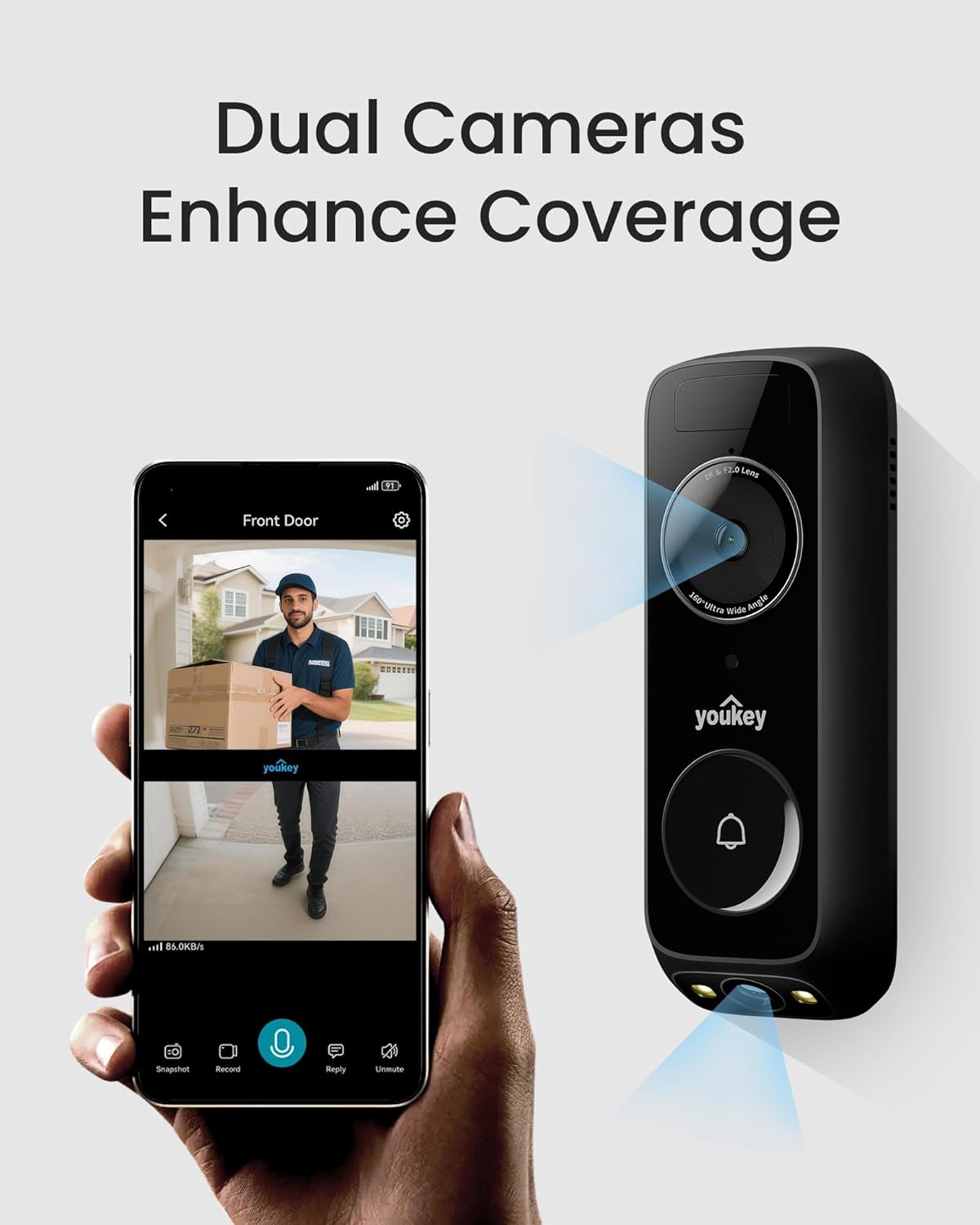
Image: The youkey DB312 doorbell camera featuring its dual-camera system, shown alongside a smartphone displaying the live view from the doorbell, illustrating enhanced coverage.
3.2. App Connection
- Download the youkey app from your device's app store.
- Create an account or log in.
- Follow the in-app instructions to add your new DB312 doorbell camera. This typically involves Bluetooth pairing for initial discovery and then connecting to your home's dual-band WiFi network.
4. Operating Instructions
The youkey DB312 provides comprehensive monitoring and communication features.
4.1. Live View and Recording
Access the live feed from your doorbell camera through the youkey app at any time. The dual-camera system provides a full head-to-toe view of visitors and packages.

Image: The youkey DB312 doorbell camera capturing a delivery person and packages from head-to-toe, demonstrating its wide field of view.
4.2. Two-Way Talk
Engage in real-time conversations with visitors at your door using the two-way audio feature through the youkey app.

Image: A visual representation of the two-way audio feature, showing a user communicating with a delivery person via the youkey doorbell camera.
4.3. Smart Detection
The doorbell utilizes advanced AI with Radar and PIR sensors for accurate detection of humans and packages. Receive relevant alerts only, even in high-traffic areas.

Image: The youkey DB312 doorbell camera's package detection feature, showing an alert for a package left at the front door.

Image: An aerial view illustrating the triple detection capabilities (Radar, PIR, and AI) of the youkey DB312 doorbell camera, highlighting its motion sensing range.
4.4. Night Vision
Benefit from 2K resolution and color night vision, ensuring clear visibility of faces and surroundings even in complete darkness. The dual light system enhances round-the-clock clarity.

Image: A clear image captured by the youkey DB312 doorbell camera at night, demonstrating its 2K Full HD and color night vision capabilities with a delivery person visible.
4.5. Smart Home Integration
The youkey DB312 video doorbell is compatible with Amazon Alexa and Google Assistant. Use voice commands to check your wireless doorbell camera anytime.

Image: A smart display showing the live feed from the youkey doorbell camera, with text indicating compatibility with Alexa and Google Assistant for voice control.
4.6. Official Product Video
Video: An official product video from Youkey Home demonstrating the features and functionality of the youkey Dual-cam Video Doorbell, including its two-way talk and night vision capabilities.
5. Maintenance
5.1. Battery Management
The youkey DB312 is equipped with a 6400mAh rechargeable battery, providing up to 180 days of battery life under typical usage (20 events per day, 15 seconds each). Actual battery life may vary. Recharge the battery using the provided Type-C charging cable when indicated by the app.
5.2. Storage Management
The doorbell includes 8GB of built-in eMMC storage, capable of storing up to 60 days of event footage without a subscription. You can manage stored footage through the youkey app. Optional cloud backup and youkey H310 backup are also supported for extended storage solutions.
5.3. Cleaning
To maintain optimal performance, periodically clean the camera lenses and the doorbell's exterior with a soft, damp cloth. Avoid using harsh chemicals or abrasive materials.
6. Troubleshooting
If you encounter issues with your youkey DB312 doorbell camera, refer to the following common solutions:
- Device Not Connecting to App: Ensure your doorbell is charged or properly wired. Verify your Wi-Fi network is active and you are connecting to the correct 2.4GHz or 5GHz band. Try restarting your router and the doorbell. Re-sync the device with the app if necessary.
- Poor Video Quality: Check your Wi-Fi signal strength at the doorbell's location. Ensure the camera lens is clean and free from obstructions.
- Motion Detection Issues: Confirm that motion detection settings are enabled in the app. Adjust sensitivity levels and detection zones to optimize performance and reduce false alerts.
- Short Battery Life: Review your usage patterns. Frequent live view access, numerous motion events, and poor Wi-Fi signal can reduce battery life. Ensure the doorbell is fully charged.
- No Sound or Two-Way Talk Issues: Check the microphone and speaker settings in the app. Ensure your phone's volume is up and there are no obstructions to the doorbell's speaker/microphone.
For persistent issues, consult the in-app help section or contact customer support.
7. Specifications
| Brand | youkey |
| Model Name | youkey DB312 Battery Video Doorbell |
| Connectivity Technology | 2.4G/5Ghz Dual-band WiFi-6, Bluetooth Pairing, Wireless |
| Special Features | 2-Way Audio, HD Resolution, Local Recording No Monthly Fee, Night Vision, Package/Human/Motion Detection |
| Power Source | Battery Powered |
| Controller Type | Amazon Alexa, Google Assistant |
| Mount Type | Wall Mount |
| Color | Black |
| Installation Type | Screw In |
| Room Type | Garage, Hallway, Living Room, Office |
| Light Source | LED |
| Connectivity Protocol | Wi-Fi |
| Wireless Technology | Wi-Fi |
| Voltage | 24 Volts (AC) |
| Batteries Required | Yes |
| Flash Memory Installed Size | 8 GB |
| Number of Items | 1 |
| Specific Uses For Product | Surveillance |
| Number of Channels | 2 |
| Item Dimensions | 6.17 x 1.25 x 2.2 inches |
| Unit Count | 1.0 Count |
| GTIN | 728434174431 |
| UPC | 728434174431 |
8. Warranty Information
The youkey DB312 Wireless Doorbell Camera comes with a 90 days limited warranty from the manufacturer. Please retain your proof of purchase for warranty claims. For detailed terms and conditions, refer to the warranty documentation included with your product or contact youkey customer support.
9. Support
For further assistance, technical support, or to report any issues, please:
- Visit the official youkey website for FAQs and support resources.
- Contact youkey customer service through the contact information provided in your quick start guide or on the official website.