
Introduction
Thank you for choosing the Doriteney RG G01 Wireless Gaming Controller. This controller is designed to enhance your gaming experience across multiple platforms with its advanced features, including a built-in heart rate monitor, Hall Effect triggers and joysticks, programmable back buttons, and versatile connectivity options. Please read this manual carefully to ensure proper setup and operation.

Image: The Doriteney RG G01 Wireless Gaming Controller, showcasing its ergonomic design and button layout.
Package Contents
- Doriteney RG G01 Wireless Gaming Controller
- USB-C Charging Cable
- 2.4GHz Wireless Receiver
- User Manual
Controller Layout
Familiarize yourself with the various buttons and features of your RG G01 controller.
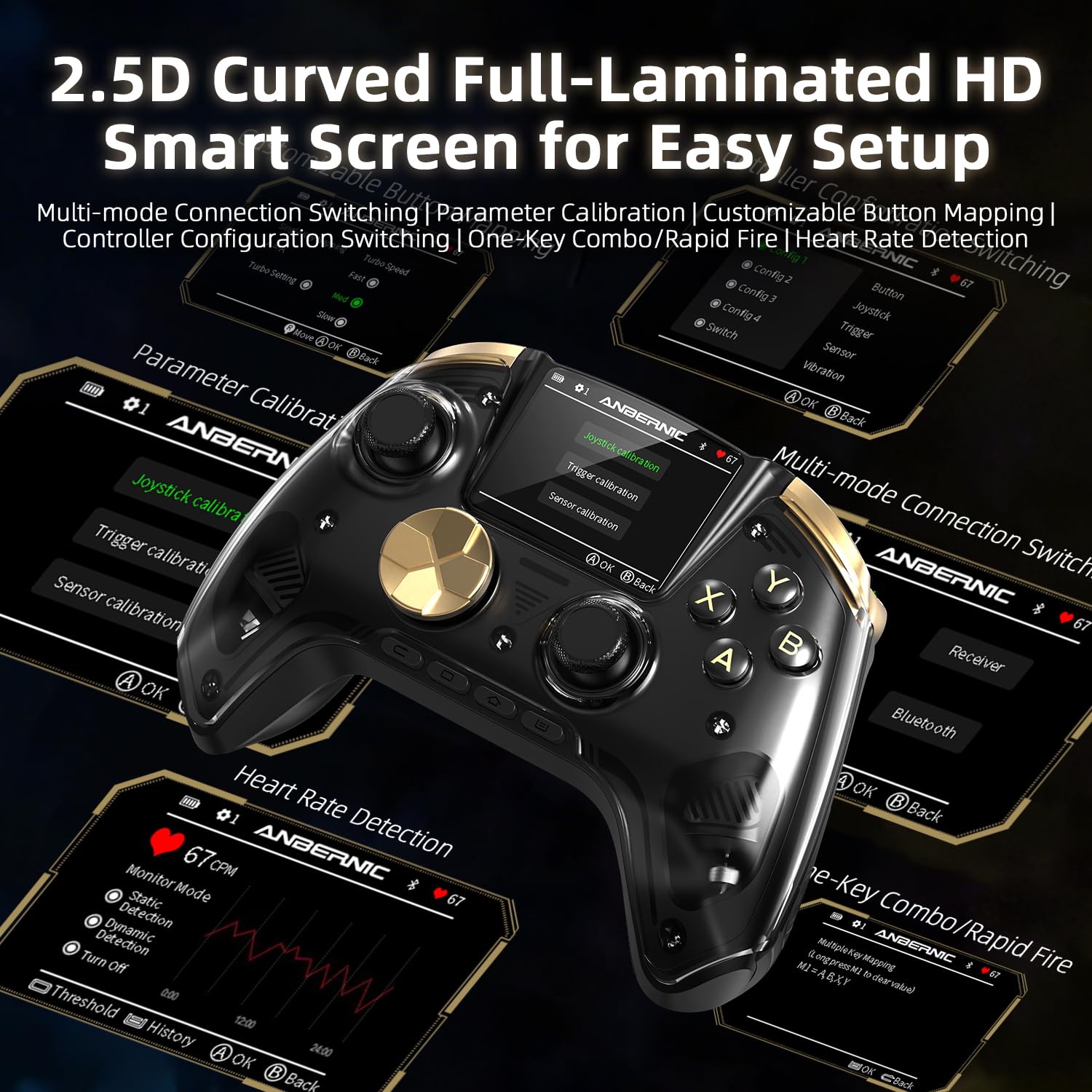
Image: Detailed view of the Doriteney RG G01 controller, highlighting the 2.5D curved IPS screen, joysticks, action buttons, D-pad, and shoulder buttons.
- 2.5D Curved IPS Screen: Displays heart rate, battery level, connection mode, and controller profile settings.
- Hall Effect Joysticks: Provide precise, drift-free control.
- Hall Effect Triggers: Offer accurate and responsive input.
- ABXY Action Buttons: Standard gaming buttons with mechanical microswitches for tactile feedback.
- D-Pad: Responsive directional input.
- Shoulder Buttons (L1/R1) & Triggers (L2/R2): For various in-game actions.
- Programmable Back Buttons (M1-M4): Customizable for macros and shortcuts.
- Heart Rate Monitor: Integrated optical sensor on the back for real-time heart rate tracking.
Setup
Charging the Controller
Before first use, fully charge the controller. Connect the supplied USB-C cable to the controller's charging port and the other end to a USB power source (e.g., PC, wall adapter). The screen will indicate charging status. A full charge provides approximately 21 hours of playtime.

Image: The Doriteney RG G01 controller connected via USB-C for charging, showing the charging port location.
Connecting the Controller
The RG G01 supports three connection modes: 2.4GHz wireless, Bluetooth 5.0, and wired USB.

Image: Illustration of the three connectivity modes: 2.4GHz wireless, Bluetooth, and wired USB, demonstrating versatility across different gaming setups.
2.4GHz Wireless Connection (for PC, Steam, Linux)
- Insert the 2.4GHz wireless receiver into an available USB port on your device.
- Turn on the controller.
- On the controller's IPS screen, navigate to the connection settings and select '2.4G Wireless'. The controller will automatically pair with the receiver.
Bluetooth 5.0 Connection (for Switch, Android, iOS, PC)
- Turn on the controller.
- On the controller's IPS screen, navigate to the connection settings and select 'Bluetooth'.
- On your device (Switch, Android, iOS, PC), go to Bluetooth settings and search for new devices. Select 'Doriteney RG G01' from the list to pair.
Wired USB Connection (for PC, Steam, Linux, Switch)
- Connect the USB-C cable to the controller and the other end to your device.
- The controller will automatically switch to wired mode.
Operating Instructions
Power On/Off
- Power On: Press and hold the Home button for 2 seconds.
- Power Off: Press and hold the Home button for 5 seconds until the controller powers down.
Using the Interactive Display
The 2.5D curved IPS screen provides real-time information and allows for on-device configuration. Use the navigation buttons around the screen to browse menus.

Image: Close-up of the controller's IPS screen displaying various settings and real-time data.
- Heart Rate: Displays current heart rate (BPM).
- Battery Level: Shows remaining battery charge.
- Connection Mode: Indicates active connection type (2.4G, Bluetooth, Wired).
- Controller Profile: Access and switch between custom profiles.
- Multilingual Menus: Supports English, Spanish, Japanese, Korean, and Chinese.
Heart Rate Monitoring
The integrated optical sensor on the back of the controller tracks your heart rate. Ensure your hand maintains contact with the sensor during gameplay for accurate readings. Your heart rate will be displayed on the IPS screen.

Image: The controller displaying heart rate data on its screen, illustrating the heart rate monitoring feature.
Video: Demonstrates the RG G01 Wireless Gaming Controller with its heart rate monitor feature in action.
Programmable Back Buttons (M1-M4)
The four back buttons can be programmed directly from the controller's interface to perform macros or shortcuts. Refer to the on-screen menu for detailed programming instructions.
Calibration and Customization
The controller allows for various customizations:
- Joystick Height Adjustment: Change joystick caps for preferred height.
- Button Remapping: Reassign functions to different buttons.
- Motion Control Calibration: Calibrate the six-axis gyroscope for accurate motion sensing.
- Vibration Intensity: Adjust the strength of the dual asymmetrical pendulum motors.
- Rapid Fire Setting: Configure automatic rapid-fire for specific buttons.
Video: Overview of the RG P01 Wireless Gaming Controller, demonstrating Hall Effect joysticks and triggers, which are also features of the RG G01 model.
Compatibility
The Doriteney RG G01 controller is compatible with a wide range of platforms:
- PC (Windows)
- Steam
- Linux
- Nintendo Switch
- Android devices
- iOS devices

Image: Visual representation of the controller's compatibility with various platforms including PC, Steam, Linux, Switch, Android, and iOS.
Maintenance
- Cleaning: Use a soft, dry cloth to clean the controller. Avoid using harsh chemicals or abrasive materials.
- Storage: Store the controller in a cool, dry place away from direct sunlight and extreme temperatures.
- Battery Care: To prolong battery life, avoid fully discharging the controller frequently. Charge it regularly, even if not in use for extended periods.
- Firmware Updates: Periodically check the official Doriteney website for firmware updates to ensure optimal performance and compatibility.
Troubleshooting
| Problem | Possible Solution |
|---|---|
| Controller does not power on. | Ensure the controller is fully charged. Connect it to a power source using the USB-C cable. |
| Cannot connect via 2.4GHz or Bluetooth. | Ensure the correct connection mode is selected on the controller's screen. For 2.4GHz, verify the receiver is properly inserted. For Bluetooth, ensure your device's Bluetooth is enabled and the controller is in pairing mode. Try restarting both the controller and the device. |
| Joystick drift or inaccurate input. | Perform joystick calibration through the controller's IPS screen settings. Ensure no physical obstructions. |
| Heart rate monitor not displaying readings. | Ensure your hand is in firm contact with the optical sensor on the back of the controller. Clean the sensor if necessary. |
| Controller disconnects frequently. | Ensure the controller is within range of the receiver/device. Check for interference from other wireless devices. Ensure the battery is sufficiently charged. |
Specifications
| Feature | Detail |
|---|---|
| Model Name | RG G01 |
| Controller Type | Gamepad |
| Connectivity | 2.4GHz Wireless, Bluetooth 5.0, Wired USB |
| Compatible Devices | PC, Steam, Linux, Nintendo Switch, Android, iOS |
| Special Features | Heart Rate Monitor, 2.5D Curved IPS Display, Hall Effect Joysticks, Hall Effect Triggers, Programmable Back Buttons, 6-Axis Gyroscope, Dual Vibration Motors |
| Battery Capacity | 2100mAh |
| Battery Life | Up to 21 hours (approximate) |
| Polling Rate | 1000Hz (2.4GHz wireless) |
| UPC | 747759412677 |
Warranty Information
The Doriteney RG G01 Wireless Gaming Controller comes with a standard manufacturer's warranty. Please refer to the warranty card included in your package or visit the official Doriteney website for detailed terms and conditions regarding warranty coverage and claims.
Support
For technical assistance, troubleshooting, or general inquiries, please contact Doriteney customer support through the following channels:
- Website: Visit the official Doriteney website for FAQs, support resources, and contact forms.
- Email: Refer to your product packaging or the official website for customer service email addresses.