
1. Introduction
This manual provides comprehensive instructions for the installation, operation, and maintenance of your Uniclife 32-Key Wall Mount Combination Lock Box. Please read this manual thoroughly before using the product to ensure proper function and safety. Keep this manual for future reference.
2. Product Overview
The Uniclife 32-Key Wall Mount Combination Lock Box is designed for secure and organized key storage. It features a robust steel construction, a customizable 3-digit combination lock, and ample space for up to 32 keys, including larger car keys. The included writable key tags and numbered hooks facilitate quick identification and retrieval.
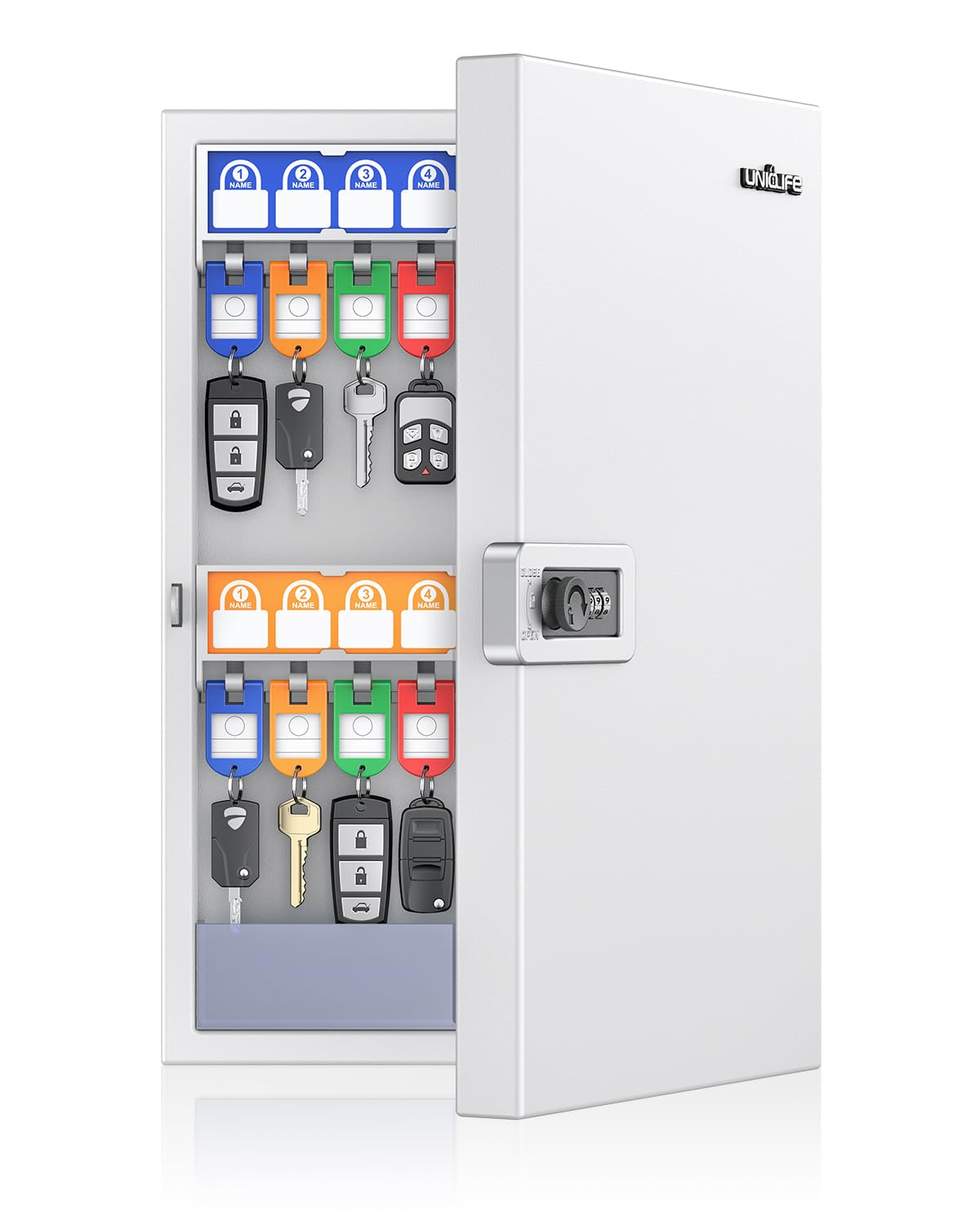
Image: The Uniclife 32-Key Wall Mount Combination Lock Box in white, shown closed.
Key Features:
- High-Capacity Storage: Organizes up to 32 key sets with dimensions of 9.8" L x 2.3" W x 15.7" H.
- Enhanced Security: Features a 3-digit combination lock with 1,000 possible combinations and a durable 1 mm steel body.
- Optimized for Larger Keys: Wider hook spacing accommodates bulky car keys without crowding.
- Efficient Organization: Includes 4 fixed plastic racks with pre-installed number stickers and 32 hooks.
- Writable Key Tags: 32 key tags in 4 colors with writable inserts for easy labeling.

Image: Diagram illustrating the dimensions of the key lock box: 15.7 inches (39.9 cm) height, 9.8 inches (24.9 cm) width, and 2.3 inches (5.8 cm) depth.

Image: The interior of the key box showing 32 keys organized with color-coded writable tags (blue, green, orange, red).
3. Package Contents
Verify that all items are present in the package:
- 1 x Uniclife 32-Key Wall Mount Combination Lock Box
- 32 x Writable Key Tags (8 each of blue, green, orange, red)
- 4 x Mounting Screws
- 4 x Wall Anchors
- 1 x Combination Reset Tool
- 1 x Instruction Manual

Image: Included mounting hardware: four screws and four wall anchors.
4. Safety Information
Please observe the following safety guidelines:
- Always use appropriate tools and safety gear when installing or maintaining the cabinet.
- Be aware of potential pinch points and hazards when handling the robust steel body.
- Follow the manufacturer's instructions for safe use and maintenance.
- This key box is designed for organizing and securing keys in a controlled environment. It is not a high-security safe.
5. Setup and Installation
The key lock box is designed for wall mounting. Ensure the mounting surface is sturdy enough to support the weight of the box and its contents.
Wall Mounting Steps:
- Choose a suitable location on a wall for installation.
- Hold the key box against the wall at the desired height and mark the positions of the four pre-drilled mounting holes.
- Drill pilot holes at the marked locations. For drywall, insert the provided wall anchors. For wood studs, drill pilot holes slightly smaller than the screw diameter.
- Align the key box with the drilled holes and secure it to the wall using the provided screws. Ensure the screws are tightened firmly but do not overtighten.

Image: Illustration of the wall mounting process, highlighting the pre-drilled holes and the included hardware for installation.
6. Operating Instructions
Setting the Combination Lock:
The default combination is 000. Follow these steps to set your personal 3-digit combination:
- Open the lock box using the default code (000).
- Locate the combination reset lever on the inside of the lock mechanism. It is usually marked 'A' and 'B'.
- Using the provided reset tool (or a pointed object), move the control lever from position 'A' to position 'B'.
- While the lever is in position 'B', rotate the dials to set your desired 3-digit code. Choose a memorable code.
- Once your new code is set, pull the lever back from position 'B' to position 'A' to lock it in.
- Close the lock box and scramble the dials to test your new combination.
Important: Remember your new combination. There is no master key or override for the combination lock. If you forget your code, you will not be able to open the box.

Image: Step-by-step visual guide for setting or resetting the 3-digit combination code on the lock box.
Using Key Tags:
The key box includes 32 writable key tags in four distinct colors. Each tag has a clear window for a paper insert.
- Write the key's identification (e.g., room number, vehicle type) on the paper insert.
- Insert the labeled paper into the key tag.
- Attach the key to the tag's ring.
- Hang the tagged key on the corresponding numbered hook inside the lock box for organized storage.
7. Maintenance
To ensure the longevity and proper function of your key lock box:
- Cleaning: Wipe the exterior with a soft, damp cloth. Avoid abrasive cleaners or solvents.
- Lock Mechanism: Periodically check the combination lock for smooth operation. Do not force the dials.
- Mounting: Regularly inspect the wall mounting screws to ensure they remain tight and secure.
- Key Hooks: Ensure key hooks are not bent or damaged.
8. Troubleshooting
If you encounter issues with your key lock box, refer to the following common problems and solutions:
- Lock Box Will Not Open:
- Ensure the correct combination is entered.
- Verify that the dials are aligned precisely with the indicator marks.
- If the combination was recently changed, ensure the reset lever was fully returned to position 'A'.
- Door Does Not Close Properly:
- Check for any obstructions inside the box preventing the door from closing fully.
- Ensure the key hooks are not overloaded or keys are not protruding.
- Verify the lock mechanism is not jammed.
- Keys Tangling/Crowding:
- Utilize the wider hook spacing for larger keys to prevent tangling.
- Ensure keys are hung individually on their designated hooks.
9. Specifications
| Feature | Detail |
|---|---|
| Brand | Uniclife |
| Model Name | Uniclife-5164 |
| Color | White |
| Material | Metal (1 mm steel body) |
| Product Dimensions (D x W x H) | 2.3" x 9.8" x 15.7" (5.8 cm x 24.9 cm x 39.9 cm) |
| Key Capacity | 32 Keys |
| Lock Type | 3-Digit Combination Lock |
| Mounting Type | Wall Mount |
| Additional Features | Writable Key Tags, Numbered Hooks, Magnetic Door Closure |
10. Warranty and Support
Uniclife products are manufactured to high-quality standards. For any questions, concerns, or support needs regarding your key lock box, please contact Uniclife customer service through the retailer where the product was purchased or visit the official Uniclife website for contact information.
Please retain your proof of purchase for any warranty claims.