
1. Introduction
This manual provides detailed instructions for the safe and effective use of the Proster ET32 Circuit Breaker Finder. This device is a versatile 4-in-1 electrical tool designed for identifying circuit breakers, testing GFCI outlets, detecting non-contact voltage (NCV), and providing illumination with its integrated flashlight. Please read this manual thoroughly before operation and retain it for future reference.
2. Safety Information
Always prioritize safety when working with electrical systems. Failure to follow safety precautions can result in electric shock, fire, or personal injury.
- Ensure the device is fully charged before use to avoid unexpected power loss during critical tasks.
- Do not use the device if it appears damaged or if any part is missing.
- Always wear appropriate personal protective equipment (PPE), such as insulated gloves and safety glasses, when working with electrical circuits.
- Verify the voltage range of the circuit before using the device. This tool is designed for 90-135V AC systems.
- Do not attempt to open or modify the device. Refer all servicing to qualified personnel.
- Keep the device away from water and damp environments.
- Before performing any work on an electrical circuit, always confirm that the power is off at the main breaker.
3. Package Contents
Verify that all items are present in your package:
- 1 × Transmitter
- 1 × Receiver
- 1 × Storage Bag
- 1 × Alligator Clip Adapter
- 1 × 3-to-2 Prong Adapter
- 1 × Light Socket Adapter
- 1 × USB-C Charging Cable
- 1 × User Manual

Image: Complete kit contents, including the transmitter, receiver, various adapters, charging cable, and a protective storage bag.
4. Product Features and Components
The Proster ET32 Circuit Breaker Finder consists of two main units: the Transmitter and the Receiver. Both units feature a durable, ergonomic design with a rechargeable lithium-ion battery.
Transmitter Features:
- Large, backlit color LCD for clear display of wiring status, voltage, frequency, and GFCI trip time.
- Power/Switch Button to turn the unit on/off.
- GFCI Test Button for testing Ground Fault Circuit Interrupter functionality.
- USB-C Charging Port.
Receiver Features:
- Inductive Probe for scanning circuit breakers.
- LED Light and Warning Light for visual indications.
- Input Button and Sensitivity Button for adjusting detection.
- NCV On/Off function for non-contact voltage detection.
- Flashlight Button/Power Button.
- USB-C Charging Port.

Image: Labeled diagram of the transmitter and receiver components.
5. Setup
Charging the Devices:
Both the transmitter and receiver are equipped with rechargeable lithium-ion batteries. Before first use, fully charge both units using the provided USB-C charging cable and a compatible USB power adapter (not included).
- Connect the USB-C end of the charging cable to the charging port on the transmitter or receiver.
- Connect the USB-A end of the cable to a USB power adapter.
- The charging indicator on the device will show charging status. Once fully charged, the indicator will change (refer to the device's display for specific indications).

Image: The transmitter and receiver units being charged via USB-C cables.
6. Operating Instructions
6.1. Circuit Breaker Finding
This function helps identify the correct circuit breaker for a specific outlet or circuit.
- Step 1: Connect the Transmitter. Plug the transmitter into the electrical outlet you wish to trace. The transmitter's LCD will display the wiring status and voltage.
- Step 2: Initial Scan. Turn on the receiver. Slowly scan the circuit breaker panel with the receiver's inductive probe. During this initial scan, ignore any audible or visual indications. This step allows the receiver to learn the electrical noise pattern of the panel.
- Step 3: Pinpoint the Breaker. Rescan all circuit breakers. As you approach the target breaker, the receiver's beep frequency will increase, and the LED bar will rise. Upon successful identification, the receiver will emit a continuous sound, and the status light will remain illuminated.

Image: Visual guide demonstrating the three-step process for accurately identifying a circuit breaker.
Video: Demonstration of the Proster Circuit Breaker Finder and GFCI Outlet Tester in use, showing how to locate a circuit breaker and test GFCI functionality.
6.2. GFCI Outlet Testing
The transmitter can test the functionality of Ground Fault Circuit Interrupter (GFCI) outlets and detect various wiring conditions.
- Plug the transmitter directly into the GFCI outlet.
- Observe the LCD display for the initial wiring status (e.g., "Correct Wiring," "Open Ground," "Hot & Neutral Reversed").
- Press the GFCI Test Button on the transmitter. A functional GFCI outlet should trip, cutting power to the outlet. The transmitter will display the GFCI trip time in milliseconds.
- If the GFCI does not trip, or if the wiring status indicates an issue, consult a qualified electrician.

Image: The transmitter's display showing different detected wiring states for an electrical outlet.
6.3. Non-Contact Voltage (NCV) Detection
The receiver can detect AC voltage without direct contact, useful for quick safety checks.
- Turn on the receiver and activate the NCV function (refer to the labeled diagram for the NCV button).
- Place the sensing tip of the receiver near the wire, outlet, or component you want to test.
- If AC voltage is detected, the receiver will emit an audible alarm and/or visual indication (e.g., flashing LED). The intensity of the alarm may vary with voltage strength and proximity.

Image: The receiver detecting non-contact voltage with its integrated flashlight active.
6.4. Using Adapters
The kit includes several adapters to expand the versatility of the transmitter:
- 3-to-2 Prong Grounding Adapter: Allows the transmitter to be used with older 2-prong outlets. Note that this adapter does not provide a ground connection if the outlet lacks one.
- Light Socket Adapter: Enables tracing circuits connected to light fixtures. Screw the adapter into a standard light socket, then plug the transmitter into the adapter.
- Alligator Clip Adapter: For tracing bare wires or terminals. Connect the alligator clips to the appropriate wires (ensure power is off before connecting) and then plug the adapter into the transmitter.
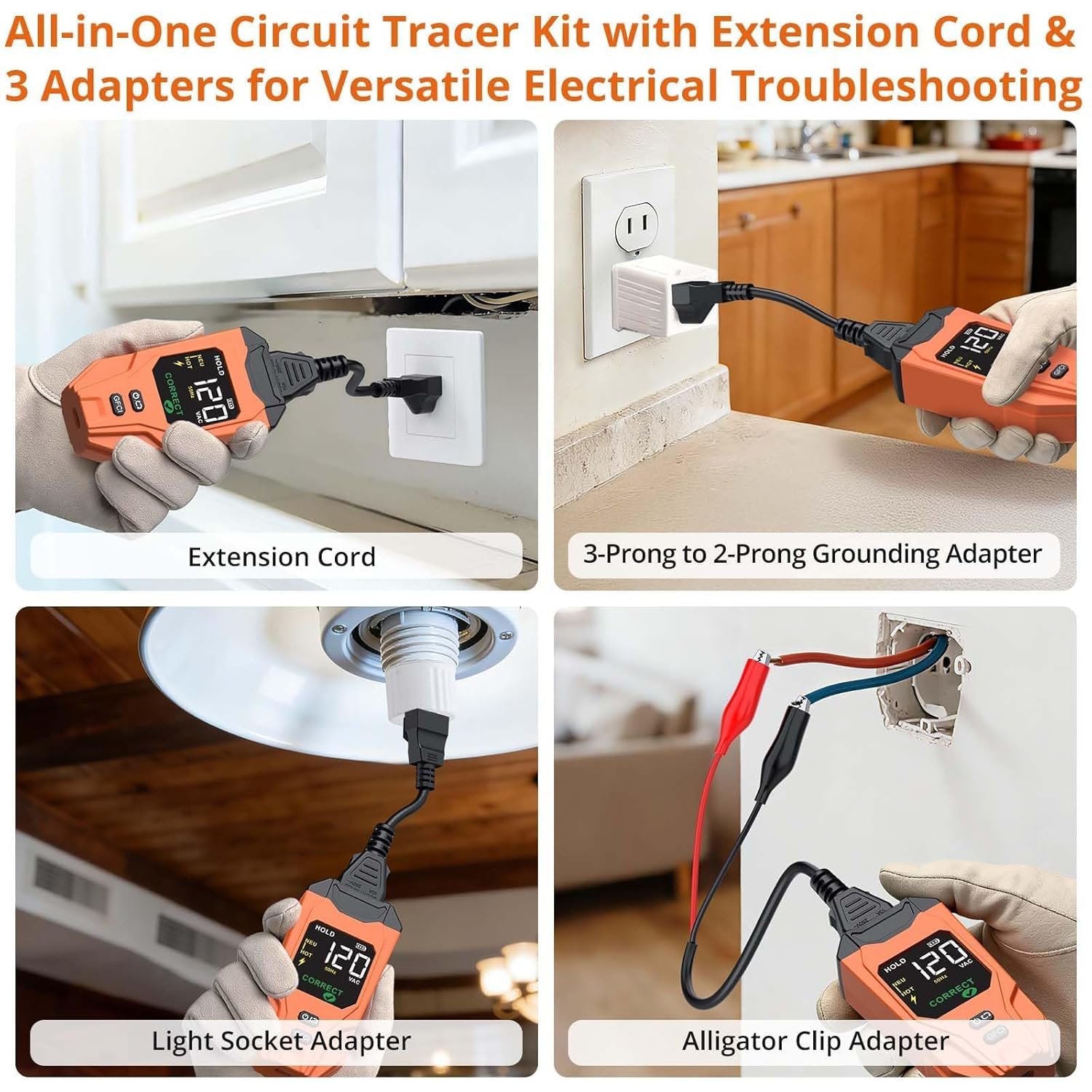
Image: Examples of using the transmitter with various adapters, including a 3-to-2 prong adapter, light socket adapter, and alligator clips.
7. Maintenance
Proper maintenance ensures the longevity and accuracy of your Proster ET32 Circuit Breaker Finder.
- Cleaning: Wipe the device with a dry, soft cloth. Do not use abrasive cleaners or solvents.
- Storage: Store the device and its accessories in the provided storage bag in a cool, dry place, away from direct sunlight and extreme temperatures.
- Battery Care: For optimal battery life, charge the units regularly, even if not in frequent use. Avoid fully discharging the battery for extended periods.
8. Troubleshooting
If you encounter issues with your Proster ET32, refer to the following common problems and solutions:
| Problem | Possible Cause | Solution |
|---|---|---|
| Receiver beeps over multiple breakers during identification. | Scanning too quickly or strong interference. | Perform the initial scan (Step 2) slowly and deliberately. During Step 3, scan each breaker very slowly. Try adjusting the receiver's sensitivity if available. |
| Transmitter display is blank or device won't turn on. | Low battery or device is off. | Charge the device using the USB-C cable. Ensure the power button is pressed to turn it on. |
| GFCI test does not trip the outlet. | Faulty GFCI outlet or incorrect wiring. | Check the wiring status displayed on the transmitter. If the GFCI still doesn't trip, the outlet may be faulty and requires inspection by a qualified electrician. |
| NCV detection is inconsistent. | Weak signal, interference, or incorrect NCV sensitivity. | Ensure the sensing tip is close to the voltage source. Adjust the NCV sensitivity setting on the receiver. |
If the problem persists after attempting these solutions, contact Proster customer support for assistance.
9. Specifications
- Brand: Proster
- Model: ET32
- Part Number: PST-WT557us
- Power Source: Battery Powered (Rechargeable Lithium-ion)
- Minimum Operating Voltage: 90V AC
- Maximum Operating Voltage: 135V AC
- Item Weight: 0.59 kg
- Color: Orange
- Included Components: Transmitter, Receiver, Storage Bag, Alligator clip adapter, 3-to-2 prong adapter, Light socket adapter, USB-C Charging Cable, User Manual
10. Warranty and Support
Proster products are designed for reliability and performance. For warranty information, technical support, or service inquiries, please refer to the contact information provided with your purchase or visit the official Proster website. Keep your purchase receipt as proof of purchase for warranty claims.