
1. Introduction
Thank you for choosing the Jasion YC1 Electric Bike. This manual provides essential information for the safe assembly, operation, maintenance, and troubleshooting of your new e-bike. Please read this manual thoroughly before your first ride and keep it for future reference. Proper understanding and adherence to these instructions will ensure a safe and enjoyable riding experience.
2. Safety Information
Your safety is paramount. Always wear a helmet and appropriate safety gear when riding. Be aware of local traffic laws and regulations. Regular maintenance checks are crucial for safe operation. Avoid riding in adverse weather conditions or under the influence of substances. Ensure all components are securely fastened before each ride.

Image: The Jasion YC1 Electric Bike features bright LED headlights and rear reflectors for enhanced visibility during day and night rides.
3. What's in the Box
Upon unpacking, verify that all components are present:
- Jasion YC1 Electric Bike (partially assembled)
- Removable Lithium-ion Battery
- Battery Charger
- Tool Kit for assembly
- User Manual (this document)
- Pedals
- Front Wheel
- Handlebar Assembly
4. Setup and Assembly
The Jasion YC1 Electric Bike arrives mostly assembled. Follow these steps to complete the setup:
- Unpacking: Carefully remove the bike and all components from the packaging. Retain packaging for potential future transport or returns.
- Handlebar Installation: Attach the handlebar to the stem, ensuring it is centered and tightened securely. Adjust the angle for comfortable riding.
- Front Wheel Installation: Install the front wheel, ensuring the quick-release skewer or axle nuts are properly tightened. Verify the brake rotor is correctly seated in the caliper.
- Pedal Installation: Identify the left (L) and right (R) pedals. The left pedal tightens counter-clockwise, and the right pedal tightens clockwise. Apply a small amount of grease to the threads before installation.
- Seat Post Adjustment: Insert the seat post into the frame and adjust the seat height to a comfortable position, ensuring your feet can touch the ground when stopped. Secure the quick-release lever firmly.
- Battery Insertion: Insert the fully charged battery into its compartment in the frame. Ensure it clicks into place and is locked with the key.
- Pre-Ride Check: Before your first ride, check tire pressure, brake function, gear shifting, and ensure all bolts and quick releases are tightened.

Image: The Jasion YC1 features an adjustable seat for rider comfort and proper leg extension.
5. Operating Instructions
5.1 Powering On/Off
To power on the bike, press and hold the power button on the LCD display. To power off, press and hold the power button again until the display turns off.
5.2 Riding Modes
The Jasion YC1 offers four distinct riding modes:
- Pure Electric Mode: Engages the motor without pedaling, providing assistance up to 25 miles on a full charge.
- Pedal Assist Mode (PAS): The motor provides assistance as you pedal, extending range up to 50 miles. Adjust assist levels via the display.
- Walking Mode: Provides low-speed motor assistance for easier maneuvering when walking alongside the bike.
- Pedal-Only Mode: Ride the bike like a traditional bicycle with no motor assistance.

Image: The Jasion YC1 offers four riding modes to suit various preferences and terrains.
5.3 Shifting Gears
The bike is equipped with a 7-speed Shimano shifter. Use the shifter on the handlebar to change gears according to terrain and desired speed. Shift to a lower gear for climbing hills and a higher gear for flat terrain or descents.

Image: The 7-speed gear system allows for flexible gear changes and efficient riding on varied terrain.
5.4 Display Usage
The multi-function LCD display provides real-time riding data:
- Current Speed (MPH/KMH)
- Total Mileage (ODO)
- Trip Distance (TRIP)
- Battery Power Level
- Pedal Assist System (PAS) Level
- Error Codes (if any)
Use the buttons on the display unit to cycle through information and adjust PAS levels.
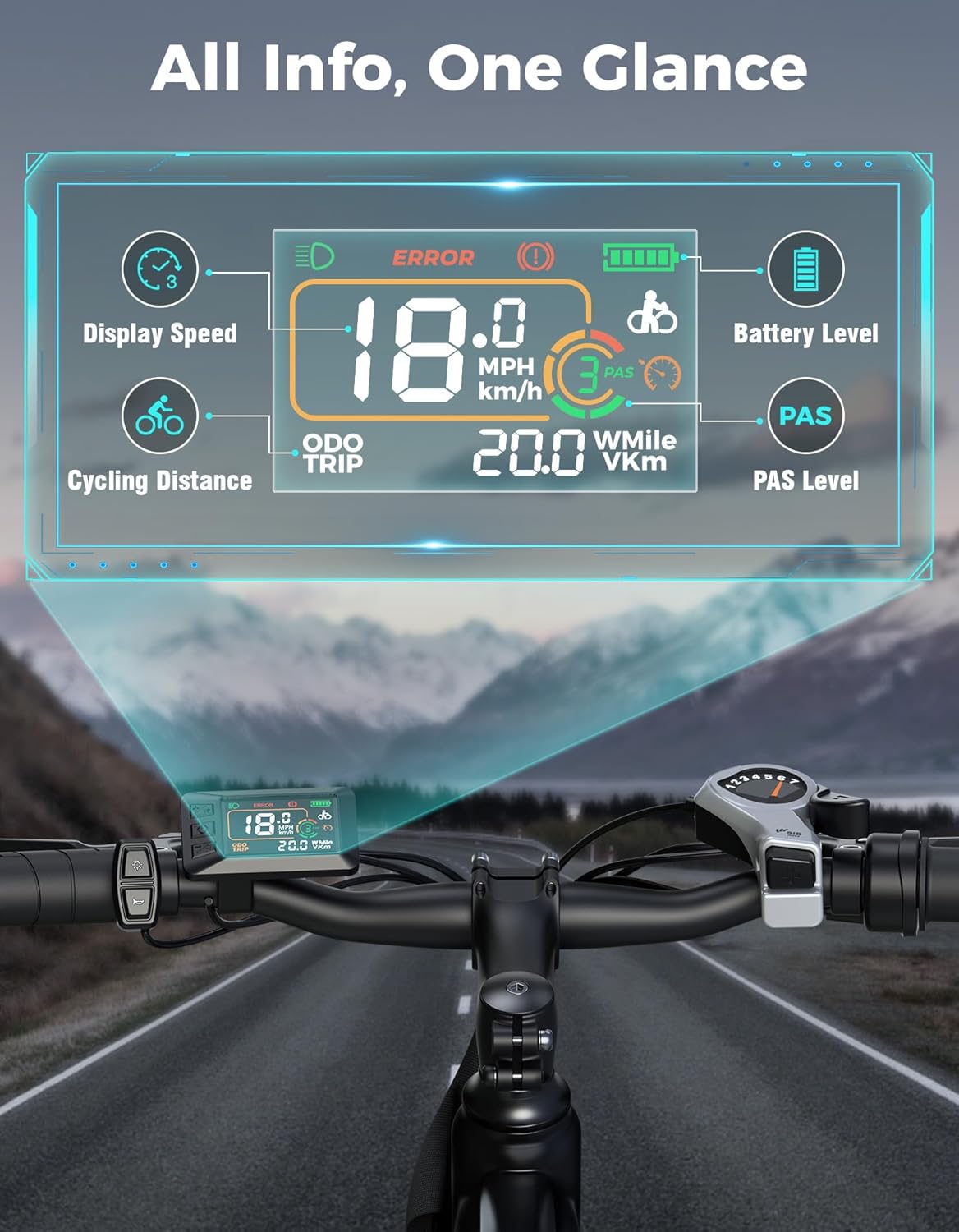
Image: The LCD display provides essential riding data at a glance, including speed, battery level, and mileage.
5.5 Braking
The Jasion YC1 is equipped with dual disc brakes for reliable stopping power. Apply both brake levers simultaneously for effective and controlled braking. Practice braking in a safe area to familiarize yourself with their response.

Image: Dual disc brakes provide reliable stopping power, even in wet conditions, enhancing rider safety.
5.6 Suspension Adjustment
The bike features a lockable front suspension fork. You can lock the suspension for efficient riding on smooth surfaces or unlock it to absorb bumps and shocks on uneven terrain, providing a smoother and more comfortable ride.

Image: The lockable front suspension fork improves ride comfort and control over various road conditions.
6. Battery Information
The Jasion YC1 is equipped with a 360Wh removable lithium-ion battery with a BMS system for improved safety. The battery is UL2849 certified.
6.1 Charging the Battery
The battery can be charged in two ways:
- On-bike Charging: Connect the charger directly to the charging port on the bike frame.
- Off-bike Charging: Remove the battery from the frame and connect it to the charger.
A full charge typically takes 5-6 hours. Always use the provided charger. Do not overcharge the battery. The battery is IPX4 waterproof rated.
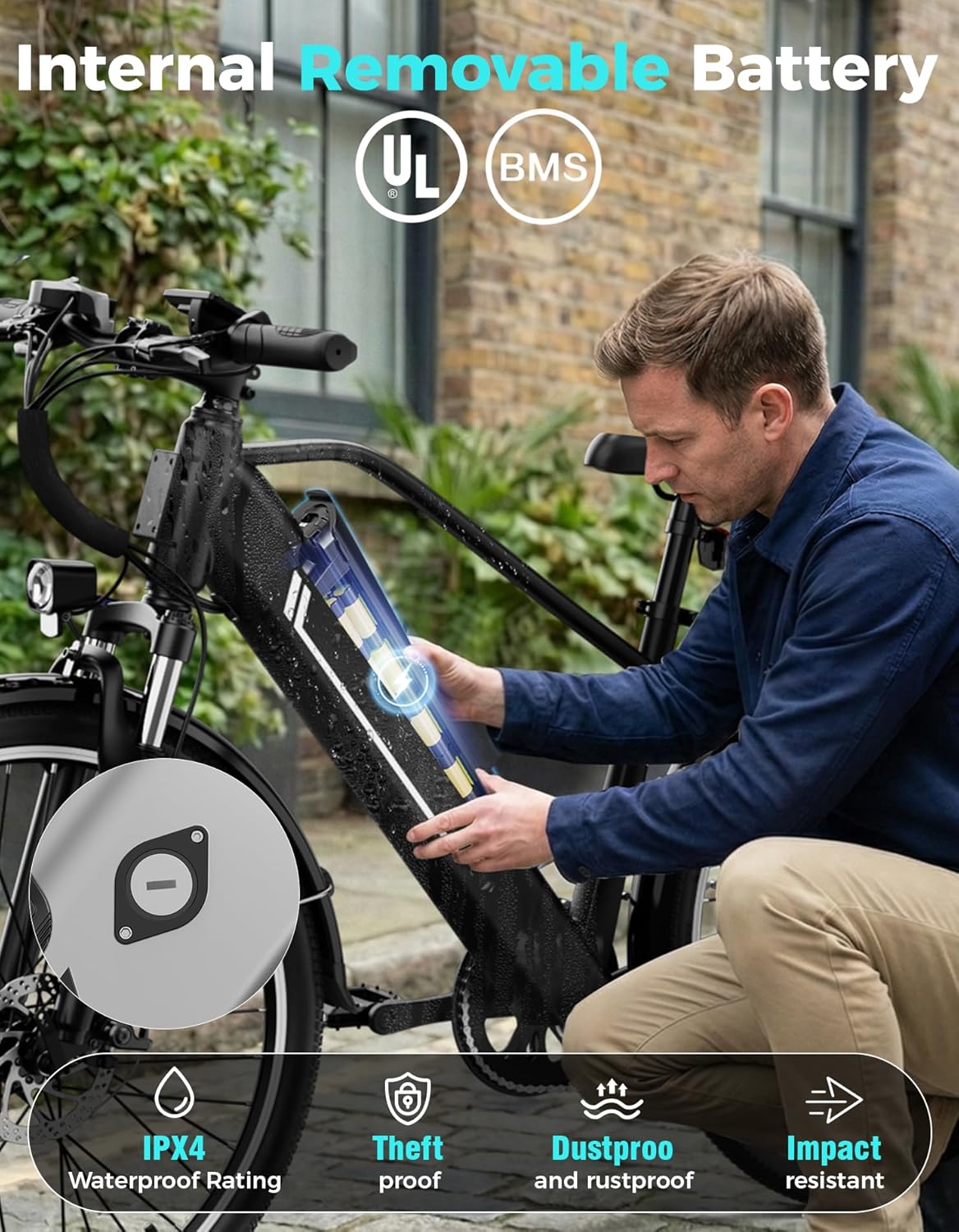
Image: The internal removable battery can be easily inserted or removed for convenient charging.
7. Maintenance
Regular maintenance ensures the longevity and safe operation of your Jasion YC1 Electric Bike.
- Tire Pressure: Check tire pressure before each ride. Maintain recommended pressure for optimal performance and safety.
- Brakes: Regularly inspect brake pads for wear and brake levers for proper function. Adjust as needed.
- Chain: Keep the chain clean and lubricated to ensure smooth gear changes and prevent wear.
- Fasteners: Periodically check all bolts, nuts, and quick releases for tightness.
- Cleaning: Clean the bike with a damp cloth and mild soap. Avoid high-pressure washing directly on electrical components.
- Battery Care: Store the battery in a cool, dry place and charge it regularly, even if not in use, to maintain its health.
8. Troubleshooting
This section addresses common issues you might encounter:
- Bike Not Powering On: Check if the battery is fully charged and properly seated. Ensure the power button is pressed correctly.
- Motor Not Assisting: Verify the PAS level is not set to zero. Check battery charge. Ensure all connections are secure.
- Brakes Squealing: This can be normal for new brakes or after riding in wet conditions. If persistent, inspect brake pads for contamination or wear.
- Gears Not Shifting Smoothly: The derailleur may need adjustment. Check for a bent hanger or stretched cable.
- Reduced Range: This can be due to low tire pressure, riding in higher assist modes, heavy loads, or cold weather.
For issues not listed or if problems persist, contact Jasion customer support.
9. Specifications
Key specifications for the Jasion YC1 Electric Bike:
| Feature | Detail |
|---|---|
| Bike Type | Commuting Bike, Electric Bike |
| Motor | 1200W Peak Brushless Motor |
| Top Speed | Up to 28 MPH |
| Max Range | Up to 50 Miles (Pedal Assist Mode) |
| Battery | 360Wh Lithium-ion, Removable, UL2849 Certified |
| Charging Time | 5-6 Hours |
| Wheel Size | 26 Inches |
| Number of Speeds | 7 (Shimano) |
| Brake Style | Dual Disc |
| Suspension Type | Front (Lockable) |
| Frame Material | High Carbon Steel |
| Item Weight | 58 Pounds |
| Maximum Weight Recommendation | 330 Pounds |
| Waterproof Rating | IPX4 |

Image: Detailed dimensions and recommended rider height for the Jasion YC1 Electric Bike.


