
Introduction
Thank you for choosing the ROCAM Portable DAB/DAB+/FM Radio. This manual provides essential information for the safe and efficient use of your device. Please read it thoroughly before operation and keep it for future reference.
Product Overview
Key Features
- Stable Signal & Clear Sound: Integrated professional DSP chip for precise scanning, enhanced sound clarity, and reduced background noise. High-sensitivity, anti-interference antenna system ensures stable reception.
- High-Fidelity Sound Quality: Equipped with an 8W powerful speaker and a precision audio circuit to minimize distortion. Features a high-quality passive diaphragm and large magnetic circuit system for deep bass and clear mid-to-high frequencies.
- Bluetooth 5.0 Connectivity: Offers transfer speeds up to 2 Mbps and a range of up to 30 meters for stable wireless connection. (Bluetooth headphones are not supported).
- Long-Lasting Battery: Built-in 3000mAh rechargeable battery provides up to 10 hours of playback at maximum volume or 18 hours at 50% volume. Up to 360 days standby time on a full charge.
- Multi-Language Support: System menu available in 12 languages.
- 80 Preset Stations & TF Card Slot: Save up to 40 DAB/DAB+ and 40 FM stations. Dedicated preset function for quick access. TF card slot supports up to 64GB for extended music library (TF card not included).
- Dual Alarms & Sleep Timer: Two independent alarms with snooze function, configurable to wake with DAB or FM radio. Adjustable sleep timer (15 to 120 minutes).
- 6 Equalizer Presets: Choose from various sound profiles (Normal, Classic, Pop, Jazz, Rock, Bass).
- 3.5mm Headphone Jack: For private listening.
Package Contents
Ensure all items are present in the box:
- ROCAM Portable Radio
- Power Adapter
- USB-C Power Cable
- User Manual
Device Layout

Image Description: An overview of the ROCAM Portable DAB/DAB+/FM Radio, highlighting its key components such as the antenna, 2.4-inch color screen, 3000mAh rechargeable battery, 80 preset stations, TF card slot, headphone jack, and USB Type-C port.
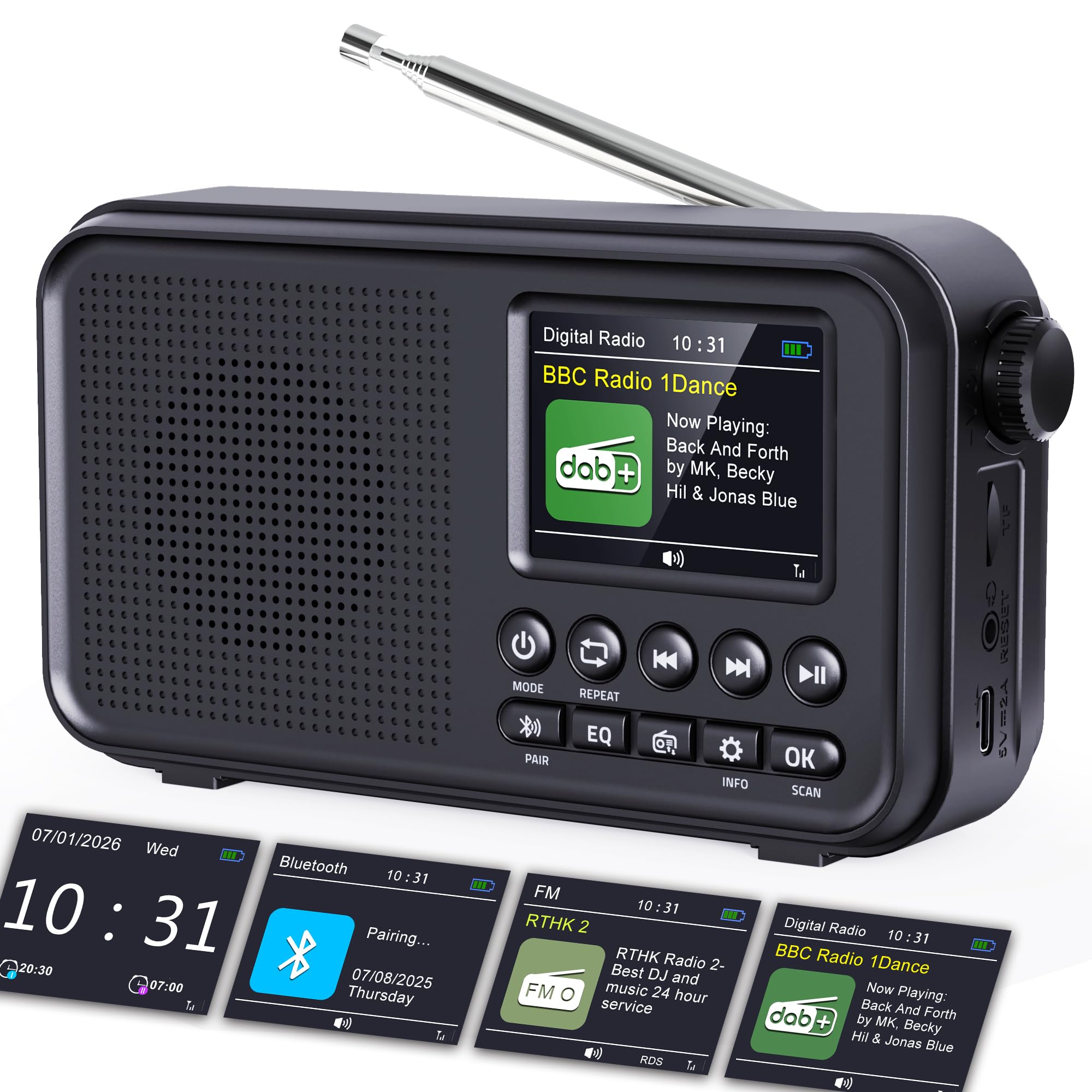
Image Description: A front view of the ROCAM Portable DAB/DAB+/FM Radio, showcasing its speaker grille, control buttons, and color display. The antenna is extended.
Setup
Charging the Battery
Before first use, fully charge the radio. Connect the provided USB-C power cable to the radio's USB-C port and the power adapter to a wall outlet. The charging indicator will show the charging status.
Initial Power On and Language Selection
- Press and hold the Power button to turn on the radio.
- The display will prompt you to select a language. Use the navigation buttons to scroll through the 12 available languages and press OK to confirm your selection.
Automatic Station Scan (DAB/DAB+ and FM)
The radio can automatically scan and store available stations.

Image Description: A visual guide illustrating the two steps of automatic station scanning. Step 1 shows the radio displaying "Scanning... Stations: 15", and Step 2 shows a list of detected FM frequencies. A warning note indicates that new stations overwrite previously saved ones during an automatic scan.
- Extend the telescopic antenna for optimal reception.
- In DAB or FM mode, press the "SCAN" button. The radio will begin scanning for stations.
- Detected stations will be automatically saved to the preset memory.
Important Note: In some regions, DAB signal coverage may not be available. It is normal for the radio not to detect DAB stations in such areas. Automatic scanning will overwrite previously saved stations.
Operating Instructions
Switching Modes (DAB/DAB+/FM/Bluetooth/TF Card)
Press the "MODE" button to cycle through available modes: DAB/DAB+, FM, Bluetooth, and TF Card.
DAB/DAB+ and FM Radio Operation
- Select DAB or FM mode using the "MODE" button.
- Selecting Stations:
- Use the Previous/Next buttons to navigate through available stations.
- To access preset stations, press the dedicated preset buttons (if available) or navigate through the preset list. The radio supports 40 DAB/DAB+ and 40 FM presets.
- Adjusting Volume: Use the volume knob on the side of the radio.

Image Description: The ROCAM radio with its antenna extended, showing the supported frequency ranges for DAB/DAB+ (174.928 - 239.200 MHz) and FM (87.5 - 108.00 MHz). It also indicates a DAB reception range of up to 20 km from the signal source.
Bluetooth Connectivity
- Select Bluetooth mode using the "MODE" button. The radio will enter pairing mode, indicated on the display.
- On your external device (smartphone, tablet, etc.), enable Bluetooth and search for "ROCAM CR1031DAB" (or similar).
- Select the radio from the list to pair. Once connected, the radio will automatically re-pair with the last connected device when in Bluetooth mode.

Image Description: The ROCAM radio displaying "Pairing..." on its screen, next to a smartphone also showing a Bluetooth pairing icon. This illustrates the Bluetooth 5.0 connectivity with a range of up to 30 meters.
TF Card Playback
- Insert a TF (MicroSD) card (up to 64GB, formatted correctly) into the TF card slot.
- Select TF Card mode using the "MODE" button. The radio will automatically detect and begin playing audio files from the card.
- Use the Previous/Next and Play/Pause buttons to control playback.

Image Description: A close-up view of the ROCAM radio's side panel, highlighting the TF (MicroSD) card slot. A note advises using TF cards up to 64GB for optimal compatibility.
Alarm Clock Function
The radio features two independent alarms.

Image Description: The ROCAM radio displaying the current time (07:30) and a pop-up menu showing alarm settings, including wake-up time, source (DAB/FM), duration, and volume. This illustrates the dual alarm feature with a gentle wake-up option.
- Access the alarm settings through the menu.
- Set the desired wake-up time, alarm source (DAB radio, FM radio, or buzzer), and volume.
- Enable the alarm. The snooze function can be activated by pressing a button when the alarm sounds.
Sleep Timer
The sleep timer allows the radio to turn off automatically after a set period.

Image Description: The ROCAM radio displaying a "Set Sleep Timer" menu with an option for "15 minutes," indicating the automatic shutdown feature after a set duration.
- Access the sleep timer settings through the menu.
- Select the desired duration (15 to 120 minutes). The radio will automatically power off once the timer expires.
Equalizer Settings
Customize your audio experience with 6 equalizer presets.

Image Description: The ROCAM radio displaying "EQ Modes" with options like Normal, Classic, Pop, Jazz, Rock, and Bass, each represented by an icon. This highlights the customizable sound profiles.
- Press the "EQ" button to cycle through the available equalizer presets: Normal, Classic, Pop, Jazz, Rock, and Bass.
- Select the preset that best suits your listening preference.
Headphone Use
For private listening, connect standard 3.5mm headphones to the headphone jack on the side of the radio. The internal speaker will be muted automatically.

Image Description: A woman wearing headphones, listening to the ROCAM radio. An inset shows a close-up of the 3.5mm headphone jack on the side of the radio, indicating its location and function.
Maintenance
- Cleaning: Use a soft, dry cloth to clean the radio's exterior. Do not use abrasive cleaners or solvents.
- Storage: When not in use for extended periods, store the radio in a cool, dry place.
- Battery Care: To prolong battery life, avoid fully discharging the battery frequently. Charge the radio regularly, even if not in active use.
- Antenna: Handle the telescopic antenna carefully to prevent damage.
Troubleshooting
| Problem | Possible Cause | Solution |
|---|---|---|
| No power/Radio does not turn on. | Battery is depleted. | Connect the radio to the power adapter and charge it. |
| Poor radio reception (DAB/FM). | Antenna not extended or poorly positioned. Weak signal in the area. | Fully extend and adjust the antenna. Try moving the radio to a different location, preferably near a window. Note that DAB coverage varies by region. |
| Bluetooth device cannot connect. | Radio not in Bluetooth pairing mode. Device too far. Bluetooth disabled on external device. | Ensure the radio is in Bluetooth mode. Move the external device closer to the radio (within 30m). Enable Bluetooth on your external device. |
| TF card not recognized or not playing. | Card not inserted correctly. Card capacity exceeds 64GB. Incorrect file format. | Reinsert the TF card. Ensure the card is 64GB or less and formatted correctly. Check if audio files are in a supported format. |
| Alarm does not sound. | Alarm not enabled. Volume too low. | Check alarm settings to ensure it is enabled and the volume is set appropriately. |
Specifications
| Brand | ROCAM |
| Model Number | CR1031DAB |
| Color | Black |
| Connectivity Technology | Bluetooth 5.0 |
| Tuning Technology | DAB/DAB+/FM |
| Power Source | Battery Powered (3000mAh Rechargeable) |
| Product Dimensions (L x W x H) | 16.9 x 4.7 x 9.2 cm |
| Item Weight | 349 Grams |
| Display Type | TFT Color Display (2.4 inches) |
| Supported TF Card Capacity | Up to 64GB |
| Output Voltage | 5 Volts |
Warranty and Support
The product comes with a standard warranty. For specific warranty details and duration, please refer to the warranty information provided with your purchase documentation or contact ROCAM customer support.
If you have any questions or require assistance with your ROCAM Portable Radio, please do not hesitate to contact our professional support team. Contact information can typically be found on the manufacturer's website or on the packaging.
Additional Information
DSP Chip Technology

Image Description: An internal view of the ROCAM radio, highlighting the high-performance DSP (Digital Signal Processing) chip. This chip is designed for low power consumption, maximum sensitivity, and anti-interference capabilities, contributing to clear sound and stable signal reception.
The integrated professional DSP chip is designed for audio processing applications, offering maximum reception sensitivity, strong anti-interference capability, and excellent sound quality. This ensures a clear and stable listening experience.
High-Fidelity Speaker

Image Description: A detailed view of the 8W speaker within the ROCAM radio, emphasizing its design for pure, distortion-free sound. The image highlights the speaker's components, including the cone and surrounding elements.
The radio is equipped with an 8W RMS speaker and a precision audio circuit to minimize distortion and noise, delivering rich and clear sound even at high volumes. The passive diaphragm and large magnetic circuit provide powerful bass and detailed mid-to-high frequencies.
2.4-inch Color Display

Image Description: The ROCAM radio placed on a bedside table, with its 2.4-inch color display showing "BBC Radio 1Dance" and "Now Playing: Back And Forth by MK, Becky Hill & Jonas Blue". The screen provides clear and detailed information.
The radio features a vibrant 2.4-inch color display that provides clear information about the current station, time, and other settings, enhancing the user experience.
Portability

Image Description: A composite image showing the ROCAM radio's portability. One panel shows it held in hand, another shows it fitting into a backpack, and a third shows a person using it outdoors on a bench. This highlights its compact size and ease of transport.
With its compact dimensions and lightweight design, the ROCAM radio is highly portable, making it suitable for use at home, in the office, or on the go.
Video Resources
No official product videos with relevant seller content were found in the provided data to embed.


