
Introduction
Thank you for choosing the Boytond Ultra Open Ear Earbuds. These earbuds are designed to provide a comfortable and secure listening experience while allowing you to remain aware of your surroundings. This manual will guide you through the setup, operation, and maintenance of your new earbuds.
Product Overview
The Boytond S30i earbuds feature an ergonomic clip-on design, ensuring a secure and comfortable fit without entering the ear canal. They are equipped with 16.3mm dynamic drivers for clear audio and utilize Bluetooth 5.3 for stable connectivity. The charging case provides extended battery life and features a digital display.
Components
- Boytond S30i Open Ear Earbuds (Left and Right)
- Charging Case with Digital Display
- USB Type-C Charging Cable
- User Manual (this document)
Key Features
- Open-Ear Design: Allows awareness of surroundings.
- Ergonomic Clip-On Fit: Lightweight and secure for extended wear.
- High-Fidelity Audio: Powered by 16.3mm dynamic drivers for clear stereo sound.
- Extended Battery Life: Up to 10 hours playtime per charge, 40 additional hours with charging case.
- Quick Charge: 5 minutes of charge provides 1 hour of playback.
- Bluetooth 5.3: Fast, stable, and low-latency wireless connection.
- Touch Controls: Easy management of music and calls.
- Integrated Microphone: For clear calls.
- Waterproof Design: Suitable for various activities.
Product Visuals
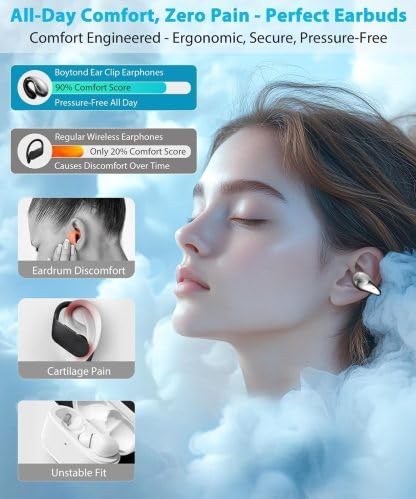
Image: Boytond S30i Earbuds securely placed in their charging case, featuring a clear digital display showing battery levels for both earbuds and the case.

Image: A detailed view of the Boytond S30i earbud, highlighting its flexible clip-on design engineered for maximum comfort and a secure fit around the ear.

Image: An exploded diagram illustrating the 16.3mm dynamic drivers and internal audio components responsible for the earbud's high-fidelity stereo sound.

Image: Boytond S30i earbuds shown with water droplets, emphasizing their waterproof construction suitable for various environments and activities.

Image: A visual guide detailing the touch control functions on the earbuds, including single tap for answer/hang up/play/pause, double tap for next song, and triple tap for previous song.
Setup
1. Charging the Earbuds and Case
Before first use, fully charge the earbuds and the charging case. Connect the provided USB Type-C cable to the charging port on the back of the case and to a power source. The digital display on the case will show the charging status and battery percentage. The earbuds will charge automatically when placed inside the case.
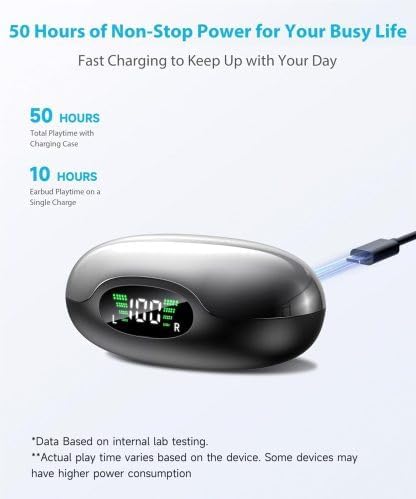
Image: The charging case of the Boytond S30i earbuds, with a USB-C cable inserted into the charging port, and the digital display indicating the current battery level.
2. Bluetooth Pairing
- Ensure the earbuds are charged.
- Open the charging case. The earbuds will automatically enter pairing mode.
- On your device (smartphone, tablet, laptop), go to Bluetooth settings.
- Search for "Boytond S30i" (or similar name) in the list of available devices.
- Select the earbuds to connect. A voice prompt will confirm successful pairing.
- Once paired, the earbuds will automatically connect to your device when taken out of the case.

Image: The Boytond S30i earbuds and their charging case positioned between a smartphone and a laptop, symbolizing their ability to connect seamlessly across multiple devices via Bluetooth 5.3.
Operating Instructions
Wearing the Earbuds
The Boytond S30i earbuds are designed to clip onto the outside of your ear, with the speaker positioned near your ear canal. Gently open the clip and place it over the top of your ear, adjusting until it feels secure and comfortable. The soft silicone piece should rest against the back of your ear.

Image: A person wearing a Boytond S30i earbud, demonstrating how the ergonomic clip-on design sits comfortably and securely on the outer ear.
Touch Controls
The earbuds feature intuitive touch controls on their surface:
- Single Tap (either earbud): Play/Pause music, Answer/End call.
- Double Tap (right earbud): Next song.
- Double Tap (left earbud): Previous song.
- Long Press (either earbud): Activate voice assistant.
Making and Receiving Calls
With the integrated microphone, you can make and receive calls directly through your earbuds. Use the single tap control to answer or end calls.
Maintenance
To ensure the longevity and optimal performance of your Boytond S30i earbuds, follow these maintenance guidelines:
- Cleaning: Gently wipe the earbuds and charging case with a soft, dry, lint-free cloth. Avoid using harsh chemicals or abrasive materials.
- Water Exposure: While the earbuds feature a waterproof design, avoid prolonged submersion in water. Dry them thoroughly if they get wet.
- Storage: When not in use, store the earbuds in their charging case to protect them from dust and damage. Store in a cool, dry place.
- Charging: Use only the provided USB Type-C cable or a certified equivalent for charging.
Troubleshooting
If you encounter issues with your Boytond S30i earbuds, try the following solutions:
| Problem | Possible Solution |
|---|---|
| Earbuds not charging or charging intermittently. |
|
| Earbuds not connecting to device or only one earbud connects. |
|
| Poor sound quality or low volume. |
|
| Earbuds fall out or are uncomfortable. |
|
Specifications
| Feature | Detail |
|---|---|
| Brand | Boytond |
| Model Number | S30i |
| Ear Placement | Open Ear (Clip-On) |
| Connectivity Technology | Wireless (Bluetooth) |
| Bluetooth Version | 5.3 |
| Control Method | Touch |
| Battery Life (Earbuds) | Up to 10 Hours |
| Total Playtime (with Case) | Up to 50 Hours |
| Quick Charge | 5 minutes charge for 1 hour playback |
| Frequency Range | 20 Hz - 20,000 Hz |
| Water Resistance Level | Waterproof |
| Enclosure Material | Plastic, Silicone |
| Compatible Devices | Smartphones, Tablets, Laptops, Desktops, Gaming Consoles, Smart Speakers |
Official Product Video
Video: An official product video from YOU-JT, showcasing the lightweight design, comfortable fit, and convenient features of the Boytond Ultra Open Ear Earbuds. It highlights the aesthetic appeal and ease of use in daily activities.
Warranty and Support
For warranty information or technical support, please refer to the contact details provided with your product packaging or visit the official Boytond website. If you experience any issues not covered in this manual, please contact customer service for assistance.