
HIFIT PB-071
HIFIT 71" Tall Kitchen Pantry Cabinet User Manual
Model: PB-071
Introduction
Thank you for choosing the HIFIT 71" Tall Kitchen Pantry Cabinet. This manual provides essential information for the safe assembly, operation, and maintenance of your new cabinet. Please read it thoroughly before beginning assembly and keep it for future reference.
Safety Information
- Always assemble the product on a soft, clean surface to prevent scratches.
- Ensure all parts are present and undamaged before assembly. Contact customer support immediately if any parts are missing or damaged.
- Follow the assembly instructions carefully, step by step. Incorrect assembly can lead to instability and potential injury.
- Do not overtighten screws during assembly, as this can damage the wood.
- This cabinet is designed for indoor use only.
- To prevent tipping, always use the included anti-tipping devices to secure the cabinet to a wall.
- Do not exceed the maximum weight capacity of 600 pounds for the entire cabinet. Distribute weight evenly.
- Keep children and pets away from the assembly area.
- When using the charging station, ensure electrical devices are compatible and do not overload the outlets.
Package Contents
Your HIFIT Kitchen Pantry Cabinet will arrive in two separate packages, which may be delivered at different times. Please ensure you have received both packages before beginning assembly.
Each package contains:
- Cabinet components (pre-drilled holes and labeled parts)
- Hardware kit (screws, connectors, etc.)
- User Manual (this document)
- Anti-tipping devices

Assembly Instructions
Assembly is required for this product. We recommend assembling the cabinet with another person to simplify the process.
- Unpack and Verify: Carefully unpack all components and compare them against the parts list in the included user manual. Ensure all pre-drilled holes and labeled parts match the instructions.
- Follow Step-by-Step Guide: Refer to the detailed assembly guide provided in your package. Each step is illustrated to ensure correct assembly.
- Secure Anti-Tipping Devices: Once assembled, securely attach the cabinet to a wall using the provided anti-tipping hardware. This is crucial for safety.
- Adjust Hinges: If cabinet doors appear misaligned, have gaps, or protrude, refer to the "Adjustable Hinges" section in this manual or the last page of your printed installation manual for guidance on fine-tuning the hinges.

Product Features
RGB LED Lighting
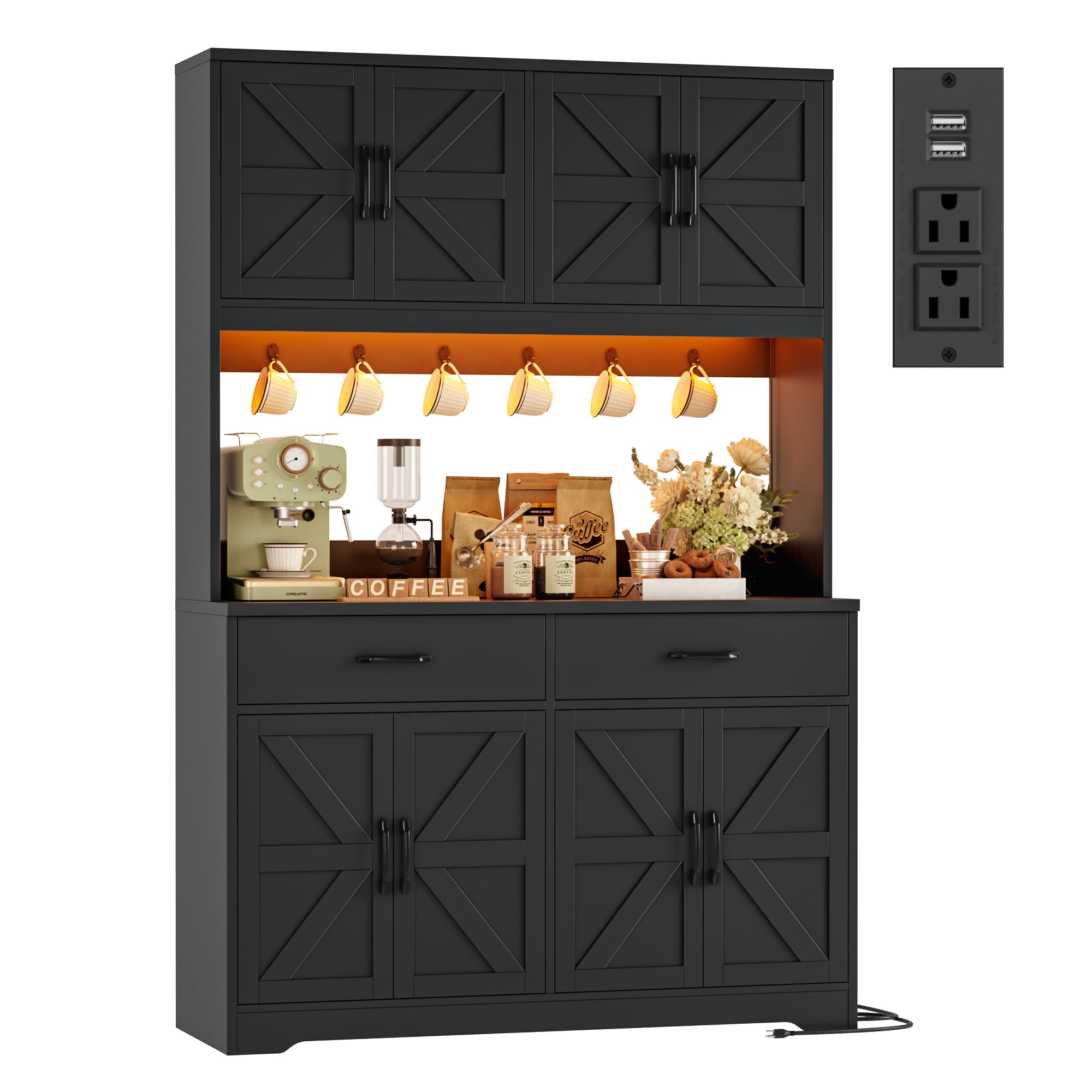
The cabinet features smart RGB LED strips with adjustable brightness and music synchronization capabilities. Control the lighting via a dedicated app or key control.

Built-in Charging Station
A convenient charging station is integrated into the countertop, featuring 2 USB ports (5V/2A) and 2 AC outlets (120V/12A). It includes a 6ft power cord for easy access.

Ample Storage Capacity
The cabinet offers 8 spacious storage compartments, two large drawers, and 6 metal hooks for organizing various kitchen items, from small appliances to mugs and tools.

Farmhouse Design
Featuring barn doors and vintage-inspired handles, this cabinet adds a farmhouse aesthetic to your kitchen or dining area.
Durable Construction
Constructed from thick, high-quality engineered wood boards and robust hardware, the cabinet has a maximum load capacity of 600 pounds, ensuring stability and longevity.
Operating Instructions
Using the LED Lights
- Power On/Off: Use the inline key control or the dedicated mobile app to turn the LED lights on or off.
- Color Selection: Through the app, select from a wide range of RGB colors to match your preference.
- Brightness Adjustment: Adjust the light intensity using the app or key control.
- Music Sync Mode: Activate the music sync feature via the app to have the lights respond to audio.
Using the Charging Station
- Plug the cabinet's 6ft power cord into a standard wall outlet.
- Connect your devices to the 2 AC outlets or 2 USB ports as needed.
- Ensure total power draw does not exceed the station's capacity (120V/12A for AC, 5V/2A for USB).
Adjusting Cabinet Hinges
If your cabinet doors are not perfectly aligned, follow these steps to adjust the hinges:
- Locate the adjustment screws on each hinge.
- Typically, there are screws for horizontal, vertical, and depth adjustments.
- Make small adjustments to one screw at a time, then check the door alignment. Repeat until the desired alignment is achieved (no gaps, even spacing, flush with the cabinet frame).
- Refer to the detailed hinge adjustment diagram in your printed manual for specific screw functions.
Maintenance
- Cleaning: Wipe surfaces with a soft, damp cloth. Avoid harsh chemicals or abrasive cleaners that could damage the finish.
- Spills: Clean up spills immediately to prevent staining or damage to the engineered wood.
- Hardware: Periodically check all screws and fasteners to ensure they are tight. Retighten if necessary.
- LED Lights: The LED strips are designed for long-term use. If issues arise, contact customer support. Do not attempt to repair electrical components yourself.
Troubleshooting
| Problem | Possible Cause | Solution |
|---|---|---|
| Cabinet doors are misaligned or have gaps. | Hinges require adjustment. | Refer to the "Adjusting Cabinet Hinges" section in this manual or the last page of your printed manual for detailed instructions on adjusting the hinges. |
| LED lights are not turning on. | Power connection issue, faulty LED strip, or control unit problem. | Ensure the power cord for the LED lights is securely plugged in. Check the key control or app for proper operation. If the issue persists, contact customer support. |
| Charging station is not working. | Power connection issue, overloaded circuit, or faulty unit. | Verify the cabinet's main power cord is plugged into a working wall outlet. Ensure the total power draw of connected devices does not exceed the station's limits. Try a different device to confirm the station is not faulty. Contact customer support if necessary. |
| Cabinet feels unstable. | Assembly not fully secured, or anti-tipping devices not installed. | Double-check all assembly screws and ensure they are tightened. Confirm that the anti-tipping devices are correctly installed and secured to a wall stud. |
Specifications
| Feature | Detail |
|---|---|
| Brand | HIFIT |
| Model Number | PB-071 |
| Color | Black |
| Material | Engineered Wood |
| Product Dimensions (D x W x H) | 15"D x 47.2"W x 71"H |
| Weight Capacity Maximum | 600 Pounds |
| Number of Drawers | 2 |
| Number of Shelves | 8 |
| Number of Doors | 8 |
| Charging Station | 2 AC Outlets (120V/12A), 2 USB Ports (5V/2A), 6ft Power Cord |
| LED Lights | RGB, Adjustable Brightness, Music Sync, App/Key Control |
| Assembly Required | Yes |
| Mounting Type | Freestanding (with anti-tipping devices) |
Warranty and Support
HIFIT is committed to providing quality products and excellent customer service. If you encounter any issues with your product, including missing parts or assembly difficulties, please contact our post-sale service team.
Our support team is available 24/7 to assist you. Please have your model number (PB-071) and purchase information ready when contacting us.
For further assistance, visit the official HIFIT store on Amazon: HIFIT Store
Product Overview Video
Video: A visual overview of the HIFIT Kitchen Pantry Cabinet, demonstrating its features such as LED lighting, charging station, and storage capacity. Please note, this video displays the white variant of the cabinet. This video is provided by the seller, HalcyonE.
Ask a question about this manual
Ask about setup, troubleshooting, compatibility, parts, safety, or missing instructions. Manuals+ will review the question and use this page’s manual context to help answer it.