
1. Introduction
Thank you for choosing the HOSTACK 75" Tall Modern Farmhouse Pantry Cabinet. This manual provides essential information for the safe assembly, operation, and maintenance of your new storage cabinet. Please read these instructions carefully before beginning assembly and retain them for future reference.
This versatile cabinet features a modern farmhouse design, ample storage with adjustable shelves, two deep drawers, a built-in charging station, and integrated RGB LED lighting to enhance your home's functionality and aesthetic.
2. Safety Information
- Always follow assembly instructions precisely.
- Due to the substantial size and weight of this cabinet, two adults are recommended for safe and efficient assembly.
- Ensure all hardware is securely tightened before use. Periodically check and re-tighten as necessary.
- This cabinet is equipped with an anti-tipping device. It is crucial to install this device to prevent accidental tipping and ensure stability, especially in households with children or pets.
- Do not overload shelves or drawers. Refer to the "Specifications" section for weight capacity limits.
- Keep electrical components (charging station, LED lights) away from water and moisture.
- Ensure the power outlet used for the charging station meets the specified requirements (1500W/12A/125V Max Load).
3. Package Contents
Your HOSTACK Pantry Cabinet package includes:
- 1x Farmhouse Pantry (components)
- 1x Instructions Manual (this document)
- 1x Accessories Bag (containing hardware)
Note: The cabinet may be shipped in two separate boxes. Please ensure all boxes have arrived before beginning assembly.

Figure 3.1: Packaging and key dimensions. Note the cabinet ships in two boxes.
4. Assembly Instructions
Please refer to the detailed step-by-step instructions and labeled components provided in the separate assembly guide included in your package. The following points highlight key aspects of the assembly process:
- Preparation: Clear a spacious area for assembly. Lay out all components and hardware. Verify all parts are present against the parts list in the assembly guide.
- Tools Required: Typically, a Phillips head screwdriver and a hammer are needed. (Specific tools will be listed in the assembly guide.)
- Team Assembly: As mentioned in the safety section, assembly by two adults is strongly recommended due to the size and weight of the cabinet.
- Door Hinge Adjustment: If cabinet doors do not align perfectly after assembly, use the hinge adjustment guide below.
4.1 Door Hinge Adjustment
Proper door alignment ensures smooth operation and a neat appearance. If you encounter issues such as gaps between doors, overlapping doors, or doors not sitting flush, follow these steps:

Figure 4.1: Detailed guide for adjusting cabinet door hinges to fix alignment problems.
- To adjust the gap between doors (side-to-side): Loosen screw A and then screw B. Slide the door left or right until the desired gap is achieved. Re-tighten both screws to secure.
- To adjust door height (up-down): Loosen screw C. Adjust the door up or down as needed. Re-tighten screw C.
- To adjust door depth (in-out): Loosen screw D. Push or pull the door to make it flush with the cabinet frame. Re-tighten screw D.
5. Operating Instructions
5.1 Storage and Organization
The HOSTACK Pantry Cabinet offers versatile storage options:
- Adjustable Shelves: The four upper and lower cabinets feature adjustable shelves. To reposition a shelf, remove any items, lift the shelf, and reinsert the shelf pins into the desired holes. Ensure all four pins are securely in place before placing items on the shelf.
- Deep Drawers: Utilize the two easy-glide drawers for smaller items, utensils, or frequently accessed accessories.
- Countertop: The spacious 45.3" wide countertop provides ample space for appliances, decor, or serving.

Figure 5.1: Overview of the cabinet's spacious and multi-purpose storage, highlighting adjustable shelves and drawers.
5.2 Built-in Charging Station
The integrated charging station provides convenient power for your devices and small appliances.
- Power Outlets: The station includes 2 AC outlets and 2 USB ports.
- On/Off Switch: Use the dedicated switch on the charging station to control power to the outlets and USB ports.
- Cable Management: A cable management hole is provided on the back panel to help keep cords tidy and out of sight.
- Safety: The charging station has built-in overload protection. Do not exceed the maximum load of 1500W/12A/125V.

Figure 5.2: Detailed view of the charging station, showing AC outlets, USB ports, and the on/off switch.
5.3 RGB LED Lighting
The integrated RGB LED strips allow you to customize the ambiance of your cabinet.
- Control: The LED lights can be controlled via a dual app system (refer to the specific app instructions included with the LED kit) or a physical switch.
- Features: Enjoy over 60,000 vivid colors, adjustable brightness, and seamless music sync capabilities.

Figure 5.3: The RGB LED lighting in action, demonstrating color options and control via a mobile application.
6. Maintenance
- Cleaning: Wipe surfaces with a soft, damp cloth. Avoid harsh chemicals or abrasive cleaners, which can damage the engineered wood finish.
- Spills: Clean up spills immediately to prevent moisture damage to the wood.
- Hardware: Periodically check all screws and fasteners to ensure they remain tight. Re-tighten as needed to maintain structural integrity.
- Electrical Components: Ensure the charging station and LED lights are kept dry. Do not attempt to repair electrical components yourself; contact qualified personnel if issues arise.
7. Troubleshooting
| Problem | Possible Cause | Solution |
|---|---|---|
| Cabinet doors do not align or close properly. | Hinges are not properly adjusted or tightened. | Refer to Section 4.1 "Door Hinge Adjustment" for detailed steps to adjust the hinges. |
| Charging station is not providing power. |
|
|
| RGB LED lights are not working or responding. |
|
|
| Cabinet feels unstable or wobbly. |
|
|
8. Specifications
| Feature | Detail |
|---|---|
| Brand | HOSTACK |
| Model | Pantry Cabinet with Charging Station |
| Color | Black |
| Material | Engineered Wood, Reinforced Frame |
| Overall Dimensions (W x D x H) | 45.28" x 15.16" x 75.39" |
| Inside Drawer Dimensions (W x D x H) | 20" x 11" x 4" |
| Weight Capacity (Tabletop/Adjustable Shelf) | 375 lbs |
| Number of Drawers | 2 |
| Number of Adjustable Shelves | 4 |
| Charging Station | 2 AC Outlets, 2 USB Ports, 1500W/12A/125V Max Load, Overload Protection |
| Lighting | RGB LED with App & Physical Switch Control, 60,000+ Colors, Adjustable Brightness, Music Sync |
| Assembly Required | Yes (Two adults recommended) |
| Safety Features | Anti-tipping device included |
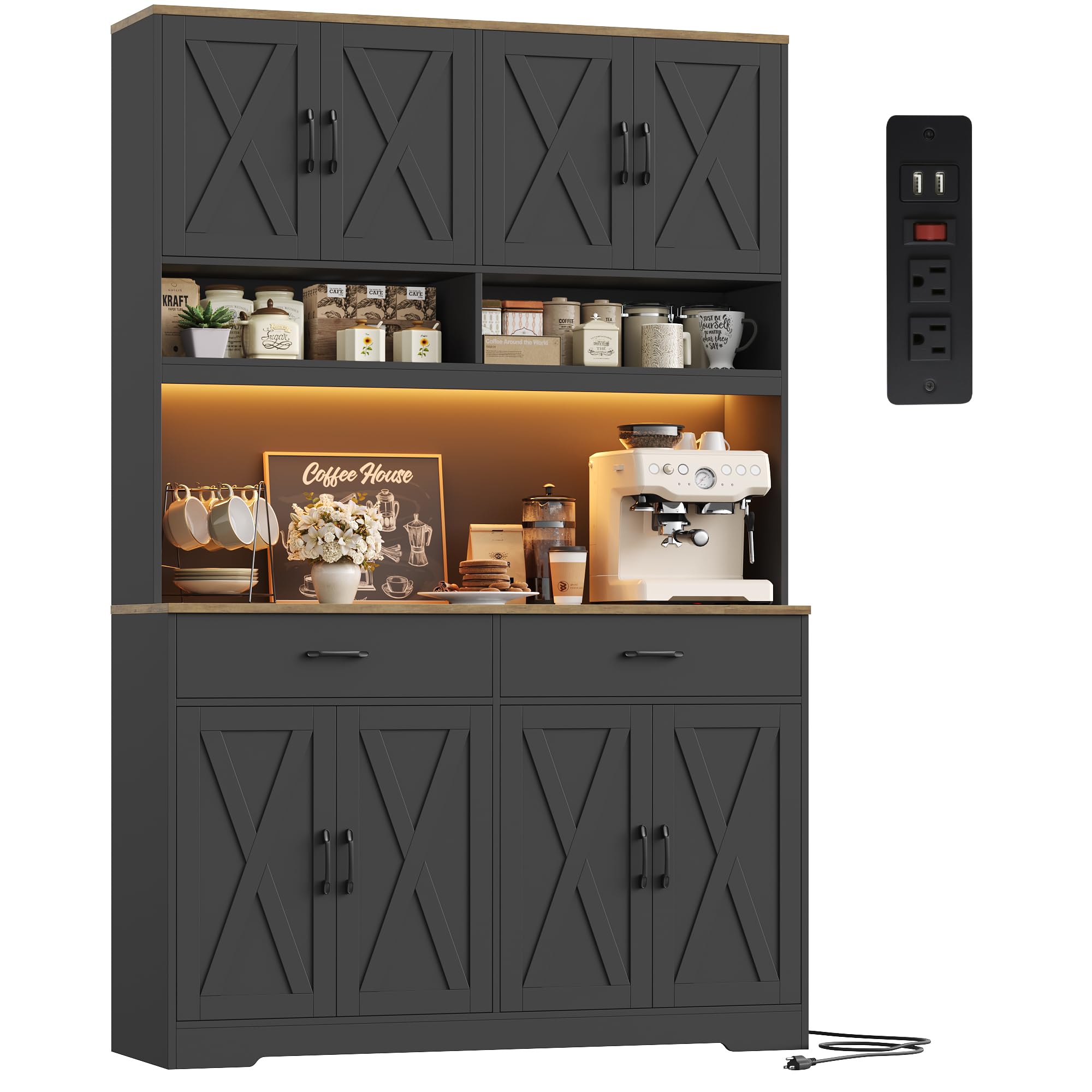
Figure 8.1: The HOSTACK Modern Farmhouse Pantry Cabinet, showcasing its design and functionality.
9. Warranty and Support
For any questions regarding assembly, missing parts, or product functionality, please contact HOSTACK customer support. While specific warranty details are typically provided with your purchase documentation, HOSTACK is committed to customer satisfaction.
Please refer to the contact information provided in your original packaging or visit the official HOSTACK website for support.
10. Product Overview Video
Watch this video for a visual overview of the HOSTACK 75" Tall Kitchen Pantry Cabinet, highlighting its features and design.
Video 10.1: A comprehensive overview of the 75" Tall Kitchen Pantry Cabinet with Charging Station, demonstrating its various features and storage capabilities.