
1. Introduction
This manual provides essential information for the proper use and maintenance of your Motorola Moto G06 4G LITE Ai smartphone. Please read it carefully to ensure optimal performance and longevity of your device.
The Motorola Moto G06 features a 6.88-inch display, a 50 MP camera system with AI capabilities, and immersive stereo speakers with Dolby Atmos. It is designed for seamless multitasking with up to 12 GB of RAM (including RAM Boost) and offers IP64 splash protection.
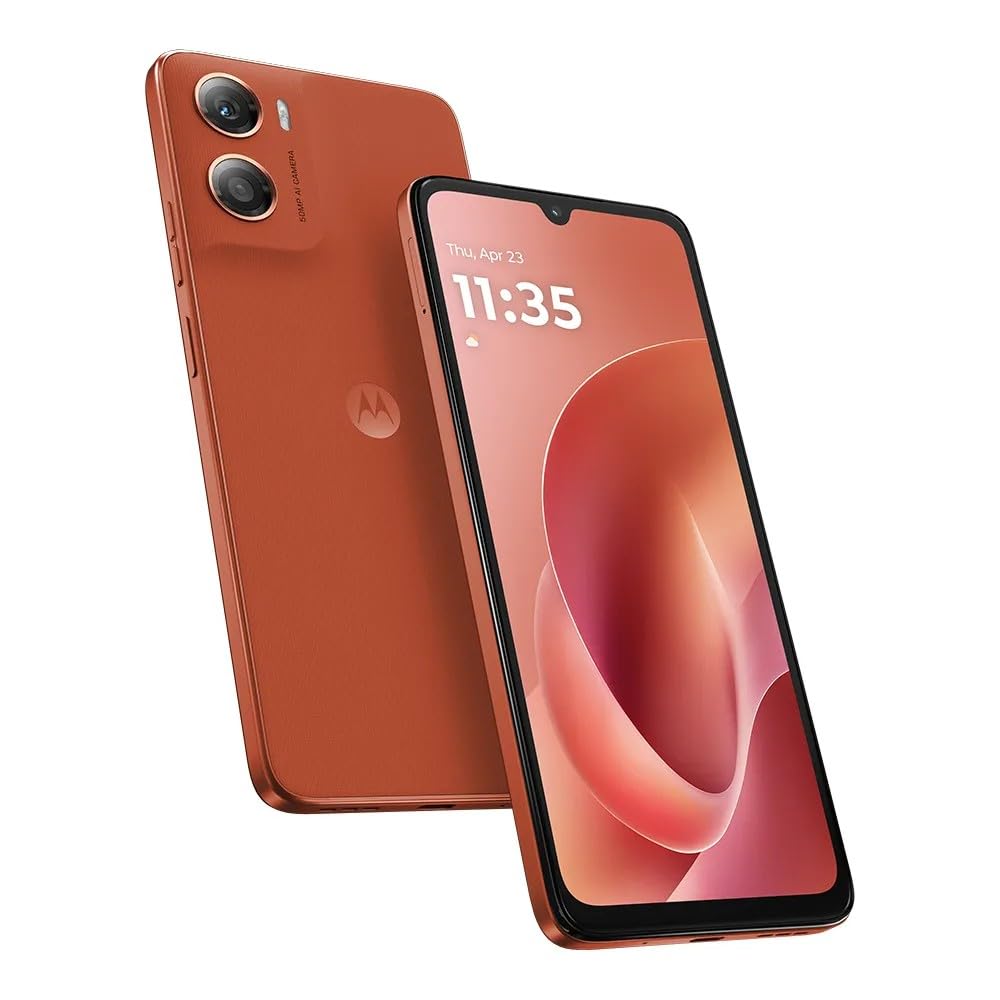
Figure 1: Motorola Moto G06 4G LITE Ai smartphone (Arabesque Orange). This image shows the front and back of the device, highlighting its design and display.
2. Device Setup
2.1. What's in the Box
- Motorola Moto G06 Smartphone
- Power Adapter
- Phone Case
- US Specs Charger (If a Euro charger is received, please contact Amazon for return and replacement.)
2.2. SIM Card Installation
The Moto G06 supports Dual Nano SIM cards.
- Locate the SIM card tray on the side of your device.
- Insert the SIM ejector tool (not included, typically comes with SIM cards or other phones) into the small hole next to the tray to open it.
- Place your Nano SIM card(s) into the tray with the gold contacts facing down. Ensure they are correctly seated.
- Carefully reinsert the tray into the phone.
2.3. Powering On and Initial Configuration
- Press and hold the Power button (located on the side) until the Motorola logo appears.
- Follow the on-screen prompts to complete the initial setup, including language selection, Wi-Fi connection, Google account setup, and security settings (PIN, fingerprint, face unlock).
- Your device runs on Android 15.
3. Operating Your Device
3.1. Display and Navigation
- Screen Size: 6.88 inches LCD with 1640 x 720 HD+ resolution.
- Refresh Rate: 120Hz for smooth scrolling and animations.
- Protection: Corning Gorilla Glass 3 for enhanced durability.
- Water Touch Technology: Allows navigation even with wet hands.
- Biometric Security: Fingerprint sensor on the side button and Face Unlock for quick access.
3.2. Camera Features
- Rear Camera: 50 MP with Flicker Sensor. Features AI-powered enhancements for portraits and low-light conditions.
- Front Camera: 8 MP for selfies.
- Flash: Yes.
- Video Capture: FHD @30fps (1080p).
- Editing: Integrated Google Photos editing tools for personalization.
3.3. Audio and Multimedia
- Speakers: Immersive stereo speakers with Bass Boost for enhanced audio.
- Audio Technology: Dolby Atmos support.
- Headphones: 3.5 mm headphone jack available.
3.4. Performance and Connectivity
- Processor: MediaTek Helio G81Extreme (2*A75 @ up to 2.0GHz, 6*A55 @ up to 1.7GHz).
- RAM: 4 GB RAM, expandable up to 12 GB with RAM Boost technology.
- Wireless: Wi-Fi 2.4 / 5 GHz (802.11 a/b/g/n/ac).
- Cellular: 4G connectivity.
- Connector: USB Type C.
4. Maintenance and Care
- Water Resistance: The device has an IP64 splashproof rating, offering protection against dust and splashes of water. It is not designed to be submerged in water.
- Battery Care: The 5200 mAh battery provides an average life of 48 hours. Use only the provided charger or certified compatible chargers for optimal battery health and fast charging.
- Cleaning: Use a soft, lint-free cloth to clean the screen and body of the phone. Avoid harsh chemicals or abrasive materials.
- Software Updates: Regularly check for and install software updates to ensure your device has the latest features and security patches.
5. Troubleshooting
5.1. Network Compatibility
The Motorola Moto G06 is a GSM unlocked phone. In the USA market, it is primarily compatible with T-Mobile, Metro, Mint, Tello, and any other carriers operating under the T-Mobile network. Outside the USA, it works with any GSM carrier worldwide.
Important: This device is NOT COMPATIBLE with CDMA carriers such as Verizon, AT&T, Xfinity, Boost, Virgin, Visible, Cricket, or other CDMA networks in the USA.

Figure 2: Carrier Compatibility. This chart visually indicates which carriers are compatible and incompatible with the Motorola Moto G06 in the USA and globally.
5.2. Common Issues
- Device not powering on: Ensure the battery is charged. Connect the phone to the charger and wait a few minutes before attempting to power on again.
- Poor network signal: Check SIM card installation. Ensure you are within a compatible carrier's network coverage area.
- Apps crashing: Clear the app's cache or reinstall the app. Ensure your device software is up to date.
- Slow performance: Close unnecessary background applications. Restart the device.
6. Specifications
| Feature | Specification |
|---|---|
| Brand | Motorola |
| Model Name | G06 |
| Operating System | Android 15 |
| CPU Model | MediaTek Helio G81Extreme |
| CPU Speed | 2 GHz |
| RAM Memory Installed Size | 4 GB (expandable with RAM Boost) |
| Screen Size | 6.88 Inches |
| Resolution | 1640 x 720 HD+ |
| Refresh Rate | 120 Hz |
| Display Protection | Corning Gorilla Glass 3 |
| Rear Camera | 50 MP + Flicker Sensor |
| Front Camera | 8 MP |
| Video Capture Resolution | 1080p @ 30 fps |
| SIM Card Slot Count | Dual SIM (Nano) |
| Connectivity Technology | 4G, Wi-Fi 2.4/5 GHz, USB Type C, 3.5 mm Headphone Jack |
| Water Resistance Level | IP64 (Splashproof) |
| Battery Capacity | 5200 Milliamp Hours |
| Average Battery Life | 48 Hours (Talk Time) |
| Biometric Security | Fingerprint Sensor (side), Face Recognition |
| Color | Arabesque (Orange) |
| UPC | 840493602387 |
7. Warranty and Support
Your Motorola Moto G06 comes with a 30-day Amazon warranty and a 1-year Latin America warranty. For warranty claims or technical support, please refer to your purchase documentation or contact the seller/manufacturer directly.
For further assistance, visit the official Motorola support website or contact their customer service.


