
Introduction
This manual provides instructions for the proper use and care of your MULCO Dream Catcher Women's Watch, model MW3-24053-113. This timepiece features a 46mm stainless steel case, a Miyota JP25 quartz analog movement, and a comfortable silicone strap. It is designed for precision timekeeping and includes multifunction sub-dials for day, date, and 24-hour display.
Please read this manual thoroughly to ensure optimal performance and longevity of your watch.
Product Overview
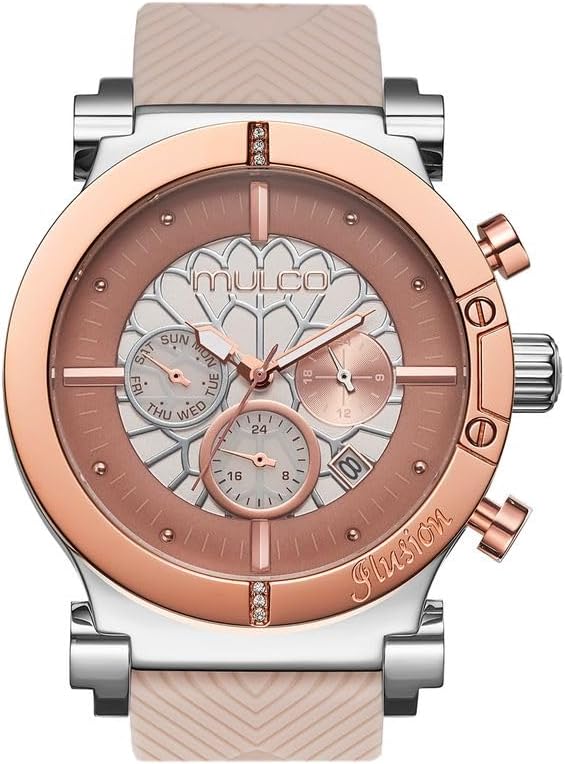
Image: Front view of the MULCO Dream Catcher Women's Watch in beige, showcasing the dial, hands, and silicone strap.
The MULCO Dream Catcher watch combines a stylish design with practical features. Key components include:
- Case: 46mm Stainless Steel
- Movement: Miyota JP25 Quartz Analog
- Strap: 100% Silicone, hypoallergenic and sweat-resistant
- Water Resistance: 10 ATM (100 meters / 330 feet)
- Functions: Hour, Minute, Second, Day, Date, 24-Hour Sub-dials
- Battery: SR621SW

Image: Illustration of the watch's water resistance, indicating 100 meters / 330 feet (10 ATM) suitability for swimming and showering.
Setup and Initial Use
Before using your watch, follow these steps to set the time, day, and date.
Setting the Time, Day, and Date

Image: Visual guide showing the crown positions for setting the watch.
- Step 1: Initial Crown Pull
Pull the crown out to the 1st click position. If there is a white plastic lock, pull it up to remove it. - Step 2: Set Hour and Minute Hands
Turn the crown to set the hour and minute hands to the correct time. - Step 3: Push Crown In
Push the crown in fully to its normal position. These steps ensure the watch battery is fully engaged.
Detailed Setting Instructions

Image: Diagram of the watch face highlighting the 24-hour hand, day hand, date disc, and buttons "A" and "B", with detailed instructions for setting.
- Setting the Day
- Pull the crown out to the 2nd Click Position.
- Turn the crown clockwise to set the day.
- After the day has been set, push the crown back to the Normal position.
- Note: The day changes during the period from 9 AM to 5 AM.
- Setting the Date
- Pull the crown out to the 1st Click Position.
- Turn the crown clockwise to set the date.
- Note: If the date is set between the hours of around 9:00 PM and 1:00 AM, the date may not change on the following day.
- After the date has been set, push the crown back to the Normal position.
- Setting the Time
- Pull the crown out to the 2nd Click Position.
- Turn the crown clockwise to set hour and minute hands.
- After the time has been set, push the crown back to the Normal position.
- Setting the Dual Time (24-Hour Hand)
- Press button "A" to set the dual time hand forward in units of 15 minutes.
- Press button "B" to set the dual time hand back in units of 15 minutes.
- Note: The dual time hand can be put rapidly by continuously pressing button "A" or "B".
Operating the Watch
Once set, your MULCO Dream Catcher watch operates continuously. The Miyota JP25 quartz movement ensures accurate timekeeping.
- Time Display: The main hands display hours, minutes, and seconds.
- Day Display: The day sub-dial indicates the current day of the week.
- Date Display: The date disc shows the current numerical date.
- 24-Hour Display: The 24-hour sub-dial provides an alternative time format or a second time zone.
- Water Resistance: The watch is water-resistant up to 10 ATM (100 meters / 330 feet). This means it is suitable for recreational swimming, showering, and snorkeling. Avoid hot water, steam, or operating buttons underwater to prevent water ingress.
Maintenance and Care
Proper maintenance will help preserve the appearance and functionality of your MULCO watch.
- Cleaning the Watch:
Wipe the watch case and crystal with a soft, dry cloth. For the silicone strap, use a mild soap and water solution, then rinse thoroughly and dry completely. Avoid harsh chemicals or abrasive materials.
- Water Resistance:
Ensure the crown is always pushed in fully to maintain water resistance. After exposure to saltwater, rinse the watch with fresh water and dry it with a soft cloth.
- Battery Replacement:
The watch uses an SR621SW battery. When the watch stops or the hands move erratically, it's time for a battery replacement. It is recommended to have the battery replaced by a qualified watch technician to ensure proper sealing and water resistance.
- Storage:
When not in use, store your watch in a cool, dry place, away from direct sunlight and extreme temperatures. Avoid placing it near magnetic fields, which can affect the quartz movement's accuracy.
- Impact and Scratches:
While the watch features mineral scratch-resistant glass, it is not entirely scratch-proof. Avoid dropping the watch or exposing it to hard impacts.

Image: Rear view of the MULCO Dream Catcher watch, displaying the stainless steel case back with an engraved model number and water resistance rating.
Troubleshooting
If you encounter any issues with your watch, please refer to the following common troubleshooting steps:
| Problem | Possible Cause | Solution |
|---|---|---|
| Watch not running | Depleted battery, crown not fully pushed in. | Ensure crown is fully pushed in. If still not running, replace battery (recommended by a professional). |
| Incorrect time/date | Time/date not set correctly, or crown accidentally pulled out. | Refer to the "Setup and Initial Use" section to reset the time, day, and date. Ensure the crown is fully pushed in after setting. |
| Water inside watch | Crown not fully pushed in, or exposure to hot water/steam. | Immediately take the watch to a qualified service center. Do not attempt to open the watch yourself. |
| Sub-dials not functioning | Incorrect setting, or internal movement issue. | Review the "Detailed Setting Instructions" for sub-dial adjustment. If the issue persists, contact customer support. |
Specifications
| Feature | Detail |
|---|---|
| Model Number | MW3-24053-113 |
| Case Material | Stainless Steel |
| Case Diameter | 46 mm |
| Case Thickness | 12.6 mm |
| Band Material | Silicone |
| Band Length | 130 mm |
| Movement Type | Quartz Analog (Miyota JP25) |
| Display Type | Analog |
| Water Resistance Depth | 100 Meters (10 ATM) |
| Power Source | Battery Powered |
| Battery Type | SR621SW |
| Item Weight | 6.08 ounces |
| UPC | 850073403198 |
Warranty and Support
MULCO watches come with a commitment to quality and customer satisfaction.

Image: MULCO watch box and warranty card, illustrating the 2-year full coverage.
2-Year Full Coverage Warranty
MULCO watches are covered by a 2-year warranty. If the product proves to be defective in material or workmanship under normal use, it will be repaired or replaced free of charge at the discretion of Mulco Watches Inc.
This warranty covers watches purchased in the USA, Panama, Colombia, Venezuela, Australia, or Africa. For customers outside these regions, shipping costs for warranty service will be borne by the customer both ways, and the watch will be repaired free of charge.
Important: To apply for warranty service, you will need a copy of your Sales Receipt. Please contact MULCO WATCHES for more information or support.
For further assistance, please visit the official MULCO website or contact their customer service.