
1. Introduction
Thank you for choosing the Mingtawn T8 Smartwatch. This manual provides essential information for setting up, operating, and maintaining your device. Please read it carefully to ensure proper use and optimal performance.

Image: The Mingtawn T8 Smartwatch on a user's wrist, showcasing its vibrant display and multiple application icons.
2. What's in the Box
The Mingtawn T8 Smartwatch package includes the following items:
- 1 x Mingtawn T8 Smartwatch
- 1 x Charging Cable
- 1 x User Manual

Image: A visual representation of the package contents, including the smartwatch, charging cable, and user manual.
3. Setup Guide
3.1. Charging the Smartwatch
Before first use, fully charge your smartwatch. Connect the magnetic charging cable to the charging points on the back of the watch and plug the USB end into a power adapter (not included) or a computer's USB port.

Image: The smartwatch placed on its charging stand, illustrating the charging process.
3.2. App Installation (GloryFit)
To unlock all features and synchronize data, download the "GloryFit" app on your smartphone.
- Scan the QR code provided in the manual or on the watch screen, or search for "GloryFit" in your phone's app store (App Store for iOS, Google Play Store for Android).
- Install the app and create an account or log in.

Image: A visual guide demonstrating how to connect the smartwatch to a smartphone via the GloryFit app, showing the QR code and app interface. The QR code links to http://qr20.cn/AOTitN.
3.3. Pairing the Smartwatch with Your Phone
Ensure your phone's Bluetooth is enabled and the smartwatch is sufficiently charged.
- Open the GloryFit app on your smartphone.
- Navigate to the "Device" or "Add Device" section within the app.
- The app will search for available devices. Select "T8" from the list to pair.
- Follow any on-screen prompts to complete the pairing process.
For Bluetooth Calling Functionality:
- After initial pairing, go to your phone's Bluetooth settings.
- Look for "T8" (or a similar device name) and connect to it. This separate connection is required for call audio.
- Ensure the call audio function is enabled in the watch's settings or the GloryFit app.
4. Operating Instructions
4.1. Display and Watch Faces
The smartwatch features a 1.83-inch HD touchscreen. You can customize the watch face through the GloryFit app, choosing from over 100 designs or using your own photos.

Image: A collection of customizable watch faces available for the Mingtawn T8 Smartwatch, demonstrating the clarity of the 1.83-inch HD display.
4.2. Bluetooth Calls and Smart Notifications
Once connected via Bluetooth, you can make and receive calls directly from your watch. The watch also displays real-time notifications from your smartphone applications (e.g., WhatsApp, Facebook, Instagram, SMS).
- Answering/Making Calls: Tap the phone icon on the watch screen to access call history, frequent contacts, or the dial pad.
- Notifications: Swipe down or up on the watch face to view recent notifications.

Image: The smartwatch interface displaying features for answering calls, viewing call history, and receiving notifications from various social media and messaging apps.
4.3. Sports Modes and Activity Tracking
The smartwatch offers over 100 sports modes to track your physical activity, including running, cycling, yoga, and more. It records data such as calories burned, steps taken, distance, and pace.

Image: A visual display of the diverse sports modes available, alongside users engaging in various activities like basketball, hiking, and cycling, with their activity data shown on the watch.
4.4. Health Monitoring
The integrated sensors monitor your heart rate, blood oxygen (SpO2), and sleep quality. Data is synchronized with the GloryFit app for detailed analysis.
- Heart Rate: Continuous 24-hour heart rate monitoring.
- Blood Oxygen (SpO2): Monitors blood oxygen levels throughout the day.
- Sleep Tracking: Records deep sleep, light sleep, and awake times.
- Women's Health: Specific mode for menstrual cycle tracking, period management, ovulation control, and period prediction. Set reminders via the GloryFit app.
- Stress Measurement: Provides stress level readings and suggests breathing exercises for relaxation.

Image: The smartwatch showing heart rate graphs and sleep duration, with accompanying images of a user on an exercise bike and another sleeping, demonstrating health monitoring features.

Image: Detailed views of the smartwatch interface for heart rate, guided breathing, sleep analysis, and blood oxygen monitoring, emphasizing precise health tracking.
4.5. Additional Functions
- Voice Assistant: Integrated AI voice assistant for tasks like making calls or playing music (requires phone's voice assistant to be active).
- Music Playback Control: Control music on your phone directly from the watch.
- Remote Camera Control: Use your watch as a remote shutter for your phone's camera.
- Flashlight: Activate a flashlight function on the watch screen.
- Alarm Clock: Set multiple alarms.
- Timer/Stopwatch: Built-in timer and stopwatch functions.
- Find Phone: Locate your misplaced phone by triggering an alert from your watch.
- Weather Updates: Get real-time weather forecasts.
- Drink Reminders: Set reminders to drink water.

Image: The smartwatch showcasing various practical functions such as remote camera control, music playback, hydration reminders, alarm settings, and current weather information.
5. Maintenance
- Cleaning: Wipe the watch screen and strap regularly with a soft, dry cloth. Avoid using harsh chemicals.
- Water Resistance: The watch has an IP67 water resistance rating, meaning it is resistant to splashes and brief immersion (up to 1 meter). It is not suitable for swimming or prolonged immersion.
- Charging: Use only the provided charging cable. Avoid exposing the charging contacts to water or corrosive liquids.
- Storage: Store the watch in a cool, dry place when not in use.
6. Troubleshooting
| Problem | Solution |
|---|---|
| Watch does not turn on. | Ensure the watch is fully charged. Connect it to the charger for at least 30 minutes. |
| Cannot pair with phone. |
|
| Notifications are not received. |
|
| Bluetooth calls not working. |
|
| Inaccurate health data. |
|
7. Specifications
| Feature | Detail |
|---|---|
| Model Number | T8 |
| Display Size | 1.83 inches |
| Display Type | Digital, HD Touchscreen |
| Connectivity | Bluetooth 5.3 |
| Compatibility | iOS 11.0 and above, Android 7.0 and above |
| Battery Type | Lithium Ion |
| Battery Life | 3-10 days (typical use) |
| Water Resistance | IP67 (Resistant to splashes, not for swimming) |
| Strap Material | Silicone |
| Watch Dimensions | Approx. 45mm x 40mm x 10mm (1.77 x 1.57 x 0.39 inches) |
| Watch Weight | 32g |
| App Name | GloryFit |
| Special Features | Heart Rate Monitor, Blood Oxygen Monitor, Sleep Tracker, Bluetooth Calling, Voice Control, Music Player, Notifications, Camera Remote, Alarm, Timer, Find Phone, Weather, Women's Health Tracking, Stress Measurement. |
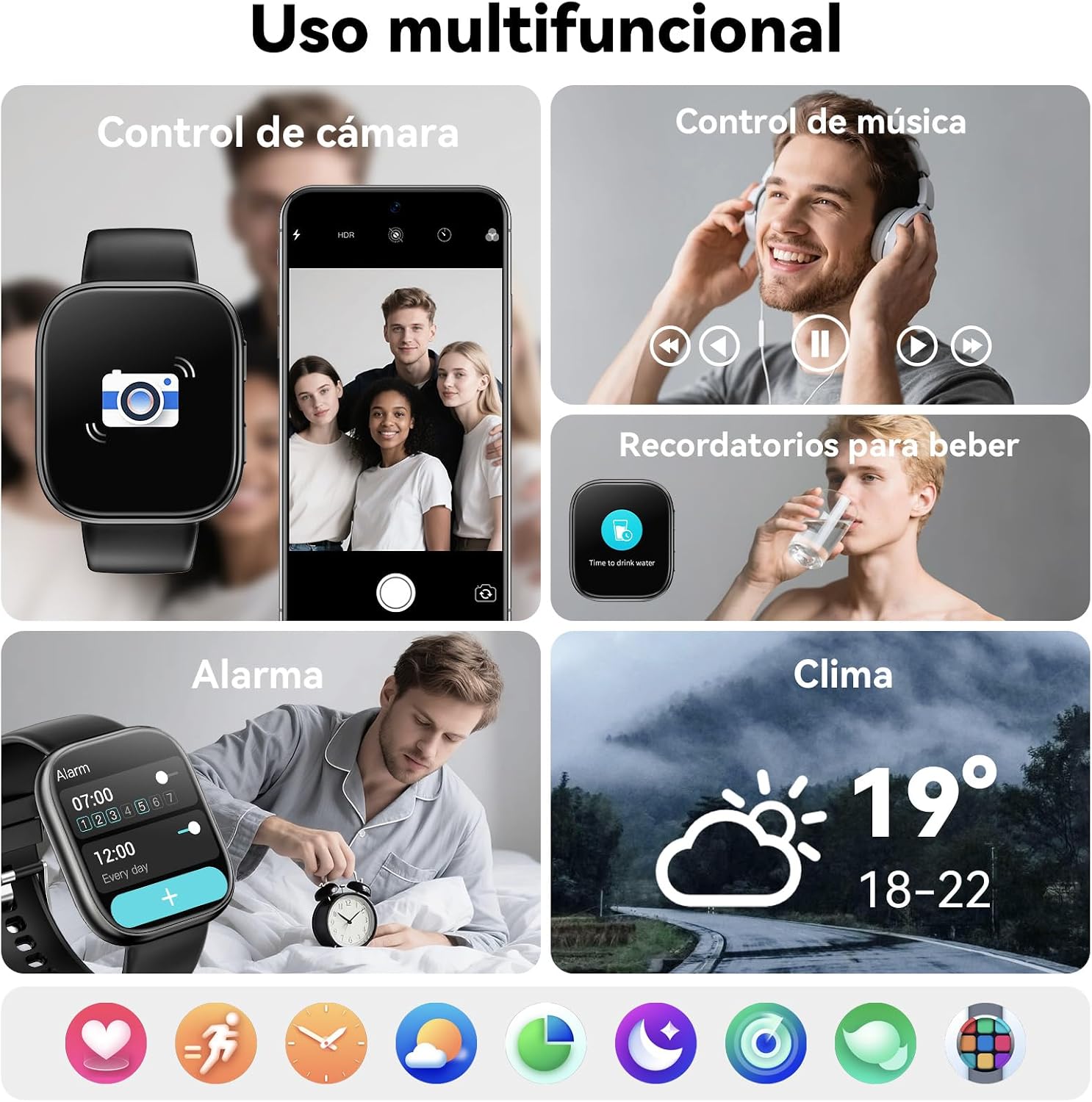
Image: A central image of the smartwatch surrounded by icons and text describing its innovative features and performance enhancements.
8. Warranty and Support
Mingtawn offers a one-year repair or replacement service for this product. If you have any questions or require assistance, please contact our customer support team. Our team is available to provide professional support.
For support, please refer to the contact information provided in your product packaging or on the official Mingtawn website.