
1. Important Safety Instructions
Please read all instructions carefully before using this appliance and retain them for future reference. Failure to follow these instructions may result in electric shock, fire, or serious injury.
- Always place the fan on a stable, flat surface to prevent tipping.
- Do not operate the fan with a damaged cord or plug. If the supply cord is damaged, it must be replaced by the manufacturer, its service agent, or similarly qualified persons to avoid a hazard.
- Keep the fan away from water or other liquids. Do not immerse the fan in water.
- Do not insert fingers or foreign objects into the fan grille during operation.
- Unplug the fan from the power outlet when not in use, before cleaning, or before moving it.
- This appliance is not intended for use by persons (including children) with reduced physical, sensory or mental capabilities, or lack of experience and knowledge, unless they have been given supervision or instruction concerning use of the appliance by a person responsible for their safety.
- Children should be supervised to ensure that they do not play with the appliance.
- Do not use the fan near curtains, plants, or other objects that could be drawn into the fan.
- Ensure the voltage indicated on the fan matches the local power supply voltage before connecting.
2. Package Contents
Verify that all items are present and in good condition upon opening the package.
- 1 x DREO Tower Fan (DR-HTF024S)
- 1 x Remote Control (includes 2 x AAA Batteries)
- 1 x User Manual
- A Set of Accessories (for base assembly)
3. Product Diagram
Familiarize yourself with the components of your DREO Smart Tower Fan.

Image: Overall view of the DREO Smart Tower Fan, highlighting its sleek design and powerful airflow.

Image: The fan demonstrating its adjustable height feature, extending from 40 to 45 inches.
The fan features a control panel on top, a main tower body with air outlets, and a stable circular base. The adjustable height mechanism is located at the base of the tower.
4. Setup
Follow these steps to assemble and prepare your tower fan for use.
- Base Assembly: Take the two halves of the circular base. Align them and rotate until they securely snap together to form a single unit.
- Attach Tower: Carefully place the main tower fan body onto the assembled base. Ensure it is firmly seated and locked into position. The cord can be routed through designated channels underneath the base.
- Power Connection: Plug the power cord into a standard electrical outlet.

Image: Illustration of the fan's one-step height adjustment, allowing it to extend from 40 to 45 inches.
5. Operating Instructions
Your DREO Smart Tower Fan offers multiple ways to control its functions.
5.1 Control Panel
The intuitive control panel located on the top of the fan allows for direct operation.
- Power Button: Turns the fan On/Off.
- Mode Button: Cycles through Normal, Natural, Sleep, and Auto modes.
- Speed Buttons (+/-): Adjusts fan speed from 1 to 9.
- Oscillation Button: Activates/deactivates 90° oscillation.
- Timer Button: Sets the auto-off timer (up to 12 hours).
5.2 Remote Control
The included remote control provides convenient access to all fan functions from a distance.
- Ensure the remote control batteries (2 x AAA) are correctly installed.
- Point the remote control directly at the fan's receiver for optimal response.
5.3 DREO App Control & Smart Integration
For enhanced control and smart features, download the DREO app and connect your fan.
- Download the DREO app from your smartphone's app store.
- Follow the in-app instructions to pair your fan via Bluetooth or Wi-Fi.
- Once connected, you can control all fan functions, set schedules, and customize modes from your phone.
- The fan is compatible with Google Assistant and Amazon Alexa for voice control. Refer to the DREO app for instructions on linking your fan to these smart home platforms.

Image: A user controlling the DREO Smart Tower Fan via the DREO mobile application.

Image: Screenshot of the DREO app demonstrating customizable sleep modes and scheduling options.
5.4 Modes and Speeds
The fan offers 4 distinct modes and 9 speed settings for personalized comfort.
- Normal Mode: Provides a constant airflow at your selected speed.
- Natural Mode: Simulates a natural breeze by varying fan speed.
- Sleep Mode: Operates at a lower speed with reduced noise for undisturbed rest.
- Auto Mode: Adjusts fan speed automatically based on ambient room temperature.
- 9 Speeds: Fine-tune the airflow intensity from a gentle breeze (Speed 1) to powerful cooling (Speed 9).
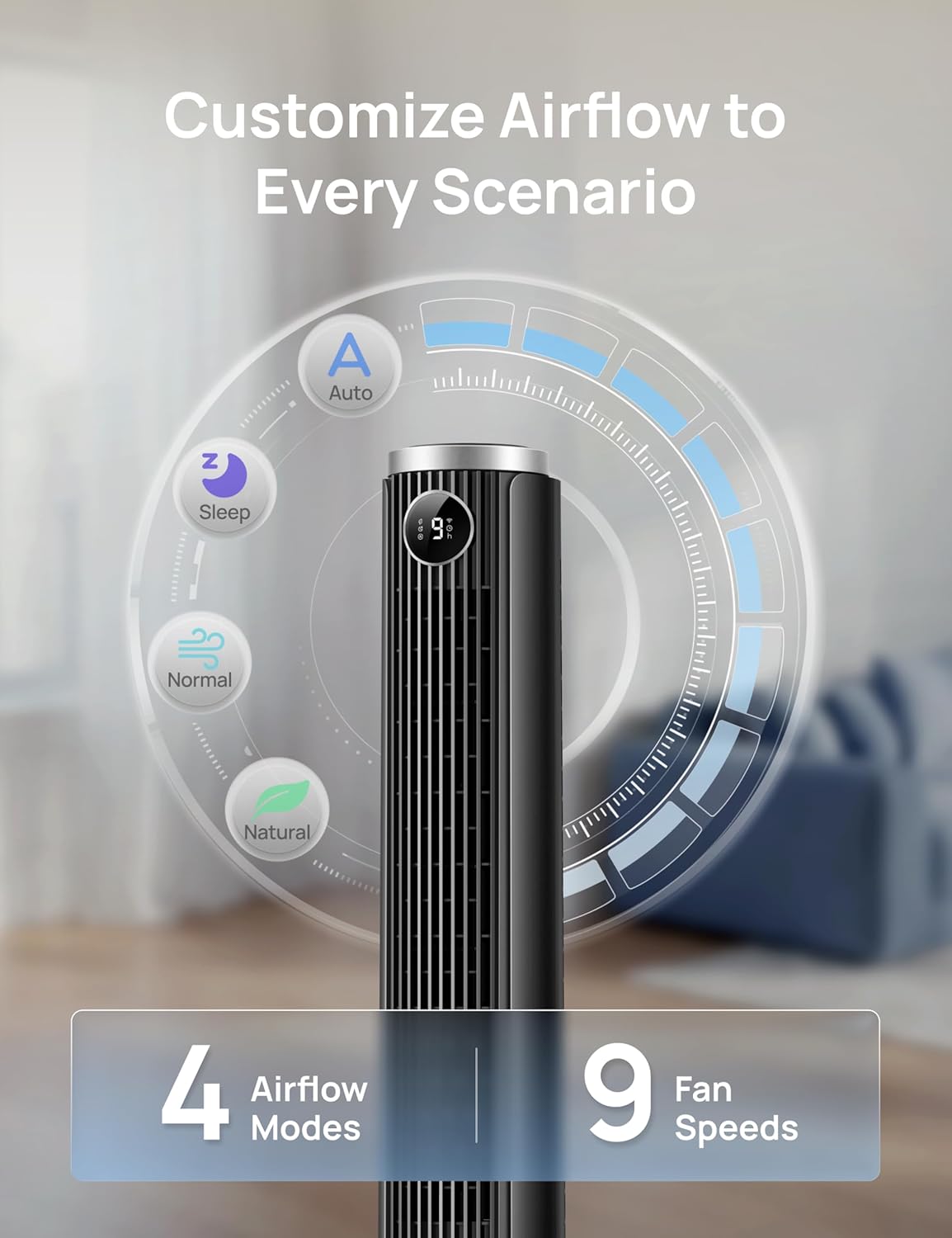
Image: Visual representation of the fan's 4 airflow modes (Auto, Sleep, Normal, Natural) and 9 speed settings.
5.5 Oscillation
Activate oscillation for wider air distribution.
- The fan oscillates 90° to cover a larger area, ensuring even air circulation throughout the room.

Image: The DREO Smart Tower Fan demonstrating its 90-degree oscillation feature, distributing air across a wide area.
5.6 Timer
Set the fan to automatically turn off after a specified period.
- The timer can be set for up to 12 hours, allowing you to conserve energy and enjoy cooling as you fall asleep.
5.7 Adjustable Height
Customize the fan's height to suit your needs.
- The fan's height can be adjusted from 40 inches to 45 inches by pressing the foot pedal at the base. This allows you to direct airflow effectively whether you are sitting or standing.
6. Maintenance
Regular maintenance ensures optimal performance and longevity of your fan.
6.1 Cleaning
- Always unplug the fan before cleaning.
- Use a soft, damp cloth to wipe the exterior surfaces. Do not use abrasive cleaners or solvents.
- Use a vacuum cleaner with a brush attachment to gently remove dust from the air intake and outlet grilles.
- Do not allow water to drip into the interior of the fan.
6.2 Storage
- If storing the fan for an extended period, clean it thoroughly.
- Store the fan in its original packaging or a suitable box in a cool, dry place.
- Avoid placing heavy objects on top of the fan during storage.
7. Troubleshooting
Refer to this section for solutions to common issues.
| Problem | Possible Cause | Solution |
|---|---|---|
| Fan does not turn on. | No power supply. Power cord not properly plugged in. Remote control batteries are dead. | Check if the power outlet is working. Ensure the power cord is securely plugged into the outlet and the fan. Replace remote control batteries. |
| Weak airflow. | Fan speed is too low. Air inlets/outlets are blocked. | Increase the fan speed setting. Clean any dust or obstructions from the grilles. |
| Fan is noisy. | Fan is on a high speed setting. Fan is not on a stable surface. Internal obstruction. | Reduce the fan speed. Place the fan on a flat, stable surface. Unplug and check for any foreign objects inside the grilles. |
| Remote control not working. | Batteries are dead or incorrectly inserted. Obstruction between remote and fan. | Replace batteries and ensure correct polarity. Ensure a clear line of sight between the remote and the fan. |
| App control not working. | Fan not connected to Wi-Fi/Bluetooth. App requires update. | Check app for connection status and re-pair if necessary. Ensure Wi-Fi is active. Update the DREO app to the latest version. |
8. Specifications
Detailed technical specifications for the DREO Smart Tower Fan (DR-HTF024S).
| Feature | Specification |
|---|---|
| Brand | DREO |
| Model Name | DR-HTF024S |
| Colour | Black |
| Electric Fan Design | Floor Fan (Tower) |
| Power Source | Corded Electric |
| Product Dimensions (D x W x H) | 33D x 33W x 115H Centimetres |
| Adjustable Height | 40" - 45" |
| Special Features | App Operable, Oscillating, Portable, Quiet Operation, Remote Controlled |
| Recommended Uses | Air Circulation, Cooling, Ventilating |
| Controller Type | App Control, Remote Control, Touchpad Control |
| Number Of Speeds | 9 |
| Noise Level | 20 Decibels (minimum) |
| Wattage | 50 watts |
| Air Flow Capacity | 1473 Cubic Feet Per Minute |
| Oscillation Angle | 90° |
| Timer | 12 Hours |
| Material Type | Plastic |
| Item Weight | 7.92 Pounds |
| Certification | ETL |
9. Warranty and Support
DREO provides a warranty for this product. Please refer to the official DREO website or your purchase documentation for the most current and detailed warranty information.
- Warranty Period: Typically, DREO products come with a 1-year limited warranty from the date of purchase.
- Returns: Products purchased from Amazon.ca generally have a 30-day return policy for refund or replacement.
- Customer Support: For technical assistance, warranty claims, or general inquiries, please contact DREO customer support through their official website or the contact information provided in your product packaging.
- Online Resources: Visit the official DREO website for FAQs, product registration, and additional support resources.


