
1. Product Overview
The WALKINGPAD MX10 is a smart folding treadmill designed for home use, offering a convenient solution for integrating physical activity into your daily routine. Its compact vertical fold design allows for easy storage, making it suitable for various living spaces. The treadmill features an LED display, remote control, and app connectivity for tracking and managing your workouts. It supports speeds from 1 to 6.5 MPH, accommodating walking, brisk walking, and light jogging. An integrated desk tray provides a surface for laptops, tablets, or phones, enabling multitasking during exercise. The cushioned running belt and foldable side handles enhance comfort and stability.

Image: WALKINGPAD MX10 Treadmill in a 'Walk & Work' setup, showcasing its compact design and integrated desktop tray for multitasking.
2. Packing List
Ensure all components are present upon unboxing:
- Treadmill Unit
- Handles (2)
- Cup Holder
- Safety Key
- Power Cord
- Remote Control
- User Manual
- Screws (for handles/cup holder)
- Allen Key
- Battery (for remote control)
- Wristband
- Silicone Oil
3. Setup Instructions
The WALKINGPAD MX10 is designed for minimal assembly. Follow these steps to set up your treadmill:
- Unfold the Treadmill: Place the folded treadmill on a flat, stable surface. Locate the release mechanism (often a lever or knob) and carefully unfold the running deck until it lies flat. Ensure it locks securely into place.
- Install Handles: Attach the side handles to the designated slots on the treadmill frame. Secure them using the provided screws and Allen key. These handles offer additional stability during use.
- Attach Cup Holder: Secure the cup holder to the designated area on the handle assembly using the provided screws.
- Connect Power: Plug the power cord into the treadmill's power input, then into a grounded electrical outlet. Ensure the power switch on the treadmill is in the 'ON' position. The LED display should illuminate.
- Insert Safety Key: Attach the safety key to the designated slot on the console. Clip the other end of the safety key to your clothing before starting any workout. The treadmill will not operate without the safety key in place.
Video: Demonstrates the quick and easy setup process of the WALKINGPAD MX10, including unfolding, attaching handles, and powering on.

Image: Visual guide illustrating the steps to unfold the treadmill from its compact storage position to its operational state.
4. Operating Instructions
Familiarize yourself with the operational features of your WALKINGPAD MX10 treadmill.
4.1 Power On/Off
- To power on, ensure the power cord is connected and the main power switch is ON. The LED display will light up.
- To power off, press the power button on the remote control or the main power switch.
4.2 Using the Remote Control
The remote control allows you to start, stop, and adjust the speed of the treadmill.
- Start/Stop: Press the central button to start or stop the treadmill.
- Speed Adjustment: Use the '+' and '-' buttons to increase or decrease the speed. The speed range is 1-6.5 MPH.

Image: The compact remote control for easy adjustment of treadmill speed and operation.
4.3 LED Display
The integrated LED display shows key workout metrics at a glance:
- Time
- Speed
- Distance
- Calories Burned
- Steps

Image: The LED display clearly showing various workout metrics for real-time tracking.
4.4 App Control & Connectivity
Connect your treadmill to the companion app for enhanced features and workout tracking.
- Download the official WALKINGPAD app from your device's app store.
- Follow the in-app instructions to pair your device with the treadmill.
- The app allows for advanced control, personalized workout programs, and detailed progress tracking.

Image: App connectivity for interactive workouts and detailed fitness tracking.
4.5 Integrated Desk Tray & Device Holder
The treadmill features a built-in foldable multi-function tray and an adjustable device holder.
- Unfold the desk tray to place a laptop (up to 15.6 inches) or other items.
- Use the adjustable device holder to securely hold tablets or smartphones for viewing.
- A splash-free drink holder is also integrated for convenience.

Image: The versatile built-in foldable multi-function tray for work or entertainment.
5. Maintenance
Regular maintenance ensures the longevity and optimal performance of your treadmill.
- Cleaning: Wipe down the treadmill surfaces with a damp cloth after each use to remove sweat and dust. Avoid abrasive cleaners.
- Belt Lubrication: Apply silicone oil to the running belt every few months or as indicated by usage. Refer to the detailed instructions in the included User Manual for proper application.
- Belt Adjustment: Periodically check the running belt for proper alignment and tension. If the belt is off-center or slipping, adjust it according to the instructions in the User Manual using the provided Allen key.
- Storage: When not in use, fold the treadmill vertically for compact storage. Ensure it is placed in a dry, cool area away from direct sunlight.
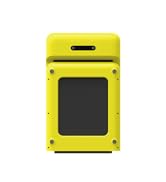
Image: The treadmill folded vertically, demonstrating its space-saving storage capability.
6. Troubleshooting
If you encounter issues with your WALKINGPAD MX10, refer to the following common solutions:
- Treadmill Not Starting:
- Ensure the power cord is securely plugged into both the treadmill and the wall outlet.
- Verify the main power switch is in the 'ON' position.
- Confirm the safety key is correctly inserted into its slot. The treadmill will not operate without it.
- Belt Slipping or Off-Center:
- The running belt may require adjustment. Refer to the 'Belt Adjustment' section in your User Manual for detailed instructions on how to re-center and tension the belt.
- Unusual Noises:
- Check for any loose parts or foreign objects under the belt.
- Ensure the treadmill is on a flat, stable surface.
- If the noise persists, consult the User Manual or contact customer support.
- Remote Control Not Responding:
- Check and replace the battery in the remote control if necessary.
- Ensure there are no obstructions between the remote and the treadmill's sensor.
For issues not covered here, please refer to the comprehensive troubleshooting guide in your User Manual or contact WALKINGPAD customer support.
7. Specifications
| Feature | Detail |
|---|---|
| Brand | WALKINGPAD |
| Model Name | MX10 Vertical Fold Treadmill |
| Product Dimensions | 56.9"D x 31.1"W x 41.2"H |
| Folded Size | 11.2"D x 31.1"W x 41.2"H |
| Item Weight | 86 Pounds |
| Material | Iron |
| Maximum Speed | 6.5 Miles per Hour |
| Minimum Speed | 1 Miles per Hour |
| Maximum Weight Recommendation | 265 Pounds |
| Motor Horsepower | 2 Horsepower (Brushless) |
| Special Features | Compact Design, Cushioned Running Belt, Foldable, Water Bottle Holder, LED Display, Remote Control, App Control |
| Assembly Required | No (minimal setup) |

Image: Detailed product dimensions for the WALKINGPAD MX10 treadmill.
8. Warranty and Support
Your WALKINGPAD MX10 treadmill comes with a 1-year warranty from the date of purchase, covering manufacturing defects. Please retain your proof of purchase for warranty claims.
For technical support, warranty inquiries, or replacement parts, please contact WALKINGPAD customer service through the official website or the contact information provided in your User Manual. You may also visit the WALKINGPAD Store on Amazon for additional resources.


