
Introduction
This manual provides detailed instructions for the Ayybboo Kids Digital Watch Model 8206B. Please read this manual carefully to understand the watch's functions, setup, and maintenance procedures. This digital watch is designed for children aged 5-12, featuring a 7-color LED backlight, multiple timekeeping functions, and a durable, water-resistant design.
Product Features
- 7-Color LED Backlight: Provides clear visibility in low-light conditions with customizable color options.
- Multi-functional Display: Includes time, date, day of the week, alarm, and stopwatch.
- 12/24 Hour Mode: Easily switch between standard and military time formats.
- 3ATM Water Resistance: Designed to withstand splashes, rain, and hand washing. Not suitable for swimming or bathing.
- Durable Construction: Features a scratch-resistant acrylic lens, robust ABS case, and a soft, comfortable TPU strap.
- Lightweight Design: Weighs approximately 23g for comfortable wear on small wrists.

Image: Overview of the watch's key features, including time, date, alarm, stopwatch, 12/24 hour mode, LED backlight, and water resistance.
Safety Information
- Water Resistance: The watch is 3ATM water resistant, meaning it can withstand splashes, rain, and hand washing. Do not press any buttons while the watch is wet or submerged. It is not suitable for swimming, diving, or bathing. Remove the watch before showering or swimming.
- Battery: Do not attempt to open the watch case or replace the battery yourself. Contact qualified personnel for battery replacement.
- Choking Hazard: Keep small parts, if any, away from very young children.

Image: Illustration of the watch's 30M water resistance, showing it is suitable for hand washing, rain, and splashes, with a clear warning against pressing buttons underwater.
Button Functions
Familiarize yourself with the watch buttons:

Image: Diagram indicating the functions of the four buttons on the watch: LIGHT, MODE, START, and RESET.
- LIGHT Button: Activates the LED backlight. Press and hold for 3 seconds to change backlight color.
- MODE Button: Cycles through different modes (Time, Alarm, Stopwatch). Used to enter setting mode.
- START Button: Used to start/stop stopwatch, adjust values in setting mode.
- RESET Button: Used to reset stopwatch, adjust values in setting mode.
Setup and Operating Instructions
1. Setting Time and Date
- In normal time display mode, press the MODE button three times until the seconds begin to flash.
- Press the RESET button to cycle through the setting options: Seconds → Hour → Minute → Month → Date → Day of the Week.
- Use the START button to adjust the flashing value.
- Once all settings are correct, press the MODE button to exit setting mode.
- To switch between 12-hour and 24-hour format, press the START button while the hour is flashing.
2. Using the Alarm
- From normal time display, press the MODE button once to enter Alarm mode.
- Press the RESET button to select the hour or minute to set. The selected value will flash.
- Use the START button to adjust the flashing hour or minute.
- Press the MODE button to exit Alarm setting mode.
- To turn the alarm ON/OFF, press the START button while in Alarm mode (without any value flashing). An alarm icon will appear/disappear.
3. Using the Stopwatch
- From normal time display, press the MODE button twice to enter Stopwatch mode.
- Press the START button to begin timing.
- Press the START button again to pause timing.
- Press the RESET button to clear the stopwatch to zero.
- Press the MODE button to return to normal time display.
4. Activating the LED Backlight
- Press the LIGHT button once to illuminate the display. The light will stay on for a few seconds.
- To change the backlight color, press and hold the LIGHT button for approximately 3 seconds. The color will cycle through the 7 available options. Release the button when your desired color is displayed.
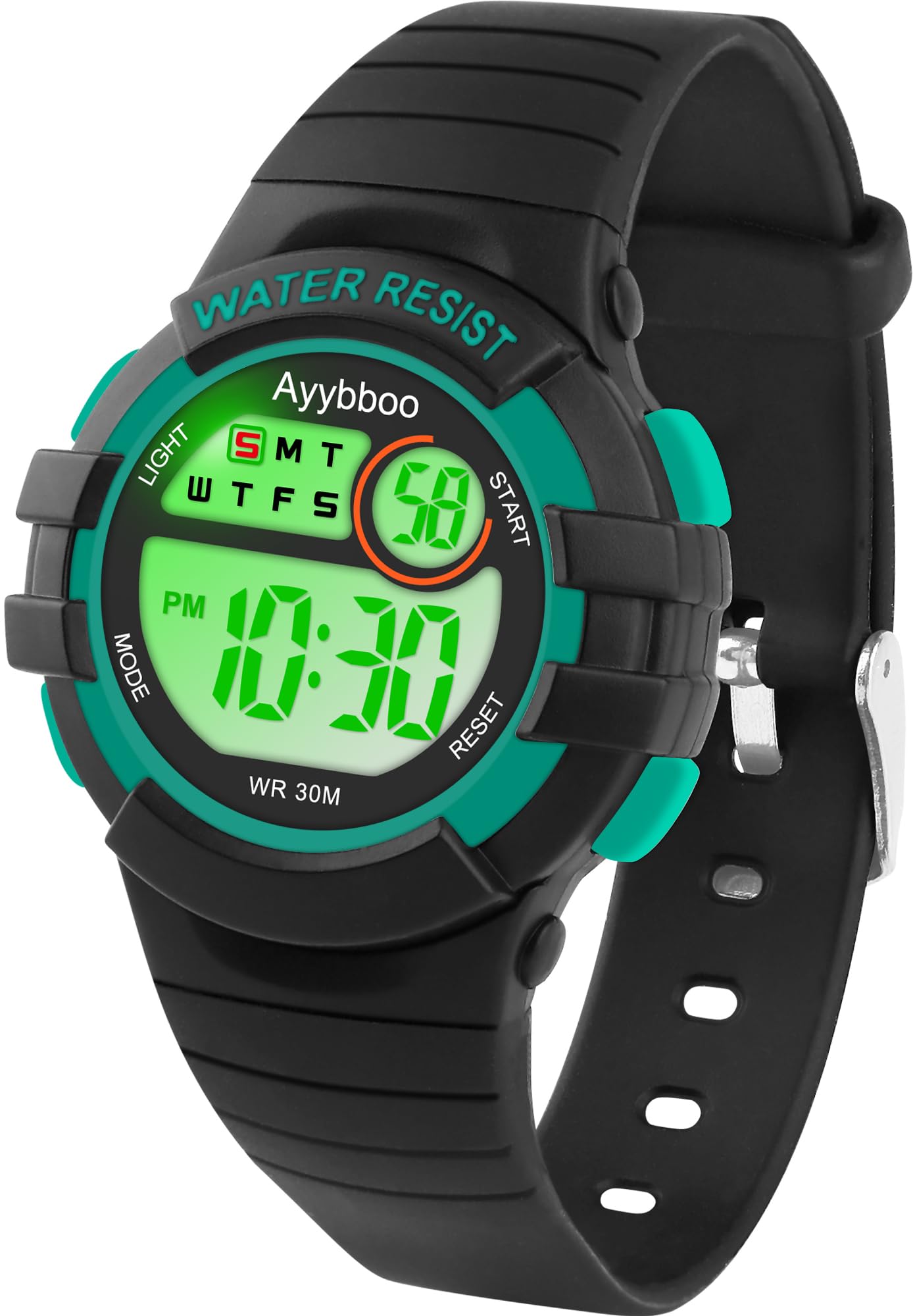
Image: Comparison of the watch display in normal conditions versus with the 7-color LED backlight activated, highlighting the luminous feature.
Maintenance
- Cleaning: Wipe the watch with a soft, dry cloth. For stubborn dirt, a slightly damp cloth can be used, followed by drying. Avoid harsh chemicals or abrasive cleaners.
- Water Exposure: While water resistant, prolonged exposure to water or steam (e.g., hot showers, saunas) should be avoided as it can compromise the seals.
- Temperature: Avoid exposing the watch to extreme temperatures, both hot and cold, as this can affect battery life and watch performance.
- Impact: Although durable, avoid dropping the watch or subjecting it to strong impacts to prevent damage to the internal components or casing.
- Battery Replacement: When the display dims or functions become erratic, the battery may need replacement. This should be done by a professional watch repair service to ensure water resistance is maintained.
Troubleshooting
- Display is blank or dim: The battery may be low or depleted. Replace the battery.
- Time is incorrect: Re-set the time following the "Setting Time and Date" instructions. Ensure the 12/24 hour mode is set correctly.
- Alarm does not sound: Ensure the alarm is activated (alarm icon visible on display). Check that the alarm time is set correctly.
- Watch is not responding to button presses: The watch might be in a frozen state. Try removing and reinserting the battery (professional service recommended) or allow the battery to fully deplete and then replace it.
- Water inside the watch: If condensation or water droplets appear inside the watch, stop using it immediately and seek professional repair. Water resistance may have been compromised.
Specifications
| Model Number | 8206B |
| Brand | Ayybboo |
| Display Type | Digital |
| Movement Type | Quartz (Japanese Automatic listed, but typically digital watches use quartz) |
| Case Material | ABS |
| Strap Material | TPU (Thermoplastic Polyurethane) |
| Lens Material | Acrylic |
| Water Resistance Rating | 30 Meters (3ATM) - Splash Resistant |
| Special Features | Alarm, 7-Color LED Backlight, Lightweight, Large Numbers, Scratch-Resistant |
| Power Source | Battery Powered |
| Case Diameter | Approx. 3.2 cm (1.26 inches) |
| Strap Width | Approx. 1.4 cm (0.55 inches) |
| Strap Length | Approx. 22.5 cm (8.86 inches) |
| Weight | Approx. 23 grams |

Image: Detailed view of the watch's dimensions and material components, including the acrylic glass, stainless steel case back, and soft TPU strap.
Warranty and Support
This product is subject to a 30-day return policy from the date of purchase. For specific terms and conditions regarding returns or warranty claims, please refer to the retailer's policy where the watch was purchased.
For further assistance or technical support, please contact the retailer or the manufacturer, Ayybboo, through their official channels.