
1. Introduction
This manual provides detailed instructions for the installation, operation, and maintenance of your LICAEVEY Keyless Digital Handle Lock (Model 6068). This advanced smart lock offers multiple secure unlocking methods, including fingerprint, PIN code, dynamic password, IC card, traditional key, and control via the Tuya App.
Please read this manual thoroughly before installation and use to ensure proper functionality and security.
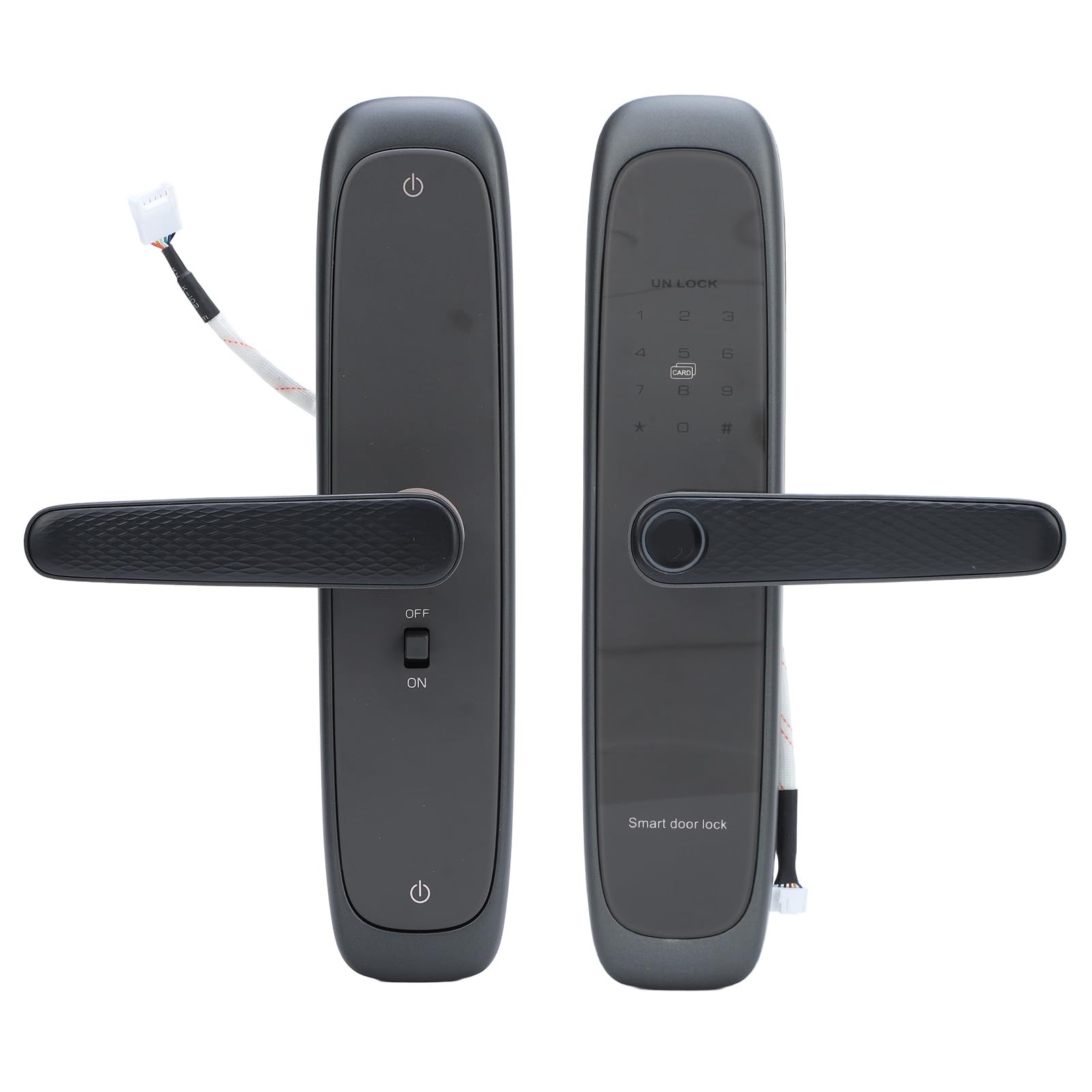
Image 1.1: Front view of the LICAEVEY Keyless Digital Handle Lock.
2. Product Components and Dimensions
Before installation, verify that all components are present in the package. Refer to the image below for a visual guide to the lock's parts and their dimensions.

Image 2.1: Detailed diagram of the lock's components and overall dimensions.
2.1. Components List
- 8 x AA batteries: Power source for the lock (4 required for operation, 4 spare).
- Handle: Ergonomic lever for manual operation.
- One-key on/off switch: For quick activation or deactivation of the lock's electronic functions.
- Touch keypad: Used for PIN code entry.
- IC card reader: Area for scanning IC cards for access.
- Semiconductor fingerprint sensor: For biometric fingerprint recognition.
- Type-C emergency power port: For temporary power supply using a Type-C cable in case of battery depletion.
- Invisible keyhole: Concealed access point for the traditional mechanical key.
2.2. Lock Body Dimensions
The lock body (mortise) has specific dimensions for proper installation. Please ensure your door's mortise cutout matches these specifications.

Image 2.2: Measurements for the lock mortise, including length, width, and backset.
- Overall Dimensions: Approximately 35L x 18W Centimeters (for the entire handle assembly).
- Mortise Dimensions: Refer to Image 2.2 for detailed measurements including 160mm length, 68mm backset, and 22mm faceplate width.
3. Setup and Installation
Installation of the LICAEVEY Keyless Digital Handle Lock requires careful attention to detail. It is recommended to follow the detailed instructions provided in the physical user manual included with your product. Below are general guidelines and important notes.

Image 3.1: Complete package contents of the smart door lock.
3.1. Pre-Installation Checklist
- Ensure your door thickness and backset are compatible with the lock's specifications.
- Verify all components listed in Section 2.1 are present.
- Gather necessary tools: screwdriver, measuring tape, drill (if new holes are required).
3.2. Battery Installation
The lock requires 4 AA batteries (not included). The battery compartment is located on the inner lock handle. To install:
- Unscrew the back screws of the inner lock handle with a screwdriver.
- Carefully open the battery cover.
- Insert 4 AA batteries, ensuring correct polarity (+/-).
- Replace the battery cover and secure it with the screws.

Image 3.2: Separate views of the internal and external lock handles, showing wiring.
3.3. Tuya App Connection (Initial Pairing)
To connect your lock to the Tuya App:
- Download the Tuya App from your smartphone's app store.
- Create an account or log in.
- Follow the in-app instructions to add a new device. Ensure your phone's Bluetooth and Wi-Fi are enabled.
- The app will guide you through the pairing process, which typically involves activating a pairing mode on the lock (refer to the physical manual for specific steps).
4. Operating Instructions
The LICAEVEY Keyless Digital Handle Lock offers multiple convenient ways to unlock your door.

Image 4.1: Overview of the five primary unlocking methods.
4.1. Fingerprint Unlock
To unlock using your fingerprint:
- Place your registered finger flat on the semiconductor fingerprint sensor located on the handle.
- Hold your finger steady until the lock emits a confirmation sound or light.
- The lock will unlock upon successful recognition.
4.2. PIN Code Entry
To unlock using a PIN code:
- Touch the keypad to activate it.
- Enter your 8-digit PIN code.
- Press the '#' key to confirm. The lock will unlock if the code is correct.
Anti-Peeping Feature: You can enter random digits before or after your actual 8-digit PIN code (up to a total of 16 digits) to prevent others from guessing your code. For example, [random digits] + [your 8-digit PIN] + [random digits] + #.

Image 4.2: Close-up of the lock's touch keypad and integrated fingerprint sensor.
4.3. Card Access
To unlock using an IC card:
- Present your registered IC card to the IC card reader area on the lock (typically indicated by a card icon).
- Hold the card briefly until the lock confirms recognition.
- The lock will unlock upon successful card recognition.
4.4. Tuya App Control
To control your lock using the Tuya App:
- Open the Tuya App on your smartphone.
- Ensure your lock is connected to your home Wi-Fi network and the app.
- From the app interface, you can remotely lock or unlock the door, manage user access (add/delete fingerprints, PINs, cards), generate dynamic passwords, and view activity logs.

Image 4.3: Remote control of the smart lock via the Tuya App on a smartphone.
4.5. Key Unlock (Emergency Access)
In case of emergency, battery depletion, or electronic malfunction, you can use the traditional mechanical key:
- Locate the invisible keyhole on the external handle.
- Insert the mechanical key provided with your lock.
- Turn the key to unlock the door.
5. Maintenance
Proper maintenance ensures the longevity and reliable operation of your smart lock.
5.1. Battery Replacement
The lock will emit a low voltage alarm (at 4.8±0.2V) when the batteries are running low. Replace all 4 AA batteries promptly to avoid loss of functionality. Refer to Section 3.2 for battery installation steps.
5.2. Cleaning
Wipe the lock surface with a soft, dry cloth. Avoid using abrasive cleaners, solvents, or harsh chemicals that may damage the finish or electronic components. Keep the fingerprint sensor and keypad clean for optimal performance.
6. Troubleshooting
If you encounter issues with your lock, refer to the following common problems and solutions:
- Lock not responding:
Solution: Check the battery level. If the low voltage alarm has sounded, replace the batteries immediately. Ensure the one-key on/off switch is in the 'ON' position. - Fingerprint not recognized:
Solution: Ensure your finger is clean and dry. Try placing your finger on the sensor at a slightly different angle. If issues persist, re-register your fingerprint through the Tuya App or lock's administration menu. - PIN code not working:
Solution: Verify that the correct 8-digit PIN code is entered. Ensure you press the '#' key after entering the code. Be mindful of the anti-peeping feature; if used, ensure the correct sequence is followed. - IC card not recognized:
Solution: Ensure the card is correctly registered. Present the card firmly to the reader. Try another registered card if available. - Tuya App connectivity issues:
Solution: Check your home Wi-Fi network status. Ensure your smartphone has a stable internet connection. Restart the Tuya App. If necessary, re-pair the lock with the Tuya App following the initial setup instructions. - Lock is completely unresponsive (no power):
Solution: Use the Type-C emergency power port to temporarily power the lock with a 5V 2A power bank or adapter. Alternatively, use the mechanical key for immediate access.
7. Specifications
| Feature | Specification |
|---|---|
| Item Type | Fingerprint Keypad Door Handle Lock |
| Material | Aluminum Alloy |
| Unlocking Methods | Fingerprint, PIN Code, Dynamic Password, Card, Key, Tuya App |
| Fingerprint Sensor | Semiconductor Fingerprint Sensor |
| Administrator Capacity | 10 Sets |
| Fingerprint Capacity | 50 Sets |
| Fingerprint, Password, Card Capacity | 250 Sets |
| Rejection Rate (FRR) | ≤0.1% |
| False Acceptance Rate (FAR) | ≤0.0001% |
| Comparison Time | ≤0.5 Seconds |
| Power Supply Voltage | 6V (4x AA Batteries, not included) |
| Standby Current | ≤50uA |
| Dynamic Current | ≤180mA |
| Low Voltage Alarm | 4.8±0.2V |
| Emergency Power Supply | Type C 5V 2A |
| Operating Temperature | -25℃~60℃ |
| Operating Relative Humidity | 20%~90%RH |
| Keyboard | Standard 12 Key Touch Keyboard |
| Password Length | 8 Digits |
| Anti-Peeping Password Length | 16 Digits |
| Double Lock | Supported |
| Lock Core Standard | Class C I B+ Lock Core |
| Product Dimensions (L x W) | 35L x 18W Centimeters |
8. Warranty and Support
For warranty information, technical assistance, or customer support regarding your LICAEVEY Keyless Digital Handle Lock (Model 6068), please contact LICAEVEY customer service through your purchase platform or the official brand website. Please have your product model number and purchase details ready when contacting support.