
Introduction
This manual provides detailed instructions for the assembly, operation, and maintenance of your AOGLLATI Loft Bed. Please read all instructions carefully before assembly and use to ensure safe and correct operation. Keep this manual for future reference.
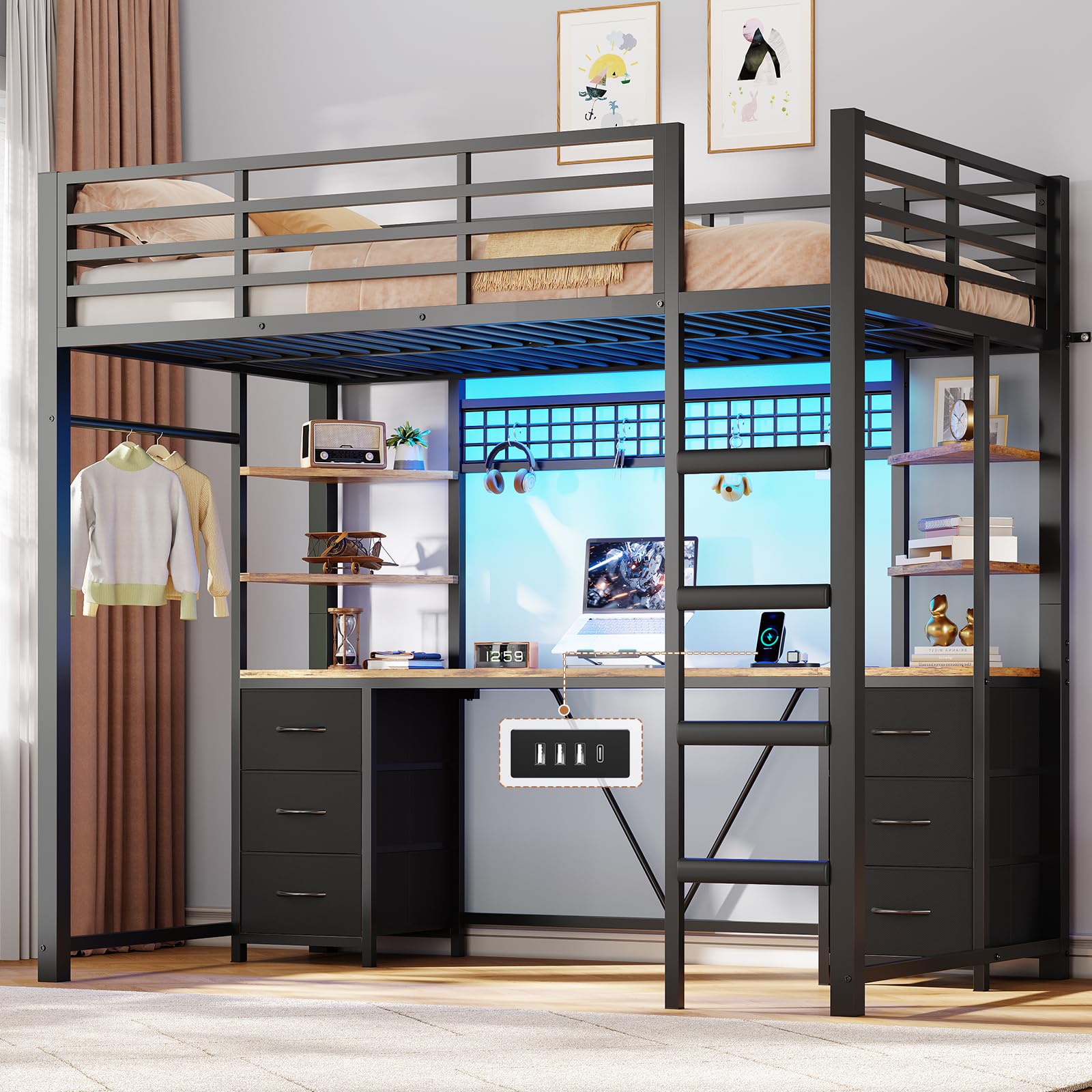
Image: Overall view of the AOGLLATI Loft Bed, showcasing the elevated bed, integrated desk, storage drawers, and shelves.
Safety Guidelines
- Weight Capacity: The bed is designed to support a maximum weight of 250 kg. Do not exceed this limit.
- Mattress Thickness: Use a mattress with a recommended thickness of 10-15 cm. Ensure the safety barrier extends at least 13 cm above the mattress surface.
- Anti-Tip Device: Always secure the bed to the wall using the provided anti-tip brackets to prevent accidental tipping.
- Assembly: Assembly should be performed by at least two adults. Follow the illustrated instructions precisely.
- Regular Checks: Periodically check all bolts and connections to ensure they remain tight.
- Ladder Safety: Ensure the non-slip EVA pads on the ladder steps are intact and clean for secure climbing.
- Children: This bed is not suitable for children under 6 years of age due to the risk of falls.

Image: Close-up of the 34 cm high safety barrier, illustrating the recommended mattress thickness for optimal safety.
Package Contents
Your AOGLLATI Loft Bed is shipped in two separate packages (A and B). Please ensure you have received both packages before beginning assembly. Verify that all numbered parts and hardware are present according to the included assembly manual.
- Metal frame components
- Slatted bed base
- Desk panels
- Storage drawers (6 units)
- Shelves (4 units)
- Hanging rail
- Grid panel
- LED strip with remote control
- Integrated power strip with USB ports
- Assembly hardware (screws, bolts, etc.)
- Anti-tip brackets
- Illustrated assembly manual

Image: Diagram showing the main components of the loft bed, including the bed frame, desk, drawers, and grid panel.
Assembly Instructions
Assembly of the AOGLLATI Loft Bed requires two people and approximately 2-4 hours. All parts are numbered for easy identification. Refer to the detailed, illustrated assembly manual included in your package for step-by-step guidance.
General Steps:
- Unpack and Identify: Carefully unpack all components and verify against the parts list in the manual.
- Assemble Bed Frame: Begin by assembling the main metal bed frame structure.
- Install Desk and Storage: Attach the desk panels, drawers, and shelves to the frame.
- Mount Ladder and Safety Barriers: Secure the ladder and all safety barriers.
- Install Electrical Components: Integrate the LED strip and power strip according to the instructions.
- Secure to Wall: Crucially, attach the anti-tip brackets to the wall to stabilize the bed.
Tools Required (Not Included):
- Screwdriver (Phillips head)
- Allen wrench (usually included with hardware)
- Hammer (for wall anchors if needed)
- Drill (for wall mounting anti-tip device)

Image: Detail of the anti-tip bracket, showing how it secures the bed frame to the wall for stability.
Product Features Overview
1. Sleeping Area
- Bed Size: 90x200 cm, suitable for standard single mattresses.
- Safety Barriers: High barriers surround the sleeping area to prevent falls.
- Reinforced Structure: Constructed from reinforced metal with a slatted base, capable of supporting up to 250 kg.
2. Integrated Desk
- Desk Dimensions: A spacious work surface measuring 35.5x200 cm.
- Smart LED Lighting: RGB LED strip located above the desk for customizable ambiance.
- Integrated Power Strip: Features 3 USB-A ports and 1 USB-C port for convenient charging.

Image: The integrated desk area with six fabric drawers and a laptop, highlighting the functional workspace.
3. Storage Solutions
- XXL Drawers: Six large fabric drawers provide ample storage for clothing and accessories.
- Triangular Shelves: Four open shelves offer easy access to books, decor, or other items.
- Hanging Rail: A 36 cm rail for hanging clothes.
- Grid Panel: A versatile grid panel for attaching notes, photos, or small accessories.

Image: Detail of the DIY grid panel and practical hanging rail, demonstrating additional storage and customization options.
Operating Instructions
1. Smart LED Lighting
The integrated RGB LED strip offers various lighting options:
- Color Selection: Choose from over 60,000 colors.
- Brightness Adjustment: Adjust light intensity to your preference.
- Dynamic Modes: Explore 29 dynamic lighting modes.
- Music Synchronization: Sync the lights with your music.
- Timer Function: Set a timer for automatic shut-off.
Control Methods: The LED lighting can be controlled via a dedicated button, the included remote control, or a compatible smartphone application.

Image: The loft bed desk area illuminated by RGB LED lights, showing the remote control and smartphone app for light management.
2. Integrated Charging Station
The 4-in-1 charging station provides convenient power access:
- USB-A Ports: 3 ports for charging various devices.
- USB-C Port: 1 port for modern devices requiring USB-C.
- Power Cable: The station is connected via a 1.8m power cable.
Simply plug your devices into the appropriate USB ports for charging. Ensure the bed's main power cable is connected to a wall outlet.

Image: Close-up of the integrated charging station on the desk, showing USB-A and USB-C ports in use with a smartphone and smartwatch.
Maintenance
- Cleaning: Wipe the metal frame and desk surfaces with a damp cloth. Avoid harsh chemicals or abrasive cleaners.
- Fabric Drawers: The fabric drawers can be spot cleaned with a mild detergent and water. Allow to air dry completely.
- Hardware Check: Periodically inspect all screws, bolts, and connections to ensure they are secure. Tighten any loose hardware.
- Ladder Pads: Keep the EVA non-slip pads on the ladder steps clean and free from debris to maintain grip.
Troubleshooting
| Problem | Possible Cause | Solution |
|---|---|---|
| Bed feels unstable or wobbly. | Loose hardware; Anti-tip device not installed or improperly secured. | Tighten all screws and bolts. Ensure the anti-tip brackets are correctly installed and secured to a wall stud. |
| LED lights not working. | Power cable disconnected; Remote control battery low; LED strip damaged. | Check power connections. Replace remote control batteries. Contact support if the LED strip appears damaged. |
| Charging station not providing power. | Main power cable disconnected; Device not compatible; Faulty USB cable. | Ensure the bed's main power cable is plugged into a working outlet. Try a different USB cable or device. |
| Drawers do not slide smoothly. | Overloaded drawers; Obstruction in the drawer runners. | Reduce the weight in the drawers. Check for any objects obstructing the drawer's movement. |
Specifications
| Feature | Detail |
|---|---|
| Model Number | 0251-XIUB |
| Bed Size (Mattress Compatibility) | 90 x 200 cm |
| Overall Dimensions (L x W x H) | 2.08 x 0.94 x 1.83 meters |
| Material | Metal (frame), Wood (desk/shelves), Fabric (drawers) |
| Color | Black |
| Maximum Recommended Load | 250 Kilograms |
| Item Weight | 58 Kilograms |
| Desk Dimensions | 35.5 x 200 cm |
| Number of Drawers | 6 |
| Special Features | Integrated LED Lighting, 4-in-1 Charging Station (3 USB-A, 1 USB-C), Storage Drawers, Shelves, Hanging Rail, Grid Panel |
| Care Instructions | Wipe with a damp cloth |

Image: Technical drawing displaying the precise dimensions of the loft bed, including height, width, and depth measurements.
Warranty Information
This product comes with a standard manufacturer's warranty. Please refer to the warranty card included in your package for specific terms, conditions, and duration. Retain your proof of purchase for any warranty claims.
Customer Support
For any questions regarding assembly, missing parts, or product operation, please contact AOGLLATI customer service. Our team is available to assist you within 24 hours.
Contact Information: Refer to the contact details provided in your product packaging or on the official AOGLLATI website.