
Introduction
This manual provides essential information for the installation, operation, and maintenance of the LDGSUPH T-con Board, model 6870C-0584A. This T-con board is designed for use with 43-inch, 49-inch, and 55-inch televisions from various manufacturers, including Philips, Vizio, Sony, and LG. Please read this manual thoroughly before proceeding with any installation or repair to ensure proper function and safety.
Safety Information
Warning: Always disconnect the television from the power source before attempting any installation, repair, or maintenance. Failure to do so can result in electric shock, personal injury, or damage to the equipment.
- Ensure you have the correct tools for the job.
- Handle the T-con board by its edges to avoid touching sensitive components.
- Static electricity can damage electronic components. Use anti-static precautions (e.g., anti-static wrist strap) when handling the board.
- If you are unsure about any step, consult a qualified technician.
Compatibility
The 6870C-0584A T-con board is compatible with various TV models from the following brands and sizes:
- TV Sizes: 43 inches, 49 inches, 55 inches
- Compatible Brands: Philips, Vizio, Sony, LG
Note: Always verify the specific model number of your existing T-con board against 6870C-0584A to ensure full compatibility before installation.
Setup and Installation
This section outlines the general steps for replacing a T-con board. Specific TV models may have variations.
Pre-installation Checklist:
- Confirm the TV is unplugged from the power outlet.
- Gather necessary tools (e.g., screwdrivers, anti-static mat/wrist strap).
- Ensure a clean, well-lit workspace.
Installation Steps:
- Access the TV's Internal Components: Carefully remove the back cover of your television. This usually involves unscrewing several screws around the perimeter and sometimes in the center.
- Locate the Existing T-con Board: The T-con board is typically located at the top center of the TV panel, often under a metal shield. It connects to the main board and the display panel via ribbon cables.
- Disconnect Cables: Gently disconnect the ribbon cables (LVDS cables) connecting the T-con board to the display panel and the main board. Be careful not to damage the delicate connectors.
- Remove the Old T-con Board: Unscrew any retaining screws holding the old T-con board in place and carefully remove it.
- Install the New T-con Board: Position the new 6870C-0584A T-con board in the same location and secure it with the screws.
- Reconnect Cables: Carefully reconnect all ribbon cables to the new T-con board, ensuring they are seated correctly and securely.
- Test the TV: Before reattaching the back cover, temporarily plug in the TV and power it on to verify that the display is functioning correctly. If the display is normal, proceed to the next step.
- Reassemble the TV: Disconnect power again, then reattach the metal shield (if applicable) and the TV's back cover.

Image: Top view of the T-con board 6870C-0584A, highlighting the main chip and various electronic components.

Image: Close-up view of a ribbon cable connector on the T-con board, illustrating the connection point for the display panel.
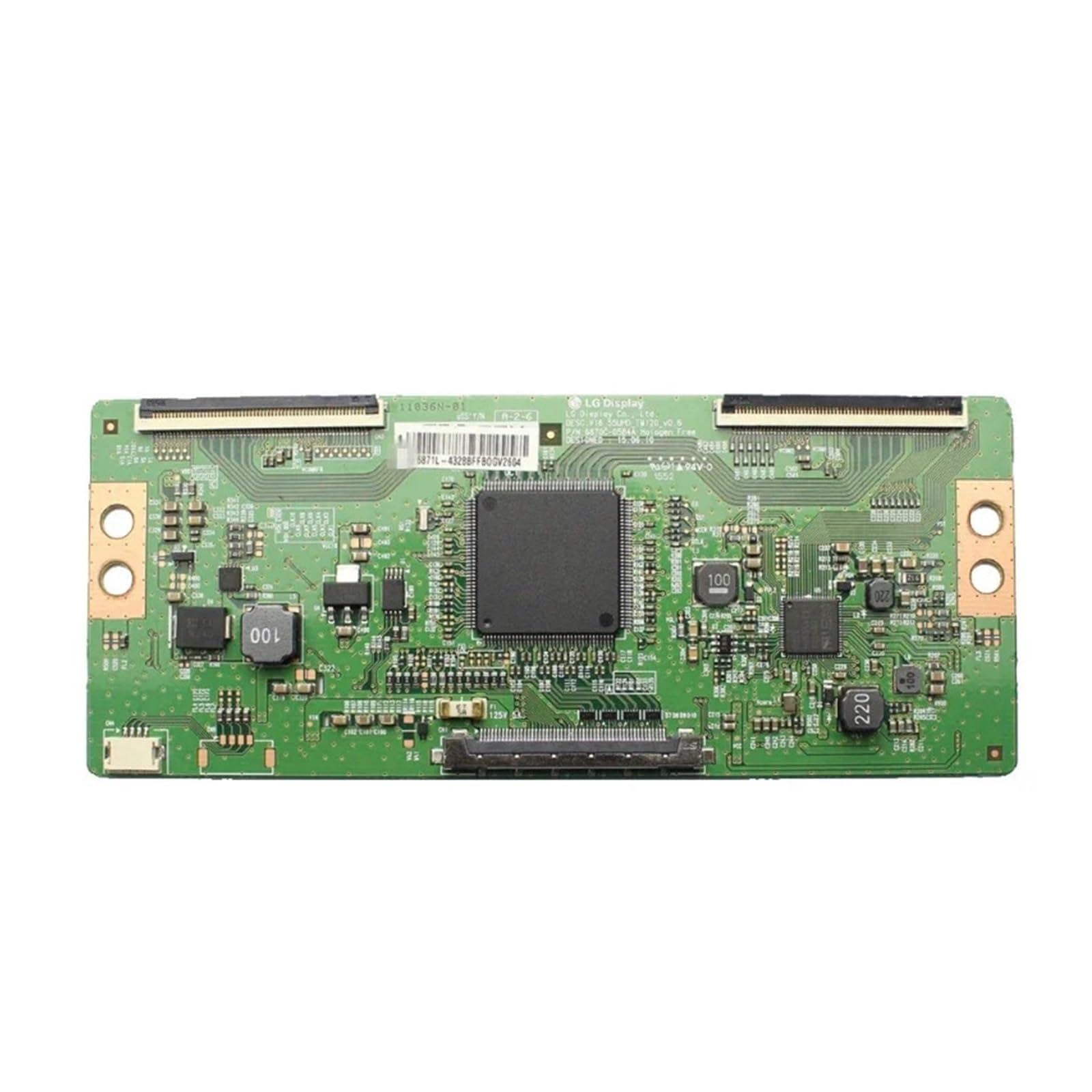
Image: The LDGSUPH T-con Board 6870C-0584A, ready for installation.
Operating Principles
The T-con (Timing Controller) board is a critical component in LCD and LED televisions. Its primary function is to receive video signals from the main board and convert them into a format that the display panel can understand. It generates timing signals to synchronize the display's pixels, ensuring that images are displayed correctly and without distortion. The 6870C-0584A board features a high-speed signal processing chip for 4K/8K signals and a stable power supply module to ensure reliable performance.
Maintenance
The T-con board itself requires minimal maintenance. To ensure its longevity and optimal performance:
- Keep it Clean: Ensure the TV's internal environment is free from excessive dust, which can accumulate on components and hinder heat dissipation.
- Avoid Overheating: Ensure proper ventilation for your television to prevent internal components, including the T-con board, from overheating.
- Handle with Care: If the TV's back cover is removed for any reason, avoid touching the T-con board's components directly.
Troubleshooting
If you encounter issues after installing the T-con board, consider the following:
- No Picture / Distorted Picture:
- Verify all ribbon cables are securely connected to both the T-con board and the display panel.
- Ensure the T-con board is correctly seated and all retaining screws are tightened.
- Check for any visible damage to the ribbon cables or connectors.
- Intermittent Display:
- This could indicate a loose connection. Re-seat all cables.
- Ensure the TV is not overheating.
- Incorrect Colors / Lines on Screen:
- This often points to a problem with the ribbon cables or the T-con board itself. Double-check connections.
- If the issue persists, the T-con board might be faulty or incompatible.
If troubleshooting steps do not resolve the issue, it is recommended to consult a professional television repair technician.
Specifications
| Feature | Description |
|---|---|
| Model Number | 6870C-0584A |
| Compatibility | 43'', 49'', 55'' TVs (Philips, Vizio, Sony, LG) |
| Signal Processing | Custom high-speed chip for 4K/8K signals, reduces ghosting and delay. |
| Power Supply | Multi-loop design with high-precision capacitors for stable output. |
| Interface Layout | Standard, including HDMI 2.1 compatibility. |
| Power Consumption & Heat | Optimized heat dissipation, low-power design (15%-20% core temp reduction). |
| System Compatibility | Built-in factory-certified drivers, compatible with native systems. |
| Item Weight | 1.76 ounces |
| Package Dimensions | 0.39 x 0.39 x 0.39 inches |
Support
For further assistance or technical support, please refer to the retailer or manufacturer's contact information provided at the point of purchase. No specific warranty information is available in this document.