
1. Introduction
This manual provides detailed instructions for the installation, operation, and maintenance of your E-YEEGER GT830 Dual Channel Dash Camera. Please read this manual thoroughly before using the device to ensure proper function and safety.
Package Contents
- E-YEEGER GT830 Front Dash Camera
- Rear Camera
- 32GB Micro SD Card (pre-installed)
- Car Charger (11.5ft)
- User Manual
- Quick Guide
- Spare 3M Adhesive Pad
- Electrostatic Sticker x2
- Easy Pry Tool
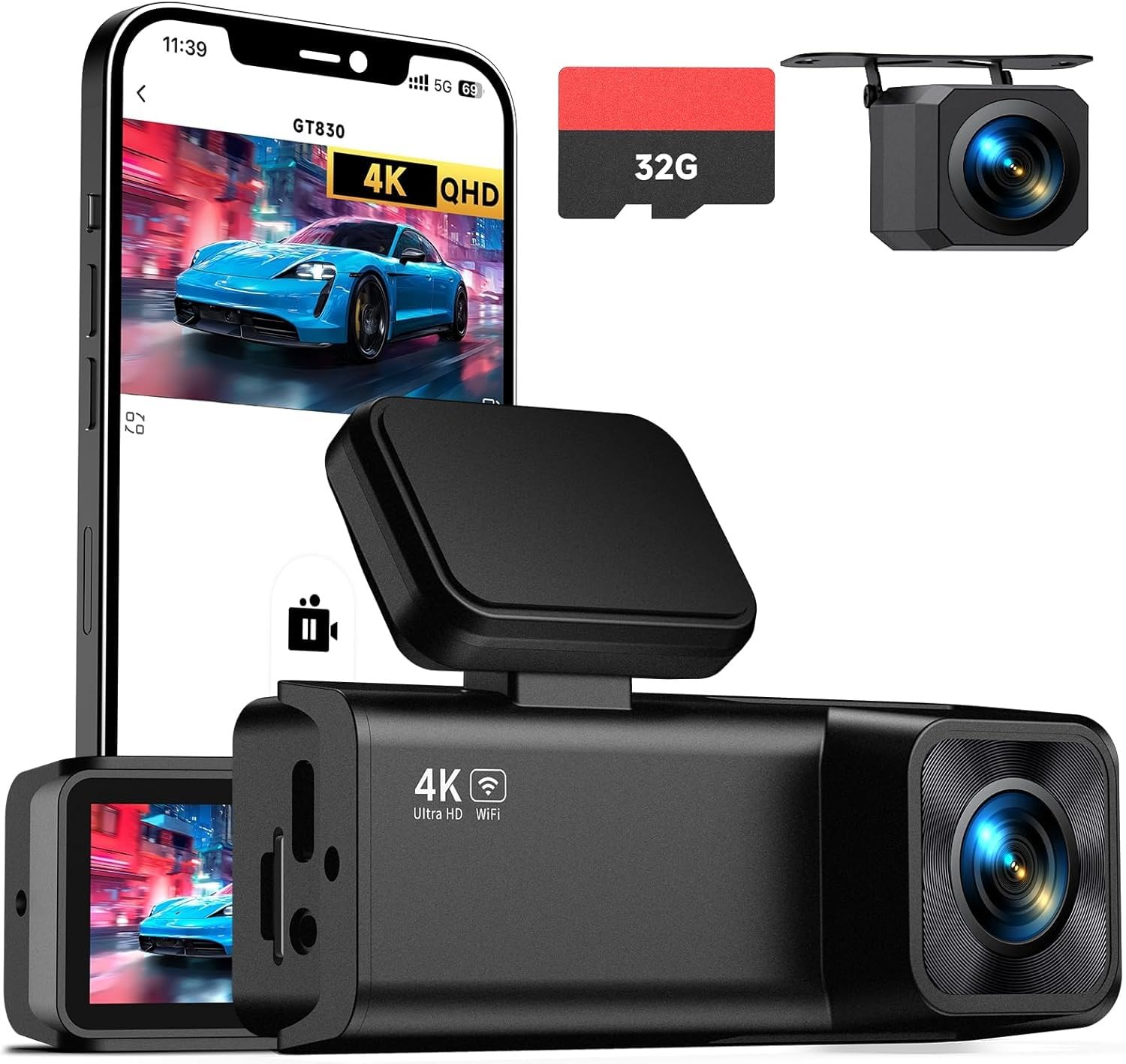
Image: The E-YEEGER GT830 Dash Camera and its included components.
2. Product Overview
The E-YEEGER GT830 is a dual-channel dash camera system designed to record both front and rear views of your vehicle. It features high-resolution recording, night vision capabilities, and smart parking surveillance.
Key Features:
- 4K UHD Front & 1080P Rear Recording: Captures clear video footage from both directions.
- 1.97" IPS Screen: Provides a clear display for live view and playback.
- Super Night Vision: F1.6 large aperture and 6-glass lens enhance low-light recording.
- 170° Ultra-Wide Angle Lens: Covers a broad field of view.
- G-Sensor: Automatically locks and saves video clips upon sudden impact or collision.
- Loop Recording: Overwrites the oldest files when the memory card is full, ensuring continuous recording.
- 24H Parking Surveillance: Monitors your vehicle while parked (requires Type-C hardwire kit, sold separately).
- Wi-Fi Connectivity & App Control: Allows real-time viewing, downloading, and sharing of footage via the VeeCar App.
- Supports up to 256GB Micro SD Card: Provides ample storage for extended recording.
Image: Front view of the E-YEEGER GT830 Dash Camera.

Image: Diagram illustrating the dual-channel recording capabilities of the dash cam.

Image: Comparison demonstrating enhanced night vision clarity provided by the dash cam.
3. Setup and Installation
3.1 Inserting the Micro SD Card
The GT830 comes with a 32GB Micro SD card pre-installed. If you need to replace or upgrade the card, ensure the camera is powered off before inserting or removing the card. The device supports Micro SD cards up to 256GB.

Image: Illustration of inserting a Micro SD card into the dash camera.
3.2 Front Camera Installation
- Clean the windshield area where the dash cam will be mounted.
- Apply an electrostatic sticker to the windshield first, then attach the dash cam's adhesive mount to the sticker. This allows for easier removal without leaving residue.
- Mount the front camera discreetly behind your rearview mirror to avoid obstructing your view.
- Adjust the camera lens to ensure it captures the road ahead clearly.

Image: The E-YEEGER GT830 Dash Cam mounted on a car windshield.
3.3 Rear Camera Installation
- Connect the rear camera cable to the main front camera unit.
- Route the rear camera cable along the vehicle's headliner and trim to the rear of the vehicle. Use the included pry tool to tuck the cable neatly.
- Mount the rear camera on the rear windshield, ensuring a clear view.
- Adjust the rear camera angle as needed.
3.4 Power Connection
- Plug the car charger into your vehicle's cigarette lighter socket.
- Connect the other end of the car charger cable to the main front camera unit.
- The dash cam will automatically power on and begin recording when your vehicle starts.

Image: The dash cam connected to the car charger.
4. Operating Instructions
4.1 Basic Recording
Once powered on, the GT830 dash cam automatically begins recording. The front camera records in 4K UHD (3840*1080P) and the rear camera in 1080P. Footage is saved to the Micro SD card.

Image: Example of high-resolution video capture from front (4K) and rear (1080P) cameras.
4.2 Loop Recording
The dash cam records video in continuous loops (e.g., 1, 3, or 5-minute segments). When the Micro SD card is full, the oldest unlocked files are automatically overwritten to make space for new recordings. This ensures uninterrupted recording.

Image: Visual representation of loop recording, where older footage is overwritten by new recordings.
4.3 G-Sensor (Emergency Recording)
The built-in G-Sensor detects sudden impacts or collisions. When triggered, it automatically locks the current video segment, preventing it from being overwritten by loop recording. These emergency files are stored in a protected folder on the SD card.

Image: Illustration of the G-Sensor detecting a collision and locking the video footage.
4.4 24-Hour Parking Surveillance
To enable 24-hour parking monitoring, a Type-C hardwire kit (not included, ASIN: B0D93LHW94) is required. When properly installed, the dash cam will automatically record when motion or impact is detected while your vehicle is parked, protecting against scratches, theft, or vandalism.

Image: Diagram showing a car protected by 24/7 parking mode, with an icon for the optional hardwire kit.
4.5 Wi-Fi Connectivity & App Control
The GT830 features built-in 2.4G Wi-Fi. Download the "VeeCar" App (available for Android & iOS) to connect your smartphone to the dash cam. This allows you to:
- View real-time footage.
- Download recorded videos directly to your phone.
- Share clips to social media.
- Adjust camera settings.

Image: Screenshot of the VeeCar App showing options for managing dash cam footage and settings.
Video: Official E-YEEGER GT830 dash cam overview, demonstrating features like 4K recording, night vision, and app connectivity.
5. Maintenance
5.1 Micro SD Card Management
- Formatting: It is recommended to format the Micro SD card regularly (e.g., once a month) within the camera's settings to ensure optimal performance and prevent data corruption.
- Capacity: The included 32GB card provides approximately 3 hours of recording. The camera supports cards up to 256GB, offering up to 16 hours of recording.
- Replacement: Replace the Micro SD card if you notice recording errors or degraded performance.
5.2 Cleaning the Lenses and Screen
Use a soft, lint-free cloth to gently clean the camera lenses and the IPS screen. Avoid using abrasive cleaners or solvents that could damage the surfaces.
6. Troubleshooting
- Camera not powering on: Ensure the car charger is securely connected to both the dash cam and the vehicle's power outlet. Check the vehicle's cigarette lighter fuse.
- Recording issues:
- Ensure the Micro SD card is inserted correctly and is not full.
- Format the Micro SD card within the camera settings.
- Try a different, high-speed (Class 10 or U3 recommended) Micro SD card.
- App connection problems:
- Ensure Wi-Fi is enabled on the dash cam and your smartphone.
- Confirm you are connected to the dash cam's Wi-Fi network.
- Restart both the dash cam and your smartphone.
- Ensure the VeeCar App is updated to the latest version.
- Footage not viewable on app: If recordings are not showing up on the app, ensure the app has necessary permissions on your phone. Try downloading files directly to your phone. If issues persist, contact customer support.
- G-Sensor too sensitive/not sensitive enough: Adjust the G-Sensor sensitivity setting in the camera's menu.
7. Specifications
| Feature | Detail |
|---|---|
| Brand | E-YEEGER |
| Model Name | GT830 |
| Video Capture Resolution | Front: 4K (2160p), Rear: 1080P |
| Display Type | IPS (1.97") |
| Field Of View | 170 Degrees |
| Connectivity Technology | Wi-Fi (2.4G) |
| Special Features | G-Sensor, Loop Recording, 24H Parking Mode (with optional hardwire kit), Night Vision |
| Included Memory Card Size | 32 GB |
| Flash Memory Supported Size Maximum | 256 GB |
| Frame Rate | 30 FPS |
| Mounting Type | Windshield Mount |
| Item Dimensions (D x W x H) | 1.25"D x 3.6"W x 1.9"H |
8. Warranty and Support
The E-YEEGER GT830 Dash Camera comes with a 24-month warranty. E-YEEGER provides lifetime technical support and 24/7 customer service. For any setup guidance, troubleshooting, or warranty claims, please contact the E-YEEGER support team.
Contact Information: Refer to the contact details provided in your product packaging or visit the official E-YEEGER website for support.