
Introduction
Thank you for choosing the Generico P47 Wireless Bluetooth Headphones. This manual provides detailed instructions for setting up, operating, maintaining, and troubleshooting your new headphones. Please read this manual carefully before use to ensure optimal performance and longevity of your device.
Product Overview
The Generico P47 headphones offer a versatile audio experience with both wireless Bluetooth connectivity and a wired option. They feature a built-in microphone for communication and a foldable design for convenience.
Key Features:
- Wireless Bluetooth Connectivity: Seamless pairing with smartphones, tablets, and other compatible devices.
- Integrated Microphone: Supports hands-free calls and voice assistant access.
- Enhanced Bass Response: Delivers dynamic low-end audio for music and media.
- Stereo Audio: Provides clear sound separation and an immersive listening experience.
- Foldable Design: Allows for easy storage and portability.
Package Contents:
- Generico P47 Wireless Bluetooth Headphones
- Charging Cable (Adapter)
- (Note: An audio cable for wired connection may also be included, depending on the specific package.)
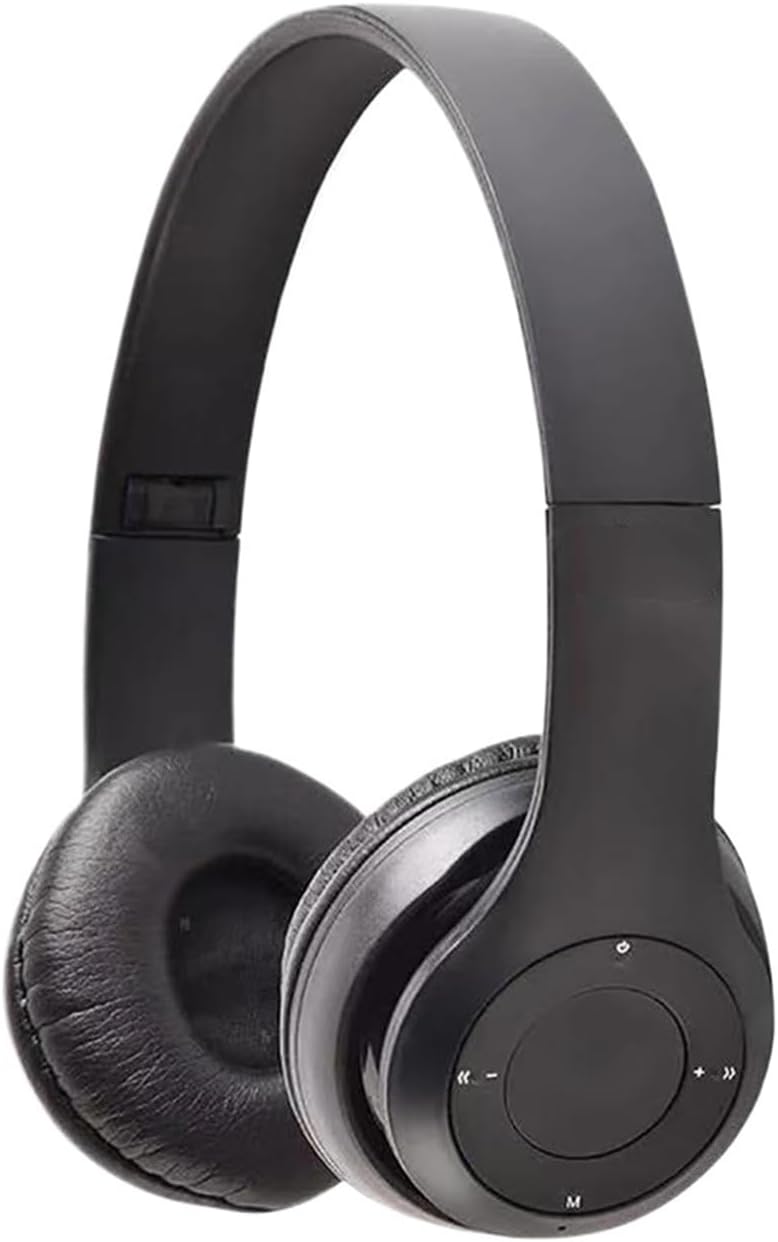
Image: Generico P47 Wireless Bluetooth Headphones. The image displays the headphones from the front, folded, and with a close-up of the control buttons on the earcup, including power, volume, and track navigation.
Setup
1. Charging the Headphones
- Locate the charging port on the headphone earcup.
- Connect the provided charging cable to the headphones and the other end to a USB power source (e.g., computer USB port, USB wall adapter).
- The LED indicator light will typically illuminate red during charging and turn off or change color (e.g., blue) when fully charged.
- Allow approximately 2-3 hours for a full charge before first use.
2. Bluetooth Pairing
- Ensure the headphones are fully charged and turned off.
- Press and hold the Power button (often marked with a 'U' or power symbol) for approximately 3-5 seconds until the LED indicator light flashes red and blue alternately. This indicates pairing mode.
- On your device (smartphone, tablet, computer), go to the Bluetooth settings.
- Enable Bluetooth and search for available devices.
- Select "P47" or a similar name from the list of found devices.
- Once paired, the LED indicator light on the headphones will typically flash blue slowly or turn solid blue. A voice prompt may also confirm successful connection.
- If prompted for a password, enter "0000".
Note: The headphones will automatically attempt to reconnect to the last paired device when powered on.
Operating Instructions
Power On/Off:
- Power On: Press and hold the Power button for about 3 seconds until the LED indicator lights up and a voice prompt confirms "Power On".
- Power Off: Press and hold the Power button for about 3 seconds until the LED indicator turns off and a voice prompt confirms "Power Off".
Music Playback:
- Play/Pause: Press the Power/Multi-function button once.
- Volume Up: Press the "+" button.
- Volume Down: Press the "-" button.
- Next Track: Press and hold the "+" button.
- Previous Track: Press and hold the "-" button.
Phone Calls:
- Answer Call: Press the Power/Multi-function button once when an incoming call rings.
- End Call: Press the Power/Multi-function button once during a call.
- Reject Call: Press and hold the Power/Multi-function button for about 2 seconds when an incoming call rings.
- Redial Last Number: Double-press the Power/Multi-function button.
Voice Assistant:
- Activate Voice Assistant: Press the "M" (Mode) button once to activate your device's voice assistant (e.g., Siri, Google Assistant).
Mode Switching (if applicable):
- Press the "M" (Mode) button to switch between Bluetooth mode, FM Radio mode, and TF Card mode (if supported by your specific model).
Maintenance
- Cleaning: Use a soft, dry cloth to clean the headphones. Do not use abrasive cleaners or solvents.
- Storage: When not in use, store the headphones in a cool, dry place, away from direct sunlight and extreme temperatures. The foldable design allows for compact storage.
- Battery Care: To prolong battery life, avoid fully discharging the headphones frequently. Charge them regularly, even if not used for extended periods.
- Water Exposure: These headphones are not waterproof. Avoid exposure to water or excessive moisture.
Troubleshooting
Headphones do not power on:
- Ensure the headphones are fully charged. Connect them to a power source and check the charging indicator light.
Cannot pair with device:
- Make sure the headphones are in pairing mode (LED flashing red and blue alternately).
- Ensure Bluetooth is enabled on your device and it is within range (typically 10 meters).
- Turn off and on both the headphones and your device, then try pairing again.
- Clear the "P47" entry from your device's Bluetooth list and attempt to pair as a new device.
No sound or low volume:
- Check the volume levels on both the headphones and your connected device.
- Ensure the headphones are properly paired and connected to your device.
- If using a wired connection, ensure the audio cable is fully inserted into both the headphones and the audio source.
- Try playing audio from a different application or source.
Poor sound quality or disconnections:
- Move closer to your connected device to reduce interference.
- Avoid obstacles between the headphones and your device.
- Ensure there are no other strong wireless signals nearby that could cause interference.
- Re-pair the headphones with your device.
Specifications
| Brand: | Generico |
| Model Name: | P47 |
| Model Number: | TATPBBGAC-08D00123 |
| Connectivity: | Bluetooth (Wireless), Wired (via audio cable, if included) |
| Form Factor: | Over-Ear, Foldable |
| Built-in Microphone: | Yes |
| Weight: | 50 g |
| Dimensions: | 10 x 10 x 10 cm (Package Dimensions) |
| Battery: | Built-in rechargeable battery |
| Color: | Black (as per current product variant) |
Warranty and Support
For warranty information and technical support, please refer to the documentation provided with your purchase or contact the retailer/manufacturer directly. Keep your proof of purchase for warranty claims.