
1. Introduction
This manual provides detailed instructions for the installation, operation, and maintenance of your XTRONS Android 14 Car Stereo. This unit is specifically designed for Porsche Cayenne models from 2003 to 2010, including Cayenne S, GTS, Turbo, Turbo S, and Diesel variants. It features a 9-inch IPS touch screen, Android 14 operating system, Octa-core processor, 4GB RAM, 128GB ROM, and an optical fiber decoder for seamless integration with your vehicle's audio system.

Figure 1.1: XTRONS Android 14 Car Stereo Overview
This image displays the main unit of the XTRONS Android 14 Car Stereo, highlighting its key specifications such as the 9-inch HD IPS screen, Octa-core processor, 4GB RAM, 128GB ROM, and integrated Global 4G LTE. The screen shows a navigation interface alongside a radio tuner, demonstrating its multimedia capabilities. An optical fiber decoder is included for compatibility with specific vehicle audio systems.
2. Applicable Models and Compatibility
This car stereo is compatible with the following Porsche Cayenne models and years:
- Porsche Cayenne (2003-2010)
- Porsche Cayenne S (2003-2010)
- Porsche Cayenne GTS (2003-2010)
- Porsche Cayenne Turbo (2003-2010)
- Porsche Cayenne Turbo S (2003-2010)
- Porsche Cayenne Diesel (2003-2010)
Important Note on Compatibility: If your vehicle is equipped with the original reversing camera, an adapter cable may be required for it to function after upgrading the car stereo. XTRONS ICE/ACS/FZMRM01 is a compatible adapter.

Figure 2.1: Installation Comparison and Reversing Camera Adapter
This image illustrates the visual transformation of the Porsche Cayenne dashboard before and after the XTRONS car stereo installation. It also highlights the necessity of a specific adapter cable for retaining the original reversing camera functionality, showing an example of such an adapter.
3. Setup and Installation
3.1. Unpacking and Components
Carefully unpack all components and verify that all items listed below are present. If any items are missing or damaged, contact XTRONS customer support.
- 2 × ISO Wiring Harness
- 1 × RCA Cable
- 1 × 4G Antenna
- 1 × Camera Cable
- 1 × Radio Antenna Cable
- 2 × USB Cable
- 1 × GPS Antenna
- 1 × CANbus Box
- 1 × CANbus Cable
- 1 × Optical Fiber Decoder
- 1 × User Manual (this document)

Figure 3.1: Product Dimensions and Included Accessories
This image provides a visual representation of the car stereo's physical dimensions and a comprehensive overview of all accessories included in the package, such as various cables, antennas, and the optical fiber decoder, essential for installation.
3.2. Installation Guidelines
Installation of this car stereo requires technical knowledge and experience with automotive electronics. It is highly recommended to have the unit installed by a qualified professional to ensure proper functionality and to avoid damage to your vehicle or the unit. Refer to the wiring diagrams provided with the unit for specific connections.
- Wiring Harness: Connect the provided ISO wiring harnesses to your vehicle's existing wiring.
- Optical Fiber Decoder: Integrate the optical fiber decoder as per the vehicle's audio system requirements (e.g., Harman-Kardon or BOSE).
- CANbus Box: The optimized CANbus decoding ensures proper communication with your Porsche's systems. Connect the CANbus box and cable as instructed.
- Antennas: Connect the GPS antenna and 4G antenna for navigation and mobile network functionality.
- USB Cables: Route the USB cables to an accessible location for connecting external devices or for USB tethering.
- Camera Cable: If installing a reversing camera, connect it using the provided camera cable.
Note: Some users have reported that a dual Fakra to single antenna adapter may be needed for German cars to ensure proper FM radio reception. This adapter is commonly available and not included with the unit.
4. Operating Instructions
4.1. Basic Operation and User Interface
The unit features a 9-inch IPS touch screen for intuitive control. Power on the unit by starting your vehicle. The exclusive XTRONS UI provides optimized menus and icons for ease of use.
- Touchscreen: Navigate through menus and applications by touching the screen.
- Changeable UI Themes: Customize the appearance of your user interface by selecting different themes from the settings menu.
- Multitask with Split Screen: The Android 14 operating system allows for split-screen multitasking, enabling you to run two applications simultaneously (e.g., navigation and music player).

Figure 4.1: User Interface Features
This image demonstrates various user interface capabilities, including customizable themes, the digital sound processor (DSP) interface for audio adjustments, picture-in-picture video playback, and the split-screen function for running multiple applications concurrently.
4.2. Smartphone Connection (CarPlay & Android Auto)
The unit supports both Wireless CarPlay and Wireless/Wired Android Auto, providing seamless integration with your smartphone.
- Wireless CarPlay: Connect your iPhone via Bluetooth for wireless CarPlay functionality. Access GPS, calls, music, and Siri.
- Wireless/Wired Android Auto: Connect your Android phone via Bluetooth for wireless Android Auto, or use a USB cable for a wired connection. Access GPS, calls, music, and Google Assistant.
- Screen Mirroring: The unit also supports screen mirroring via Wi-Fi, allowing you to display your phone's screen directly on the car stereo.
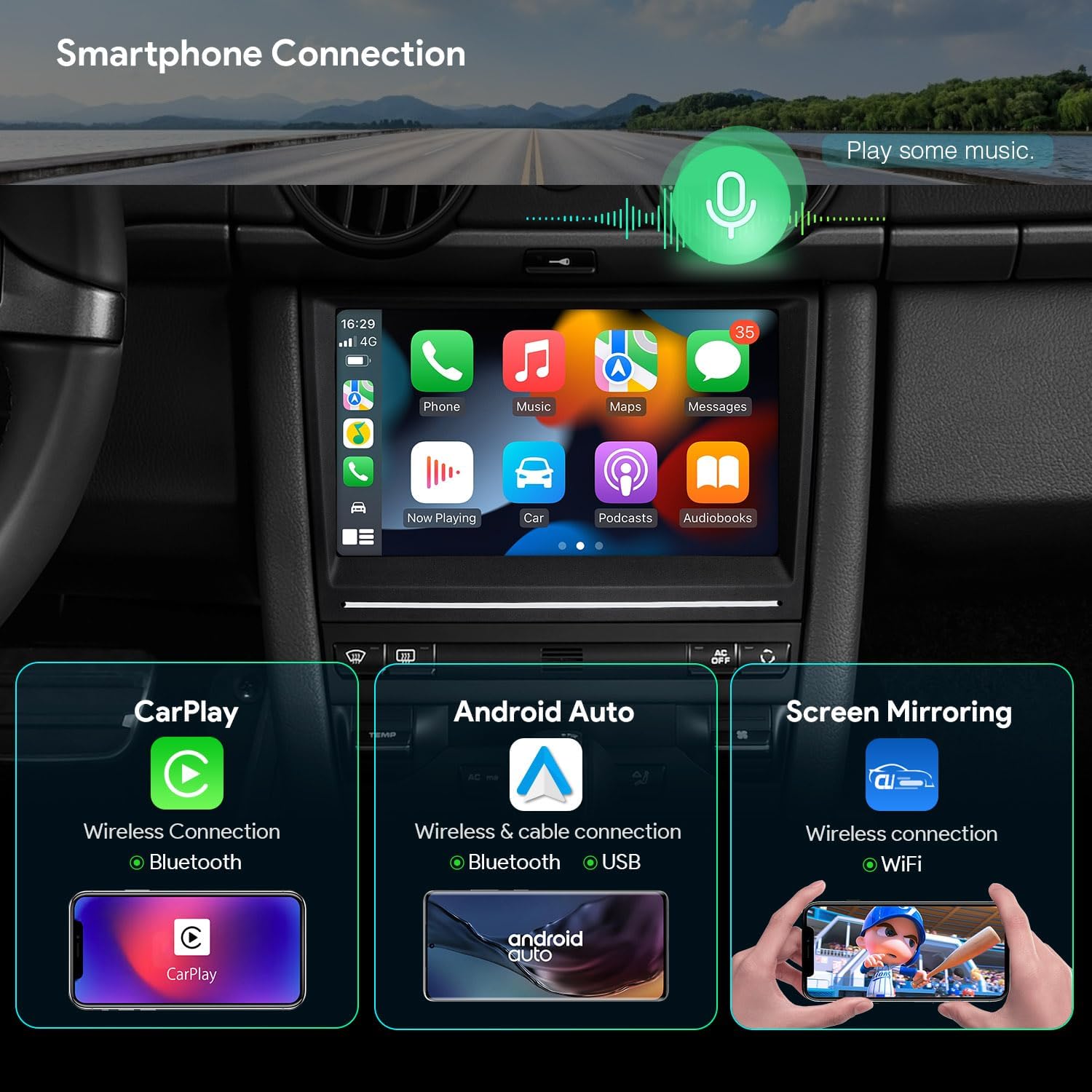
Figure 4.2: Smartphone Connectivity Options
This image illustrates the various ways to connect your smartphone to the car stereo, including Wireless CarPlay for iPhones, Wireless/Wired Android Auto for Android devices, and general screen mirroring capabilities via Wi-Fi.
4.3. Navigation (GPS)
The unit supports various Android-compatible navigation software, including Google Maps, Sygic, and Waze. Ensure the GPS antenna is properly connected for optimal performance.

Figure 4.3: Navigation and Audio Features
This image displays the GPS navigation interface, along with other key features such as the Digital Sound Processor (DSP) for audio customization, Bluetooth 5.0 for hands-free calls and audio streaming, and the CANbus decoding interface.
4.4. Audio Features
- Built-in DSP: Utilize the Digital Sound Processor (DSP) with a 30-band EQ to fine-tune your audio experience. Adjust bass, balance, loudness, and other sound parameters.
- Bluetooth 5.0: Connect your smartphone for hands-free calls and audio streaming. The unit supports phone book synchronization.
- Radio: Tune into FM radio stations. Ensure the radio antenna cable is securely connected.
- Powerful Amplifier: The unit features a 4x48W amplifier (TDA7851) for enhanced audio output.
4.5. Network Connectivity
- Global 4G LTE: Insert a Micro-SIM card (not included) into the designated slot to access 4G mobile broadband. Supports download speeds up to 300Mbps and 99% of carriers worldwide.
- Dual Band Wi-Fi: Connect to Wi-Fi networks (2.4GHz and 5GHz) for internet access.
- USB Tethering: Share your mobile phone's internet connection with the unit via a USB cable. Configure your smartphone settings for USB tethering. Note: Some mobile carriers may limit or charge for tethering.
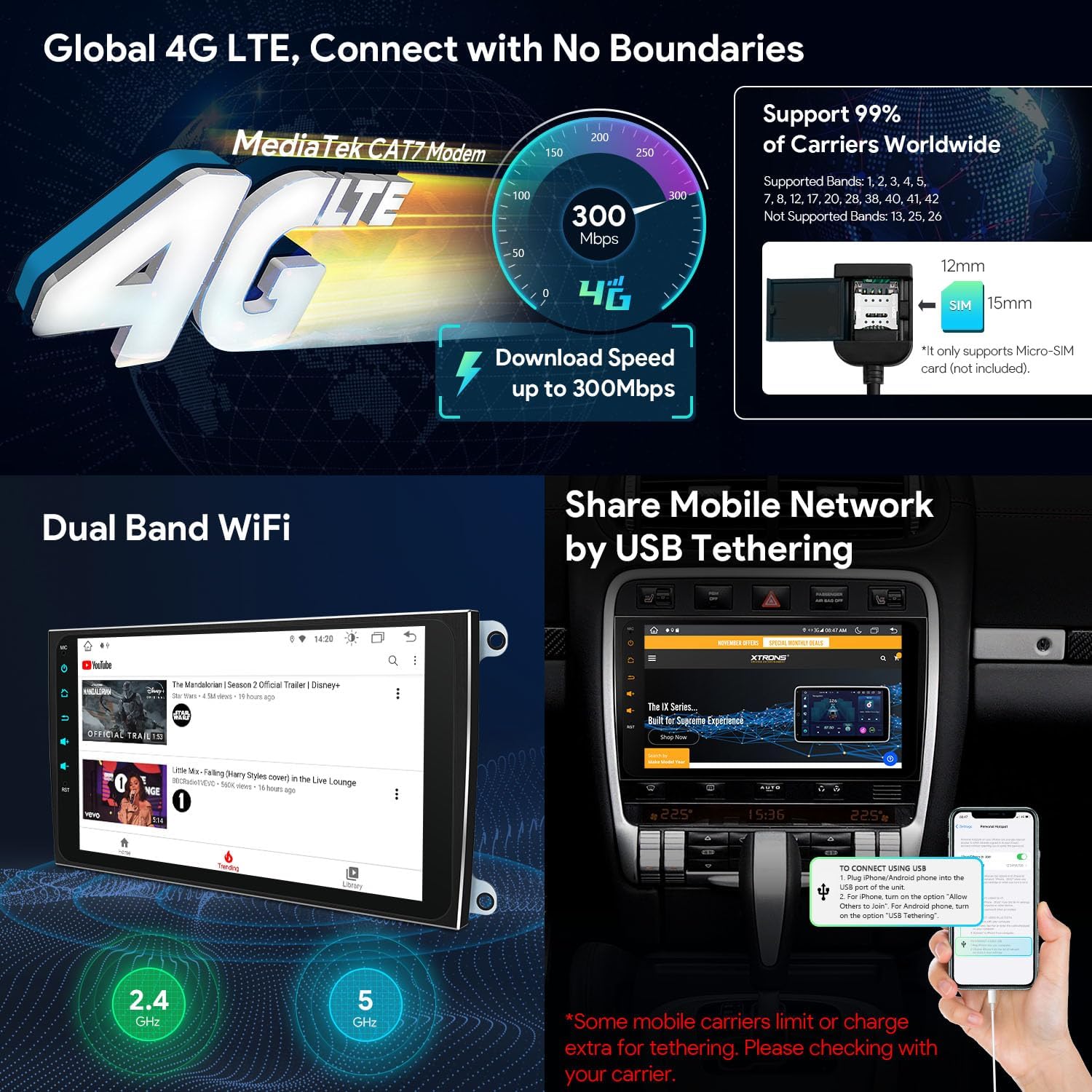
Figure 4.4: Network Connectivity Options
This image details the unit's network capabilities, including Global 4G LTE support with a Micro-SIM card slot, dual-band Wi-Fi for internet access, and the process for sharing mobile internet via USB tethering from a smartphone.
4.6. Video Playback
The 9-inch HD IPS screen supports 2K video playback with the latest video decoder chipset (G52 GPU Decoding). Enjoy high-definition video content directly on your car stereo.
5. Maintenance
To ensure the longevity and optimal performance of your XTRONS car stereo, follow these maintenance guidelines:
- Screen Cleaning: Use a soft, lint-free cloth to gently wipe the touchscreen. Avoid abrasive cleaners or harsh chemicals that could damage the screen.
- Software Updates: Periodically check for and install software updates to ensure the system runs efficiently and has the latest features and security patches.
- Environmental Conditions: Avoid exposing the unit to extreme temperatures, direct sunlight for prolonged periods, or excessive moisture.
- Connections: Ensure all cables and connections remain secure. Loose connections can lead to intermittent issues.
6. Troubleshooting
If you encounter issues with your XTRONS car stereo, refer to the following common troubleshooting steps:
- Unit Does Not Power On:
- Check all power connections to ensure they are securely fastened.
- Verify that the vehicle's ignition is on and providing power to the unit.
- Inspect fuses related to the car stereo in your vehicle's fuse box.
- No Sound Output:
- Ensure the volume is not muted or set to a very low level.
- Check the optical fiber decoder connection and ensure it is correctly integrated with your vehicle's audio system (e.g., Bose).
- Verify speaker connections.
- GPS Signal Issues:
- Ensure the GPS antenna is properly installed and has a clear view of the sky.
- Check the GPS antenna cable connection to the unit.
- Poor Radio Reception:
- Verify the radio antenna cable is securely connected.
- Consider installing a dual Fakra to single antenna adapter if your vehicle is a German model and reception is consistently poor.
- CarPlay/Android Auto Not Connecting:
- Ensure Bluetooth is enabled on both your phone and the car stereo.
- For wired Android Auto, try a different USB cable.
- Restart both your phone and the car stereo.
- Touchscreen Unresponsive:
- Perform a soft reset of the unit (refer to the device settings for a reset option, or power cycle the vehicle).
- Ensure the screen is clean and free of debris.
If these steps do not resolve the issue, please contact XTRONS customer support for further assistance.
7. Specifications
| Feature | Specification |
|---|---|
| Brand | XTRONS |
| Model Number | B0GL1SRNZK |
| Operating System | Android 14 |
| Processor | Octa Core (Cortex A75 Processor) |
| RAM | 4GB DDR4 |
| ROM | 128GB Solid State |
| Screen Size | 9 Inch |
| Display Type | IPS Touch Screen |
| Resolution | 1280x720 HD |
| Viewing Angle | 178° |
| Video Decoding | 2K Video Playback, H.264, H.265/HEVC (G52 GPU Decoding) |
| Connectivity | Android Auto, Bluetooth 5.0, USB, Wi-Fi (Dual Band), Wireless CarPlay, Global 4G LTE |
| Special Features | Built-In Bluetooth, Global 4G LTE, Touchscreen, Built-in DSP, Optimized CANbus Decoding, USB Tether |
| Audio Output Mode | Stereo |
| Surround Sound | 7.1 Channel Configuration |
| Amplifier | 4x48W (TDA7851) |
| Compatible Devices | Smartphone, iPhone |
| Included Decoder | Optical Fiber Decoder |

Figure 7.1: Key Product Specifications
This infographic provides a concise summary of the car stereo's core technical specifications and advanced features, such as its operating system, memory, processor, display technology, and connectivity options.
8. Warranty and Support
Warranty information for the XTRONS B0GL1SRNZK car stereo is not provided within this document. Please refer to the product packaging, your purchase receipt, or the official XTRONS website for detailed warranty terms and conditions.
For technical support, troubleshooting assistance beyond this manual, or inquiries regarding parts and service, please contact XTRONS customer support through their official channels. You can typically find contact information on the XTRONS website or through the retailer where you purchased the product.
XTRONS Official Website: www.xtrons.com (Please verify the actual official website for XTRONS)


