
Product Overview
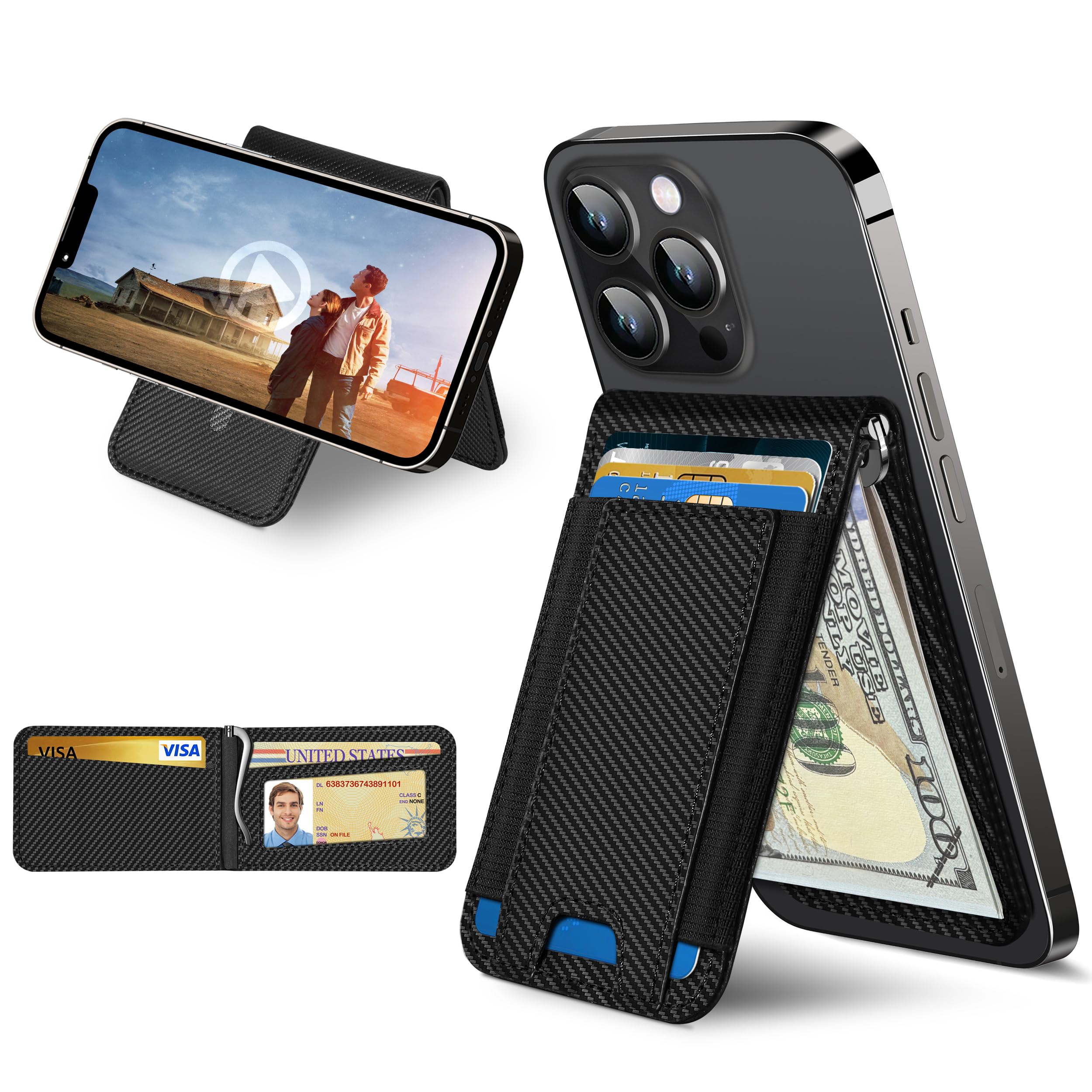
The ExtreLife MagSafe Wallet with Money Clip is designed for convenience and security, offering card storage, a money clip, an ID window, and a phone stand function. It features a strong magnetic attachment for compatible iPhone models and MagSafe cases, along with RFID blocking technology.
- Capacity: Designed to hold up to 8 credit cards, ID, and cash.
- Money Clip: Integrated money clip for securing bills.
- Magnetic Strength: Features 4200Gs magnetic force for secure attachment to iPhone 17/16/15/14/13/12 series (excluding 13/12 Mini).
- Phone Stand: Folds into a stable stand for hands-free viewing in both portrait and landscape orientations.
- ID Window: Clear window for quick access to identification cards.
- RFID Blocking: Equipped with secure RFID blocking to protect card information.
Setup
This MagSafe wallet is designed for use with iPhone 17/16/15/14/13/12 series models and MagSafe compatible cases. Ensure your device or case has MagSafe functionality for optimal magnetic attachment.
- Prepare your iPhone: Ensure your iPhone (12 series or newer, excluding Mini models) or MagSafe-compatible case is clean and free of debris on the back surface.
- Attach the Wallet: Align the ExtreLife MagSafe Wallet with the MagSafe ring on the back of your iPhone or MagSafe case. The strong magnets will automatically snap the wallet into place.

Important: This wallet is not compatible with iPhone 13 Mini or 12 Mini models, or with non-magnetic phone cases.
Video: Strong Magnetic Attachment
Video: This video demonstrates the strong magnetic attachment of the ExtreLife MagSafe Wallet to an iPhone, showcasing its secure connection.
Operating Instructions
Storing Cards and Cash
The wallet is designed to hold up to 8 cards and multiple bills. The elastic strap allows for flexible storage.
- Card Slots: Insert credit cards, debit cards, or other identification cards into the designated slots. The elastic material will secure them.
- Money Clip: Fold your bills and slide them under the metal money clip for secure storage.
- ID Window: Place your primary ID (e.g., driver's license) in the clear ID window for easy visibility and quick access without removal.


Using the Phone Stand Function
The wallet can be folded to create a stable stand for your iPhone.
- Detach (Optional): For some viewing angles, you may need to slightly detach the wallet from the phone or adjust its position.
- Fold into Stand: Gently fold the wallet along its crease to form a triangular stand shape.
- Position Phone: Place your iPhone onto the folded wallet. The stand supports both portrait and landscape orientations for hands-free viewing.

Video: Adjustable Stand and ID Window
Video: This video illustrates the multi-functional design of the wallet, including its adjustable phone stand and quick-access ID window features.
RFID Blocking Functionality
The wallet incorporates RFID blocking technology to protect your credit card information from unauthorized scanning. Keep your cards fully inserted within the wallet to ensure maximum protection.

Maintenance
To ensure the longevity and appearance of your ExtreLife MagSafe Wallet, follow these maintenance guidelines:
- Cleaning: Wipe the wallet with a soft, damp cloth. Avoid using harsh chemicals, abrasive cleaners, or solvents, as these can damage the material.
- Storage: When not in use, store the wallet in a cool, dry place away from direct sunlight and extreme temperatures.
- Avoid Overstuffing: While the wallet is designed to hold up to 8 cards, consistently overstuffing it can stretch the material and reduce its lifespan.
- Magnetic Care: Keep the magnetic surface clean. Avoid placing the wallet near strong magnetic fields that are not intended for MagSafe use, as this could potentially affect magnetic strength over time.
Troubleshooting
If you encounter any issues with your ExtreLife MagSafe Wallet, refer to the following common solutions:
- Wallet not attaching securely to iPhone:
- Ensure your iPhone is a 12 series model or newer (excluding Mini models).
- Verify that your phone case is MagSafe compatible. Non-magnetic cases will prevent a secure attachment.
- Check for any debris or obstructions on the back of your iPhone or case, or on the wallet's magnetic surface.
- Confirm the wallet is correctly aligned with the MagSafe ring on your device.
- Difficulty inserting or removing cards:
- Avoid overstuffing the card slots. The wallet is designed for up to 8 cards.
- Use the thumb slot or elastic pull tab (if present) to assist with card removal.
- Phone stand is unstable:
- Ensure the wallet is fully folded into its triangular stand configuration.
- Place the phone and stand on a flat, stable surface.
- Adjust the angle of the stand to find the most stable position for your viewing preference.
- RFID blocking not working:
- Ensure all cards are fully inserted into the wallet's card slots. Cards partially exposed may not be fully protected.
Specifications
| Feature | Detail |
|---|---|
| Brand | ExtreLife |
| Model Name | Magsafe Wallet With Money Clip |
| Model Number | CB191 (Manufacturer Part Number: BSJCB191) |
| Color | Carbon Fiber Black |
| Material | Carbon Fiber, Faux Leather (Lining) |
| Closure Type | Magnetic |
| Card Slot Count | 8 |
| Additional Features | Adjustable Stand, ID Window, Money Clip, Pocket Friendly, Stronger Magnetic (4200Gs) |
| Compatibility | iPhone 17/16/15/14/13/12 Series (Not for 13/12 Mini), MagSafe Cases |
| Item Dimensions (D x W x H) | 1"D x 1"W x 1"H (Note: These dimensions may be generic and not reflect actual product size accurately) |
Warranty Information
The ExtreLife MagSafe Wallet with Money Clip comes with a 1-Year Manufacturer Warranty. This warranty covers defects in materials and workmanship under normal use. Please retain your proof of purchase for any warranty claims.
For warranty service or inquiries, please contact ExtreLife customer support.
Support
For further assistance, technical support, or to provide feedback, please contact ExtreLife customer service through the following channels:
- Website: Visit the official ExtreLife website for FAQs and support resources.
- Email: Refer to your product packaging or purchase confirmation for customer support email address.
- Amazon Store: You can also reach out via the ExtreLife Store on Amazon: ExtreLife Amazon Store
When contacting support, please have your product model number (CB191) and purchase date available.
