
1. Introduction
Thank you for choosing the AIYIMA S4000 Active Bookshelf Speakers. These speakers are designed to deliver high-fidelity audio with versatile connectivity options, suitable for various applications including home entertainment, PC audio, and professional studio monitoring. Please read this manual thoroughly before use to ensure proper setup and operation.
2. Safety Instructions
To prevent fire, electric shock, or product damage, please observe the following safety guidelines:
- Do not expose this appliance to rain or moisture.
- Do not place objects filled with liquids, such as vases, on the appliance.
- Ensure proper ventilation. Do not block any ventilation openings.
- Do not install near any heat sources such as radiators, heat registers, stoves, or other apparatus (including amplifiers) that produce heat.
- Protect the power cord from being walked on or pinched, particularly at plugs, convenience receptacles, and the point where they exit from the appliance.
- Only use attachments/accessories specified by the manufacturer.
- Unplug this appliance during lightning storms or when unused for long periods.
- Refer all servicing to qualified service personnel. Servicing is required when the apparatus has been damaged in any way.
3. Package Contents
Please check that all items are present in the box:
- AIYIMA S4000 Studio Monitors (2 units)
- RCA Audio Cable
- XLR Audio Cable
- User Manual (this document)
- Magnetic Grilles (2 units)
- Rubber Feet (8 units)
- Power Cable
- Wireless IR Remote Control
4. Product Overview
4.1 Front Panel
The front panel features the horn-loaded tweeter and the 4-inch woofer, along with a multi-function rotary control for volume and input selection.

Image: Front and rear view of the AIYIMA S4000 speakers. The front shows the tweeter and woofer, while the rear displays all input/output ports and controls.
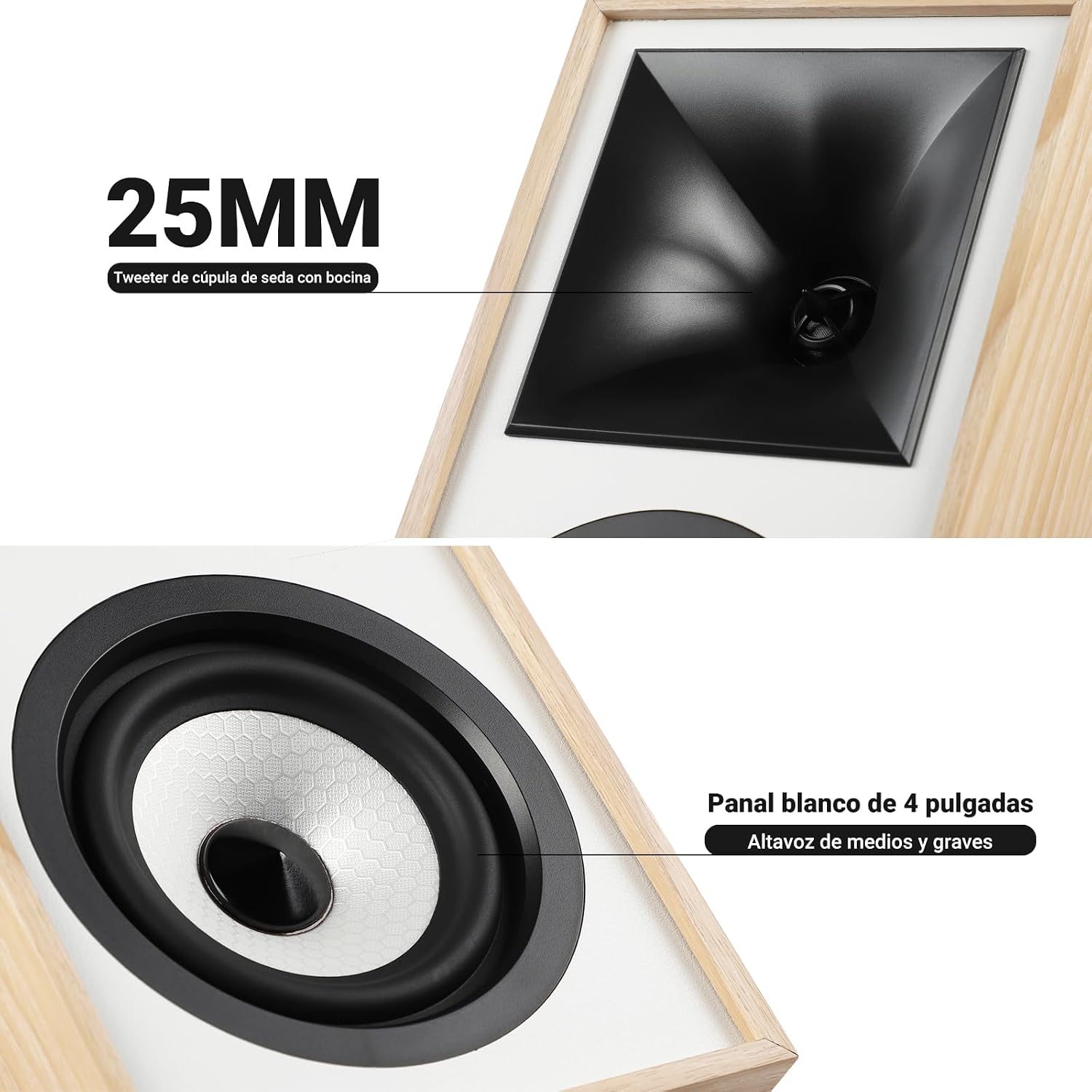
Image: Close-up view of the 25mm horn-loaded silk dome tweeter and the 4-inch white cone woofer on the AIYIMA S4000 speaker.
The S4000 incorporates a 1.25-inch horn-loaded tweeter for enhanced vocal clarity and a 4-inch woofer for deep bass. The cabinet is constructed from 15mm high-density MDF to reduce resonance and distortion.
4.2 Rear Panel
The rear panel houses all connectivity ports and additional controls.
Image: Detailed view of the rear panel of the AIYIMA S4000 speaker, showing the volume, treble, and bass knobs, RCA and XLR inputs, SUB OUT, power switch, and power input.
- Volume/Input Selector: Rotary knob for volume adjustment and input source selection (Bluetooth, RCA, XLR).
- Treble Control: Knob to adjust high frequencies.
- Bass Control: Knob to adjust low frequencies.
- RCA Input: For connecting devices via RCA cables.
- XLR Input: Professional balanced input for mixers, audio interfaces, etc.
- SUB OUT: Output for connecting an external active subwoofer.
- Power Switch: To turn the speakers on or off.
- AC Power Input: For connecting the power cable (AC 100V-240V).
- SPK-L OUT: Output to connect the passive left speaker.
5. Setup
5.1 Speaker Placement
For optimal sound quality, place the speakers on a stable surface, such as a bookshelf or speaker stands. Position them at ear level and equidistant from your listening position. Ensure there is adequate space behind the speakers for the L-shaped bass reflex port to function effectively.

Image: AIYIMA S4000 speakers positioned on a wooden cabinet, demonstrating a typical home setup with a turntable.
5.2 Connecting Audio Sources
The S4000 offers multiple input options:
- RCA Input: Connect your audio source (e.g., CD player, TV, PC) to the RCA ports on the rear panel using the provided RCA cable.
- XLR Input: For professional audio equipment like mixers or audio interfaces, use XLR cables to connect to the balanced XLR inputs. This input is resistant to interference.
- Bluetooth 5.0: For wireless connection, refer to section 6.4 for Bluetooth pairing instructions.

Image: AIYIMA S4000 speaker shown connected to a laptop and electronic keyboard, highlighting the professional balanced input capabilities.
5.3 Connecting an External Subwoofer (SUB OUT)
To enhance bass performance, you can connect an active subwoofer to the SUB OUT port on the rear panel. The system will automatically adjust the crossover frequency, converting your setup into a 2.1 audio system.

Image: AIYIMA S4000 speakers set up with a television and an external subwoofer, illustrating the SUB OUT functionality for a 2.1 home cinema experience.
5.4 Power Connection
Connect the provided power cable to the AC Power Input on the rear panel of the active speaker, then plug it into a wall outlet (AC 100V-240V). Connect the active speaker to the passive speaker using the SPK-L OUT port.
6. Operating Instructions
6.1 Power On/Off
Flip the Power Switch on the rear panel to the "ON" position to turn on the speakers. Flip it to "OFF" to power them down.
6.2 Volume Control and Input Selection
The multi-function rotary control on the front panel adjusts the volume. Press the knob to cycle through input sources: Bluetooth (BT), RCA, and XLR. The current input will be indicated by an LED.
6.3 Bass and Treble Adjustment
Use the independent Bass and Treble knobs on the rear panel to fine-tune the sound according to your preference and audio source. Adjustments range from -6dB to +6dB.
6.4 Bluetooth Pairing
- Turn on the speakers and select Bluetooth input using the front panel knob or remote control. The Bluetooth indicator light will flash.
- On your device (smartphone, tablet, computer), enable Bluetooth and search for "AIYIMA S4000".
- Select "AIYIMA S4000" to pair. Once connected, the Bluetooth indicator light will stop flashing and remain solid.
- You can now play audio wirelessly from your device.

Image: AIYIMA S4000 speaker in a room setting, illustrating its Bluetooth 5.0 connectivity for wireless audio streaming.
6.5 Remote Control Usage
The included wireless IR remote control allows you to adjust volume, select input modes, and control playback (play/pause, next/previous track for Bluetooth) from up to 20 meters away without requiring line-of-sight.

Image: Composite image showing the AIYIMA S4000 speakers, a close-up of the 15mm MDF cabinet construction, an internal view of the L-shaped bass reflex port, and the wireless remote control.
7. Maintenance
- Cleaning: Use a soft, dry cloth to clean the speaker cabinets. Do not use liquid cleaners or abrasive materials.
- Storage: If storing the speakers for an extended period, disconnect them from power and store them in a cool, dry place, preferably in their original packaging.
- Grilles: The magnetic grilles can be removed for cleaning or for a different aesthetic. Handle them gently to avoid damage.
8. Troubleshooting
| Problem | Possible Cause | Solution |
|---|---|---|
| No sound |
|
|
| Distorted sound |
|
|
| Bluetooth connection issues |
|
|
| Remote control not working |
|
|
If the problem persists, please contact AIYIMA customer support.
9. Specifications

Image: Diagram showing the dimensions of the AIYIMA S4000 speakers: 280mm (11.02 inches) height, 185mm (7.28 inches) depth, and 145mm (5.70 inches) width.
| Feature | Specification |
|---|---|
| Model Name | S4000 |
| Brand | AIYIMA |
| Speaker Type | Bookshelf, Active, 2-way, Surround Sound |
| Audio Channels | 2.1 (with SUB OUT) |
| Maximum Output Power | 80 Watts RMS (2x40W RMS: 2x25W Bass/Mid, 2x15W Treble) |
| Frequency Response | 45 Hz - 20 kHz |
| Woofer Diameter | 4 inches |
| Tweeter Type | 1.25-inch Horn-loaded Silk Dome |
| Connectivity Technology | Bluetooth 5.0, RCA, XLR |
| Bluetooth Range | Up to 20 meters (wireless remote also 20m) |
| Control Method | Touch (front knob), Remote Control |
| Cabinet Material | 15mm High-density MDF |
| Power Source | AC 100V-240V (Power Cable) |
| Product Dimensions (D x W x H) | 18.5 x 14.5 x 28 cm (7.28 x 5.70 x 11.02 inches) |
| Product Weight | 6.9 kg (pair) |
| Color | Brown (wood finish) |
| Recommended Uses | Home Entertainment, PC Audio, Recording Studios, Home Cinema |
10. Warranty and Support
AIYIMA products come with a standard manufacturer's warranty. For detailed warranty information, please refer to the warranty card included in your package or visit the official AIYIMA website.
For technical support, troubleshooting assistance, or service inquiries, please contact AIYIMA customer support through their official channels. Please have your product model number (S4000) and purchase information ready when contacting support.
Manufacturer: AIYIMA

