
1. Introduction and Overview
The AGXOV P40 is a high-fidelity portable music player designed for an immersive audio experience. It supports a wide range of audio formats, offers robust Bluetooth connectivity, and features a user-friendly touchscreen interface with a durable zinc alloy chassis.
- Extensive Format Support: Compatible with MP3, AAC, FLAC, APE, WAV, PCM, WMA, OGG, ALAC, AIFF, DSF, and DFF, including native DSD256 (11.2MHz) playback.
- Bluetooth 5.3 Connectivity: Provides a stable, energy-efficient wireless connection for Bluetooth headphones, speakers, and car stereos (A2DP profile). Note: Functions as a Bluetooth transmitter only.
- High-Fidelity Lossless Audio: Utilizes advanced DSD decoding technology and an integrated ES9018K2M DAC for up to 24-bit/192kHz playback with a 127dB signal-to-noise ratio and minimal distortion.
- Versatile Output Options: Features both a 3.5mm headphone jack and a line-out port for connection to various external audio equipment.
- User-Friendly Design: Equipped with a 2.8-inch HD touchscreen (240x320 resolution) and a retro-style mechanical knob for precise volume adjustment.
- Long Battery Life & Expandable Storage: A 2000mAh battery offers up to 50 hours of continuous high-resolution audio playback. Includes a 64GB microSD card and supports expansion up to 256GB.
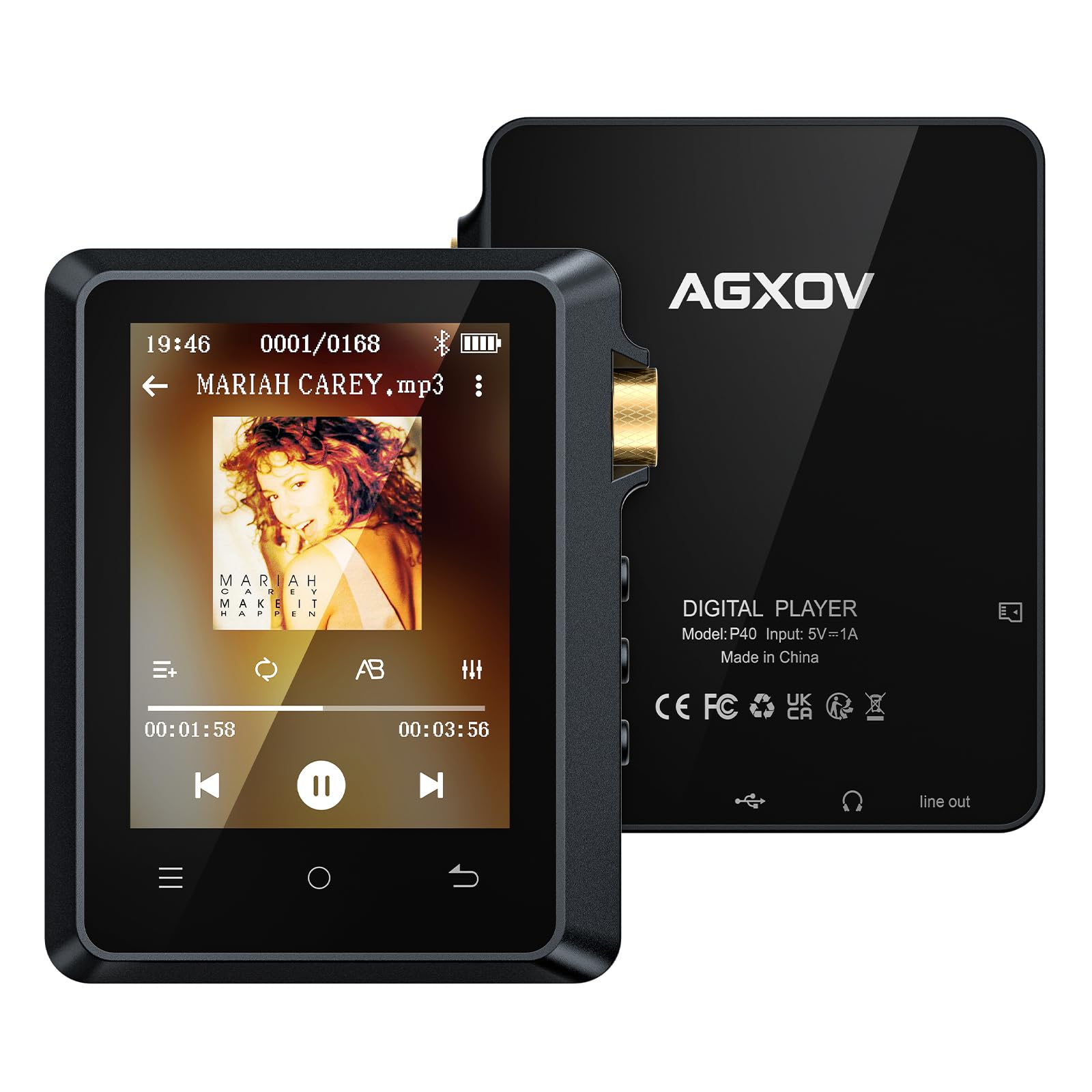
Image: The AGXOV P40 HiFi MP3 Player, showcasing its compact design and screen.
2. Setup
2.1. What's in the Box
- MP3 player x1
- 64GB microSD card x1
- Protective Leather Case (Black) x1
- USB-C Charging Data Cable x1
- User Manual x1
- Gift Packaging Box x1

Image: All items included in the AGXOV P40 product packaging.
2.2. Charging the Device
- Connect the provided USB-C charging cable to the player's USB-C port.
- Connect the other end of the cable to a USB power adapter (not included) or a computer's USB port.
- The battery indicator on the screen will show charging status. A full charge provides up to 50 hours of playback.
2.3. Installing the MicroSD Card
- Locate the microSD card slot on the side of the player.
- Gently insert the provided 64GB microSD card into the slot until it clicks into place. The player supports up to 256GB.

Image: The AGXOV P40 highlighting its massive storage capacity and microSD card slot.
2.4. Initial Power On
- Press and hold the Power button (usually on the side) for a few seconds until the screen lights up.
- Follow any on-screen prompts for initial setup, such as language selection.
3. Operating Instructions
3.1. Basic Navigation
- Touchscreen: Use your finger to tap icons, swipe through menus, and select options on the 2.8-inch HD touchscreen.
- Mechanical Knob: Rotate the retro-style mechanical knob for precise volume adjustment.
- Physical Buttons: Utilize the dedicated buttons for playback control (play/pause, skip tracks) and menu navigation.

Image: The 2.8-inch full-color touchscreen of the AGXOV P40, showing its intuitive interface.

Image: Close-up of the precision volume wheel on the AGXOV P40.
3.2. Music Playback
- From the main menu, select the 'Music' icon.
- Browse your music library by artist, album, genre, or all songs.
- Tap on a song to begin playback.
- Use the on-screen controls or physical buttons to play/pause, skip tracks, or adjust volume.
3.3. Bluetooth Pairing
- Ensure your Bluetooth headphones or speaker are in pairing mode.
- On the P40, navigate to 'Settings' and then 'Bluetooth'.
- Turn Bluetooth ON and select 'Search Device' or 'Scan'.
- Select your device from the list of available devices to pair.

Image: The AGXOV P40 demonstrating both wired and Bluetooth 5.3 wireless connectivity options.
3.4. File Transfer
- Connect the P40 to your computer using the provided USB-C cable.
- The device will appear as a removable storage device on your computer.
- Drag and drop your desired audio files into the appropriate folders on the player's internal storage or microSD card.
- Safely eject the device from your computer before disconnecting the cable.
4. Maintenance
- Cleaning: Use a soft, dry cloth to clean the device. Avoid liquid cleaners or abrasive materials.
- Battery Care: To prolong battery life, avoid fully discharging the device frequently. Charge it regularly and store it in a cool, dry place when not in use for extended periods.
- Storage: Keep the device away from extreme temperatures, direct sunlight, and moisture.
5. Troubleshooting
- Device won't turn on: Ensure the battery is charged. Connect to a power source and try again.
- No sound: Check volume levels on both the player and connected headphones/speakers. Ensure headphones are properly connected or Bluetooth is paired correctly.
- Bluetooth not connecting: Ensure both devices are in pairing mode and within range. Try restarting both devices.
- Files not transferring: Ensure the USB cable is securely connected and the device is recognized by your computer. Try a different USB port or cable.
- Device unresponsive: Press and hold the power button for 10-15 seconds to force a restart.
6. Specifications
| Feature | Detail |
|---|---|
| Brand | AGXOV |
| Model Name | P40 |
| Special Feature | Touch Screen |
| Connectivity Technology | USB, Bluetooth 5.3 |
| Memory Storage Capacity | 64 GB (Expandable up to 256GB via Micro SD) |
| Screen Size | 2.8 Inches |
| Compatible Devices | Personal Computer, Bluetooth Headphones/Speakers |
| Media Type | Micro SD |
| Supported Standards | MP3, AAC, WAV, FLAC, OGG, APE, PCM, WMA, ALAC, AIFF, DSF, DFF (Native DSD256) |
| Battery Average Life | 50 Hours |
| Item Weight | 0.2 Kilograms |
| Manufacturer | AGXOV |
| UPC | 788195744755 |

Image: The AGXOV P40's professional ATJ2167 audio core, highlighting its lossless decoding capabilities.
7. Warranty and Support
The AGXOV P40 HiFi MP3 Player comes with a standard manufacturer's warranty. For warranty claims, technical support, or any inquiries, please refer to the contact information provided on the product packaging or the official AGXOV website.
