
1. Introduction
This manual provides detailed instructions for the assembly, operation, and maintenance of your DICTAC 53-inch Fluted Makeup Vanity Desk. Please read these instructions carefully before assembly and use to ensure proper function and longevity of your product. Keep this manual for future reference.
The DICTAC Vanity Desk features an elegant fluted design, a high-definition LED mirror with adjustable lighting, RGB glass cabinets, multiple storage drawers, and a built-in power outlet for convenience.
2. Product Dimensions
Refer to the diagram below for the overall dimensions and key measurements of your vanity desk.

3. Setup and Assembly
Assembly of the DICTAC Vanity Desk is required. Please follow the step-by-step instructions provided in the separate assembly guide included with your packaging. Ensure all parts are present before beginning assembly.
3.1 Important Assembly Notes:
- Part Identification: All components are clearly labeled. Match labels to the assembly guide for correct placement.
- Tools Required: Ensure you have the necessary tools as specified in the assembly guide.
- Anti-Tip Design: For safety and stability, install the anti-tip hardware as instructed. This prevents accidental tipping, especially in households with children or pets.

4. Operating Instructions
4.1 LED Vanity Mirror
The integrated LED mirror offers three color modes (cool, natural, warm) and adjustable brightness.
- Power On/Off: Tap the touch sensor on the mirror to turn the lights on or off.
- Change Color Mode: Tap the touch sensor repeatedly to cycle through cool, natural, and warm light modes.
- Adjust Brightness: Press and hold the touch sensor to smoothly adjust the brightness level from 0% to 100%.

4.2 RGB Glass Cabinets
The glass side cabinets are equipped with RGB LED lights, offering a wide range of colors and dynamic lighting effects.
- Control Methods: The RGB lights can be controlled via a dedicated button or through a smartphone application.
- Features: Explore over 60,000 colors, light rhythm, music sync, built-in microphone response, and timing functions through the app.

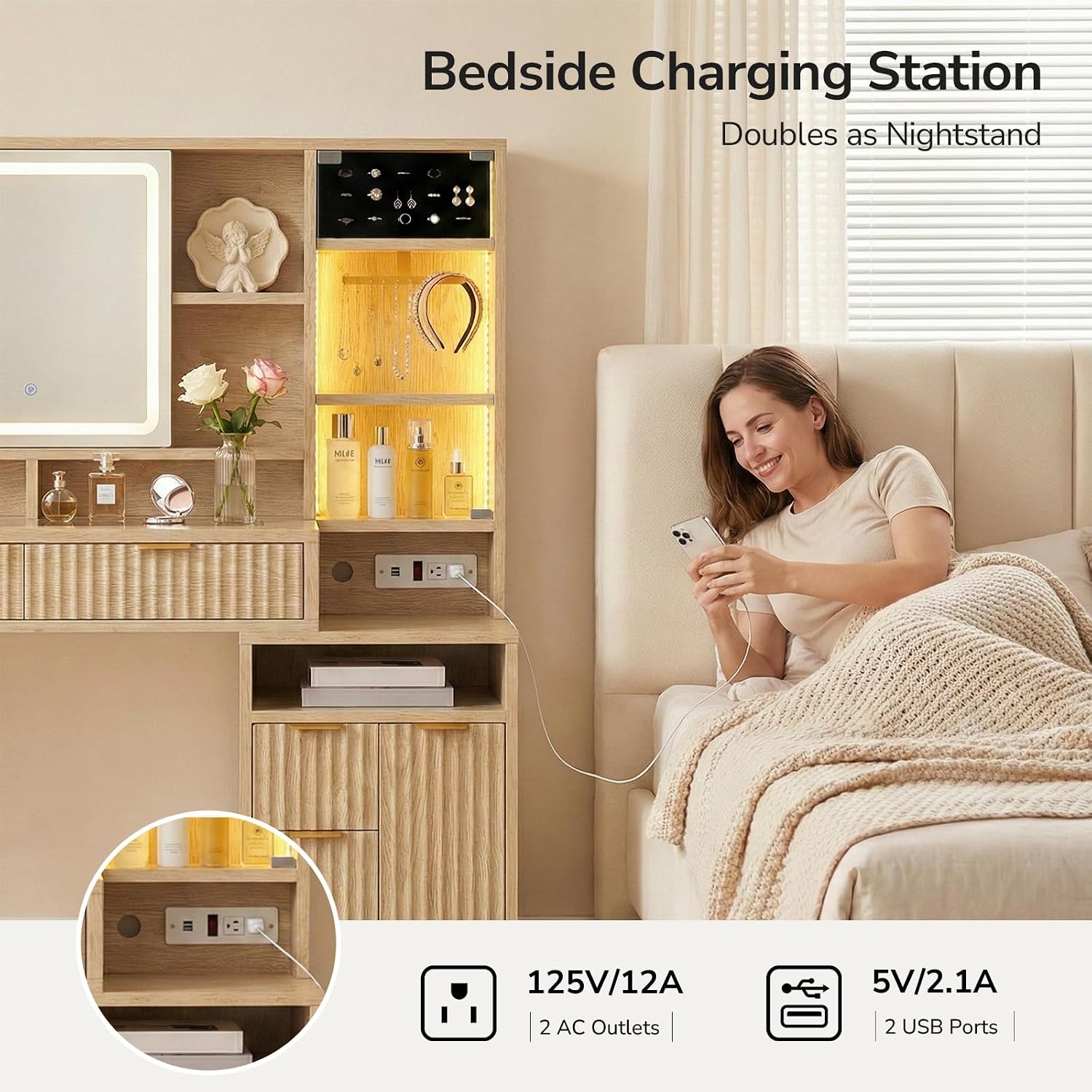
4.3 Built-in Charging Station
The vanity includes a convenient power strip with AC outlets and USB ports.
- AC Outlets: Two 125V/12A AC outlets are available for powering hair dryers, curling irons, or other small appliances.
- USB Ports: Two 5V/2.1A USB ports are provided for charging smartphones, tablets, and other USB-powered devices.
- Placement: The charging station is thoughtfully placed for easy access, doubling the lower-height side section as a nightstand.
4.4 Storage Features
The vanity desk offers ample and versatile storage solutions.
- Sliding Mirror Door: The mirror slides to reveal additional storage shelves behind it, keeping daily essentials within easy reach.
- Drawers: Multiple drawers of varying sizes provide organized storage for cosmetics, jewelry, and other items. The drawers feature smooth slides for effortless operation.
- Lockable Drawer: A private lockable drawer is included to safeguard your valuables.
- Open Shelves: Keep frequently used items accessible on the open shelves.


4.5 Product Video
Watch this official product video for a visual overview of the DICTAC Vanity Desk's features and functionality.
5. Maintenance
Proper care and maintenance will extend the life and appearance of your vanity desk.
- Cleaning Surfaces: Wipe engineered wood surfaces with a soft, damp cloth. Avoid harsh chemicals or abrasive cleaners. For glass surfaces, use a glass cleaner and a lint-free cloth.
- Electrical Components: Ensure the power outlet and USB ports are kept dry. Do not spray liquids directly onto electrical components.
- Drawer Slides: Periodically check drawer slides for smooth operation. If needed, a small amount of silicone lubricant can be applied.
- Mirror Care: Clean the LED mirror with a soft, dry cloth. Avoid excessive pressure on the touch sensor.
6. Troubleshooting
If you encounter any issues with your vanity desk, refer to the following common troubleshooting tips:
- LED Mirror Lights Not Working:
- Check if the power cord is securely plugged into a working outlet.
- Ensure the touch sensor is clean and free from obstructions.
- Try unplugging and re-plugging the vanity to reset the electrical connection.
- RGB Cabinet Lights Not Responding:
- Verify the power connection to the RGB lights.
- If using the app, ensure your device is properly paired and within range.
- Check the battery in the remote control (if applicable) or try the manual button control.
- Charging Station Not Functioning:
- Confirm the vanity desk is plugged into a live power outlet.
- Test the outlets/USB ports with a different device to rule out device issues.
- Avoid overloading the power strip with high-wattage appliances.
- Drawers Sticking or Difficult to Open:
- Check for any obstructions within the drawer or along the slides.
- Ensure the vanity is on a level surface. Uneven surfaces can cause misalignment.
- Inspect the drawer slides for damage or loose screws. Tighten if necessary.
If these steps do not resolve the issue, please contact DICTAC customer support for further assistance.
7. Specifications
| Feature | Detail |
|---|---|
| Brand | DICTAC |
| Model Number | VDQS-01 |
| Color | Oak |
| Size | 53 inches |
| Material | Engineered Wood |
| Product Dimensions (D x W x H) | 15.8"D x 47.2"W x 53.2"H |
| Item Weight | 95.2 pounds |
| Number of Drawers | 6 |
| Mirror Type | HD LED with 3 Color Modes & Adjustable Brightness |
| Cabinet Lighting | RGB LED with App/Button Control |
| Charging Station | 2 AC Outlets (125V/12A), 2 USB Ports (5V/2.1A) |
| Safety Features | Anti-tip design, non-slip legs |
8. Warranty and Support
For warranty information or technical support, please refer to the warranty card included with your product or visit the official DICTAC website. You may also contact DICTAC customer service directly for assistance with any product-related inquiries or issues.
Customer Service Contact: Please refer to your purchase documentation or the DICTAC brand website for the most current contact information.