
TANGZU Wan'er S.G II Red Lion
TANGZU Wan'er S.G II Red Lion In-Ear Monitor User Manual
Introduction
Thank you for choosing the TANGZU Wan'er S.G II Red Lion In-Ear Monitors. These earphones are designed to deliver a high-fidelity audio experience with a focus on powerful bass and clear sound. Featuring a 10mm PET diaphragm dynamic driver and an ergonomic design, they are suitable for various audio applications, including gaming and music listening. This manual provides essential information for the proper setup, operation, and maintenance of your new in-ear monitors.

Figure 1: TANGZU Wan'er S.G II Red Lion In-Ear Monitors
What's in the Box
Please check the package contents to ensure all items are present:
- TANGZU Wan'er S.G II Red Lion In-Ear Monitors (Left and Right)
- Detachable 0.78mm 2-pin OFC Cable (3.5mm Jack)
- Tang Sancai Wide Bore Eartips (3 pairs: Small, Medium, Large)
- Sonic Eartips (3 pairs: Small, Medium, Large)
- Silicone Headphone Organizer
- Cleaning Cloth
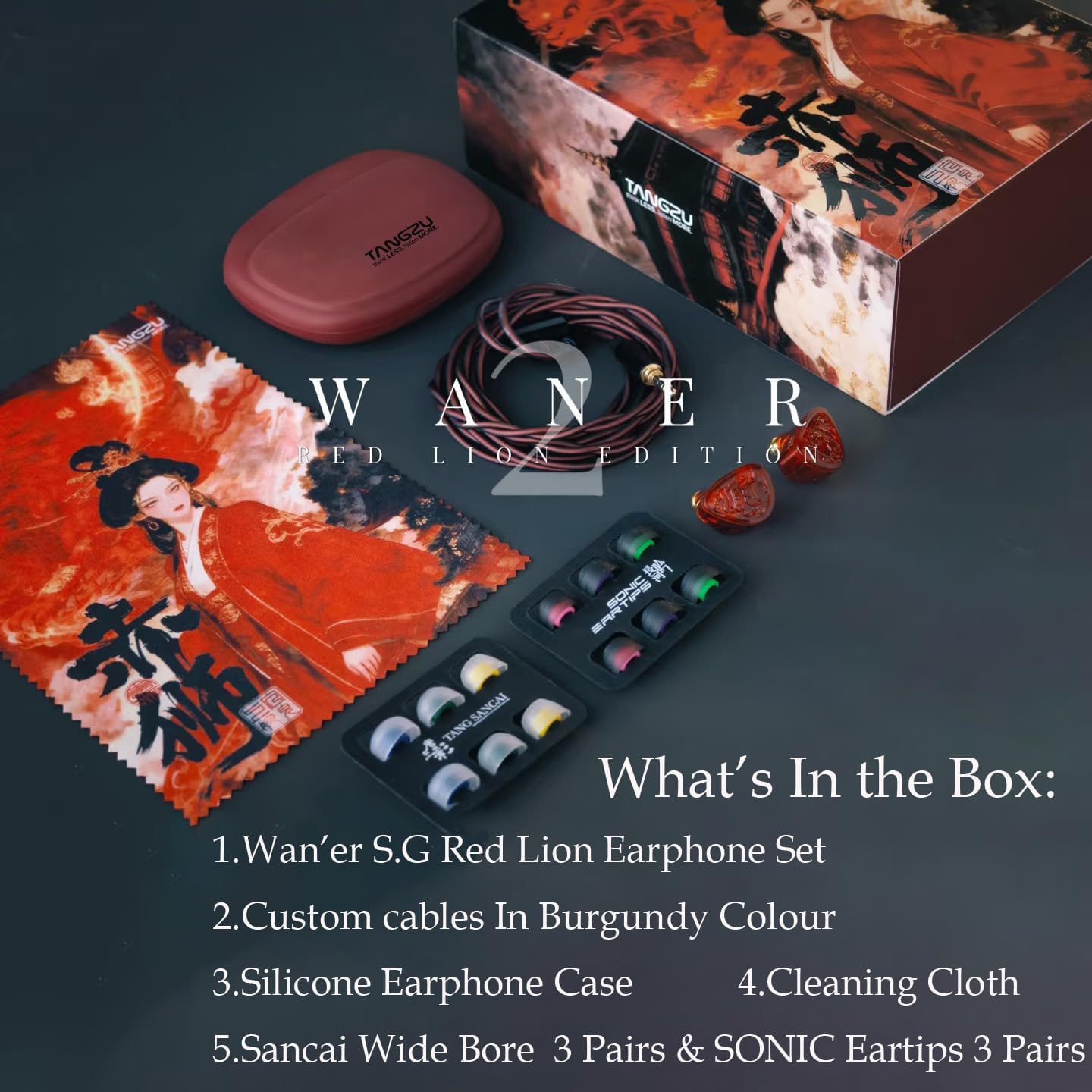
Figure 2: Package Contents
Setup
1. Attaching the Cable
- Identify the left (L) and right (R) earpieces and cable connectors. The cable connectors typically have L/R markings.
- Align the 0.78mm 2-pin connector on the cable with the corresponding socket on the earpiece. Ensure the pins are correctly oriented.
- Gently push the connector into the socket until it is firmly seated. Do not force the connection.
- Repeat for the other earpiece.

Figure 3: Cable Connection Diagram
2. Choosing Eartips
Selecting the correct eartip size is crucial for comfort, sound quality, and passive noise isolation. The package includes two types of eartips:
- Tang Sancai Wide Bore Eartips: Designed to optimize sound pathways and enhance acoustic clarity.
- Sonic Eartips: May offer a different sound profile, potentially emphasizing bass.
Experiment with different sizes (Small, Medium, Large) and types to find the best fit for your ears. A good seal will provide optimal bass response and prevent sound leakage.

Figure 4: Tang Sancai Wide Bore Eartips
3. Wearing the IEMs
- Gently insert the earpieces into your ear canals.
- Route the cable over the top of your ears for a secure and comfortable fit. This also helps reduce microphonics (cable noise).
- Adjust the earpieces until you achieve a snug fit and good seal.
Operating Instructions
1. Connecting to an Audio Source
Plug the 3.5mm jack of the cable into the headphone output of your audio device. Compatible devices include smartphones, PCs, gaming consoles, Hi-Res players, and headphone amplifiers.
2. Volume Control
Adjust the audio volume directly from your connected audio source. Start with a low volume and gradually increase it to a comfortable listening level to prevent hearing damage.
3. Passive Noise Cancellation
The ergonomic design and proper fit of the in-ear monitors provide passive noise cancellation, reducing external ambient noise for an immersive listening experience.
Maintenance
1. Cleaning Eartips
Regularly clean your eartips to maintain hygiene and optimal sound quality. Remove the eartips from the earphones and wash them with mild soap and lukewarm water. Rinse thoroughly and allow them to air dry completely before reattaching.
2. Cleaning Earphone Shells
Wipe the exterior of the earphone shells with the provided cleaning cloth or a soft, dry, lint-free cloth. Avoid using harsh chemicals or abrasive materials. Do not immerse the earphones in water.
3. Cable Care
To prolong the life of your cable, avoid sharp bends, twists, or excessive pulling. When disconnecting, always grasp the plug, not the cable itself.
4. Storage
When not in use, store your TANGZU Wan'er S.G II Red Lion IEMs in the provided silicone headphone organizer or a suitable protective case to prevent damage from dust, dirt, and physical impact.

Figure 5: Silicone Headphone Organizer
Troubleshooting
No Sound or Intermittent Sound
- Ensure the 3.5mm jack is fully inserted into your audio source.
- Verify that the 2-pin connectors are securely attached to both earpieces.
- Check the volume level on your audio source and ensure it is not muted.
- Test the earphones with a different audio source to rule out device issues.
- Inspect the cable for any visible damage or kinks.
Poor Sound Quality or Lack of Bass
- The most common cause is an improper seal. Experiment with different eartip sizes and types to find the best fit for your ear canals.
- Ensure the eartips are clean and free of debris that might obstruct sound.
- Confirm that the earpieces are inserted correctly and securely in your ears.
Uncomfortable Fit
- Try different eartip sizes and materials (Tang Sancai or Sonic) to find the most comfortable option.
- Adjust the cable routing over your ears to relieve any pressure points.
Specifications
| Brand | TANGZU |
| Model Name | Wan'er S.G II Red Lion |
| Ear Placement | In Ear |
| Impedance | 20 Ω |
| Audio Driver Type | 10mm PET Diaphragm Dynamic Driver |
| Frequency Range | 20 Hz - 20 kHz |
| Sensitivity | 113.5dB ± 3dB @ 1000Hz |
| Distortion Rate | ≤3% @ 100Hz-5000Hz |
| Cable Type | 0.78mm 2-pin Detachable OFC Cable |
| Cable Length | 1.2m ± 5% |
| Headphone Jack | 3.5 mm Jack |
| Enclosure Material | Medical-grade PET Plastic |
| Noise Control | Passive Noise Cancellation |
| Specific Uses | Gaming, Music Listening |
| Compatible Devices | Smartphones, PCs, Gaming Consoles, Hi-Res Players, Headphone Amplifiers |
Product Video
Official product video demonstrating the TANGZU Wan'er S.G II Red Lion in-ear monitors, highlighting their design and features.
Warranty and Support
Warranty Information
The TANGZU Wan'er S.G II Red Lion In-Ear Monitors come with a standard manufacturer's warranty. Please refer to your purchase documentation or the official TANGZU website for specific warranty terms and conditions.
Customer Support
For technical assistance, troubleshooting, or warranty claims, please contact TANGZU Official customer support. You can find contact information and additional resources on the official TANGZU store page:
Ask a question about this manual
Ask about setup, troubleshooting, compatibility, parts, safety, or missing instructions. Manuals+ will review the question and use this page’s manual context to help answer it.