
Product Overview
The BTMETER BT-881W is a versatile digital instrument designed to measure various environmental parameters, including wind speed, ambient temperature, humidity, and Wet Bulb Globe Temperature (WBGT). It serves as both a digital anemometer and a heat stress monitor, suitable for indoor and outdoor applications.
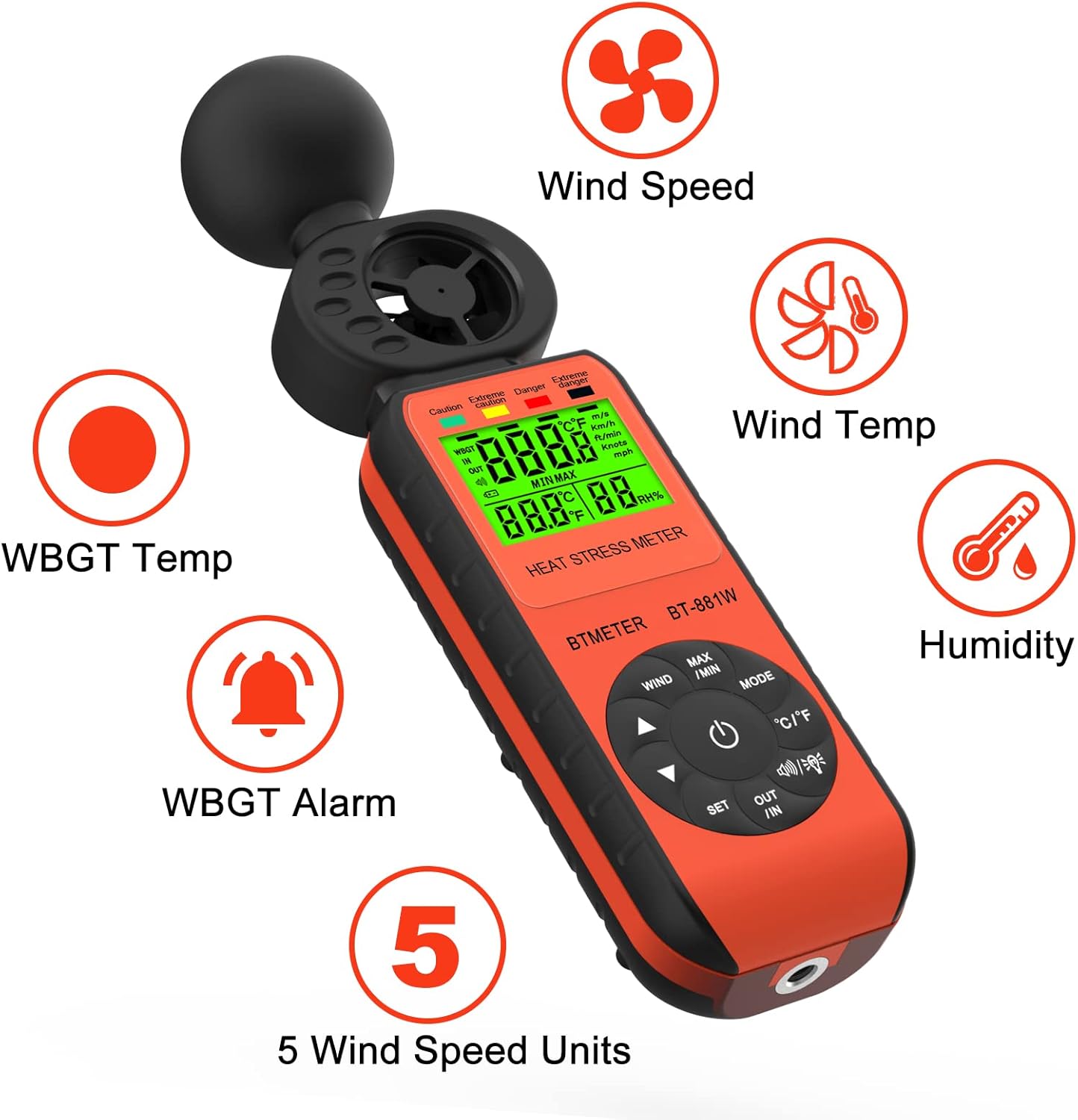
Figure 1: BTMETER BT-881W Heat Stress Meter Anemometer with its primary functions: Wind Speed, Wind Temperature, WBGT Temperature, Humidity, WBGT Alarms, and 5 Wind Speed Units.
Key Features:
- Multifunctional Measurement: Measures wind speed, ambient temperature, humidity, and WBGT.
- High Accuracy: Features upgraded wind and temperature sensors for precise readings.
- WBGT Monitoring: Includes WBGT alarms and supports indoor/outdoor WBGT measurement modes.
- User-Friendly: Offers 5 air velocity units, 2 temperature units, data hold, backlit LCD, and auto power-off.
- Tripod Mountable: Equipped with a 1/4" screw hole for tripod installation.
Setup
Battery Installation:
The BT-881W requires one 9V battery (not included). To install the battery:
- Locate the battery compartment cover on the back of the device.
- Open the cover.
- Insert a 9V battery, ensuring correct polarity.
- Close the battery compartment cover securely.
Tripod Mounting (Optional):
For stable measurements, the device can be mounted on a tripod. A 1/4" screw hole is located at the bottom of the unit.
- Locate the 1/4" screw hole at the base of the meter.
- Align the meter with your tripod's mounting screw.
- Gently twist the meter onto the tripod until it is secure.

Figure 2: Rear view of the BT-881W showing the battery compartment and dimensions.
Operating Instructions
Power On/Off:
- Press the Power button to turn the device on.
- The device features an auto power-off function to conserve battery life.
Mode Switching (Wind Speed / WBGT):
Press the MODE button to switch between wind speed measurement and WBGT (Wet Bulb Globe Temperature) measurement.
Wind Speed Unit Selection:
In wind speed mode, press the WIND button to cycle through the 5 available air velocity units: m/s, Ft/min, Knots, Km/h, Mph.

Figure 3: Display showing various wind speed units and the tripod mounting option.
Temperature Unit Switching (°C / °F):
Press the °C/°F button to switch between Celsius and Fahrenheit temperature units.
Indoor/Outdoor WBGT Mode:
In WBGT display mode, press the OUT/IN button to switch between indoor and outdoor WBGT measurement modes. This helps account for differences in temperature, humidity, and direct or radiant sunlight.
Data Hold Function:
Press the MAX/MIN button briefly to activate the data hold function, which freezes the current measurement on the display. Press again to release.
WBGT Alarm Settings:
The device can alert you when the black globe temperature (TG) level reaches a set threshold (20~50°C).
- Press the SET button to enter alarm setting mode.
- Use the arrow buttons (▲ / ▼) to adjust the alarm temperature value.
- When WBGT alarms are triggered, the backlight color changes to red.

Figure 4: WBGT alarm levels and corresponding temperature ranges (Caution, Extreme Caution, Danger, Extreme Danger).
Video Demonstration:
Video 1: Official BTMETER 881W Heat Stress Meter Anemometer demonstration, covering unboxing, basic operation, and feature highlights.
Maintenance
- Keep the device clean and dry. Use a soft, damp cloth for cleaning; do not use abrasive cleaners or solvents.
- Store the device in its protective pouch when not in use to prevent damage.
- Remove the battery if the device will not be used for an extended period to prevent battery leakage.
- Avoid exposing the device to extreme temperatures, direct sunlight, or high humidity.
Troubleshooting
If you encounter issues with your BTMETER BT-881W, consider the following common troubleshooting steps:
- Device not powering on: Check if the 9V battery is installed correctly and has sufficient charge. Replace the battery if necessary.
- Inaccurate readings: Ensure the sensors are clean and unobstructed. Allow the device to equilibrate to the environment for several minutes, especially for WBGT measurements.
- Display issues: If the display is dim or flickering, replace the battery.
- WBGT alarm not working: Verify that the alarm temperature is set correctly in WBGT mode.
For further assistance, please refer to the Support section.
Specifications
| Model Number | BT-881W |
| Product Dimensions | 2.05 x 1.57 x 8.19 inches (5.2 x 4.0 x 20.8 cm) |
| Item Weight | 4.96 ounces (0.31 Pounds) |
| Power Source | Battery Powered (1 x 9V battery required, not included) |
| Display Type | LCD |
| Sensor Technology | Ultrasonic |
| Wind Speed Range | 0~30 m/s |
| Ambient Temperature Range | 0~50°C (32~122°F) |
| Temperature Accuracy | ±0.6°C (±2°C overall) |
| Humidity Range | 0.1%~99.9% RH |
| WBGT Temperature Range | 32~122°F (Celsius/Fahrenheit Switchable) |
| Material Type | Plastic |
| Included Components | 1*Heat Stress Meter, 1* User manual |
Warranty and Support
Warranty Information:
The BTMETER BT-881W comes with a 1-Year Manufacturer Warranty. All BTMETER electrical products are strictly calibrated before shipment.
Technical Support:
BTMETER provides lifetime technical support for this product. For any technical inquiries, troubleshooting assistance, or warranty claims, please contact BTMETER customer service directly. Refer to the contact information provided with your purchase or visit the official BTMETER website for support details.