
1. Introduction
Thank you for choosing the Linkind Smart Solar Pool Lights SO5 Upgrade. These lights are designed to provide dynamic and customizable lighting for your inground or above-ground pool, fence, or pond. Featuring IP68 waterproofing, AI Dotis APP control, and solar-powered operation, these lights offer a convenient and energy-efficient way to enhance your outdoor space. Please read this manual carefully before installation and use to ensure optimal performance and safety.

Image: Overview of the Linkind Smart Solar Pool Light system.
2. What's in the Box
Verify that all components are present in your package:
- Smart Solar Pool Light (x2)
- Short Mounting Plate (x2)
- Long Mounting Plate (x2)
- Frame Mounting Clamp (x2)
- Underwater Glue (x6)
- VHB Tape (x6)
- Screw Accessory Pack (x1)
- Instruction Manual (x1)

Image: All components included in the Linkind Smart Solar Pool Lights package.
3. Setup and Installation
Before installation, ensure the solar panel receives direct sunlight for optimal charging. The lights are designed for both in-ground and above-ground pools, as well as other outdoor applications like fences or ponds.
3.1 App Download and Connection
To unlock the full features of your Linkind Smart Solar Pool Lights, download the AiDot app and connect your devices.
- Download the AiDot App from the App Store (iOS) or Google Play (Android).
- Sign in or create a new account.
- Ensure Bluetooth is enabled on your phone.
- Press the red button on the light unit to cycle between warm light and white light, indicating it's ready for pairing.
- Tap the "+" button and then "Add Device" in the app. Select "Nearby" to discover your lights.
- Follow the on-screen prompts to complete the connection.

Image: Step-by-step guide for downloading the AiDot app and connecting your Linkind Smart Solar Pool Lights.
3.2 Installation for In-Ground Pools
For in-ground pools, the lights can be installed on the pool edge using either underwater glue or VHB tape, depending on the surface. Ensure the surface is clean and dry before application.
- Clean the installation surface thoroughly.
- Apply underwater glue or VHB tape to the back of the mounting plate.
- Install the bracket to the surface, pressing firmly for 6-12 seconds.
- Allow the adhesive to cure for 24 hours before attaching the light.
- Apply underwater glue to the wall for the submersible light and install it after the adhesive cures for 24 hours.

Image: Visual guide for installing the lights on an in-ground pool edge, showing options for right-angle and large rounded edges.

Image: Detailed step-by-step instructions for securing the lights to an in-ground pool surface.
Video: Installation guide for Linkind Smart Solar Pool Lights on an in-ground pool.
3.3 Installation for Above-Ground Pools
For above-ground pools, use the provided frame mounting clamps to secure the lights to the pool frame. Ensure the frame size is compatible (30-75mm).
- Measure your pool frame size to ensure it is between 30-75mm.
- Adjust the mounting clamp to fit your pool frame.
- Attach the clamp securely to the pool frame.
- Install the light unit onto the clamp.
- Position the underwater light as desired.

Image: Visual guide for installing the lights on an above-ground pool frame using the mounting clamp.

Image: Detailed step-by-step instructions for securing the lights to an above-ground pool frame.
Video: Installation guide for Linkind Smart Solar Pool Lights on an above-ground pool.

Image: Diagram illustrating compatible pool types and mounting options for both in-ground and above-ground pools.
4. Operation
The Linkind Smart Solar Pool Lights offer versatile control options through the AiDot app and automatic solar functionality.
4.1 Solar Power and Automatic Operation
The lights are equipped with high-efficiency solar panels for charging during the day. They will automatically turn on at dusk and turn off at dawn, provided there is sufficient charge. The 1800mAh battery ensures long runtime.
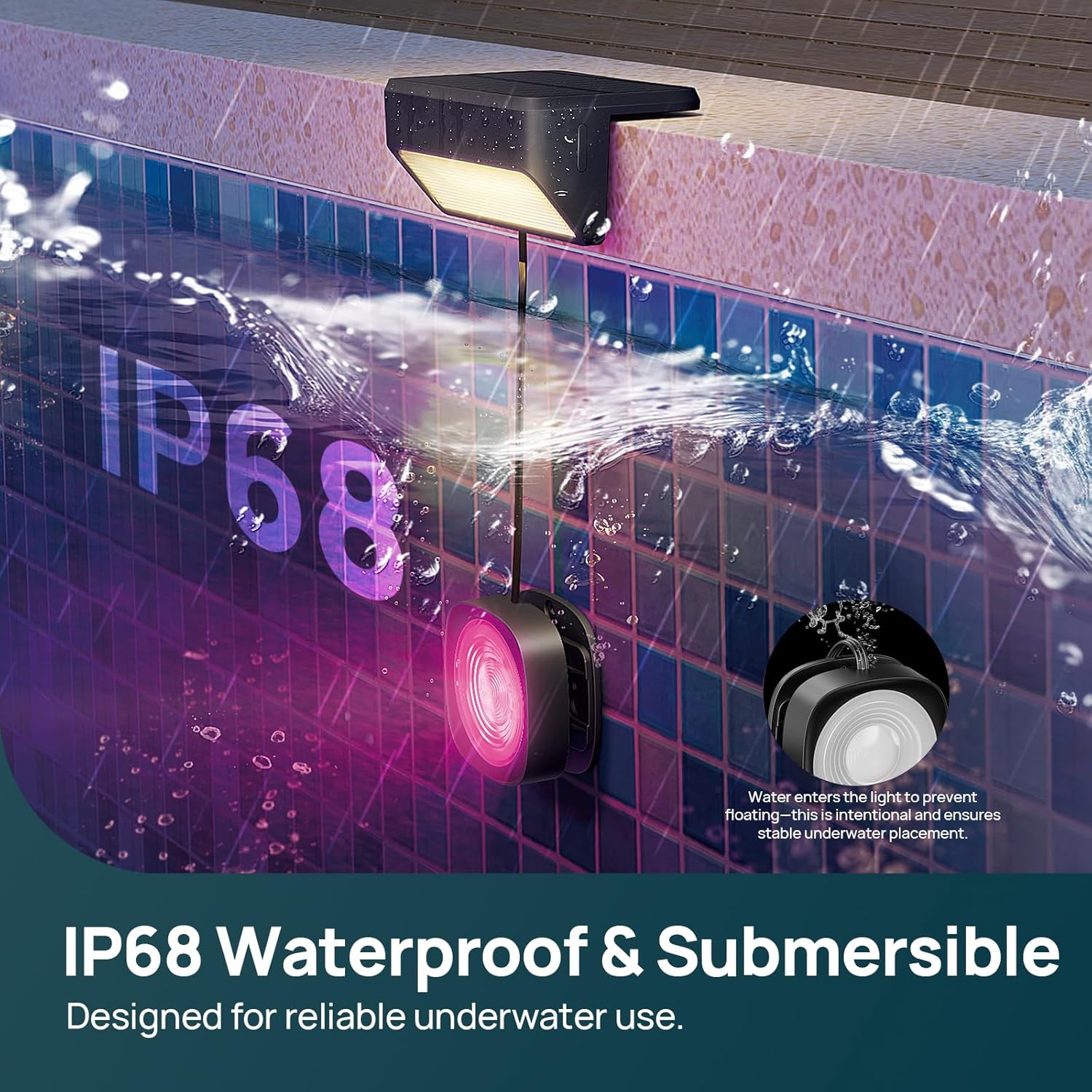
Image: Illustration of the solar charging process and battery capacity.

Image: Visual representation of the solar charging and battery features.
4.2 AiDot App Control
The AiDot app provides comprehensive control over your pool lights:
- 16 Million Colors & Tunable White: Adjust the light color from a vast spectrum of 16 million colors and fine-tune white light from 2700K (warm white) to 6500K (cool white).
- Dual-Zone Color Control: Independently control the colors of the top and bottom light zones for unique dual-tone effects.
- 54+ Preset Scenes: Choose from a variety of pre-programmed lighting scenes for different moods and occasions, including party modes and holiday themes.
- Dynamic Light Shows & Music Sync: Create vibrant light shows that react to music, bringing your pool to life.
- Smart Scheduling: Set custom schedules for your lights to turn on/off automatically, optimizing energy use and convenience.
- AI Dotis Integration: Use AI Dotis for intelligent lighting suggestions and automated effects.
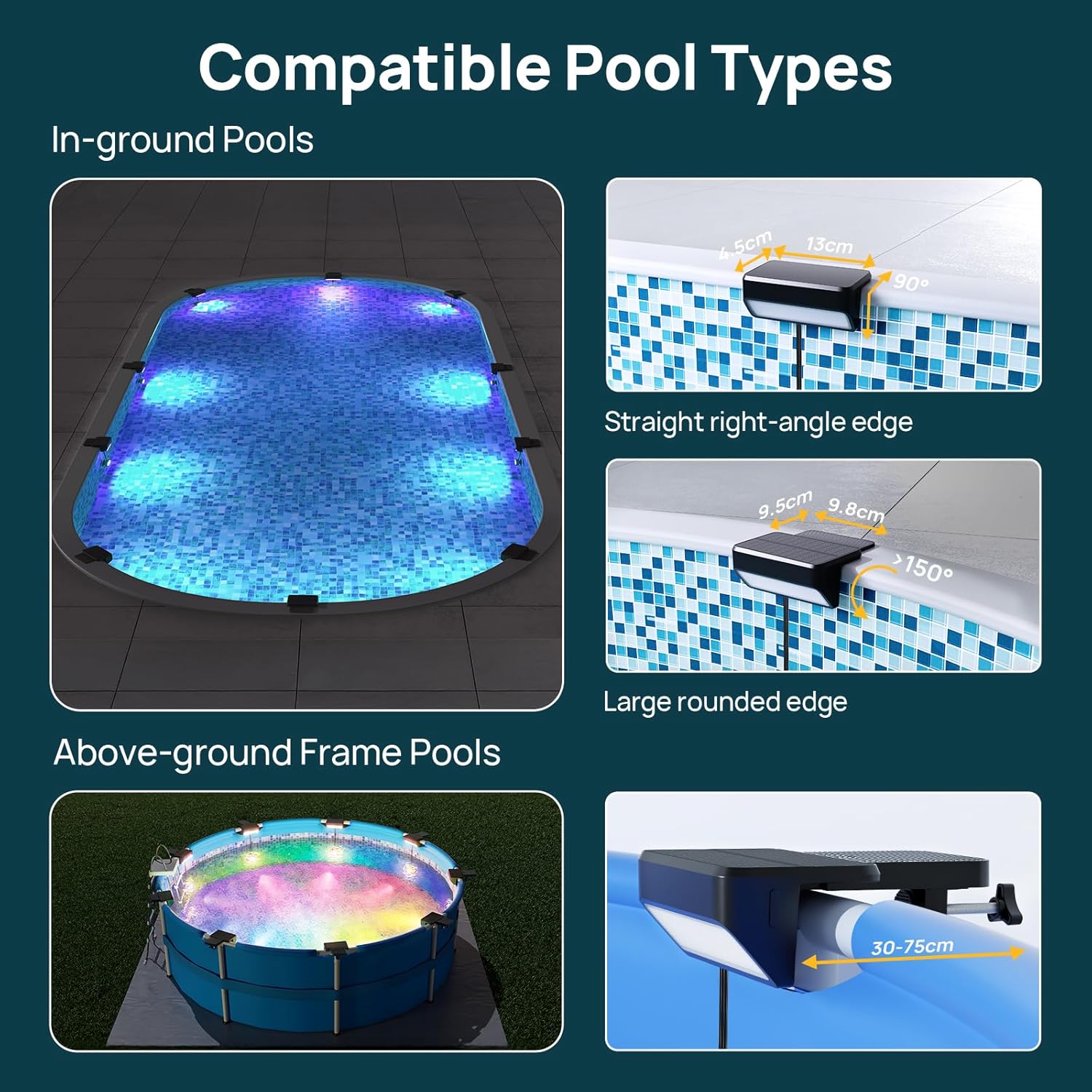
Image: The AiDot app interface demonstrating AI Dotis functionality for smart lighting suggestions.

Image: Another view of the AiDot app interface showcasing AI Dotis capabilities.

Image: The AiDot app displaying options for 16 million colors and over 54 preset scenes to customize ambiance.

Image: The AiDot app interface for setting brightness and selecting from various preset scenes and color temperatures.

Image: The AiDot app interface for selecting dynamic light shows and music sync modes.

Image: Visual representation of lights synchronizing with music, controlled via the AiDot app.

Image: The AiDot app interface for setting smart schedules to automate pool lighting.

Image: The AiDot app interface demonstrating how to set custom operating schedules for the lights.

Image: The AiDot app demonstrating dual-zone color control, allowing separate color settings for the top and bottom lights.

Image: Comparison of unified color mode and dual-zone color mode in the AiDot app.
Video: Demonstration of app operation for Linkind Solar Pool Lights, showcasing various features.
Video: Overview of Linkind Smart Solar Pool Lights SO5, highlighting key features and app control.
4.3 Voice Control (with Hub)
For voice control functionality with Amazon Alexa and Google Assistant, a compatible hub is required. This also extends the control range to 131 ft. Each light must be within 131 ft of the hub or another connected light within range.

Image: Information on voice control compatibility with Amazon Alexa and Google Assistant, and extended range with a hub.
5. Maintenance
Proper maintenance ensures the longevity and optimal performance of your Linkind Smart Solar Pool Lights.
- Cleaning: Regularly wipe the solar panel and light surfaces with a soft, damp cloth to remove dust, dirt, and debris. This ensures efficient solar charging and light output. Avoid abrasive cleaners.
- Solar Panel Exposure: Ensure the solar panel is not obstructed by leaves, dirt, or other objects that could block sunlight. Position the lights in an area that receives maximum direct sunlight throughout the day.
- Waterproofing: The lights are IP68 rated for submersion. However, avoid tampering with the seals or opening the unit, as this may compromise its waterproof integrity.
- Storage: If storing the lights for an extended period, ensure they are fully charged and store them in a cool, dry place.

Image: Illustration highlighting the IP68 waterproof rating and submersible design for reliable underwater use.

Image: Close-up view emphasizing the IP68 waterproof design for reliable underwater use.

Image: Diagram showing the durable components, including PC lampshade, LED lifetime, monocrystalline silicon solar panels, and UV-resistant ABS material.
6. Troubleshooting
If you encounter issues with your Linkind Smart Solar Pool Lights, refer to the following common problems and solutions:
| Problem | Possible Cause | Solution |
|---|---|---|
| Lights do not turn on at night. | Insufficient solar charge. | Ensure the solar panel is in direct sunlight for at least 6-8 hours daily. Clean the solar panel if dirty. |
| Lights are dim or flicker. | Low battery charge or partial obstruction of solar panel. | Allow for a full day of charging. Check for any shadows or debris on the solar panel. |
| App cannot connect to lights. | Bluetooth off, lights not in pairing mode, or too far from device. | Ensure Bluetooth is on. Press the red button on the light to activate pairing mode. Move closer to the lights. Restart the app. |
| Lights not responding to app commands. | Connection issue or interference. | Check app connection. If using a hub, ensure it's within range. Restart lights and app. |
| Underwater light detaches. | Improper adhesive application or insufficient curing time. | Re-clean the surface and reapply underwater glue or VHB tape, ensuring proper pressure and allowing a full 24-hour cure time before re-attaching. |
7. Specifications
| Feature | Detail |
|---|---|
| Brand | Linkind |
| Model Number | SO5 Upgrade |
| Power Source | Solar Powered |
| Battery Capacity | 1800mAh (Integrated) |
| Solar Conversion Efficiency | 25% |
| Water Resistance Level | IP68 (Submersible) |
| Light Source | LED |
| Light Color | Multicolor (16 Million Colors), Tunable White (2700K-6500K) |
| Control Method | App (AiDot), Touch |
| Special Features | Dual-Zone Colors Control, Dynamic Light Show, Music Sync, Smart Scheduling, AI Dotis |
| Material | Plastic (UV-Resistant ABS), Durable PC Lampshade |
| Item Dimensions (L x W x H) | 9.75" x 3.9" x 3.51" |
| Cable Length (Underwater Light) | 3.28 ft |
| Included Items | 2 Smart Solar Pool Lights, Mounting Plates, Frame Clamps, Adhesives, Screws, Manual |

Image: Recommended placement diagrams for Linkind Smart Solar Pool Lights in various underground pool shapes and sizes.
8. Warranty & Support
Linkind provides a comprehensive warranty and customer support for your product.
- Warranty: Linkind offers a one-year warranty on this product.
- Unconditional Replacement: Enjoy 12-months unconditional replacement for eligible issues.
- Lifetime Warranty: Lifetime service and technical support are provided.
- Customer Support: For assistance, please contact Linkind Customer Support at 1-877-770-5727 (Mon-Fri, 9 AM–5 PM PST).

Image: Linkind brand logo.

Image: Details on Linkind's 12-month unconditional replacement, lifetime warranty, and customer support contact.

