
1. Introduction
This manual provides detailed instructions for the assembly, operation, maintenance, and troubleshooting of your SEDETA L Shaped Gaming Desk, Model 1.6 desk. This desk is designed for home office and gaming environments, offering a spacious work surface, integrated storage, and LED lighting.
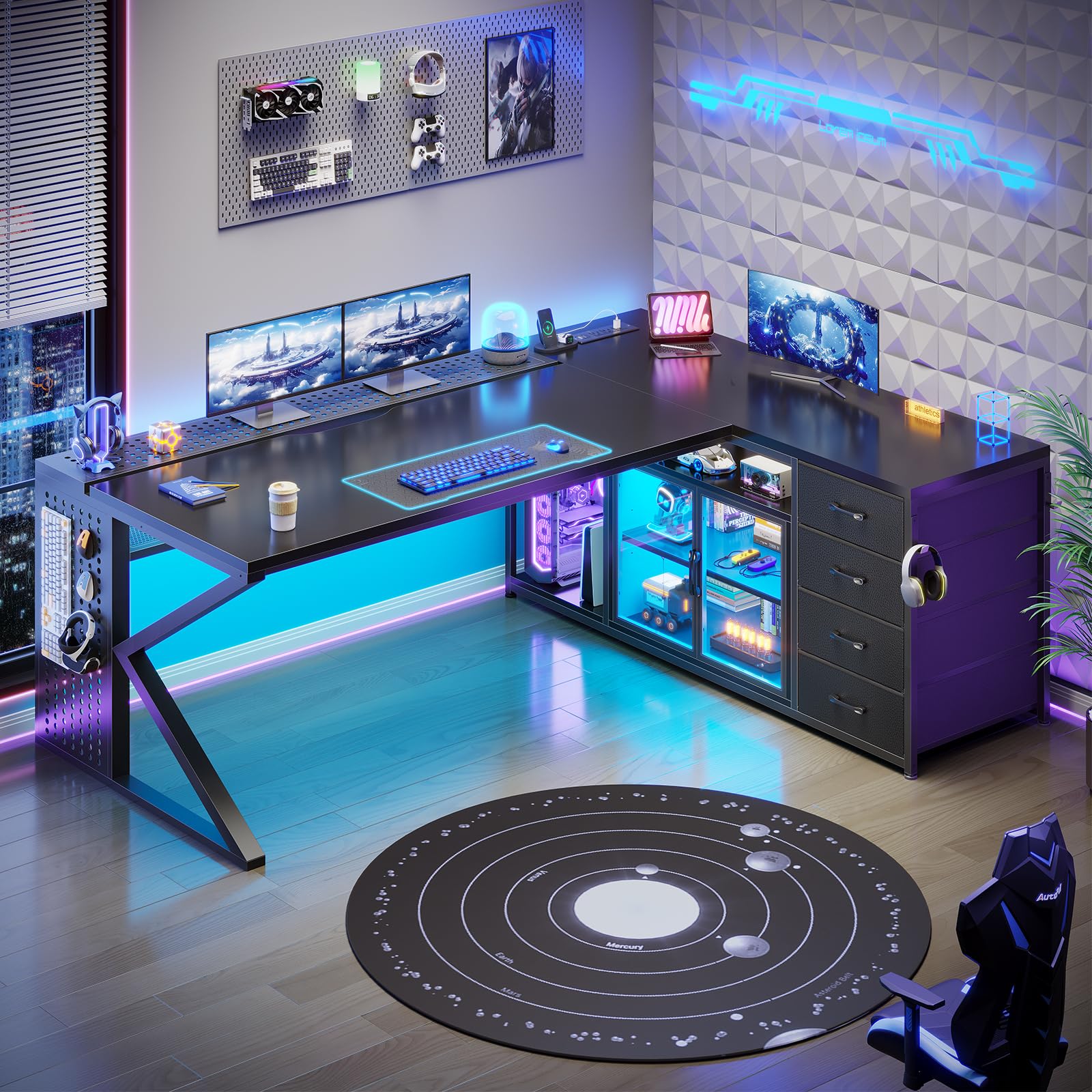
Overall view of the SEDETA L Shaped Gaming Desk, showcasing its L-shape design and integrated storage.
2. Setup and Assembly
Carefully unpack all components and verify against the included parts list. Assembly requires following the detailed instructions provided in the separate assembly guide. While some basic tools may be included, having your own hex key set or an impact driver with appropriate bits can significantly ease the assembly process.
2.1 Unpacking and Inspection
- Open the packaging carefully and remove all parts.
- Inspect all components for any damage or missing parts. If any issues are found, contact customer support immediately.
- Keep all packaging materials until assembly is complete and you are satisfied with the product.
2.2 Assembly Steps
Refer to the separate assembly instruction booklet for step-by-step diagrams and detailed guidance. Ensure all screws are tightened securely, but do not overtighten to avoid damaging the material.

Diagram showing the dimensions of the L-shaped desk, including desktop width, length, and height.
2.3 Safety Precautions During Assembly
- Assemble the desk on a soft, clean surface to prevent scratches.
- It is recommended to have two people for assembly due to the size and weight of the components.
- Always follow the assembly instructions carefully.
- Ensure the desk is properly anchored to the wall or floor to prevent tipping, especially if heavy items are placed on shelves or the display cabinet.
3. Operating Instructions
3.1 Power Outlet Usage
The desk includes a built-in charging station with 3 AC outlets, 1 USB port (5V/2A), and 1 Type-C port (5V/2A). This allows for convenient power access for up to 5 devices simultaneously.

Close-up of the integrated power outlet, showing 3 AC outlets, 1 USB port, and 1 Type-C port.
- Connect the desk's power cord (6.6 ft) to a wall outlet.
- Plug your devices into the available AC, USB, or Type-C ports.
- Avoid overloading the power strip.
3.2 LED Lighting System
The desk features an RGB LED light strip with over 60,000 colors and 29 flashing modes. Control is available via an APP or remote control.

The L-shaped desk illuminated by its RGB LED lighting system in a gaming environment.
- Connect the LED light strip to its power source as per the assembly instructions.
- Download the specified APP (if applicable) or use the provided remote control to customize colors and modes.
3.3 Storage Features
The desk offers extensive storage, including four fabric drawers, an adjustable display cabinet, a cable management tray, and two open shelves.

View of the four fabric drawers, designed for easy access and storage of various items.

The display cabinet featuring adjustable shelves and internal lighting, suitable for showcasing items.

The 46-inch cable management tray, designed to keep power cords and cables organized and out of sight.
- Utilize the fabric drawers for storing documents, office supplies, or personal items.
- Adjust the shelves within the display cabinet to accommodate items of different heights.
- Route power cords and data cables through the cable management tray to maintain a tidy workspace.
4. Maintenance
4.1 General Care
- Clean the desk surfaces with a soft, damp cloth. Avoid abrasive cleaners or harsh chemicals that may damage the finish.
- For the fabric drawers, spot clean with a mild detergent and allow to air dry.
- Regularly check all screws and fasteners to ensure they remain tight. Retighten if necessary.
4.2 Electrical Component Care
- Keep the power strip and electrical cords away from heat sources and liquids to prevent electrical shorts or fires.
- Do not attempt to modify or repair the built-in power outlet or LED lighting system. Contact qualified personnel for service.
5. Troubleshooting
| Problem | Possible Cause | Solution |
|---|---|---|
| Desk feels unstable or wobbly. | Loose fasteners; uneven floor; heavy load distribution. | Ensure all assembly screws are tightened. Adjust leveling feet if present. Redistribute weight evenly on the desktop. |
| Display cabinet doors or handles are loose. | Improper installation; wear and tear. | Re-tighten door handles. If persistent, consider using a thread-locking adhesive on handle screws. Ensure hinges are properly aligned and secured. |
| LED lights are not working. | Power connection issue; remote control battery dead; APP connectivity problem. | Check if the LED strip is properly connected to its power source. Replace remote control batteries. Ensure APP is correctly paired and updated. |
| Power outlets are not providing power. | Desk's main power cord unplugged; circuit breaker tripped; device issue. | Verify the desk's power cord is securely plugged into a functional wall outlet. Check your home's circuit breaker. Test devices in another outlet. |
| Desktop panel bowing under monitor weight. | Excessive weight on unsupported areas. | Avoid placing very heavy monitors or equipment on areas of the desktop that lack direct support from the frame or legs. Distribute weight evenly. Consider using a monitor arm that clamps to the desk frame if possible. |
6. Product Specifications
| Feature | Detail |
|---|---|
| Brand | SEDETA |
| Model Number | 1.6 desk |
| Shape | L-Shape |
| Product Dimensions (D x W x H) | 27.6"D x 63"W x 30"H |
| Color | Black |
| Material Type | Engineered Wood (Top and Base), Metal (Frame) |
| Finish Type | Powder Coated PVC |
| Number of Drawers | 4 (Fabric) |
| Number of Shelves | 2 (Open) + Adjustable shelves in display cabinet |
| Number of Cabinets | 1 (Display Cabinet) |
| Built-in Power Outlet | 3 AC Outlets, 1 USB Port (5V/2A), 1 Type-C Port (5V/2A) |
| Power Cord Length | 6.6 ft |
| Cable Management | 46" Cable Management Tray |
| Item Weight | 85 Pounds |
| Assembly Required | Yes |
7. Warranty Information
This SEDETA L Shaped Gaming Desk is covered by a Customer Satisfaction Guarantee. For specific details regarding the terms and conditions of your warranty, please refer to the documentation included with your purchase or contact SEDETA customer support.
The warranty typically covers manufacturing defects and issues arising from normal use. Damage caused by misuse, improper assembly, or unauthorized modifications may not be covered.
8. Customer Support
Should you encounter any issues with your SEDETA L Shaped Gaming Desk, or if you have questions regarding assembly, operation, or parts, please do not hesitate to contact our customer support team.
- For damaged, scratched, or missing parts: Contact us directly for a free replacement or partial refund.
- General inquiries: Refer to the contact information provided in your purchase documentation or visit the official SEDETA website.
When contacting support, please have your model number (1.6 desk) and purchase details readily available to expedite assistance.