
1. Introduction
This manual provides detailed instructions for the safe and efficient operation, installation, and maintenance of your Temprium 9000 BTU Mini Split Air Conditioner 115V. Please read this manual thoroughly before using the unit and retain it for future reference.
The Temprium Mini Split AC system offers advanced inverter technology for energy efficiency, providing both 9,000 BTU cooling and 9,500 BTU heating for spaces up to 450 sq. ft. It features quiet operation, smart control via WiFi, and multiple operating modes for year-round comfort.
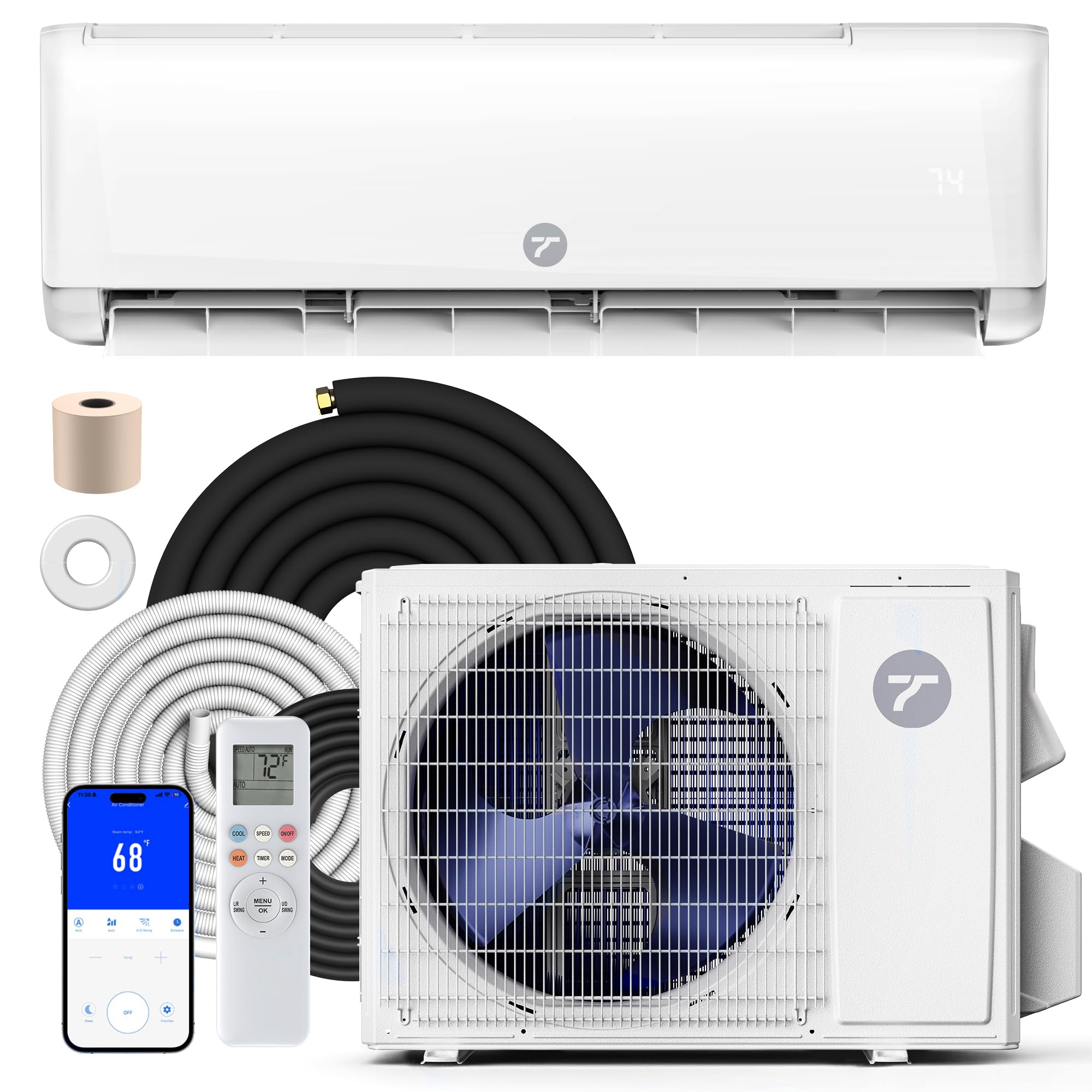
Figure 1.1: Temprium 9000 BTU Mini Split Air Conditioner System
2. Safety Information
Always follow basic safety precautions when using electrical appliances to reduce the risk of fire, electric shock, or injury.
- Ensure the unit is properly grounded.
- Do not operate the unit with wet hands.
- Keep children away from the unit.
- Disconnect power before cleaning or servicing.
- Do not block air inlets or outlets.
- Use only authorized service personnel for repairs.
3. Package Contents
Verify that all components are present in the package. If any items are missing or damaged, contact customer support.
- Indoor Unit
- Outdoor Unit
- Remote Control
- AAA Batteries (2)
- Drain Hose (6.89 ft)
- Communication Cable (14.76 ft)
- Copper Pipes (13.12 ft each, 2 pieces)
- Power Cord (8.20 ft)
- Putty
- Tape
- Wall Cap
- Mounting Bracket
- Mini Bubble Level

Figure 3.1: Included Components
4. Product Overview
The Temprium Mini Split AC system consists of an indoor unit and an outdoor unit, designed to provide efficient heating and cooling. The indoor unit is typically mounted high on a wall, while the outdoor unit is placed outside the building.
4.1 Indoor Unit
The indoor unit houses the evaporator coil, fan, and control electronics. It distributes conditioned air into the room. The display shows the current temperature and operating status.

Figure 4.1: Indoor Unit Airflow
4.2 Outdoor Unit
The outdoor unit contains the compressor, condenser coil, and fan. It is responsible for releasing or absorbing heat from the outside air.
4.3 Remote Control and Smart Features
The system can be controlled via the included remote control or through a WiFi-enabled app, compatible with Alexa and Google Assistant. This allows for convenient temperature adjustments and mode selections from anywhere.
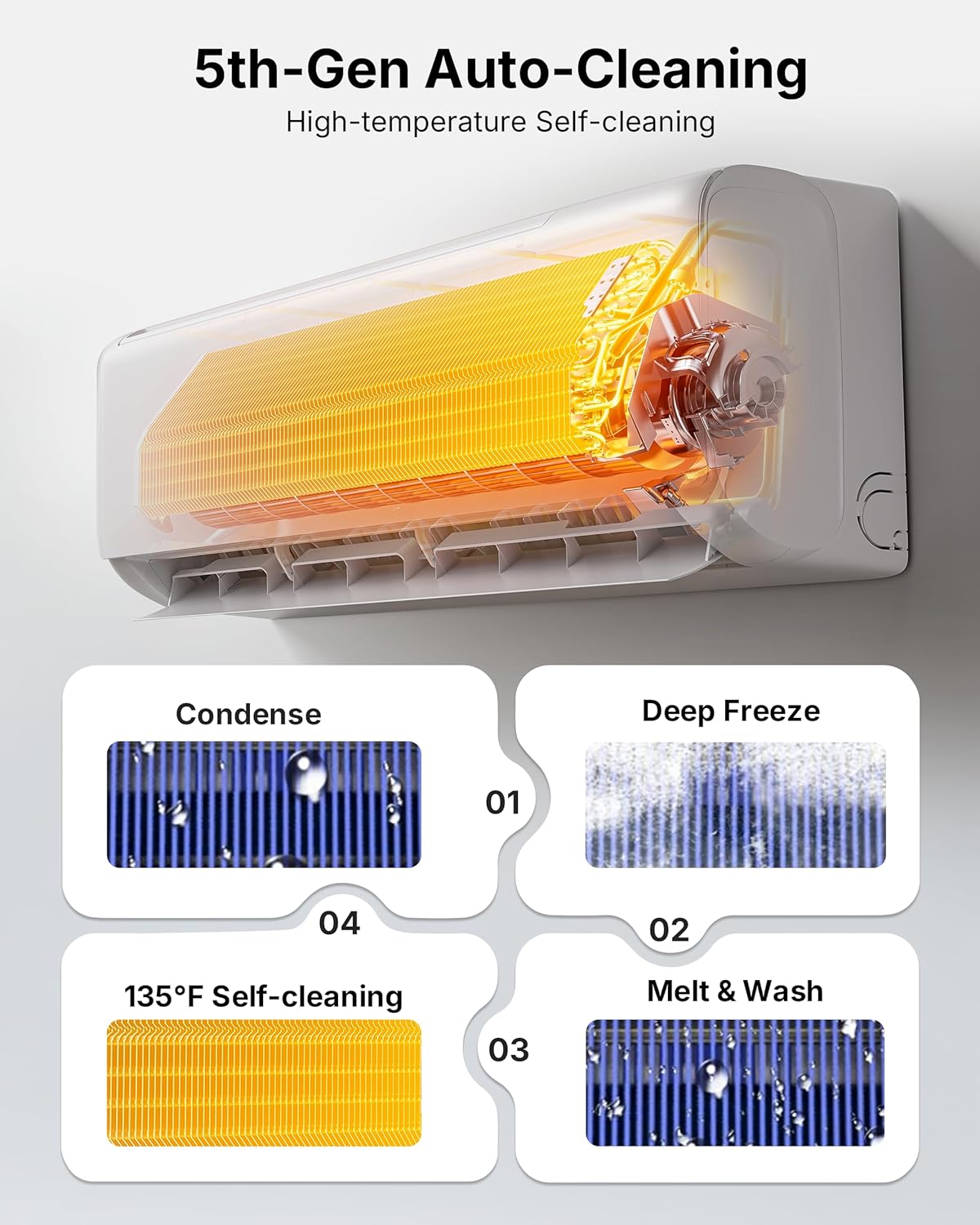
Figure 4.2: Remote and App Control
5. Setup and Installation
For optimal performance and safety, professional HVAC installation is strongly recommended. Improper installation can lead to refrigerant leakage, incorrect wiring, reduced energy efficiency, and early system failure. A licensed local HVAC professional can ensure your system performs exactly as designed.
5.1 Installation Steps Overview
- Mount the indoor unit bracket on the wall.
- Drill a hole through the wall for refrigerant lines, drain hose, and communication cable.
- Connect the refrigerant lines, drain hose, and electrical wiring to the indoor unit.
- Hang the indoor unit on the mounting bracket.
- Install the outdoor unit in a suitable location (on a wall bracket or ground pad).
- Connect the refrigerant lines and electrical wiring to the outdoor unit.
- Evacuate the refrigerant lines using a vacuum pump.
- Release refrigerant and check for leaks.
- Seal the wall opening.
5.2 Installation Video Guide
For a visual guide on the installation process, please refer to the official Temprium installation video:
Video 5.1: Temprium Split AC Installation Guide. This video provides a step-by-step walkthrough of the installation process for the mini split air conditioner.
6. Operating Instructions
Your Temprium Mini Split AC offers various modes and features to customize your comfort.
6.1 Operating Modes
The unit features 7 operating modes:
- Auto: Automatically selects cooling or heating based on the set temperature and room temperature.
- Cool: Provides cooling to lower the room temperature.
- Heat: Provides heating to raise the room temperature.
- Dry: Dehumidifies the air without significant cooling.
- Fan: Circulates air without heating or cooling.
- Sleep: Adjusts temperature and fan speed for comfortable sleep, with dimmed display.
- ECO: Optimizes operation for maximum energy savings.
6.2 Fan Speeds and Airflow
Choose from 7 fan speeds to control airflow intensity. The 4D auto swing feature allows for multi-directional airflow distribution.

Figure 6.1: Operating Modes and Fan Speeds
6.3 Smart Control (WiFi, App, Voice)
Control your unit remotely using the dedicated WiFi app or voice commands via Amazon Alexa or Google Assistant. This allows for scheduling, mode changes, and temperature adjustments from anywhere.
Video 6.2: Temprium Mini Split AC WiFi Control. This video demonstrates how to use the WiFi control features for your mini split AC system.
7. Maintenance
Regular maintenance ensures optimal performance and longevity of your Temprium Mini Split AC.
7.1 Self-Cleaning Function
The unit features a 133°F high-temperature self-cleaning function that helps keep the indoor coil clean and dry, reducing manual upkeep and preventing mold and bacteria growth.

Figure 7.1: Auto-Cleaning Process
7.2 Washable Filter
The washable filter effectively captures dust and airborne particles. Clean the filter regularly (every 2-4 weeks, depending on usage) to maintain air quality and efficiency.
- Open the front panel of the indoor unit.
- Remove the air filters.
- Wash filters with lukewarm water and mild detergent.
- Rinse thoroughly and allow to air dry completely before reinstalling.
7.3 Cleaning Tips Video Guide
For a visual guide on cleaning your split AC, please refer to the official Temprium cleaning tips video:
Video 7.2: Temprium Split AC Cleaning Tips. This video provides guidance on how to clean your mini split air conditioner for optimal performance.
8. Troubleshooting
If you encounter issues with your unit, refer to the following common problems and solutions. If the problem persists, contact customer support.
| Problem | Possible Cause | Solution |
|---|---|---|
| Unit does not turn on | No power, circuit breaker tripped, remote batteries dead | Check power supply, reset breaker, replace remote batteries. |
| Insufficient cooling/heating | Dirty air filter, blocked outdoor unit, wrong mode selected, room size too large | Clean filter, clear obstructions, select correct mode, ensure unit matches room size. |
| Unusual noise | Loose parts, foreign objects, unit not level | Inspect unit for loose components, remove foreign objects, ensure stable installation. |
| Water leakage | Clogged drain hose, improper installation | Clear drain hose, verify proper slope and connections. |
| WiFi connection issues | Incorrect network settings, router issues, app not updated | Verify WiFi credentials, restart router, update app, ensure unit is within WiFi range. |
9. Specifications
Detailed technical specifications for the Temprium 9000 BTU Mini Split Air Conditioner 115V.

Figure 9.1: Parameter Details
| Feature | Detail |
|---|---|
| Model Number | SAC001-B-9K |
| Cooling Power | 9000 British Thermal Units |
| Heating Capacity | 9500 British Thermal Units |
| Seasonal Energy Efficiency Ratio (SEER2) | 22.0 |
| Heating Seasonal Performance Factor (HSPF2) | 9.0 |
| Voltage | 115 Volts |
| Noise Level | 23 Decibels (Indoor Unit) |
| Refrigerant | R-32 |
| Max Input Power | 1300W |
| Air Flow Volume | 353 CFM |
| Recommended Area | Up to 450 sq. ft. |
| Product Dimensions (Indoor Unit) | 7.87"D x 29.96"W x 11.61"H |
| Product Dimensions (Outdoor Unit) | 13.58"D x 32.48"W x 23.43"H |
| Control Method | App, Remote, Voice (Alexa, Google Assistant) |
| Special Features | Air Purification Filter, Anti Bacterial Filter, Inverter Compressor, Sleep Mode, Self-Cleaning |
10. Warranty and Support
10.1 Manufacturer's Warranty
This Temprium Mini Split Air Conditioner is covered by a 1-Year Manufacturer's Warranty. Please retain your proof of purchase for warranty claims.
10.2 Return Policy
We offer a 30-day hassle-free return and replacement policy. If your item arrives defective, damaged, or with missing parts, we will cover all return and replacement shipping costs. For returns due to personal reasons, you may be responsible for return shipping costs.
10.3 Customer Support
Temprium is committed to providing continuous support for our products. Our customer support team is available to assist you with any questions, technical help, or installation guidance.
- Replies within 24 hours via chat or phone.
- Lifetime technical support and direct manufacturer access.
- Multilingual assistance available.
For support, please visit the official Temprium website or contact us through your purchase platform.

