
1. Important Safety Information
Please read all instructions carefully before assembling and using this exercise bike. Keep this manual for future reference.
- Maximum User Weight: Do not exceed 353 pounds (160 kg).
- Assembly: Ensure all bolts and nuts are securely tightened before use.
- Placement: Place the exercise bike on a flat, stable surface. Ensure adequate space around the bike for safe operation.
- Children and Pets: Keep children and pets away from the exercise bike during operation.
- Medical Advice: Consult a physician before starting any exercise program, especially if you have pre-existing health conditions.
- Moving the Bike: Use the transportation wheels to move the bike. Lift carefully to avoid injury.
2. Product Overview
The Wenoker Recumbent Exercise Bike is designed for comfortable, low-impact workouts at home. Its ergonomic design and adjustable features make it suitable for various users.
Key Features:
- Ergonomic Design: Features an adjustable seat and comfortable backrest for optimal support.
- 16-Level Magnetic Resistance: Allows for a wide range of workout intensities, from gentle pedaling to light strength training.
- Fitness App Connectivity: Syncs with popular fitness applications to track workouts and provide interactive training experiences.
- Ultra-Quiet Operation: Advanced magnetic resistance system ensures a smooth and nearly silent ride.
- Clear LCD Display: Monitors time, speed, distance, calories, pulse, and odometer.
- Easy Assembly: Mostly pre-assembled design for quick setup.
- Portability: Equipped with transportation wheels for easy movement.
Product Dimensions:
56.61" (Depth) x 24.21" (Width) x 43.31" (Height)

Image: Wenoker Recumbent Exercise Bike with key dimensions highlighted.
3. Setup and Assembly
The Wenoker Recumbent Exercise Bike features a mostly pre-assembled design, allowing for quick setup, typically within 30 minutes. Follow the steps below for proper assembly.
Assembly Video Guide:
Video: Detailed assembly instructions for the Wenoker Recumbent Exercise Bike.
Key Assembly Steps:
- Unpack Components: Carefully remove all parts from the packaging. Verify all components are present against the parts list in your included manual.
- Attach Stabilizers: Secure the front and rear stabilizers to the main frame using the provided bolts and tools. Ensure they are firmly attached for stability.
- Install Pedals: Attach the pedals to the crank arms. Note that pedals are typically marked 'L' for left and 'R' for right, and should be threaded in the correct direction (left pedal counter-clockwise, right pedal clockwise).
- Connect Console Wires: Carefully connect the sensor wires from the main frame to the console.
- Mount Console Post: Secure the console post to the main frame using the designated bolts.
- Attach Handlebars: Fasten the handlebars to the console post.
- Install Seat and Backrest: Mount the seat and backrest onto their respective posts, ensuring all fasteners are tight.
- Final Checks: Double-check all connections and ensure the bike is stable before first use.
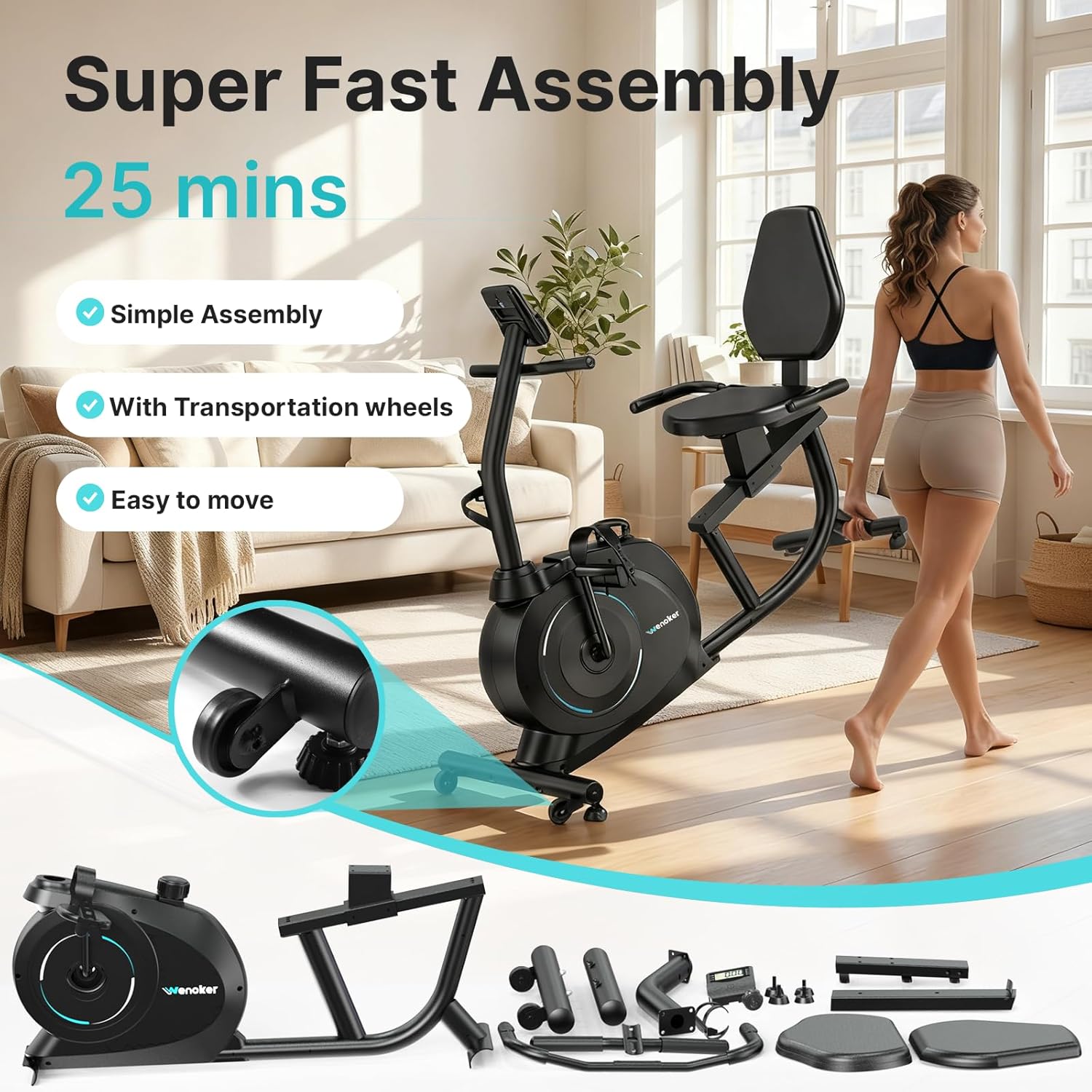
Image: All components of the Wenoker Recumbent Exercise Bike laid out for assembly, highlighting the 'Super Fast Assembly' feature.
4. Operating Instructions
Adjusting the Seat:
The seat can be adjusted forwards and backwards to accommodate users of different heights. Locate the adjustment knob beneath the seat, pull it out, slide the seat to your desired position, and release the knob to lock it in place. Ensure the seat is securely locked before beginning your workout.

Image: A user demonstrating the ergonomic design and adjustable seat of the recumbent exercise bike.
Adjusting Resistance:
The bike features 16 levels of magnetic resistance. Turn the tension control knob, usually located below the console, clockwise to increase resistance for a more challenging workout, or counter-clockwise to decrease resistance for an easier session.

Image: Close-up of the multi-functional resistance knob, illustrating the 16 adjustable levels for varied workouts.
Using the LCD Display:
The built-in LCD monitor tracks your workout data. Use the 'MODE' button to cycle through different metrics such as Time, Speed, Distance, Calories, Pulse, and Odometer. The 'RESET' button clears your current workout data. The 'SET' button can be used to set target values for your workout.

Image: The clear LCD monitor with a large holder, displaying various workout metrics like time, speed, distance, calories, pulse, and odometer.
Fitness App Connectivity:
This exercise bike connects seamlessly to popular fitness apps like Kinomap via Bluetooth. Once synced, the app can display your workout data and offer interactive training programs. (Note: Tablet/iPad is not included with this product).

Image: A user engaged in a customized training program, with the bike connected to a fitness app on a tablet.
5. Maintenance
Regular maintenance ensures the longevity and optimal performance of your Wenoker Recumbent Exercise Bike.
- Cleaning: Wipe down the bike with a damp cloth after each use to remove sweat and dust. Avoid abrasive cleaners.
- Check Connections: Periodically inspect all bolts, nuts, and moving parts to ensure they are secure. Tighten any loose components.
- Lubrication: No specific lubrication is required for the magnetic resistance system.
- Storage: Store the bike in a dry, cool place away from direct sunlight and extreme temperatures.
6. Troubleshooting
If you encounter any issues with your Wenoker Recumbent Exercise Bike, refer to the following common solutions:
- No Display on LCD: Ensure batteries are correctly installed and not depleted. Check all wire connections to the console.
- Unstable Bike: Verify that the bike is placed on a level surface. Adjust the leveling caps on the stabilizers if necessary. Ensure all assembly bolts are tightened.
- Unusual Noises: Check for any loose parts or components that may be rubbing. Tighten any loose bolts. If the noise persists, contact customer support.
- Resistance Not Changing: Ensure the tension control knob is functioning correctly and not stuck.
For issues not listed here or if problems persist, please contact Wenoker customer support.
7. Specifications
| Feature | Detail |
|---|---|
| Brand | Wenoker |
| Model Name | 1 |
| Model Number | 51-VIP3-KFF6 |
| Color | Blue |
| Item Weight | 58.6 Pounds |
| Material | Alloy Steel |
| Resistance Mechanism | Magnetic |
| Product Dimensions (D x W x H) | 56.61"D x 24.21"W x 43.31"H |
| Maximum Weight Recommendation | 353 Pounds |
| UPC | 772358039109 |
8. Warranty and Support
For warranty information, please refer to the specific documentation included with your product at the time of purchase. For customer support, assistance with assembly, operation, or troubleshooting, please contact Wenoker customer service through the retailer where the product was purchased or visit the official Wenoker website.