
Introduction
Thank you for choosing the Cecotec Bolero Aguazero 4270 Full-BI 45cm Built-in Dishwasher. This manual provides essential information for the safe and efficient use, installation, and maintenance of your appliance. Please read these instructions carefully before using the dishwasher and keep them for future reference.
Safety Information
Always follow basic safety precautions when using electrical appliances to reduce the risk of fire, electric shock, or injury. This appliance is intended for household use only. Do not allow children to play with the dishwasher. Ensure the appliance is properly grounded. Do not operate the dishwasher if it is damaged. Refer to the full instruction manual for detailed safety guidelines.
Product Overview
Key Features
- 11 Place Settings: Large capacity suitable for daily use and special occasions.
- Energy Efficiency Class D: Optimized water and electricity consumption for savings and environmental protection.
- Inverter Plus Duo Technology: Advanced inverter motor with a BLDC pump for powerful, quiet, and durable washing.
- 6 Wash Programs: Designed for various types of dishes.
- Touch Control Panel: Intuitive interface for easy operation.
- FloorView Light: Projects a light onto the floor to indicate program status.
- Super Dry Function: Ensures perfect drying by combining hot and cold air.
- Half Load Function: For smaller loads, saving water and energy.
- Save+ Function: For quicker and more efficient cycles.
- AutoClean Function: Helps maintain the interior of the dishwasher.
- Delayed Start: Program the start time of the wash cycle.
- Adjustable Upper Basket: Provides flexibility for loading taller items.
- Third Cutlery Basket: Dedicated basket for efficient cutlery cleaning and space optimization.
Components Included
- Dishwasher unit
- Lower basket
- Upper basket
- Cutlery tray
- Drain hose
- Instruction manual
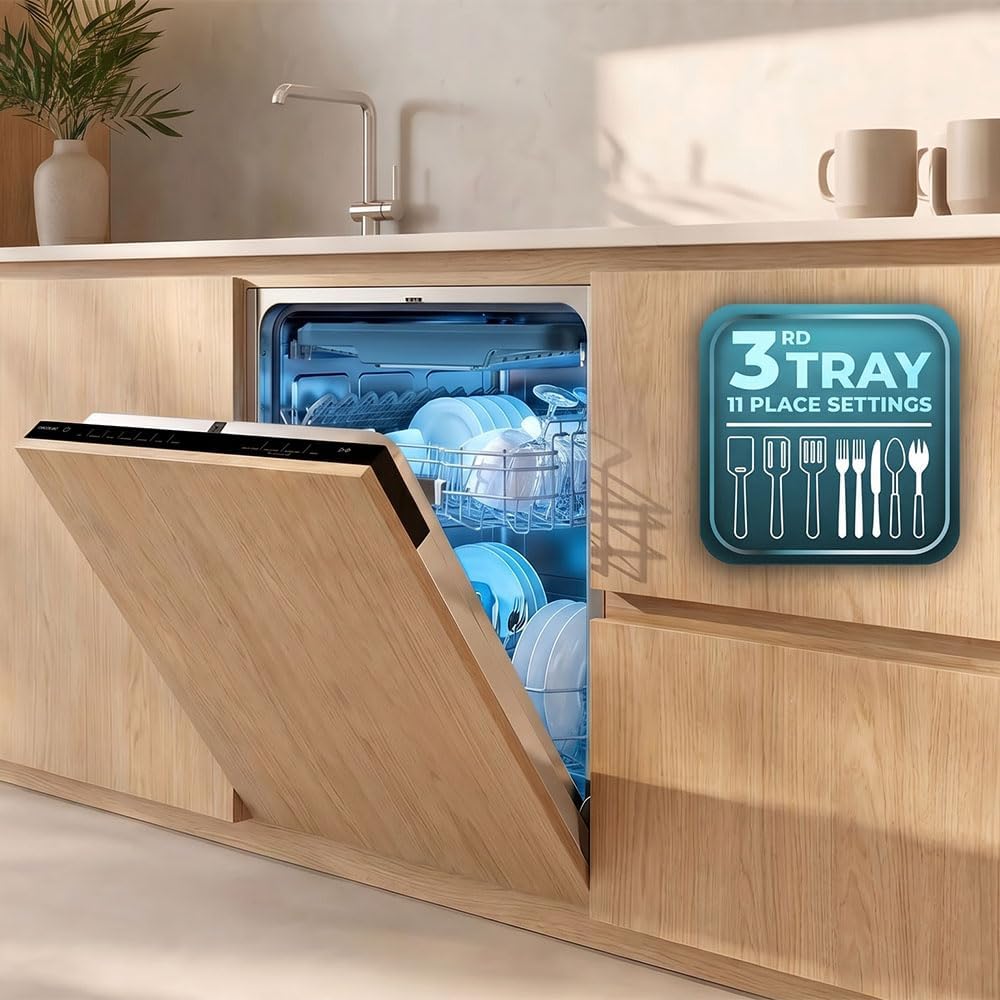
Image: Interior view of the dishwasher, showing the upper and lower baskets designed for efficient loading of dishes and glassware.

Image: The dishwasher integrated into a modern kitchen, highlighting its capacity and the convenience of the third tray for 11 place settings.

Image: A detailed view of the dedicated third cutlery tray, demonstrating how cutlery can be arranged for thorough cleaning.
Setup and Installation
Installation Requirements
- Type: Built-in
- Product Dimensions (DxWxH): 54.5P x 44.7l x 81.6H cm (Depth x Width x Height)
- Ensure adequate space and proper ventilation for installation.
- Connect to a suitable water supply and drainage system.
- Ensure electrical connection meets specified voltage (220 Volts).
Initial Setup
Before first use, ensure all packaging materials are removed. Connect the water inlet and drain hoses securely. Plug the appliance into a grounded electrical outlet. For detailed installation steps, refer to the comprehensive instruction manual provided with the product.

Image: Rear and side view of the dishwasher with key dimensions indicated, crucial for proper built-in installation.
Operating Instructions
Control Panel
The dishwasher features an intuitive touch control panel located on the top edge of the door. It allows you to select programs, activate special functions, and monitor the wash cycle.

Image: User interacting with the touch control panel, demonstrating its accessible placement and ease of use.
Starting a Wash Cycle
- Load dishes, ensuring they do not block spray arms.
- Add detergent to the dispenser.
- Select the desired wash program using the touch panel.
- Press the Start button.
Special Functions
- FloorView Light: A light projected onto the floor indicates the current status of the wash cycle, allowing you to check progress at a glance without opening the door.
- Super Dry: This function enhances drying performance by utilizing a combination of hot and cold air, ensuring dishes are perfectly dry and ready to be put away.
- Half Load: Ideal for when you have fewer dishes, this option reduces water and energy consumption for smaller loads.
- Save+: Activates quicker and more efficient wash cycles, optimizing resource usage.
- Delayed Start: Allows you to set a specific time for the wash cycle to begin, offering flexibility to suit your schedule.

Image: The FloorView Light feature, showing a blue light circle on the floor, which provides a visual cue of the dishwasher's cycle status.

Image: The Super Dry function in action, with steam indicating effective drying for spotless results.

Image: Visual representation of the Half Load and Save+ functions, highlighting their benefits for efficiency and resource saving.
Wash Programs
Available Programs
The Bolero Aguazero 4270 Full-BI offers 6 distinct wash programs to cater to various cleaning needs:
- ECO: Energy-saving program for normally soiled dishes.
- Intensive: For heavily soiled dishes and pots.
- Rapid: Quick wash for lightly soiled dishes.
- Universal: Standard program for everyday use.
- Smart: Automatically adjusts wash parameters based on soil level.
- AutoClean: A self-cleaning program for the dishwasher itself.
For detailed information on program duration, temperature, and water consumption, please consult the full instruction manual.
Maintenance
Cleaning the Dishwasher
Regular cleaning ensures optimal performance and longevity of your dishwasher. Wipe down the exterior with a soft, damp cloth. Clean the filter system regularly to prevent blockages and ensure efficient washing.
AutoClean Function
Utilize the dedicated AutoClean program to clean the interior of the dishwasher. This helps remove grease and limescale buildup, maintaining hygiene and performance.

Image: Diagram illustrating the AutoClean function, showing water circulation for internal cleaning.
Troubleshooting
Common Issues
- Dishwasher not starting: Check power supply, door closure, and selected program.
- Dishes not clean: Ensure proper loading, sufficient detergent, and clean filters.
- Water not draining: Check for blockages in the drain hose or filter.
- Unusual noise: Verify that dishes are not obstructing spray arms or other internal components.
For more detailed troubleshooting steps and error codes, refer to the comprehensive instruction manual.
Specifications
| Feature | Specification |
|---|---|
| Brand | Cecotec |
| Model Name | Bolero Aguazero 4270 Full-BI |
| Model Number | A01_EU01_119742 |
| Installation Type | Built-in |
| Product Dimensions (DxWxH) | 54.5P x 44.7l x 81.6H cm |
| Capacity | 11 Place Settings |
| Number of Programs | 6 |
| Control Type | Touch |
| Noise Level | 47 Decibels |
| Voltage | 220 Volts |
| Item Weight | 30 Kilograms |
| Special Features | Half Load Program, Delayed Start Timer, Inverter Plus Duo, FloorView Light, Super Dry, AutoClean |

Image: The dishwasher highlighting its Energy Class D rating and Inverter Plus Duo technology, emphasizing efficiency and durability.
Warranty and Support
Warranty Information
This Cecotec dishwasher comes with a 3-year product warranty. Please retain your proof of purchase for warranty claims. The warranty covers manufacturing defects under normal use conditions.
Customer Support
For technical assistance, spare parts, or any questions regarding your appliance, please contact Cecotec customer support. Refer to the contact information provided in your original instruction manual or visit the official Cecotec website for support details.


