
1. Important Safety Instructions
Please read all instructions carefully before using your Waitbird CB-03A Steam Cleaner. Keep this manual for future reference.
- High Temperature Steam: The unit generates steam up to 248°F (120°C). Always direct steam away from yourself, other people, pets, and heat-sensitive materials.
- Child Lock: The steam cleaner features an integrated child lock to prevent accidental activation. Ensure it is engaged when not in use or when children are present.
- Automatic Shut-off: The device includes an automatic shut-off feature that activates if pressure exceeds a safe level or if the water tank runs low.
- Ergonomic Handle: The ergonomic handle is designed for comfortable handling during extended use.
- Electrical Safety: Always ensure the unit is unplugged before filling or emptying water, or when performing maintenance. Do not operate with a damaged cord or plug.
For specific safety concerns regarding the lid, pressure, or leaks, refer to the Troubleshooting section.
2. Product Overview & Accessories
Your Waitbird CB-03A Steam Cleaner comes with a comprehensive set of 21 accessories designed for various cleaning tasks.

Image: The Waitbird CB-03A Steam Cleaner main unit with all 21 included accessories, such as various brushes, nozzles, extension tubes, and cloths, neatly arranged on a surface.
Included Accessories:
- 4 x Nylon Utility Brushes
- 2 x Brass Utility Brushes
- 3 x Ironing Cloths
- 2 x Microfiber Mop Pads
- 2 x Extension Tubes
- 1 x Measuring Cup
- 1 x Glove
- 1 x Ironing Brush
- 1 x Shoulder Strap
- 1 x Glass Brush
- 1 x Large Nozzle
- 1 x Floor Brush
- 1 x Carpet Glider
Main Unit Components:
- Power ON/OFF Switch
- LED Indicator Light (Red/Green)
- Steam Adjustable Button (Min/Max)
- Steam Lock
- Safety Valve
- Soft Pipe
- Extension Tube Connection Port
- Shoulder Strap Attachment Points
3. Setup
3.1. Filling the Water Tank
- Ensure the steam cleaner is unplugged and completely cool.
- Unscrew the safety cap counter-clockwise.
- Using the provided measuring cup, add up to 30 ounces (900 ml) of water into the tank. Distilled water is recommended to prevent mineral buildup.
- Caution: Do not overfill the tank beyond 900 ml, as this may cause leaks during heating or operation.
- Securely screw the safety cap back on clockwise until fully tightened.

Image: A visual guide showing the steps for adding water to the steam cleaner using a measuring cup, securely closing the safety cap, plugging in the unit, and waiting for the indicator light to turn green.
3.2. Connecting Power and Heating
- Plug the power cord into a suitable electrical outlet.
- Press the Power ON/OFF switch. The LED indicator light will turn red, indicating the unit is heating.
- Wait approximately 5 minutes for the water to heat up to 248°F (120°C). The LED indicator light will turn green when the unit is ready for use.
4. Operating Instructions
4.1. Selecting Steam Mode and Adjusting Steam Output
The steam cleaner offers both manual and automatic steam modes, along with adjustable steam output.

Image: A diagram illustrating the manual steam mode (hold button) and automatic steam mode (lock button to the right), along with a visual representation of the Min/Max steam adjustment dial.
- Manual Mode: Hold down the steam button on the steam gun to release steam. Release the button to stop steaming.
- Automatic Mode: For continuous steam without holding the button, turn the steam lock to the right. To stop, turn the lock back to the left.
- Adjusting Steam: Use the adjustable button (Min/Max) on the steam gun to control the intensity of the steam output.
4.2. Effective Cleaning Techniques
For optimal cleaning performance, ensure the steam is applied close to the surface.

Image: A diagram showing the optimal distance for steam cleaning. The 'HOT' area (closest to the nozzle, approx. 1 inch) is most effective, while steam dissipates and becomes 'COLD' further away (approx. 12 inches).
- Position the nozzle or attachment close to the surface you are cleaning to utilize the highest temperature steam.
- Move the steam gun slowly across the surface to allow the heat to penetrate and loosen dirt and grime.
- Wipe away loosened debris with a clean cloth as you go.
4.3. Versatile Cleaning Applications
The Waitbird CB-03A Steam Cleaner is designed for chemical-free cleaning across various surfaces.
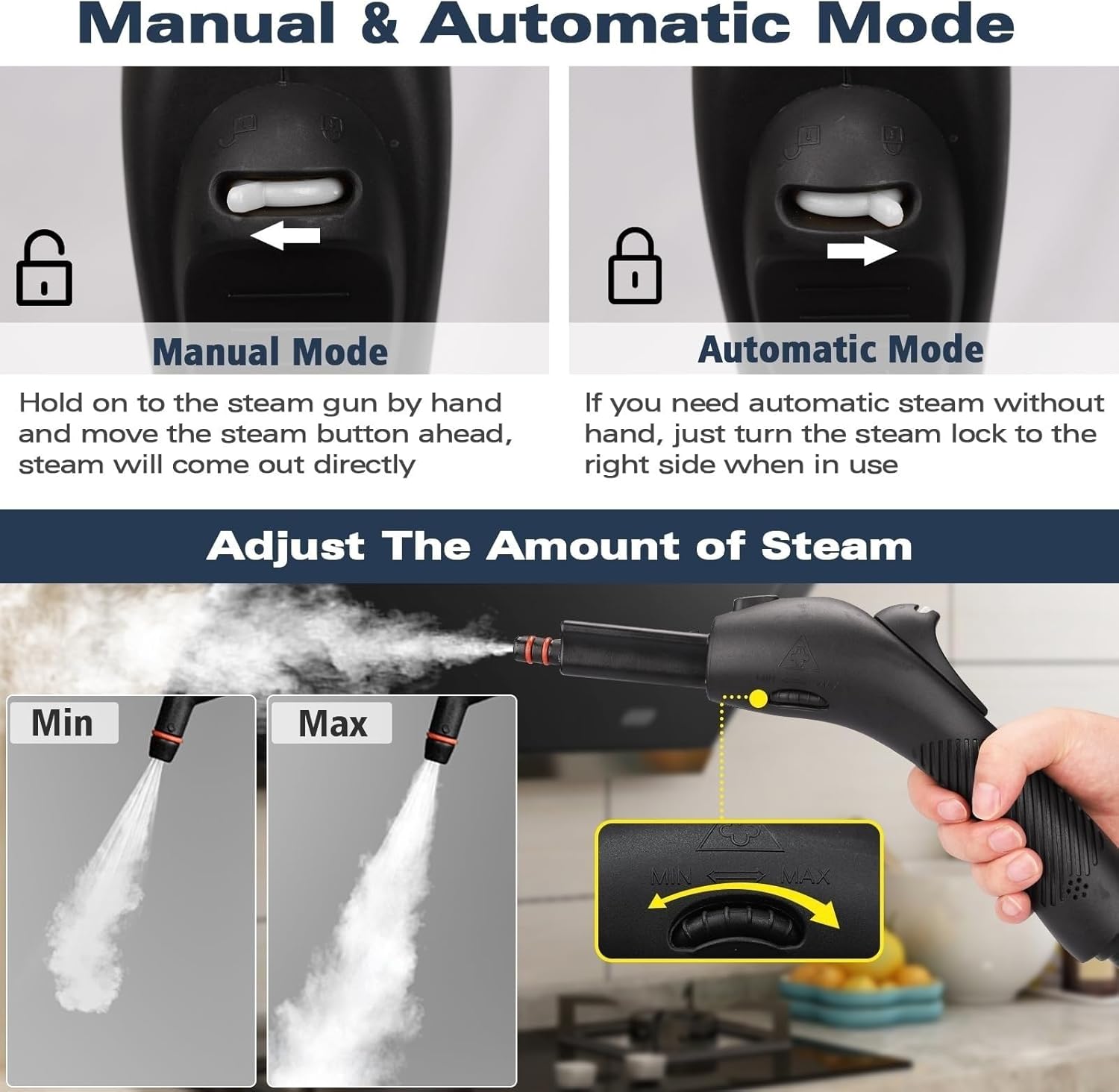
Image: A collage demonstrating the Waitbird steam cleaner in use on different surfaces, including floors, ceramic tiles, car interiors, and sofas, highlighting its versatility.
Use appropriate attachments for:
- Sealed wood and laminate flooring
- Household appliances and extractor hoods
- Windows and glass surfaces
- Car interiors
- Pet beds and upholstery
- Outdoor grills
4.4. Instructional Video
Video: An official Waitbird video demonstrating the various usage methods of the steam cleaner, including assembly, water filling, and application on different surfaces.
5. Maintenance
5.1. After Each Use
- Unplug the Unit: Always unplug the steam cleaner from the power outlet.
- Vent Pressure: Turn the unit upside down and press the vapor release button until all residual pressure is vented. This is crucial for safety.
- Open Lid Safely: Once pressure is fully vented and the unit has cooled, safely open the safety cap.
- Prevent Lid Sticking: After the unit has cooled down, gently unscrew the lid one full turn. This prevents the lid from getting stuck due to temperature changes and maintains the integrity of the seals for long-term use.
- Empty Remaining Water: If there is any water left, carefully empty it from the tank.
5.2. Cleaning and Storage
- Wipe down the main unit and all accessories with a damp cloth. Ensure all parts are dry before storage.
- Store the steam cleaner and its accessories in a cool, dry place, away from direct sunlight and extreme temperatures.
6. Troubleshooting
If you encounter any issues with your Waitbird CB-03A Steam Cleaner, refer to the following common problems and solutions:
| Problem | Possible Cause | Solution |
|---|---|---|
| Steam does not stay hot indefinitely. | High heat of steam naturally dissipates quickly. | Keep the unit energized during use to maintain optimal performance. |
| Cannot open the lid immediately after use. | Residual steam and pressure inside the tank. | Unplug the unit, turn it upside down, and press the vapor release button until all pressure is vented. Then, safely open the lid. |
| Unit leaks air after connecting accessories. | Slight pressure imbalance or improper connection. | Press the steam switch once to allow steam to be released. If the leak persists, ensure accessories are securely attached or contact support. |
| Not enough steam pressure. | Safety cap not fully tightened. | Allow the unit to cool completely, then reopen and securely fasten the safety cap. Reheat the unit. Never operate with a loose cap. |
7. Specifications
| Feature | Detail |
|---|---|
| Brand | Waitbird |
| Model Name | CB-03A |
| Wattage | 1500 watts |
| Heat Time | Less than 5 Minutes |
| Maximum Temperature | 248°F (120°C) |
| Water Tank Capacity | 1.08 Liters (38 ounces), recommended max 30 ounces (900 ml) |
| Voltage | 120 Volts |
| Power Source | Corded Electric |
| Special Features | Carry Handle, Child Lock, Compact Design, High Pressure, Rapid Heat Up |
| Included Components | 6 x Nylon Utility, 4 x Brass Utility, 3 x Ironing Towel, 6 x Microfiber Mop Pads, 2 x Extension Tube, 1 x Measuring Cup, 1 x Glove, 1 x Ironing Brush, 1× Shoulder Strap, 1 x Glass Brush, 1 x Big Nozzle, 1 x Floor Brush, 1 x Carpet Glider |
8. Warranty & Support
8.1. Warranty Information
The Waitbird CB-03A Steam Cleaner comes with a 1-year warranty period from the date of purchase. Please retain your proof of purchase for warranty claims.
8.2. Customer Support
For any questions, technical assistance, or warranty claims, please contact our support team. If you experience issues such as leaks, please provide photos or videos to assist our team in troubleshooting or arranging replacement parts.
Contact information can typically be found on the product packaging or the official Waitbird website.

