
Ultrean K40H
Ultrean K40H Digital Kitchen Scale
Instruction Manual
Introduction
Thank you for choosing the Ultrean K40H Digital Kitchen Scale. This manual provides essential information for the proper setup, operation, and maintenance of your new kitchen scale. Please read it thoroughly before use to ensure optimal performance and longevity of the product.
The Ultrean K40H is designed for precise measurement of ingredients for baking, cooking, and meal preparation, offering versatile unit options and smart features for a modern kitchen experience.
Package Contents
- Ultrean K40H Digital Kitchen Scale
- User Manual
Note: 3 AAA batteries are required and are not included in the package.
Setup
- Unpacking: Carefully remove the scale from its packaging. Inspect for any damage.
- Battery Installation:
Locate the battery compartment on the underside of the scale. Open the cover and insert 3 AAA batteries, ensuring correct polarity (+/-). Close the battery compartment cover securely.

Image: The underside of the Ultrean K40H scale, highlighting the battery compartment and indicating its dimensions (9.25 inches length, 6.26 inches width, 0.79 inches height). It also notes that 3 AAA batteries are required, it has a stainless steel surface, a maximum capacity of 22 lbs/10 kg, and an increment of 0.1 oz/1g/1ml.
- Placement: Place the scale on a hard, flat, and stable surface. Uneven surfaces can affect measurement accuracy. Avoid placing it near strong electromagnetic fields or vibrating equipment.
- Initial Power On: Press the power button (usually labeled "ON/OFF" or integrated with "UNIT/T" button) to turn on the scale. The display should light up and show "0" or "0.0".
Operating Instructions
- Power On/Off:
Press the ON/OFF button to turn the scale on. To turn it off, press and hold the ON/OFF button for a few seconds, or wait for the automatic 2-minute shutdown feature to activate.
- Unit Conversion:
With the scale on, press the UNIT button to cycle through the available measurement units: grams (g), kilograms (kg), pounds (lbs), fluid ounces (fl. oz), and milliliters (ml).

Image: The Ultrean K40H digital kitchen scale with a bowl of salad on its surface. The scale's display shows detailed nutritional information, including calories, fat, carbs, protein, and sodium, along with the 'UNIT' and 'T/O' buttons for function control.
- Tare Function (Zeroing):
To weigh ingredients in a container without including the container's weight, place the empty container on the scale. Press the T/O (Tare/Zero) button. The display will reset to "0". You can then add your ingredients, and only their weight will be measured.
- Weighing Ingredients:
Place the item(s) to be weighed directly onto the scale platform or into a container (after using the tare function). The weight will be displayed on the LCD screen.

Image: The Ultrean K40H digital kitchen scale with a bowl containing various ingredients, such as vegetables and eggs, being weighed. The large LCD display clearly shows the weight measurement.
- Smart Features (Nutritional Calculator, AI Recognition, Health Sync):
This scale integrates with a companion application to provide advanced features such as a nutritional calculator, AI-powered food recognition, and seamless health data synchronization. Refer to the application's instructions for detailed usage of these features.
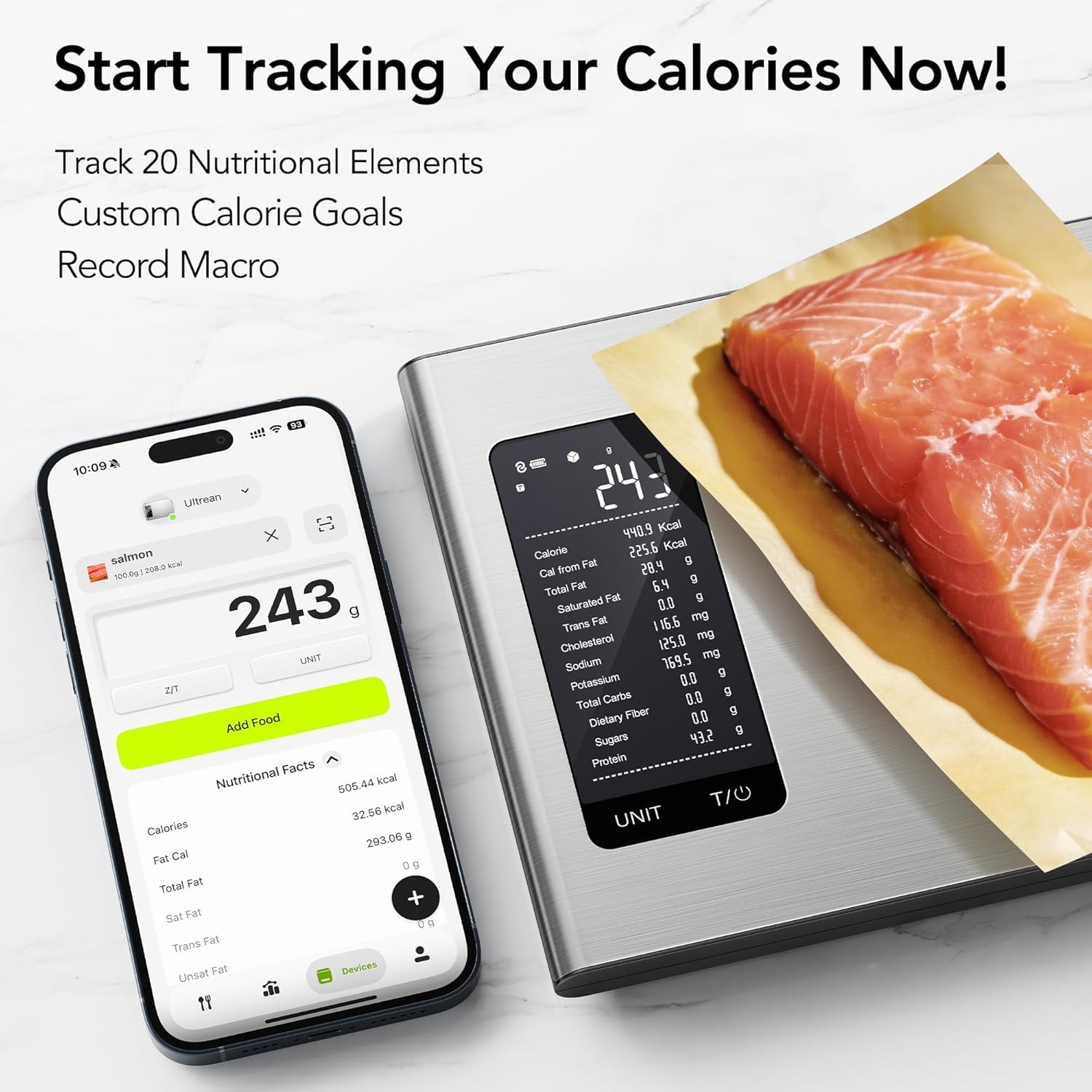
Image: The Ultrean K40H digital kitchen scale with a piece of salmon on its surface, displaying a weight of 243g. Next to it, a smartphone shows a food tracking application with detailed nutritional facts for salmon, including calories, fat, and protein, demonstrating the scale's smart features.
Maintenance
- Cleaning: Wipe the scale surface with a slightly damp cloth. Do not immerse the scale in water or use abrasive cleaners, as this can damage the electronic components.
- Storage: Store the scale in a cool, dry place. Avoid placing heavy objects on the scale when not in use.
- Battery Replacement: If the display shows "Lo" or becomes dim, replace the 3 AAA batteries. Ensure proper polarity during installation.
Troubleshooting
| Problem | Possible Cause | Solution |
|---|---|---|
| Scale does not turn on. | Batteries are dead or incorrectly installed. | Check battery polarity or replace with new 3 AAA batteries. |
| Display shows "Lo". | Low battery power. | Replace the 3 AAA batteries. |
| Display shows "Err" or "O-Ld". | Overload. The weight exceeds the maximum capacity (10.2 kg / 22 lbs). | Remove items immediately to prevent damage. Do not exceed maximum capacity. |
| Inaccurate readings. | Scale is on an uneven surface, or there are vibrations. | Place the scale on a hard, flat, stable surface. Ensure no external vibrations. |
| Display is unstable. | Air currents, vibrations, or unstable surface. | Ensure the scale is on a stable surface, away from drafts. |
Specifications
- Model: K40H
- Capacity: 0.1 oz / 3 g to 10.2 kg (22 lbs)
- Measurement Units: g, kg, lbs, fl. oz, ml
- Accuracy: +/-0.5%
- Display: Large LCD
- Auto-Off: 2 minutes
- Power Source: 3 x AAA batteries (not included)
- Dimensions: 25.7 x 17.4 x 2.9 cm (approx. 10.1 x 6.8 x 1.1 inches)
- Product Weight: 660 g (approx. 1.46 lbs)
- Material: Stainless Steel Surface
- Special Features: Nutritional Calculator, AI-powered Information, Smart Photo Recognition, Seamless Health Sync (via companion app)
Warranty & Support
Ultrean is committed to providing high-quality products and customer satisfaction. Your Ultrean K40H Digital Kitchen Scale comes with a commitment to Lifetime After-Sales Service.
For any questions, concerns, or technical support regarding your product, please contact Ultrean customer service. Details for contacting support can typically be found on the Ultrean official website or through your purchase platform.
Please retain your proof of purchase for any warranty or support inquiries.
Related documentsK40H


Ask a question about this manual
Ask about setup, troubleshooting, compatibility, parts, safety, or missing instructions. Manuals+ will review the question and use this page’s manual context to help answer it.