
Introduction
This manual provides comprehensive instructions for the AT&T EL2131-11 DECT 6.0 Cordless Telephone. It covers essential information regarding setup, operation, maintenance, and troubleshooting to ensure optimal performance and a seamless user experience. Please read this manual thoroughly before using your new telephone.
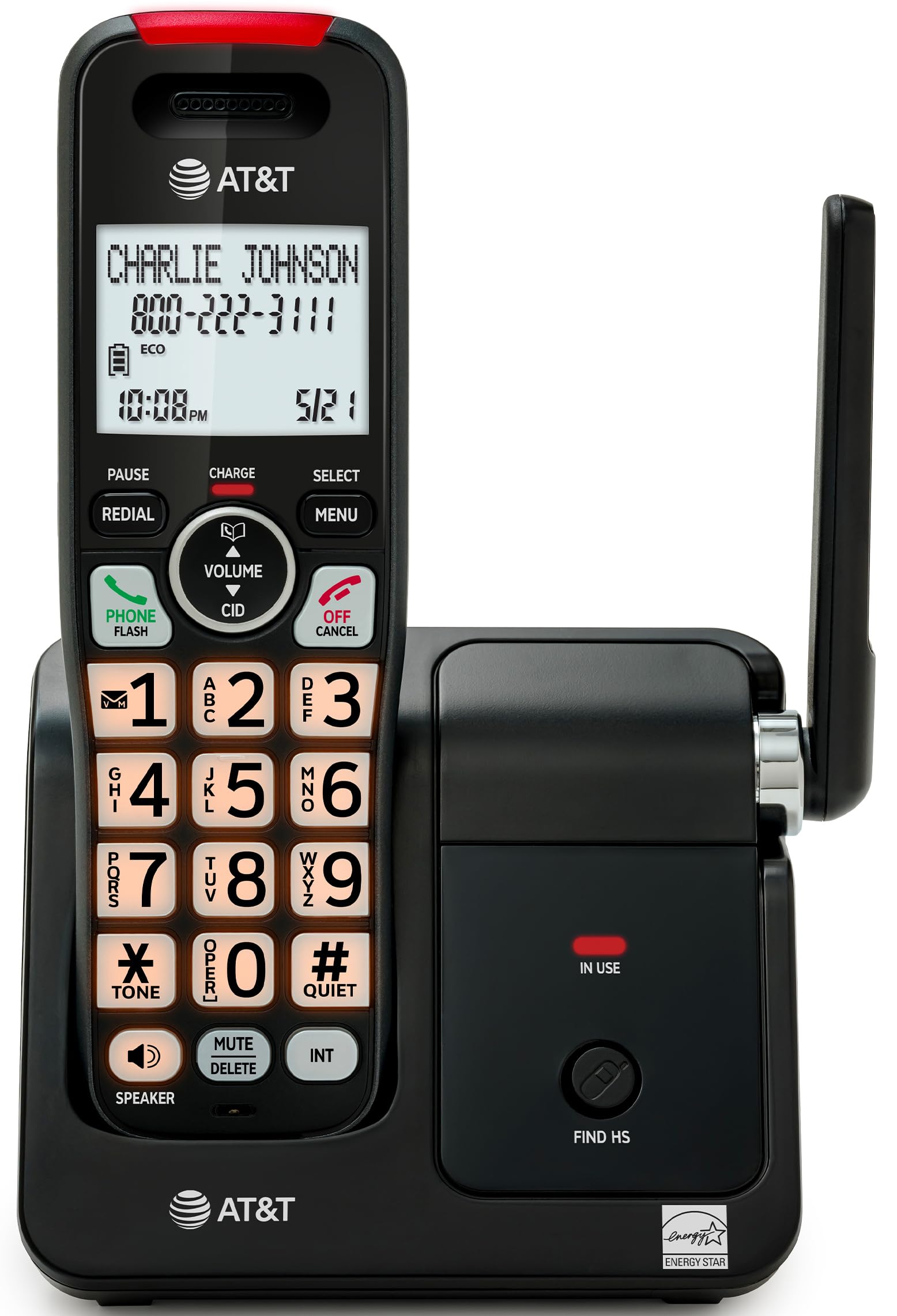
This image displays the AT&T EL2131-11 cordless telephone handset resting on its base unit, showcasing its sleek black and silver design. The handset features a clear display and a well-arranged keypad.
Product Overview
Key Features
- Call Blocker: Block up to 50 unwanted numbers, including robocalls and telemarketers, ensuring peaceful home calls.
- Caller ID/Call Waiting: View caller information (name, number, time, date) before answering and store up to 50 call records for easy review.
- Full-Duplex Handset Speakerphone: Enjoy clear, natural two-way conversations hands-free on both the handset and base unit simultaneously.
- Backlit Display and Keypad: High-contrast 2-inch white backlit display and orange backlit keypad for easy readability and dialing in any lighting condition.
- Long Battery Life: Provides up to 10 hours of talk time or 5 days of standby time on a single charge.
- ECO Mode: Power-saving technology that automatically conserves energy, optimizing battery performance and reducing power consumption.
- DECT 6.0 Technology: Delivers superior voice quality and secure, interference-free communication throughout your home.
Feature Illustrations

This image highlights the Call Blocker feature, showing the phone's display with a 'Block list' menu. It illustrates how users can manage and block unwanted callers, preventing interruptions.

A close-up of the handset's screen demonstrating the Caller ID feature, displaying the caller's name and number ('CHARLIE JOHNSON 800-222-3111'), along with the time and date of the call.

This image depicts a user engaging in a hands-free conversation using the handset's speakerphone, illustrating the clear, two-way audio capability.

The image shows the handset being held in a dimly lit environment, with its screen and keypad brightly illuminated, emphasizing ease of use in low-light conditions.

This visual demonstrates the phone's extended battery life, showing a transition from a fully charged state to a state indicating 5 days of standby time.

An aerial view of a home layout with the phone's base unit centrally located, illustrating the wide and clear signal coverage provided by DECT 6.0 technology.
Product Components
- One cordless handset
- Base unit
- Power adapter
- Telephone line cord
- Two battery cells
- Quick start guide (separate document)
- Wall mount bracket (optional)
Setup
1. Battery Installation
Carefully open the battery compartment cover on the back of the handset. Insert the two provided battery cells, ensuring that the polarity (+ and -) matches the markings inside the compartment. Close the battery compartment cover securely until it clicks into place.
2. Connecting the Base Unit
Connect the small end of the power adapter to the 'DC IN' jack on the back of the base unit. Plug the larger end of the power adapter into a standard electrical outlet that is not controlled by a wall switch. Next, connect one end of the telephone line cord to the 'LINE' jack on the base unit and the other end to your telephone wall jack.
3. Charging the Handset
Place the handset on the base unit with the display facing forward. The handset will emit a short beep, and the display will show a charging indicator. For optimal battery performance and to ensure a full charge, allow the handset to charge continuously for at least 16 hours before its first use.
Operating Instructions
Making a Call
- Press the PHONE/FLASH button or any dialing key to get a dial tone.
- Enter the desired phone number using the keypad.
- Press PHONE/FLASH again or place the handset back on the base to end the call.
Answering a Call
When the phone rings, press the PHONE/FLASH button or the SPEAKER button to answer the call.
Using the Speakerphone
During an active call, press the SPEAKER button to activate the speakerphone mode. To switch back to the handset earpiece, press the SPEAKER button again.
Caller ID
When an incoming call is received, the caller's information (name and number, if available) will be displayed on the handset screen. To review your call history, press the CID button and use the navigation keys to scroll through recent calls.
Call Blocker
To block an unwanted number from your call history:
- Press the MENU button on the handset.
- Navigate to the "Call Blocker" option using the navigation keys and press SELECT.
- Choose "Block a number" and follow the on-screen prompts to add the desired number to the block list. The phone can store up to 50 blocked numbers.
ECO Mode
The phone automatically activates ECO mode to conserve power when the handset is placed close to the base unit. This feature helps extend battery life and reduce energy consumption without user intervention.
Maintenance
Cleaning
To clean your telephone and base unit, use a soft, slightly damp cloth. Avoid using cleaning sprays, waxes, or harsh chemicals, as these can damage the product's finish or electrical components. Ensure no moisture enters the openings.
Battery Care
To maintain optimal battery life, avoid fully discharging the battery frequently. If the phone will not be used for an extended period (e.g., more than a month), it is recommended to remove the battery from the handset to prevent potential leakage or damage.
Troubleshooting
If you experience any issues with your AT&T EL2131-11 cordless telephone, please refer to the table below for common problems and their solutions.
| Problem | Solution |
|---|---|
| No dial tone | Ensure the telephone line cord is securely connected to both the base unit and the telephone wall jack. Verify that the power adapter is properly connected to the base unit and a working electrical outlet. |
| Handset does not charge | Verify the handset is correctly placed on the base unit, ensuring the charging contacts align. Clean the charging contacts on both the handset and base with a dry cloth. Ensure the power adapter is plugged in and the outlet is functional. |
| Poor sound quality or static | Move the handset closer to the base unit. Check for interference from other electronic devices (e.g., Wi-Fi routers, microwaves). Ensure the telephone line cord is not damaged or coiled excessively. |
| Caller ID not displayed | Confirm that you have subscribed to Caller ID service from your telephone service provider. Ensure the phone's date and time settings are correct. |
| Cannot make or receive calls | Check all cable connections. Ensure the handset battery is charged. If using a DSL service, ensure a DSL filter is installed on the telephone line. |
Specifications
The following table outlines the technical specifications for the AT&T EL2131-11 Cordless Telephone.
| Feature | Detail |
|---|---|
| Brand | AT&T |
| Model Number | EL2131-11 |
| Color | Black & Silver |
| Phone Type | Cordless |
| Material | Plastic |
| Power Source | Corded Electric |
| Product Dimensions (Base Unit) | 12.9 x 11.8 x 18.4 cm (Length x Width x Height) |
| Product Dimensions (Handset) | 7.8 x 9.1 x 18.42 cm (Length x Width x Height) |
| Standby Time | Up to 5 days |
| Talk Time | Up to 10 hours |
| Caller ID | Yes |
| Multi-line Operation | Single-line operation |
| Answering System Type | None |
| GTIN (UPC) | 650530034510 |

This image provides a visual representation of the combined dimensions of the base unit and the handset, indicating height, length, and width in both inches and centimeters.

This image focuses on the handset, detailing its individual dimensions including height, length, and width, for a clear understanding of its size.
Warranty and Support
For detailed warranty information regarding your AT&T EL2131-11 Cordless Telephone, please refer to the quick start guide included in the product packaging or visit the official AT&T website. For technical assistance, troubleshooting beyond this manual, or customer service inquiries, please contact AT&T customer support directly through their official channels.


