
1. Safety Information
Before operating the LE-IDEA IDEA12GPS drone, please read and understand all safety guidelines. Failure to follow these instructions may result in injury, damage to the drone, or property damage.
- Flight Environment: Fly in open areas, away from people, animals, buildings, and power lines. Avoid flying in strong winds or adverse weather conditions.
- Battery Safety: Use only the provided charger and battery. Do not overcharge or puncture batteries. Discontinue use if batteries show signs of damage or swelling.
- Propeller Safety: Keep hands, face, and loose clothing away from rotating propellers. Ensure propellers are correctly installed before each flight.
- Operator Responsibility: The operator is responsible for safe operation and compliance with local regulations regarding drone usage.
- Age Recommendation: This drone is suitable for adults.
2. Product Overview
The LE-IDEA IDEA12GPS is a professional-grade GPS drone equipped with a 4K camera, designed for both beginners and experienced aerial photographers. It features a brushless motor for stable flight and a foldable design for portability.
2.1 Key Features
- 4K Camera: Captures high-resolution aerial footage with a 90° electrically adjustable lens.
- GPS Positioning: Provides stable flight, precise tracking, and intelligent return-to-home functions.
- Brushless Motors: Ensures efficient and powerful flight performance.
- Intelligent Flight Modes: Includes Follow Me, Waypoint Flight, and Point of Interest.
- Auto Return Home: Automatically returns to the takeoff point in case of signal loss, low battery, or user command.
- Foldable Design: Compact and easy to transport.
2.2 Drone Components
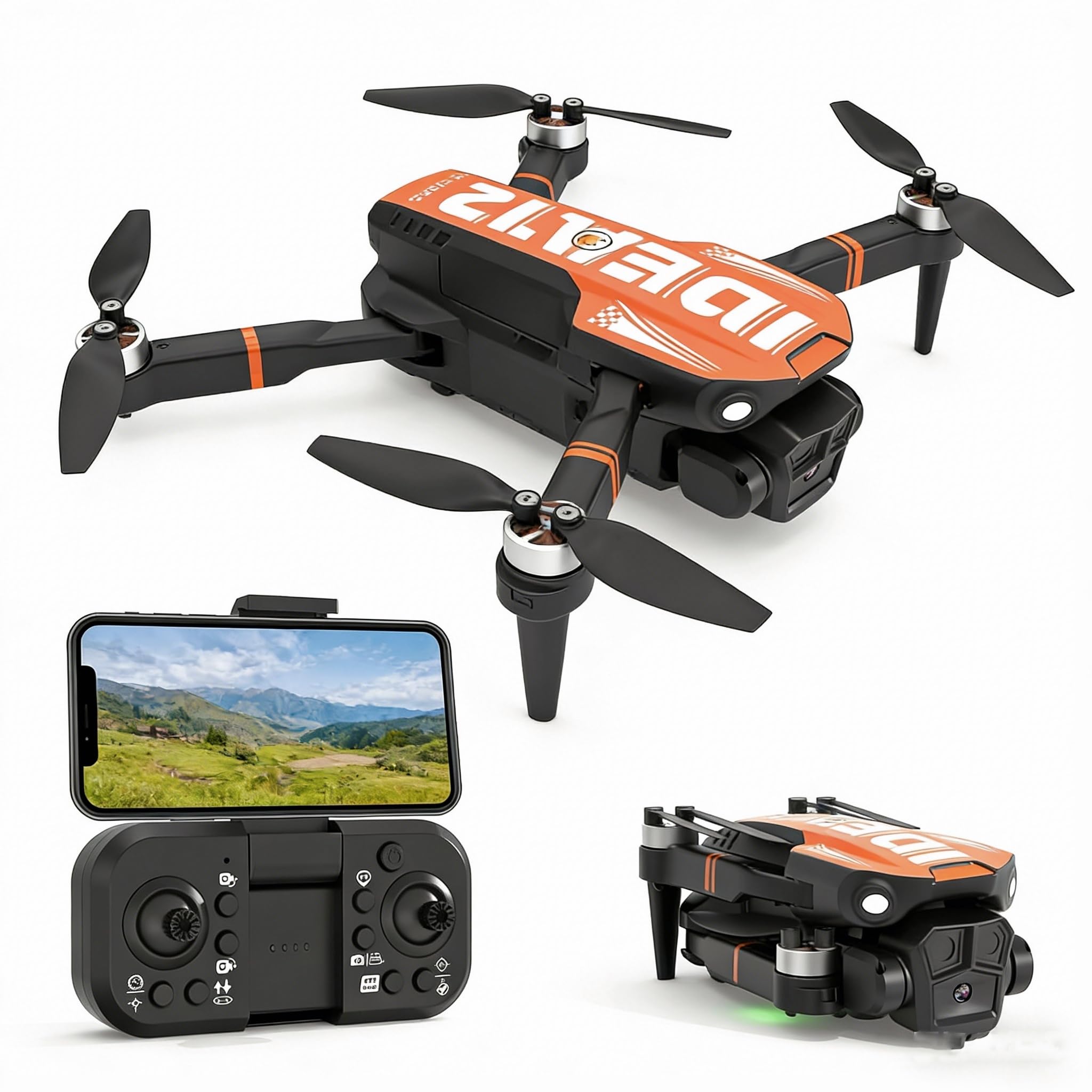
This image shows the LE-IDEA IDEA12GPS drone in its compact, folded state, ready for storage or transport. The drone features an orange and black color scheme with the 'IDEA12' logo prominently displayed on its top casing.
This video provides a visual overview of the LE-IDEA IDEA12GPS drone's key features and operational modes, including one-key takeoff, 4K camera capabilities with electric angle adjustment, intelligent flight modes like Follow Me and Point to Point Flight, and GPS Auto Return Home functions.
3. Setup
3.1 Unfolding the Drone
- Gently unfold the front arms of the drone until they lock into place.
- Unfold the rear arms until they are fully extended.
- Ensure all arms are securely locked before flight.
3.2 Battery Installation and Charging
- Insert the fully charged Lithium Polymer battery into the drone's battery compartment until it clicks into place.
- To charge the battery, connect it to the provided charger and plug the charger into a power source. The charging indicator will show the charging status.
- A full charge typically takes approximately 120-150 minutes.
3.3 Propeller Installation
The drone comes with pre-installed propellers. If replacement is needed:
- Match the 'A' and 'B' marked propellers to their corresponding motor arms.
- Securely attach the propellers using the provided screws.
3.4 Remote Controller and App Setup
- Install the required batteries into the remote controller (not included).
- Download the LE-IDEA drone application from your device's app store.
- Power on the drone and then the remote controller.
- Connect your smartphone to the drone's Wi-Fi network (usually named 'LE-IDEA-XXXX').
- Open the LE-IDEA app to establish a connection and view the live camera feed.
4. Operating Instructions
4.1 Pre-Flight Checklist
- Ensure drone and remote controller batteries are fully charged.
- Check that propellers are securely attached and undamaged.
- Verify GPS signal acquisition (indicated by solid green lights on the drone).
- Confirm a stable connection between the drone, remote controller, and app.
4.2 Takeoff and Landing
- One-Key Takeoff: Press the dedicated One-Key Takeoff button on the remote controller or in the app. The drone will automatically ascend to a safe altitude and hover.
- Manual Takeoff: Push both joysticks down and outwards to start the motors. Then, push the left joystick up to ascend.
- One-Key Landing: Press the dedicated One-Key Landing button. The drone will automatically descend and land gently.
- Manual Landing: Slowly pull the left joystick down to descend. Once landed, push both joysticks down and inwards to stop the motors.
4.3 Basic Flight Controls
- Left Joystick (Throttle/Yaw): Up/Down controls altitude. Left/Right controls rotation (yaw).
- Right Joystick (Pitch/Roll): Up/Down controls forward/backward movement (pitch). Left/Right controls left/right movement (roll).
4.4 Intelligent Flight Modes
These modes are accessible via the LE-IDEA app and require a strong GPS signal.
- Follow Me: The drone will automatically follow the remote controller or your smartphone, maintaining a set distance and altitude. Activate this mode in the app and ensure your device's GPS is active.
- Waypoint Flight (Point to Point Flight): Plan a custom flight path by tapping points on the map within the app. The drone will then fly autonomously along the designated route.
- Point of Interest: Select a central point on the map, and the drone will circle around it at a specified radius and altitude, capturing footage of the subject.
4.5 Camera Operation
- Photo/Video Capture: Use the dedicated buttons on the remote controller or the app interface to take photos or start/stop video recording.
- Electric Angle Adjustment: Adjust the camera's vertical angle (tilt) using the designated control on the remote controller or within the app for optimal framing.
4.6 GPS Auto Return Home (RTH)
The drone features a triple safety net for RTH:
- One-Key RTH: Press the RTH button on the remote controller or in the app.
- Low Battery RTH: The drone will automatically initiate RTH when the battery level is critically low.
- No Signal RTH: If the drone loses connection with the remote controller, it will automatically return to its last recorded home point.
5. Maintenance
5.1 Cleaning
- Wipe the drone's body with a soft, dry cloth after each flight.
- Remove any dust or debris from the motors and propellers.
- Keep the camera lens clean using a lens cleaning cloth.
5.2 Storage
- Store the drone in a cool, dry place, away from direct sunlight and extreme temperatures.
- Remove batteries from the drone and remote controller if storing for extended periods.
5.3 Battery Care
- Do not fully discharge the battery. Charge it to about 50-60% for long-term storage.
- Avoid exposing batteries to water or fire.
6. Troubleshooting
| Problem | Possible Cause | Solution |
|---|---|---|
| Drone does not power on | Battery not charged or incorrectly installed | Charge battery fully; ensure it is securely inserted. |
| No connection to remote controller/app | Incorrect pairing; Wi-Fi issue | Ensure drone and controller are powered on; re-pair according to instructions; reconnect to drone's Wi-Fi. |
| Drone drifts during flight | Insufficient GPS signal; uncalibrated sensors | Fly in an open area with clear sky; perform compass calibration as per app instructions. |
| Poor camera image quality | Dirty lens; poor lighting conditions | Clean the camera lens; ensure adequate lighting for recording. |
| Auto Return Home not working | Weak GPS signal; home point not set | Ensure strong GPS signal (at least 7-8 satellites); confirm home point is recorded before takeoff. |
7. Specifications
- Brand: le-idea
- Model Name: IDEA12GPS
- Special Feature: One Button Return
- Age Range (Description): All (recommended for adults for optimal control)
- Color: Orange
- Video Capture Resolution: 4K
- Connectivity Technology: Wi-Fi
- Included Components: User Manual, Drone, Battery, Charger, Propellers (Remote Controller not explicitly listed as included, but implied for operation)
- Skill Level: All
- Item Weight: 180 Grams
- Battery Capacity: 1800 Milliamp Hours
- Video Capture Format: MP4
- Remote Control Technology: WIFI
- Control Type: Remote Control
- Wireless Communication Technology: Wi-Fi
- Battery Cell Composition: Lithium Polymer
- Are batteries included?: Yes (for drone)
- Includes Remote?: No (as per specifications, but typically required for operation)
- Optical Sensor Technology: CMOS
- Includes Rechargeable Battery: Yes
- Manufacturer: le-idea
- Part Number: IDEA12GPS
- ASIN: B0GJDCX11H
- Material: Plastic
- Item Dimensions L x W x H: 7"L x 6"W x 2"H (folded dimensions)
8. Warranty and Support
LE-IDEA provides a standard warranty for manufacturing defects. Please refer to the product packaging or the official LE-IDEA website for specific warranty terms and conditions.
8.1 Customer Support
For technical assistance, troubleshooting, or warranty claims, please contact LE-IDEA customer support through their official channels. Contact information can typically be found on the product packaging or the manufacturer's website.
