
1. Introduction
This manual provides detailed instructions for the assembly, operation, and maintenance of your FUSOU Vanity Desk. Equipped with an HD mirror, 10 Hollywood-style LED bulbs, ample storage, and a multifunctional charging station, this vanity is designed to enhance your daily routine. Please read this manual thoroughly before assembly and use.
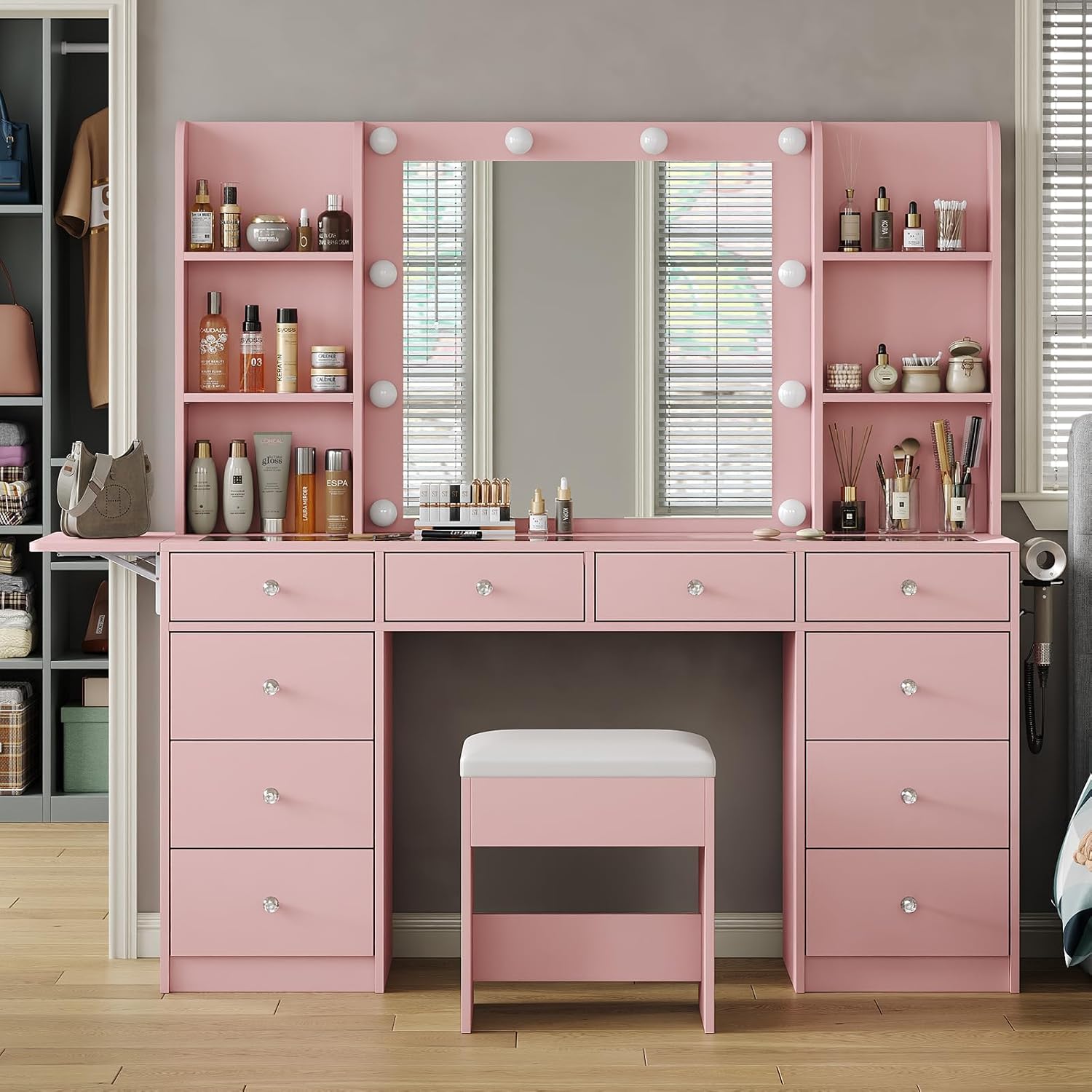
Figure 1: FUSOU Vanity Desk with Mirror and Stool
2. Setup and Assembly
The FUSOU Vanity Desk is designed for straightforward assembly. All parts are labeled, and a detailed manual is included. Follow the step-by-step instructions provided in the separate assembly guide.
2.1 Package Contents
Your vanity desk will arrive in two separate boxes. Ensure both packages are received before beginning assembly. Verify all components and hardware are present against the packing list in the assembly guide.

Figure 2: Product packaging, typically arriving in two boxes.
2.2 Assembly Tips
- Lay out all parts on a clean, soft surface to prevent scratches.
- Identify each part by its label before starting.
- Use appropriate tools as recommended in the assembly guide.
- Tighten all screws and fasteners securely, but do not overtighten.
- If you encounter any difficulties, refer to the troubleshooting section or contact customer support.
3. Features & Components
3.1 HD Mirror & 10 Hollywood-Style LED Bulbs
The vanity features a high-definition mirror surrounded by 10 bright LED bulbs. These bulbs offer 3 color modes (warm, natural, cool) and adjustable brightness to suit various lighting needs for makeup application or live streaming.

Figure 3: LED lights with three color modes (Cold, Natural, Warm Light).
3.2 Large-Capacity Storage
This vanity includes 10 metal sliding drawers and 6 shelves, providing extensive storage for cosmetics, accessories, and other beauty products. The design helps keep your items organized and easily accessible.

Figure 4: Vanity desk with drawers and shelves showcasing storage capacity.
3.3 Multifunctional Charging Station
A built-in charging station is integrated into the vanity, featuring 2 standard outlets and 2 USB ports. This allows for convenient charging of electronic devices and powering styling tools. A dedicated hair dryer holder is also included.

Figure 5: Integrated power strip and hair dryer holder.
3.4 Fold-up Panel & Glass Tabletop
The vanity features a fold-up panel on one side, offering additional surface area when needed. The sleek glass tabletop provides a visible display for frequently used items, making them easy to locate.

Figure 6: Tempered glass tabletop for visible storage.
3.5 Vanity Stool
A padded stool is included, constructed from high-quality flame-resistant sponge and fabric. Its comfortable height and soft seat are designed to reduce fatigue during use.

Figure 7: Padded vanity stool for comfort.
4. Operating Instructions
4.1 LED Mirror Lights
- Power On/Off: Locate the touch sensor on the mirror to turn the lights on or off.
- Change Color Mode: Tap the touch sensor to cycle through the three color modes: warm, natural, and cool light.
- Adjust Brightness: Press and hold the touch sensor to adjust the brightness level for the selected color mode.
4.2 Charging Station
- Plug the vanity's main power cord into a standard wall outlet.
- Connect your devices to the 2 standard AC outlets or the 2 USB ports located on the side of the vanity.
- Ensure devices are compatible with the provided power specifications (125V/12A for AC, 5V/2A for USB).
4.3 Fold-up Panel
- To extend the panel, gently lift and pull it outwards until it locks into place.
- To fold it down, release the locking mechanism (if present, refer to assembly guide) and push the panel inwards until it is flush with the side.
5. Maintenance
5.1 Cleaning the Vanity
- Wood Surfaces: Wipe with a soft, damp cloth. Avoid harsh chemicals or abrasive cleaners that may damage the engineered wood finish.
- Glass Surfaces: Use a glass cleaner and a microfiber cloth to prevent streaks.
- Mirror: Clean with a non-abrasive glass cleaner and a soft cloth. Do not spray cleaner directly onto the mirror; apply it to the cloth first.
5.2 Electrical Components
- Ensure the vanity is unplugged before cleaning any electrical components.
- Regularly check power cords for any signs of damage. Do not use if cords are frayed or damaged.
- Keep liquids away from outlets and USB ports.
5.3 Drawer Maintenance
- Periodically check drawer slides for smooth operation. If they become stiff, a silicone-based lubricant can be applied.
- Avoid overloading drawers to prevent damage to the slides and drawer bottoms.
6. Troubleshooting
| Problem | Possible Cause | Solution |
|---|---|---|
| Lights not turning on | Power cord unplugged; faulty outlet; bulb issue. | Ensure power cord is securely plugged in. Test the outlet with another device. If individual bulbs are replaceable, check them. |
| Lights not changing color/brightness | Touch sensor malfunction; electrical issue. | Ensure the touch sensor is clean and dry. Try unplugging and replugging the vanity to reset. |
| Charging station not working | Vanity not powered; device incompatibility; faulty port. | Verify the vanity is plugged in and lights are functional. Check device compatibility with 125V/12A (AC) or 5V/2A (USB). Try a different port or device. |
| Drawers sticking or difficult to open | Overloaded drawer; debris in slides; misaligned slides. | Reduce contents of the drawer. Clean drawer slides. Refer to assembly guide for realignment instructions. |
| Vanity feels unstable | Loose fasteners; uneven floor. | Check and tighten all assembly fasteners. Use shims under the base if the floor is uneven. |
For issues not covered here or if solutions do not resolve the problem, please contact FUSOU customer support.
7. Specifications
| Attribute | Detail |
|---|---|
| Brand | FUSOU |
| Model | 55'' W 10 Drawers |
| Color | Pink |
| Material | Engineered Wood |
| Product Dimensions (D x W x H) | 15.7"D x 55"W x 55"H |
| Item Weight | 170 Pounds |
| Number of Drawers | 10 |
| Number of Shelves | 6 |
| Mirror Type | HD Mirror with 10 Hollywood-Style LED Bulbs |
| LED Light Modes | 3 (Warm, Natural, Cool) with adjustable brightness |
| Power Outlet | 2 Standard AC Outlets (125V/12A), 2 USB Ports (5V/2A) |
| Assembly Required | Yes |

Figure 8: Product dimensions overview.
8. Warranty & Support
For any questions, concerns, or assistance with your FUSOU Vanity Desk, please contact the seller directly through your purchase platform. They will provide professional help and support for assembly, missing parts, or product issues.
Please retain your proof of purchase for any warranty claims or support requests.