
1. Product Overview
The Waterdrop M6H Instant Hot Reverse Osmosis System is a 7-stage countertop water filter designed to provide purified and heated water. It features a 0.0001μm RO membrane and LED function, reducing various contaminants including TDS, PFOA, PFOS, Nitrate, Fluoride, Arsenic, and Lead. The system includes a large 185oz tank with a 3:1 pure to drain water ratio, ensuring separation of tap water and wastewater. It offers five preset temperature options for instant hot water and adjustable volume settings. The system is installation-free, requiring only filling the feed water tank and plugging it in. A detachable 40oz BPA-free glass pitcher is included for convenience.

Image: Waterdrop M6H Instant Hot Reverse Osmosis System with detachable glass pitcher.
2. Product Information and Parts List
The Waterdrop M6H system includes the main countertop RO unit, an M6RF filter, a pure water pitcher, a drip tray, and a user manual. The system is designed for ease of use and maintenance.

Image: Waterdrop M6H system showing the main unit, M6RF filter, pure water pitcher, and drip tray.
System Components:
- M6H System (Main Unit)
- M6RF Filter
- Pure Water Pitcher
- Drip Tray
- User Manual
3. Safety Precautions
Precautions for Installation:
- This unit MUST be grounded to reduce the risk of electric shock.
- MUST use a properly grounded outlet (15A or higher) and ensure the grounding plug is securely connected.
- If unsure about grounding, consult a qualified electrician.
- DO NOT modify the plug — install a compatible outlet if needed.
- AVOID installing under direct sunlight, outdoor locations, or placing the unit upside down/diagonally — keep it level.
- DO NOT expose to an environment below 5°C/41°F.
Precautions for Operation:
- Keep out of reach of children. Please DO NOT let children operate the unit.
- DO NOT disassemble the unit by yourself to prevent water leakage and damage to the unit.
- DO NOT plug or unplug with wet hands. DO NOT clean with a damp cloth. It may cause electric shock.
- Please make sure the temperature of water source is 5°C-38°C/41°F-100°F.
- AVOID touching the outlet when taking hot water to prevent scalds.
- AVOID squeezing, folding, knotting or twisting the power cord to prevent damage.
- To run the unit smoothly, please use accessories and filters from Waterdrop.
4. Setup and Installation
Follow these steps to set up your Waterdrop M6H Instant Hot Reverse Osmosis System:
- Insert the Filter:
- Remove the new filter's wrapping.
- Insert the filter into its compartment and twist to the right until secure.
Image: A hand inserting the M6RF filter into the Waterdrop M6H system.
- Flush the Unit:
- Fill the feed tank with tap water approximately to the MAX level. Keep the pure pitcher on the unit during flushing.
- Connect power to auto-flush.
- Place a container larger than 104oz under the outlet.
- When the water dispenser key is flashing, tap it to dispense water. Do not move the pitcher or drink the water during this initial flush.
- When 100% is shown on the screen, flushing is finished. (Pro Tip: The water tastes best starting from the third pitcher you filtered after the system flush.)
Video: This video demonstrates the initial setup and flushing process of the Waterdrop M6H system, including how to insert the filter and perform the first flush.
5. Operating Instructions
The Waterdrop M6H features a user-friendly smart panel for easy operation.
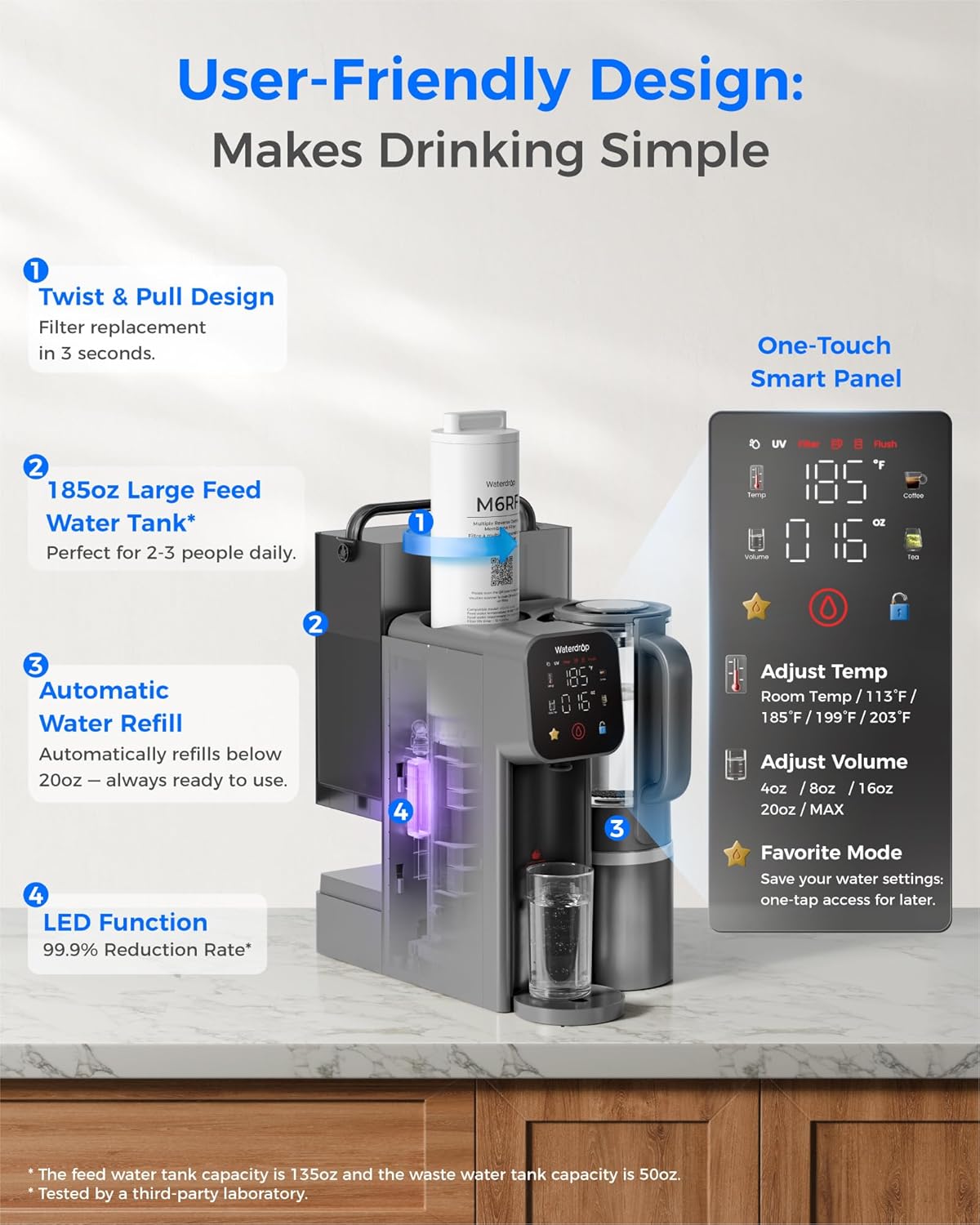
Image: Close-up of the Waterdrop M6H smart panel showing temperature, volume, and other settings.
Panel Operation:
- Temperature Key: Adjusts water temperature.
- Volume Key: Adjusts dispensed water volume.
- Favorite Mode Key: Saves custom temperature and volume settings.
- Quick Keys (Coffee/Tea): Preset temperatures for coffee (93°C/200°F) and tea (85°C/185°F).
- Child Lock Key: Prevents accidental hot water dispensing.
- Water Dispenser Key: Initiates water dispensing.
Dispensing Water:
- Dispense Room Temperature Water: Tap the water dispenser key.
- Dispense Hot Water:
- Tap the temperature key to select desired temperature (113°F, 131°F, 149°F, 167°F, 185°F, 203°F). Hold the temperature key for 3 seconds and press to add 9°F each time.
- Tap the child lock key, then tap the water dispenser key to dispense.
- Set Cup Volume:
- Tap the volume key to select 4oz, 8oz, 16oz, 20oz. Hold the volume key for 3 seconds and press to add 2oz each time, then tap the water dispenser key.
- Set Favorite Mode:
- Hold the favorite mode key for 3 seconds, then adjust temperature and volume.
- Exit by tapping the water dispenser key or hold the favorite mode key for 3 seconds. Alternatively, wait for 10 seconds to default.
- Set Child Lock:
- Hold the child lock key for 5 seconds to turn off. Hold again for 5 seconds to turn on. (Recommended to keep child lock on if kids or pets are at home to prevent accidental scalds.)
- Set Boiling Point:
- Check your area's altitude. The unit's preset boiling point suits altitudes of 0-1000 meters. Correct it if the altitude is higher.
- Hold the temperature key and volume key for 5 seconds.
- When 203°F flashes, tap the temperature key to adjust in 9°F increments (185°F, 194°F, 212°F).
- Tap the water dispenser key to save. The setting stays on even if powered off.
Video: This video provides a comprehensive guide to operating the Waterdrop M6H system, including panel functions, temperature and volume adjustments, and child lock settings.
6. Maintenance (Filter Replacement)
Regular filter replacement is crucial for maintaining water quality and system performance. The M6RF filter is designed to last approximately one year.
- Remove the Expired Filter: Uncover the filter compartment and take out the expired filter by twisting it to the left.
- Insert the New Filter: Remove the new filter's wrapping. Align the new filter with the marker, insert it, and then twist it to the right until secure.
- Replace Cover: Place the top cover plate back.
- Flush After Replacement: You will need to flush the unit manually after replacing the filter. Refill the feed tank with tap water to the MAX level. Press and hold the water dispenser key for 5 seconds to reset the filter life indicator. The flushing mode will start. Place a container larger than 104oz under the outlet. When the water dispenser key is flashing, tap it to dispense water. Do not move the pitcher or drink the water during this flush. When 100% is shown on the screen, flushing is finished.
Video: This video provides a step-by-step guide on how to replace the filter cartridge in your Waterdrop M6H system.
7. Troubleshooting
Here are some common issues and their solutions:
- Bad Taste: If the water tastes bad, ensure the filter is correctly installed and the system has been adequately flushed. The first two pitchers of filtered water should be discarded.
- Leaking: Check all connections and ensure the filter is properly seated and twisted to the right.
- Error Codes: Refer to the user manual for specific error code meanings and troubleshooting steps.
- Tank Full Indicator (while flushing): If the tank light is on while flushing, empty the tank and refill it with fresh tap water. The waste water is correctly filled.
- Low Water Indicator: Refill the feed water tank.
- Wastewater Tank Full: Empty the wastewater tank. The system will not operate if the wastewater tank is full.
8. Specifications
| Feature | Detail |
|---|---|
| Brand | Waterdrop |
| Model Name | WD-M6 |
| Special Feature | Instant Hot, 7-Stage RO System With Glass Pitcher, 3:1 Pure to Drain, 5 Temperature Options, 5 Volume Options, NSF/ANSI 372 Certified |
| Product Dimensions | 15.9"L x 9.3"W x 14.5"H |
| Material | Reverse Osmosis Membrane & Carbon Block & PP Cotton |
| Capacity | 75 Gallons Per Day (GPD) |
| Included Components | Glass Pure Water Tank*1, Countertop RO, M6RF Water Filter, Feed Water Tank |
| Item Weight | 9.8 Kilograms |
9. Warranty and Support
Waterdrop is committed to providing excellent customer service and product support.
- Warranty: 1 year support included.
- Customer Service: 365 days online service.
- For further assistance, please refer to the contact information provided in your user manual or visit the official Waterdrop website.


